Cms: Collection:next/previous ignores other entries of the same day
Bug Description
I have a collection "articles".
When I am on an article page (frontend), I want to display links to the previous and the next article.
I did this by using this code:
{{ collection:previous in="articles" as="posts" limit="1" sort="date:asc" }}
<!--        {{ if no_results }}-->
<!--        No more posts to read!-->
<!--        {{ /if }}-->
    {{ posts }}
    <p class="post">
        Previous article: <a href="{{ url }}">{{ title }}</a>
    </p>
    {{ /posts }}
    {{ /collection:previous }}

    {{ collection:next in="articles" as="posts" limit="1" sort="date:asc" }}
<!--    {{ if no_results }}-->
<!--    No more posts to read!-->
<!--    {{ /if }}-->
    {{ posts }}
    <p class="post">
        Next article: <a href="{{ url }}">{{ title }}</a>
    </p>
    {{ /posts }}
    {{ /collection:next }}
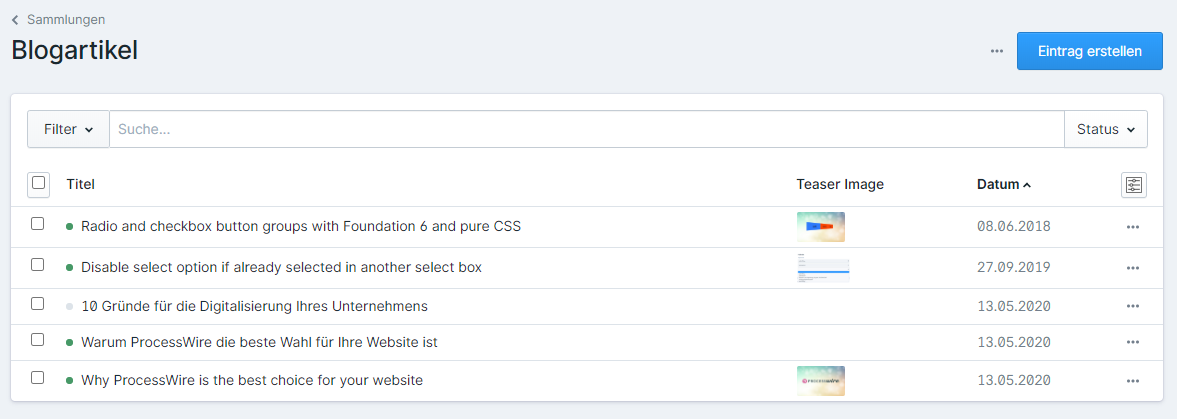
but when I am on the page of the article "Warum ProcessWire die beste Wahl für Ihre Website ist" the link to the next article "Why ProcessWire is the best choice for your website" (same article in english language) is not being displayed.
If I change the date of the latter, the link is being displayed.
Am I doing something wrong, or is this a bug?
Environment
Statamic version: 3.0.0.-beta-28
PHP version: 7.3
 jmartsch
All 8 comments
Entries with the same date should be further sorted by title. "Previous" should be older/further down the list, which would be "Why ProcessWire...". Next would be new, which would be "Disable select option if already...".
Does that make sense? Is that what's happening?
 jackmcdade
on 27 May 2020
jackmcdade
on 27 May 2020
What you wrote would be the expected output, but it isn't that way.
Here is a screenshot of the page "Warum ProcessWire..."
The link to the next entry is correct. But the link to the previous entry "Why ProcessWire.." is skipped. Instead the next entry "Disable select..." is shown.
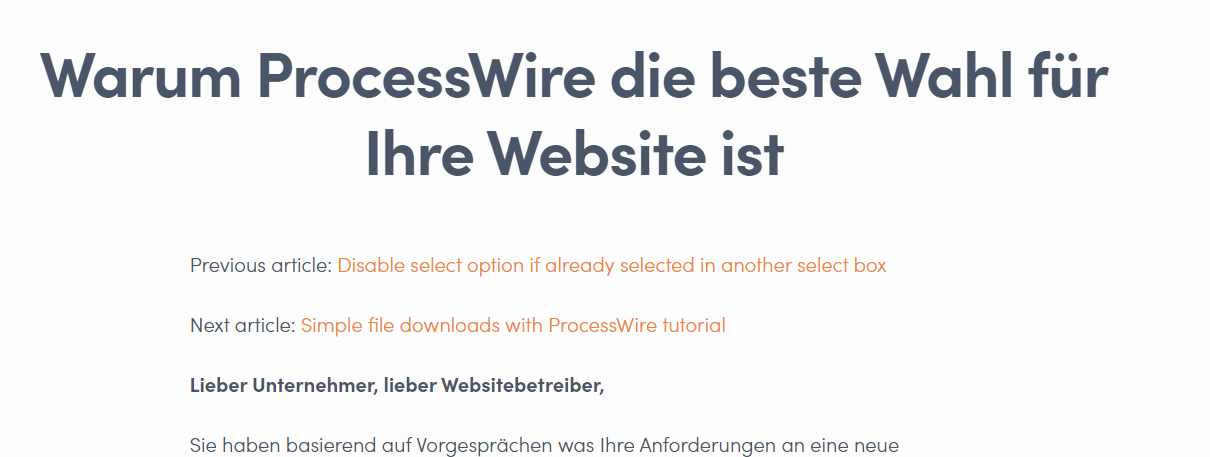
The same happens if I am on the page "Why ProcessWire...". The link to the entry "Warum ProcessWire..." does not appear, it is just skipped:

I also tried setting the sort to date:desc, but that does not make any difference in terms of showing the correct entries.
The entry which has the same date, as the actual entry is being skipped.
jmartsch
on 27 May 2020
Yeah, this is a confirmed bug here. Thanks for the report!
jackmcdade
on 27 May 2020
Can confirm. Ran into this one today too. Adjusting the dates solved the issue. 👍
 mikemartin
on 26 Jun 2020
mikemartin
on 26 Jun 2020
Had the same issue, @jmartsch made me aware of the ongoing bug report. Manually sorting the entries by different dates unfortunately is a hacky workaround.
Further distinction is possible by setting the date picker of the respective blueprint to include time, so only the time of the dates have to be different for entries to be displayed.
Will/should the entries be distinguished by name or by id? Just curious. :)
 Gitsack
on 23 Jul 2020
Gitsack
on 23 Jul 2020
I encountered this bug too, I tried sorting by slug next but it just ignored entries with the same date.
{{ collection:previous in="interviews" sort="date:desc|slug:desc" limit="1" }}
 tao
on 27 Nov 2020
tao
on 27 Nov 2020
This issue has not had recent activity and has been marked as stale — by me, a robot. Simply reply to keep it open and send me away. If you do nothing, I will close it in a week. I have no feelings, so whatever you do is fine by me.
![github-actions[bot] picture](https://avatars.githubusercontent.com/in/15368?v=4&s=40) github-actions[bot]
on 27 Jan 2021
github-actions[bot]
on 27 Jan 2021
Bug is still there though
jmartsch
on 27 Jan 2021
Related issues
 skoontastic
·
4Comments
skoontastic
·
4Comments
 filipac
·
4Comments
filipac
·
4Comments
 riasvdv
·
4Comments
riasvdv
·
4Comments
 aerni
·
3Comments
aerni
·
3Comments
 wm-simon
·
3Comments
wm-simon
·
3Comments
Most helpful comment
Yeah, this is a confirmed bug here. Thanks for the report!