After upgrade to ubuntu20 (gnome 3.36.3), whenever I try to add another key, I get this error:
gpg: invalid key resource URL '/etc/apt/trusted.gpg.d/isv:ownCloud:desktop.gpg'
gpg: Schlüsselblockhilfsmittel`(null)': Allgemeiner Fehler
gpg: key 4ABE1AC7557BEFF9: 1 Beglaubigung wegen fehlendem Schlüssel nicht geprüft
gpg: key 3B4FE6ACC0B21F32: 3 Beglaubigungen wegen fehlender Schlüssel nicht geprüft
gpg: key D94AA3F0EFE21092: 3 Beglaubigungen wegen fehlender Schlüssel nicht geprüft
gpg: key 871920D1991BC93C: 1 Beglaubigung wegen fehlendem Schlüssel nicht geprüft
gpg: key 8881B2A8210976F2: 1 Beglaubigung wegen fehlendem Schlüssel nicht geprüft
gpg: Anzahl insgesamt bearbeiteter Schlüssel: 10
gpg:       ignorierte neue Schlüssel: 10
OC desktop client works fine, but I’m not sure whether it blocks me from installing other software (trying pgAdmin4).
To install, I followed the instructions at SuSE:
echo 'deb http://download.opensuse.org/repositories/isv:/ownCloud:/desktop/Ubuntu_20.04/ /' | sudo tee /etc/apt/sources.list.d/isv:ownCloud:desktop.list
curl -fsSL https://download.opensuse.org/repositories/isv:ownCloud:desktop/Ubuntu_20.04/Release.key | gpg --dearmor | sudo tee /etc/apt/trusted.gpg.d/isv:ownCloud:desktop.gpg > /dev/null
sudo apt update
sudo apt install owncloud-client
Fellows at owncloud central tend to regard this as a bug.
 herrdeh
All 15 comments
Hi,
I am using Ubuntu 20.04
Today I was updating my system and realized the same error is popping up in my machine too.
Kindly share the updated and verifiable keys.
Regards
Abhinav Aggarwal
 abhiquiet
on 26 Sep 2020
abhiquiet
on 26 Sep 2020
With the next 2.7 version, we’re moving away from download.opensuse.org/repositories… . 2.7.0-beta5 repos are already available on our own download mirrors.
Here you can give it a try:
https://download.owncloud.com/desktop/ownCloud/testing/2.7.0.2141-v270beta5/linux/download/
 michaelstingl
on 26 Sep 2020
michaelstingl
on 26 Sep 2020
Did so. Same error happens:
gpg: invalid key resource URL '/etc/apt/trusted.gpg.d/isv:ownCloud:desktop.gpg'
gpg: Schlüsselblockhilfsmittel`(null)': Allgemeiner Fehler
gpg: key 4ABE1AC7557BEFF9: 1 Beglaubigung wegen fehlendem Schlüssel nicht geprüft
gpg: key 3B4FE6ACC0B21F32: 3 Beglaubigungen wegen fehlender Schlüssel nicht geprüft
gpg: key D94AA3F0EFE21092: 3 Beglaubigungen wegen fehlender Schlüssel nicht geprüft
gpg: key 871920D1991BC93C: 1 Beglaubigung wegen fehlendem Schlüssel nicht geprüft
gpg: Anzahl insgesamt bearbeiteter Schlüssel: 10
gpg:       ignorierte neue Schlüssel: 10
Could you post the full steps you tried?
michaelstingl
on 26 Sep 2020
Sorry. This happens after the very first command - with sudo as well:
wget -nv https://download.owncloud.com/desktop/ownCloud/testing/2.7.0.2141-v270beta5/linux/Ubuntu_20.04/Release.key -O - | sudo apt-key add -
Can I do something to "clean" the system from previous attempts?
herrdeh
on 26 Sep 2020
Hi,
Same issue with Ubuntu 20.04
My workaround was rename "/etc/apt/trusted.gpg.d/isv:ownCloud:desktop.gpg" to "/etc/apt/trusted.gpg.d/isv-ownCloud-desktop.gpg"
It worked for me.
Regards,
 jferradans
on 5 Oct 2020
jferradans
on 5 Oct 2020
Sorry for the late reply. I tried it on two machines - works on both. I think it's more than a workaround, isn't it?
Thank you very much - you made my day! - Couldn't install pgAdmin4 all the time for that reason - now I could.
herrdeh
on 11 Oct 2020
To be fair, the official install instruction pipes the key into /etc/apt/trusted.gpg.d/isv:ownCloud:desktop.gpg, so this issue isn't solved, as long as Ubuntu 20.04 seems to have a problem with a key filename with colons?!
I'd reopen it.
 Basster
on 16 Oct 2020
Basster
on 16 Oct 2020
I'd reopen it.
Agreed.
herrdeh
on 16 Oct 2020
SUSE fixed the instructions. They now use isv_ownCloud_desktop.gpg instead of isv:ownCloud:desktop.gpg
 jnweiger
on 19 Nov 2020
jnweiger
on 19 Nov 2020
Sorry, to bother you but then the owncloud website still points to the wrong package:
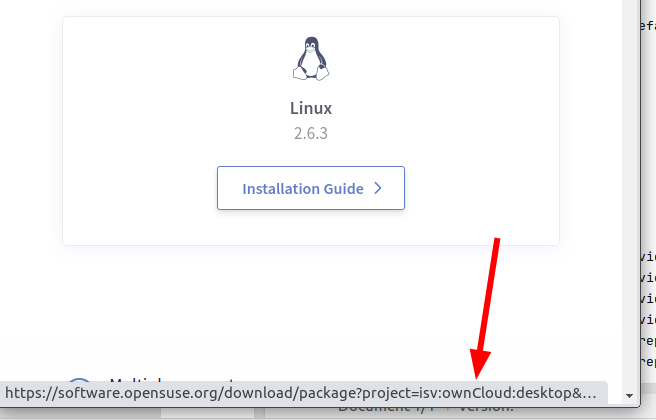
Who's resonsible for changing that?
Basster
on 20 Nov 2020
Website will be updated with the 2.7 links the next few days anyway.
michaelstingl
on 20 Nov 2020
This is still a bug on Ubuntu 20.04. Tried to update again today and still same issue from last year.
Renaming as suggested doesn't help:
sudo mv /etc/apt/trusted.gpg.d/isv\:ownCloud\:desktop.gpg /etc/apt/trusted.gpg.d/isv-ownCloud-desktop.gpg
I still get this error
Err:8 https://download.owncloud.com/desktop/ownCloud/stable/latest/linux/Ubuntu_20.04  InRelease
  The following signatures couldn't be verified because the public key is not available: NO_PUBKEY 0700205DFD41A71A
Any suggestions to hacks or we must wait?
 AWSBarker
on 24 Jan 2021
AWSBarker
on 24 Jan 2021
I performed a quick test using Docker, but I wasn't able to reproduce.
docker run --rm -ti ubuntu:20.04
Fresh install 2.7.4 from ownCloud repo
Instructions:
# owncloudcmd --version
ownCloud 2.7.4 (build 2934) Dec 21 2020 15:42:27
https://github.com/owncloud/client/commit/44d1541bdc7765d11ab0327910496a09afeb1b0b
Libraries Qt 5.12.9, OpenSSL 1.1.1f  31 Mar 2020
Using virtual files plugin: off
root@f91dbe9ca6b5:/# history
    1  apt update && apt install curl wget sudo gnupg -y
    2  wget -nv https://download.owncloud.com/desktop/ownCloud/stable/latest/linux/Ubuntu_20.04/Release.key -O - | sudo apt-key add -
    3  echo 'deb https://download.owncloud.com/desktop/ownCloud/stable/latest/linux/Ubuntu_20.04/ /' | sudo tee -a /etc/apt/sources.list.d/owncloud.list
    4  sudo apt update
    5  sudo apt install owncloud-client
    6  owncloudcmd --version
    7  history
Fresh install 2.6.3 from SUSE repo, then update to 2.7.4 from ownCloud repo
Instructions:
- https://software.opensuse.org/download/package?project=isv:ownCloud:desktop&package=owncloud-client
(Add repository and install manually) - https://download.owncloud.com/desktop/ownCloud/stable/latest/linux/download/
# owncloudcmd --version
ownCloud 2.7.4 (build 2934) Dec 21 2020 15:42:27
https://github.com/owncloud/client/commit/44d1541bdc7765d11ab0327910496a09afeb1b0b
Libraries Qt 5.12.9, OpenSSL 1.1.1f  31 Mar 2020
Using virtual files plugin: off
root@acca479d673a:/# history
    1  apt update && apt install curl wget sudo gnupg -y
    2  echo 'deb http://download.opensuse.org/repositories/isv:/ownCloud:/desktop/Ubuntu_20.04/ /' | sudo tee /etc/apt/sources.list.d/isv:ownCloud:desktop.list
    3  curl -fsSL https://download.opensuse.org/repositories/isv:ownCloud:desktop/Ubuntu_20.04/Release.key | gpg --dearmor | sudo tee /etc/apt/trusted.gpg.d/isv_ownCloud_desktop.gpg > /dev/null
    4  sudo apt update
    5  sudo apt install owncloud-client
    6  owncloudcmd --version
    7  wget -nv https://download.owncloud.com/desktop/ownCloud/stable/latest/linux/Ubuntu_20.04/Release.key -O - | sudo apt-key add -
    8  echo 'deb https://download.owncloud.com/desktop/ownCloud/stable/latest/linux/Ubuntu_20.04/ /' | sudo tee -a /etc/apt/sources.list.d/owncloud.list
    9  sudo apt update
   10  sudo apt install owncloud-client
   11  owncloudcmd --version
   12  history
There's a recommendation in another issue:
You have an error message there:
gpg: invalid key resource URL '/etc/apt/trusted.gpg.d/isv:ownCloud:desktop.gpg'-> that is from a a previous attempt. Remove that file.
(Source: https://github.com/owncloud/client/issues/8195#issuecomment-728558300)
michaelstingl
on 24 Jan 2021
Related issues
 ymakhloufi
·
3Comments
ymakhloufi
·
3Comments
 ChrisEdS
·
4Comments
michaelstingl
·
4Comments
michaelstingl
·
5Comments
ChrisEdS
·
4Comments
michaelstingl
·
4Comments
michaelstingl
·
5Comments
 vco1
·
3Comments
vco1
·
3Comments
Most helpful comment
Hi,
Same issue with Ubuntu 20.04
My workaround was rename "/etc/apt/trusted.gpg.d/isv:ownCloud:desktop.gpg" to "/etc/apt/trusted.gpg.d/isv-ownCloud-desktop.gpg"
It worked for me.
Regards,