Client: OSX Desktop Client fails to work with Google SAML SSO
Expected behaviour
After installing the OSX desktop client, you enter the next-cloud server address. The server is configured using Google's SSO via SAML. The Desktop client should open sort of a web-view showing the Google sign-in page.
Actual behaviour
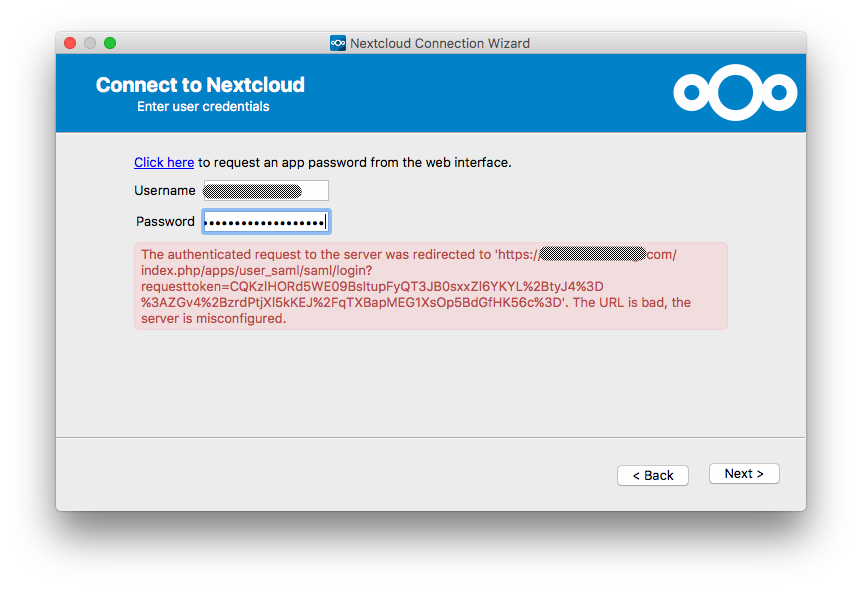
Instead of showing the Google sign-in page, it asks for the username/app-password combination. After setting up an app-password in the web-client (using google sign-in), and then entering that created app password in the OSX client, it shows an error (see screenshot).
-- It does work as intended with the google-login using the Linux and the Windows client. Only the OSX client seems to have a problem.
Steps to reproduce
- Set up next-cloud server (Ubuntu 16.04 + snap package + letsencrypt)
- Set up the next-cloud server as a SAML app in the google-admin and activate the SAML plugin in the nextcloud-server and configure it accordingly with the google details (https://help.nextcloud.com/t/google-as-a-saml-provider/5126/6)
- Install the nextcloud desktop client on OSX
- Start the client and enter the URL to the server
- The desktop-client will ask for an app-password instead of opening a google singn-in view
- Click on the "click here" link to set up an app password through the browser
- Do so using the browser
- Copy the app password (and username) into the desktop client
- Click "Next"
- The error (as seen on the screenshot) apprears
Server configuration
Operating system: Ubuntu 16.04 + NextCloud Snap Package
Web server: Apache
Database: mysql
PHP version: 7.0
ownCloud version: NextCloud 11
Storage backend (external storage):
Client configuration
Client version: 2.3.3 build 84
Operating system: macOS Sierra 10.12.6
OS language: English
Installation path of client: /Applications/nextcloud.app
Logs
Client logfile:
https://pastebin.com/BuxZhZ9pWeb server error log:
empty -
Server logfile: ownCloud log (data/owncloud.log):
- also empty -
 ymakhloufi
All 3 comments
The OSX nextcloud client is build without shibboleth support:
https://github.com/nextcloud/client_theming/blob/master/osx/build.sh#L31
The build line has -DNO_SHIBBOLETH=1
Please report the bug to nextcloud.
 ogoffart
on 7 Dec 2017
ogoffart
on 7 Dec 2017
@ogoffart Doesn't that mean it would work fine with the ownCloud client?
If yes @ymakhloufi can just download that one -> https://owncloud.org/changelog/desktop/
 guruz
on 7 Dec 2017
guruz
on 7 Dec 2017
the owncloud-client works, thanks for the hint.
ymakhloufi
on 11 Dec 2017
Related issues
 denniskhong
·
4Comments
denniskhong
·
4Comments
 xmana
·
5Comments
xmana
·
5Comments
 codesmaker
·
4Comments
codesmaker
·
4Comments
 ohnemich
·
5Comments
ohnemich
·
5Comments
 ahmedatawfik
·
5Comments
ahmedatawfik
·
5Comments
Most helpful comment
@ogoffart Doesn't that mean it would work fine with the ownCloud client?
If yes @ymakhloufi can just download that one -> https://owncloud.org/changelog/desktop/