Client: Unable to show Files in File Explorer option on Linux
Ubuntu Linux 19.04. This feature used to work fine, now clicking on it opens a dialog "Enable Keybase in File Explorer" but clicking on Yes Enable button does nothing. As in, it doesn't seem to be accepting any input.
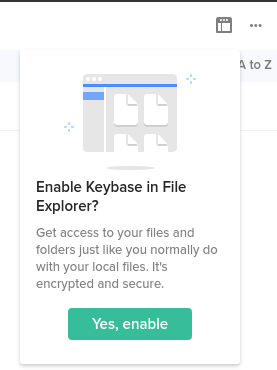
kbfs use mount works fine though, and I can navigate and browse the mountpoint via Nautilus and CLI.
my log id: 489e5b98b25a037dce1f951c
 kaerumy
All 7 comments
That option is not supposed to show up for Linux, where the explorer integration is always enabled.
cc: @jzila @songgao I see this on the nightly build too, seems like a regression.
 strib
on 22 Apr 2019
strib
on 22 Apr 2019
Definitely a regression. We'll take a look, thanks.
 jzila
on 22 Apr 2019
jzila
on 22 Apr 2019
Same problem here. Clicking "Yes, Enable" does nothing.
Ubuntu 18.04.2
EDIT: I am unable to see any explorer integration with Nautilus or Caja.
 thwaller
on 27 Apr 2019
thwaller
on 27 Apr 2019
I get this dialog too, but sometimes I also get the message:
Error: /keybase is unavailable. Please try again. at mo.a.readdir (file:///usr/share/keybase-app/desktop/dist/main.bundle.js:1:2982507) at FSReqWrap.oncomplete (fs.js:141:20)
So clicking the button seems to be doing "something". Unsure if it is related or just coincidental. But I do not have the setuid redirector running.
 eli-schwartz
on 28 Apr 2019
eli-schwartz
on 28 Apr 2019
Same problem here. Clicking "Yes, Enable" does nothing.
Ubuntu 18.010
It worked flawlessly until a few weeks ago when I restarted the computer.
 Fantoni0
on 29 Apr 2019
Fantoni0
on 29 Apr 2019
Thanks folks; we'll have a fix soon and let you all know when we have a testable version.
 songgao
on 29 Apr 2019
songgao
on 29 Apr 2019
Hey folks, we have the fix merged: https://github.com/keybase/client/pull/17236
It should be included in the next release but if you feel adventurous the nightly build should already have it.
songgao
on 30 Apr 2019
Related issues
 caronni
·
3Comments
caronni
·
3Comments
 shadowfacts
·
4Comments
shadowfacts
·
4Comments
 ATCUSA
·
4Comments
ATCUSA
·
4Comments
 Magi1053
·
3Comments
Magi1053
·
3Comments
 qntmpkts
·
3Comments
qntmpkts
·
3Comments
Most helpful comment
Thanks folks; we'll have a fix soon and let you all know when we have a testable version.