Client: CLI Login and Input Paper Key Without GUI
I'm working on a project that needs to be able to login to Keybase without using the GUI.
keybase login someUserId
The problem I'm running into with this command is first it prompts fordeviceorpaper key. It'd be great if I could specifypaper keyas an argument in order to avoid the interaction. The next problem is when choosingpaper keyI then have to interact with the Keybase GUI app.
Is there anyway to input the paper key from the CLI itself?
 rolyatwilson
All 25 comments
Why doesn't keybase support automating the login with a paper key? This is super painful when using Keybase in CI.
I expect something like: keybase login --user user --paper-key key
spawn keybase login
expect "passphrase for "
sleep 1; send "$pass\r"
 bootstraponline
on 20 Apr 2018
bootstraponline
on 20 Apr 2018
We have cmd_paperprovision as devel-only, we didn't want to expose it in production.
 maxtaco
on 20 Apr 2018
maxtaco
on 20 Apr 2018
why aren't we able to automate production for running keybase on CI servers to download encrypted git repos?
bootstraponline
on 20 Apr 2018
If you're using expect you should be able to get it to work on the command line.
keybase login bootstraponline
would be your starting point. Then you will first select the paper key with which to provision, then enter it in.
I just provisioned keybase on a headless server with a paper key on the command line yesterday. Worked fine.
We also use a version of expect in some of our tests...
 patrickxb
on 20 Apr 2018
patrickxb
on 20 Apr 2018
If you're using expect you should be able to get it to work on the command line.
Expect doesn't work because keybase creates a GUI prompt for the paper key. The index number for pass phrase is also constantly changing. I posted above the expect script I used to explore this approach.
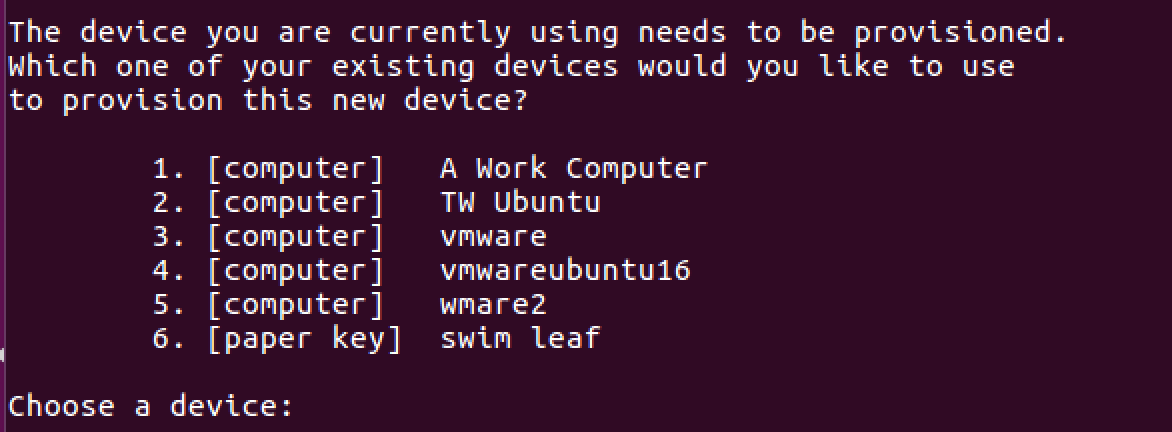
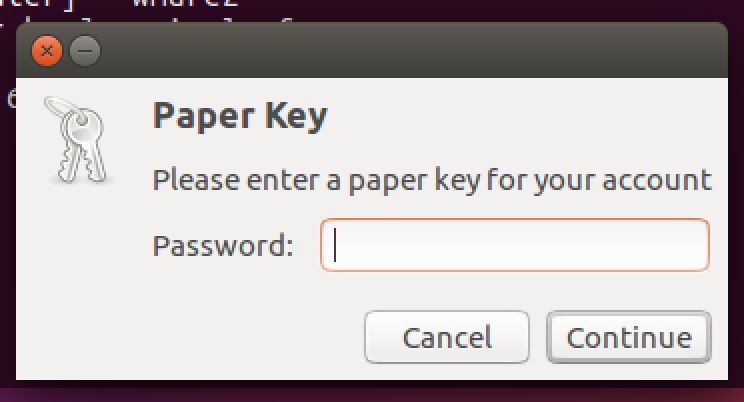
In addition supplying a unique name per device doesn't make sense for Docker.
I just provisioned keybase on a headless server with a paper key on the command line yesterday.
Please post the script you used. The current version of keybase is not possible to automate.
I am using http://bitrise.io/ that runs a fresh docker container for every build. The CI job needs to install keybase and then login automatically at the start of each build for git clone to work successfully. Keybase today doesn't support that use case in a friendly way.
I have even tried manually authenticating and creating a tar file of the home folder, that doesn't work though.
After reading the encrypted git blog post I was quite excited. Setup was painless and we started using keybase at work. Now I have to automate login for git clone and that's not a supported feature so we're blocked.
bootstraponline
on 20 Apr 2018
Try keybase --pinentry /dev/null login whatever which should use CLI prompt.
I didn't use a script, I'm just saying it is possible.
As far as your use case, could you add a docker container that has keybase installed and provisioned already?
patrickxb
on 20 Apr 2018
Bitrise uses the same Docker image for all Android builds for all of their customers. Baking keybase credentials into the Docker image would expose them to multiple customers.
rolyatwilson
on 21 Apr 2018
I didn't use a script, I'm just saying it is possible.
I don't think this solves the 3,000 builds equals 3,000 uniquely named provisioned devices. I want Keybase to be possible in a Docker workflow, I'm not sure that's true today.
Individually naming ephemeral containers is a blocking issue. The weirdness around having to use expect instead of supporting cmd_paperprovision.go in production is an additional contributing factor.
bootstraponline
on 21 Apr 2018
I have keybase working on Travis CI.
Just login locally, then copy all the files to TravisCI and setup a script to place the files in the right folder, then run_keybase and all keybase commands including git work fine.
I have one device for Travis CI. If I ever feel like it was compromised, I’ll revoke the device with my other device...
The only thing I wish we had was permissions on a per device level.
“This device key cannot revoke other devices or sign in new devices” would be HUGE.
 dabura667
on 21 Apr 2018
dabura667
on 21 Apr 2018
I have keybase working on Travis CI.
Please post the .travis.yml config so I can look at the script. I've tried local login on a linux box and copying over the session.json. That wasn't successful.
I used GitHub advance search and didn't find anyone using encrypted git repos on Travis CI.
bootstraponline
on 21 Apr 2018
Currently travelling.
This is the docker I found in one of the issues on here a while back.
https://gist.github.com/junderw/2de606d9969c768077308582cd4f7153
Let me know if it helps.
Those four files are all you need.
Config file might contain metadata from
Multiple accounts if you login to multiple accounts with one PC, so you might want to clean it up.
dabura667
on 21 Apr 2018
Thank you, I'll research that approach.
@patrickxb Are there any plans to make this a less crazy process? Better supporting encrypted git on Docker would open up entire new use cases for keybase.
This request has been made before with no response:
bootstraponline
on 21 Apr 2018
Just so I understand the requirements better, do you want a solution where keybase can crash and be restarted, or would the docker just be rebooted in that case?
Maybe the right solution here would be to allow some sort of ephemeral instantiation of the paper key, without any actual changes to the user's sigchain when the docker is booted up.
maxtaco
on 22 Apr 2018
I threw together a prototype that I tested to work: https://github.com/keybase/client/pull/11500. I'm not sure if we'll keep it or not, but it might be useful. The idea is
keybase service &
KEYBASE_USERNAME=foo KEYBASE_PAPERKEY="ball plane foo bar bam boop" keybase oneshot
And then your container should be able to function as a provisioned device as long as the service process doesn't crash. But the device won't show up as a provisioned device on your sigchain, it'll actually be, instead, an instantiation of the "paper key" device.
maxtaco
on 22 Apr 2018
That sounds perfect! I'll be able to run that command on any CI server and easily access the encrypted git repos.
Build instructions:
$ brew update; brew install go
$ go get github.com/keybase/client/go/keybase
$ cd ~/go/src/github.com/keybase/client/go/keybase
$ git checkout maxtaco/login-onetime
$ go install github.com/keybase/client/go/keybase

# Exit keybase if already running

$ keybase service
$ keybase oneshot
I'm getting an error when cross compiling for linux 64 bit.
$ env GOOS=linux GOARCH=amd64 go build -v github.com/keybase/client/go/keybase
github.com/keybase/client/go/vendor/github.com/keybase/go-framed-msgpack-rpc/rpc/resinit
# github.com/keybase/client/go/vendor/github.com/keybase/go-framed-msgpack-rpc/rpc/resinit
../vendor/github.com/keybase/go-framed-msgpack-rpc/rpc/resinit/resinit.go:17:3: undefined: resInit
The code compiles directly on a Linux VM though.
bootstraponline
on 22 Apr 2018
@maxtaco I tested your patch, there's another blocking issue:
Oops, you are trying to run as an admin user (Uid: 0). This isn't supported.
Docker is running as root, this is how CI services work. There's no valid reason to hard exit and refuse to login when building software with Docker.
Ideally keybase would seamlessly work in a CI workflow. Vault, AWS KMS, and AWS Secrets Manager are all filling this need today. It'd be great to revisit this keybase limitation to support Docker based CI.
bootstraponline
on 22 Apr 2018
We can easily disable that check. I’ll work on it later today. Thanks!
On Sun, Apr 22, 2018 at 12:39 PM bootstraponline notifications@github.com
wrote:
@maxtaco https://github.com/maxtaco I tested your patch, there's
another blocking issue:Oops, you are trying to run as an admin user (Uid: 0). This isn't
supported.Docker is running as root, this is how CI services work. There's no valid
reason to hard exit and refuse to login when building software with Docker.Ideally keybase would seamlessly work in a CI workflow. Vault
https://www.vaultproject.io/, AWS KMS https://aws.amazon.com/kms/,
and AWS Secrets Manager https://aws.amazon.com/secrets-manager/ are all
filling this need today. It'd be great to revisit this keybase limitation
to support Docker based CI.—
You are receiving this because you were mentioned.Reply to this email directly, view it on GitHub
https://github.com/keybase/client/issues/11481#issuecomment-383394650,
or mute the thread
https://github.com/notifications/unsubscribe-auth/AA05_8rxCtq5P0jLwhHpuNZEOEWWKi1-ks5trLImgaJpZM4TclN5
.
maxtaco
on 22 Apr 2018
Thanks. I am building a custom version right now with that check disabled so I can verify if there are any remaining issues using the patch on Bitrise.
bootstraponline
on 22 Apr 2018
root@e204934008e8:/bitrise/src# chmod +x keybase
root@e204934008e8:/bitrise/src# ./keybase service &
[1] 66
root@e204934008e8:/bitrise/src# ▶ WARNING Running in devel mode
▶ INFO | net.Listen on unix:/root/.config/keybase.devel/keybased.sock
▶ WARNING PushHandler: unable to create push service client: no UID; probably not logged inroot@e204934008e8:/bitrise/src# ./keybase oneshot
▶ WARNING Running in devel mode
▶ ERROR API network error: doRetry failed, attempts: 3, timeout 13.5s, last err: Get http://localhost:3000/_/api/1.0/user/lookup.json?fields=basics&load_deleted_v2=1&multi=1&username=myusername: dial tcp 127.0.0.1:3000: connect: connection refused (code 1601)
I guess the source builds are expecting a server on local host? Is there a way to point the binary at the prod server?
bootstraponline
on 22 Apr 2018
KEYBASE_RUN_MODE=prod
On Sun, Apr 22, 2018 at 12:57 PM bootstraponline notifications@github.com
wrote:
root@e204934008e8:/bitrise/src# chmod +x keybase
root@e204934008e8:/bitrise/src# ./keybase service &
[1] 66
root@e204934008e8:/bitrise/src# ▶ WARNING Running in devel mode
▶ INFO | net.Listen on unix:/root/.config/keybase.devel/keybased.sock
▶ WARNING PushHandler: unable to create push service client: no UID;
probably not logged inroot@e204934008e8:/bitrise/src# ./keybase oneshot
▶ WARNING Running in devel mode
▶ ERROR API network error: doRetry failed, attempts: 3, timeout 13.5s,
last err: Get
http://localhost:3000/_/api/1.0/user/lookup.json?fields=basics&load_deleted_v2=1&multi=1&username=myusername:
dial tcp 127.0.0.1:3000: connect: connection refused (code 1601)I guess the source builds are expecting a server on local host? Is there a
way to point the binary at the prod server?—
You are receiving this because you were mentioned.
Reply to this email directly, view it on GitHub
https://github.com/keybase/client/issues/11481#issuecomment-383395948,
or mute the thread
https://github.com/notifications/unsubscribe-auth/AA05_zW23HzSIGXw63oHQF1hUOl_iB7_ks5trLaAgaJpZM4TclN5
.
maxtaco
on 22 Apr 2018
Great, login works now! There's a weird error when running git clone:
fatal: Unable to find remote helper for 'keybase'

bootstraponline
on 22 Apr 2018
Is git-remote-keybase in your path?
On Sun, Apr 22, 2018 at 1:13 PM bootstraponline notifications@github.com
wrote:
Great, login works now! There's a weird error when running git clone:
fatal: Unable to find remote helper for 'keybase'
[image: image]
https://user-images.githubusercontent.com/1173057/39097770-ebdf7664-462e-11e8-81f3-53a608db0a43.png—
You are receiving this because you were mentioned.
Reply to this email directly, view it on GitHub
https://github.com/keybase/client/issues/11481#issuecomment-383397042,
or mute the thread
https://github.com/notifications/unsubscribe-auth/AA05__qORpdjv-ufu3biC6TtcWyz3Q_hks5trLpJgaJpZM4TclN5
.
maxtaco
on 22 Apr 2018
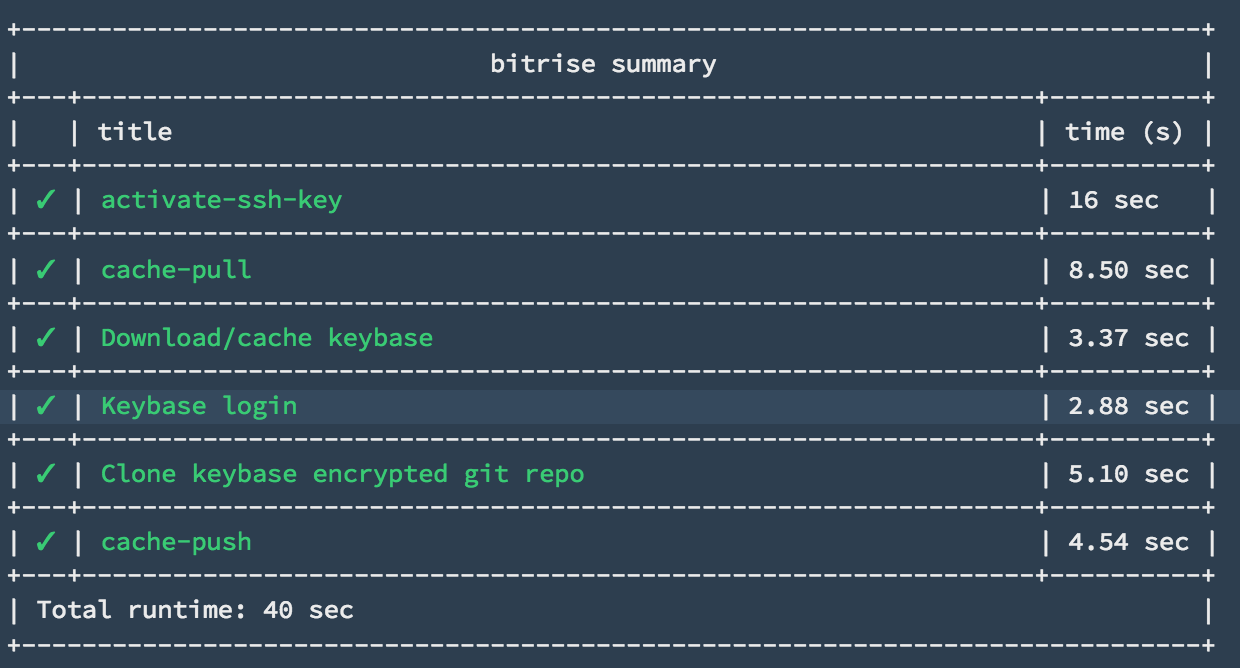
Great, I confirm the patch works now! I had to download git-remote-keybase.
bootstraponline
on 22 Apr 2018
Great, glad it worked!!
I added KEYBASE_ALLOW_ROOT=1 to my patch....
maxtaco
on 23 Apr 2018
I'm going to mark this closed along with #11500. Thanks everyone! It'll go out with the next Linux release, which should be tomorrow.
maxtaco
on 23 Apr 2018
Related issues
 caronni
·
3Comments
caronni
·
3Comments
 tyrion
·
3Comments
tyrion
·
3Comments
 Magi1053
·
3Comments
Magi1053
·
3Comments
 hkjels
·
4Comments
hkjels
·
4Comments
 ATCUSA
·
4Comments
ATCUSA
·
4Comments
Most helpful comment
I'm going to mark this closed along with #11500. Thanks everyone! It'll go out with the next Linux release, which should be tomorrow.