Client: Cannot add Keybase folder to Explorer in Windows
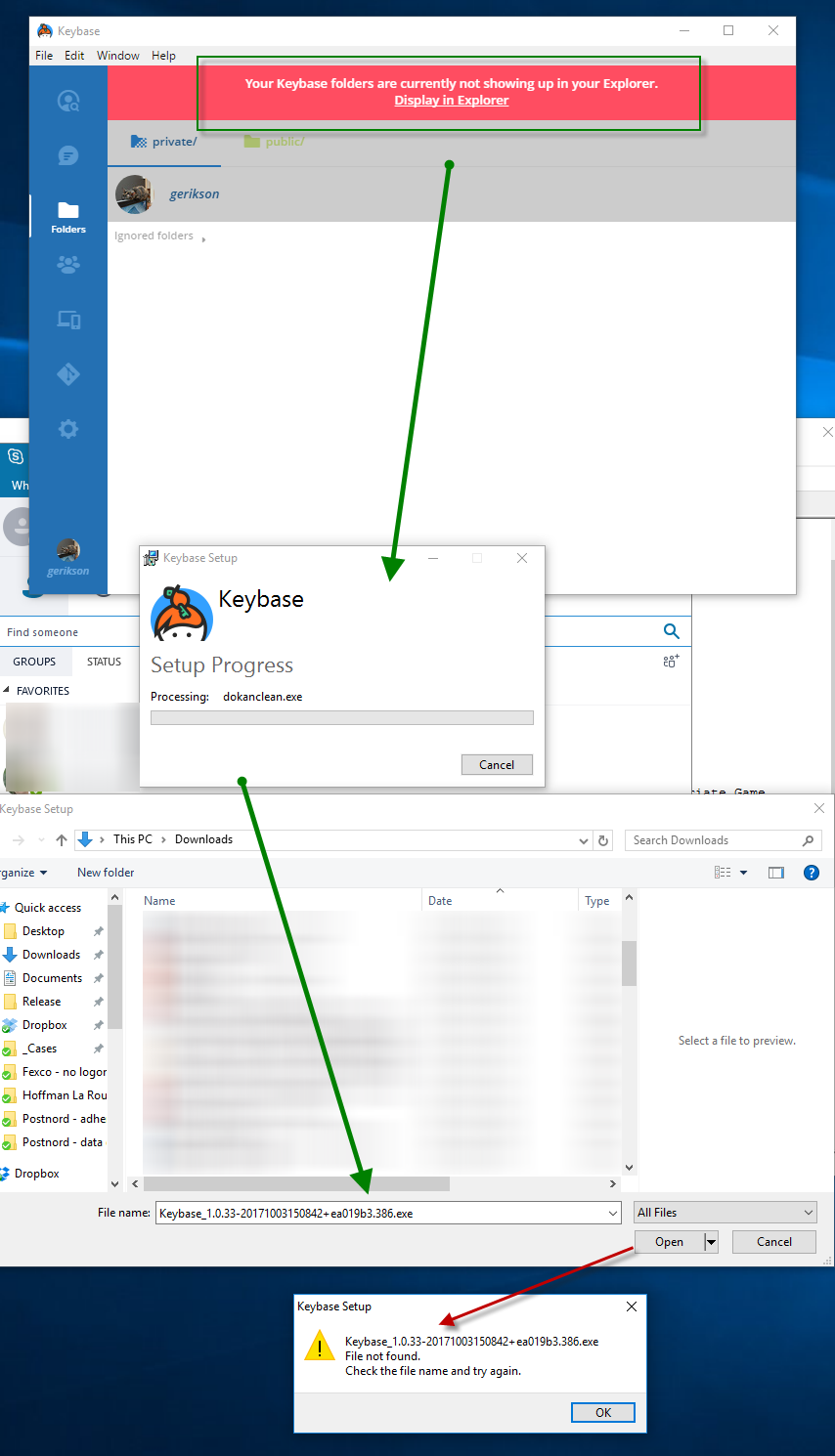
Windows app, File area. Click the "Display in Explorer".
"Repair" option in installer is prompted. Click it to start.
Installer prompts for EXE: Keybase_1.0.33-20171003150842+ea019b3.386.exe, default folder is my Downloads folder. However this file is not found there. Pressing cancel cancels the operation.
- Screenshot 01
- Log file Keybase_20171005083857.log
I try again, this time searching for the file name on my PC. I find it in the folder
C:\Users\gustafe\AppData\Local\Package Cache{8029599c-5d18-407a-9bc1-5b7875d899d5}
However, pasting that path into the Find File prompt and selecting the file fails the install.
- Log file Keybase_20171005084018.log
 gustafe
All 18 comments
I have exactly the same problem.
 igufi
on 5 Oct 2017
igufi
on 5 Oct 2017
cc: @zanderz
 maxtaco
on 5 Oct 2017
maxtaco
on 5 Oct 2017
Can you also do a keybase log send ? Thanks.
 zanderz
on 5 Oct 2017
zanderz
on 5 Oct 2017
Meanwhile, it should work if you point that dialog at the installer you downloaded, https://prerelease.keybase.io/keybase_setup_386.exe
zanderz
on 5 Oct 2017
__EDIT__ I realized I messed up below, I should have launched the install from the app instead of from the installer. I'll probably uninstall/reinstall tomorrow when I have access to the machine again and follow the procedure as above.
Logs send with console commands, subject references this issue.
Tried to use the downloaded installer, ran as local admin and chose "Repair". After process finished, restarted machine, but Folders view in app still shows "folders not showing up in Explorer".
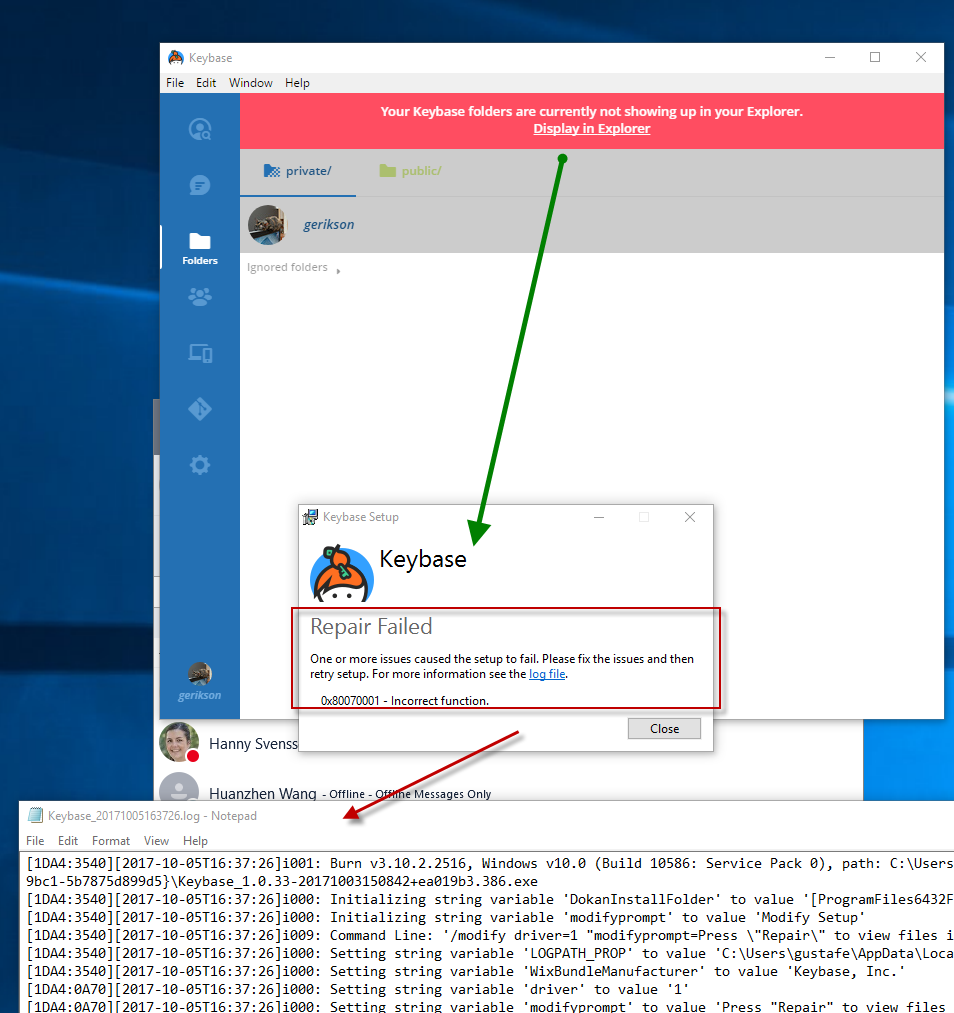
Clicking on "Display in Explorer" launches the installer as before. Choosing repair, but get a message saying the repair has failed - screenshot 02.
Error message reads:
0x80070001 - Incorrect function.
Log file attached.
Keybase_20171005163726.log
keybase log send executed once more.
gustafe
on 5 Oct 2017
Pointing to the keybase_setup_386.exe instead of the pre-filled Keybase_1.0.33-20171003150842+ea019b3.386.exe in the dialog box allows the repair process to complete and I can now see the KBFS in Explorer. Thanks for the tip @zanderz .
igufi
on 5 Oct 2017
@igufi Can you do a keybase log send too? We aren't yet able to reproduce this and it could help to see the resolution case. Thanks.
zanderz
on 5 Oct 2017
Log id 9823525bd9bef541d6c16f1c was sent via the CLI. Is this enough or do you need it also as an attachment in this thread?
igufi
on 5 Oct 2017
@iguifi No need, I can now reproduce, thank you.
zanderz
on 5 Oct 2017
After uninstalling and reinstalling Keybase client, issue is resolved.
gustafe
on 6 Oct 2017
Hello,
I don't want to hijack this thread but I am also getting the same issue
I reinstalled as gustafe has done without any success (however on another computer that I was able to reproduce this one the reinstalling and running with Administrator rights did solve the issue).
I have sent a log with Log ID: 65faeddecb387dd185e3b31c for further troubleshooting.
Let me know if it's better if I open a new issue for this or if I should continue in this thread
 XIRGO
on 13 Oct 2017
XIRGO
on 13 Oct 2017
@XIRGO Do you mean that "Display in Explorer" fails? Does it open a dialog to find a weirdly named installer? If you select the original download at that point it should work: https://prerelease.keybase.io/keybase_setup_386.exe
We've identified the problem and it should work better in an upcoming release.
zanderz
on 13 Oct 2017
@zanderz, I went ahead and did this and even tried uninstalled + reinstalled but with using "Run as Administrator". This fixed the issue and I no longer see the first issue however I do not see any K: drive in Explorer nor can I open any of the folders from the keybase client.
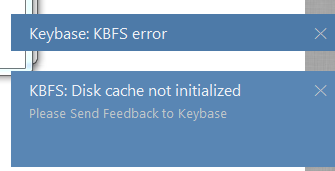
When I quit the client and rerun it I get a notification pop-up at the bottom right of my screen that says
Keybase: KBFS error
& another that says
KBGS: Disk cache not initialized. Please send Feedback to Keybase
I have also attached the imagine in this comment
Let me know if there's any other information I could provide you to help troubleshoot this further.
XIRGO
on 13 Oct 2017
You can safely ignore the cache error, it's really just a warning. As long as everything else seems to be working fine, you should be good. We're looking into that separately. cc: @jzila.
 strib
on 13 Oct 2017
strib
on 13 Oct 2017
"Run as Administrator" isn't usually recommended, since Keybase has to run with the same permissions as the current user. It may enable installation in cases where the normal user account lacks permission to install things, but that doesn't mean you're out of the woods. Please do a keybase log send and post the ID and we'll see what happened to your drive letter.
zanderz
on 13 Oct 2017
@strib the drive is not mounting after being ran and I'm unable to open any folders from within the client either
@zanderz I have resent the log. The log id is: 0e05d432d384522d1d53bb1c
XIRGO
on 13 Oct 2017
@XIRGO Logs show a "start error" from Dokan, the filesystem driver. I don't know what causes that but you might try uninstalling Dokan from the control panel, then doing the "Display in Explorer" again. Or it may be a symptom of having been installed as administrator. @taruti ?
zanderz
on 13 Oct 2017
@zanderz alright, I've uninstalled Dokan, reinstalled it via the Display in Explorer. When that didnt work i uninstalled keybase and Dokan fully and tried reinstalling everything without any administrator rights. When that didnt work i disabled my anti-virus (webroot) and tried the above steps all over. I've rebooted my computer between all these steps as well.
Lastly I shared a folder with myself from another keybase user account to see if this would do anything different, rebooted and still nothing.
None of these steps have fixed the issue
I've generated a new keybase log send id of: 72bbaf07678dd49c064ea41c
Is there anything I could do to get some additional debugging logs to troubleshoot this further?
XIRGO
on 13 Oct 2017
Related issues
 tyrion
·
3Comments
tyrion
·
3Comments
 kurianjacob
·
4Comments
kurianjacob
·
4Comments
 shadowfacts
·
4Comments
shadowfacts
·
4Comments
 caronni
·
3Comments
caronni
·
3Comments
 dwhagar
·
3Comments
dwhagar
·
3Comments
Most helpful comment
Pointing to the keybase_setup_386.exe instead of the pre-filled Keybase_1.0.33-20171003150842+ea019b3.386.exe in the dialog box allows the repair process to complete and I can now see the KBFS in Explorer. Thanks for the tip @zanderz .