Client: keybase rekey warning, cannot rekey
This issue appears to be reoccurring on a new device -
keybase/client#7629
I installed keybase on a new laptop and the app is prompting me to turn on another device or enter a paper key.
Neither of which appear to resolve the issue.
I get this from the command line -
keybase rekey status
TLFs need rekeying:
private/soulware

Devices that can rekey:
backup  <redacted>
desktop macbook_q
mobile  iphone
Running keybase rekey paper has no effect. I can enter the paper key but the issue persists.
Assuming logs will help so here you go -
keybase log send

------------
Success! Your log ID is:

  c1439726bf1dc5c596b4921c

Here's a URL to submit new bug reports containing this ID:

  https://github.com/keybase/client/issues/new?body=[write%20something%20useful%20and%20descriptive%20here]%0A%0Amy%20log%20id:%20c1439726bf1dc5c596b4921c

Thanks!
------------
 soulware
All 29 comments
cc: @songgao / @jzila / @strib
 maxtaco
on 3 Oct 2017
maxtaco
on 3 Oct 2017
@maxtaco @oconnor663 : the TLF showing up for a rekey is an old folder that's since been reset (#7629). We need to wipe it from the kbfstld db. The TLF ID is 53c15aff9406acee0c8aa0fdbb1bf916.
 strib
on 3 Oct 2017
strib
on 3 Oct 2017
Oh wait, I forgot that I know how to do this. I'll put up a PR in a sec.
strib
on 3 Oct 2017
@soulware This will be fixed on the next server deploy. Sorry about that!
strib
on 3 Oct 2017
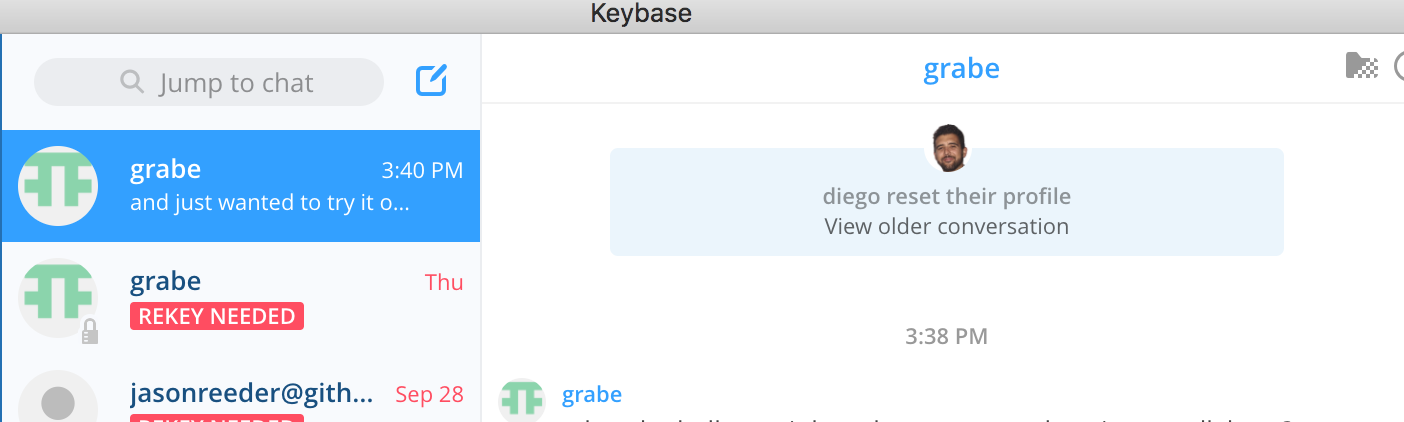
Hello - I am not sure if this is realted to my problem. I got a new laptop so I decided to revoke everything and start over. I installed keybase on my new computer, and verified my identities. Now in the GUI when I go to chat, it tells me I need to rekey. I press the rekey button but nothing happens.
In the command line when I type in keybase rekey status I get: No TLFs need rekeying.
 diego898
on 6 Oct 2017
diego898
on 6 Oct 2017
Now I see the following:
diego898
on 6 Oct 2017
Same symptom as @soulware here. Log ID is 7513bee88be799b57a237c1c
 copyhacker
on 18 Oct 2017
copyhacker
on 18 Oct 2017
@copyhacker: yeah, you've had reset folders in the past too. Should be fixed on our next server deploy.
strib
on 18 Oct 2017
@strib can you comment on whether or not my issue is related here?
diego898
on 18 Oct 2017
@diego898: your issue seems unrelated and probably warrants a new github issue (and a keybase log send, if you're willing). It might be known already, I know some other folks did some work on post-reset chats recently, but the fixes probably aren't released yet.
strib
on 18 Oct 2017
I am seeing this as well on Arch Linux. I cannot remove it. I sent my log report if it helps: 3ec24a22228a19f07fa5eb1c
 blainsmith
on 6 Dec 2017
blainsmith
on 6 Dec 2017
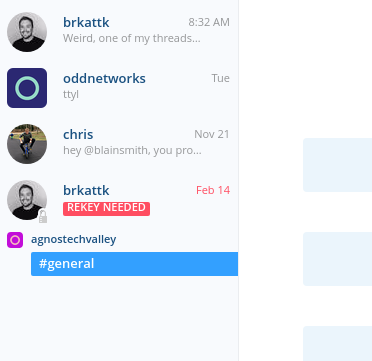
@blainsmith it looks like your folders are all rekeyed now, do you still see badging or notifications? can you put up a screenshot and a keybase log send if so?
maxtaco
on 6 Dec 2017
@maxtaco Sure thing...
Success! Your log ID is:

  3ec24a22228a19f07fa5eb1c

Here's a URL to submit new bug reports containing this ID:

  https://github.com/keybase/client/issues/new?body=[write%20something%20useful%20and%20descriptive%20here]%0A%0Amy%20log%20id:%203ec24a22228a19f07fa5eb1c

Thanks!
------------
Thanks for sending. Unrelated to the problems in this thread, that notification is because you reset your account, and we have some UI bugs for the small minority of people in this case. Cc @mmaxim who knows a fair amount about these.
maxtaco
on 6 Dec 2017
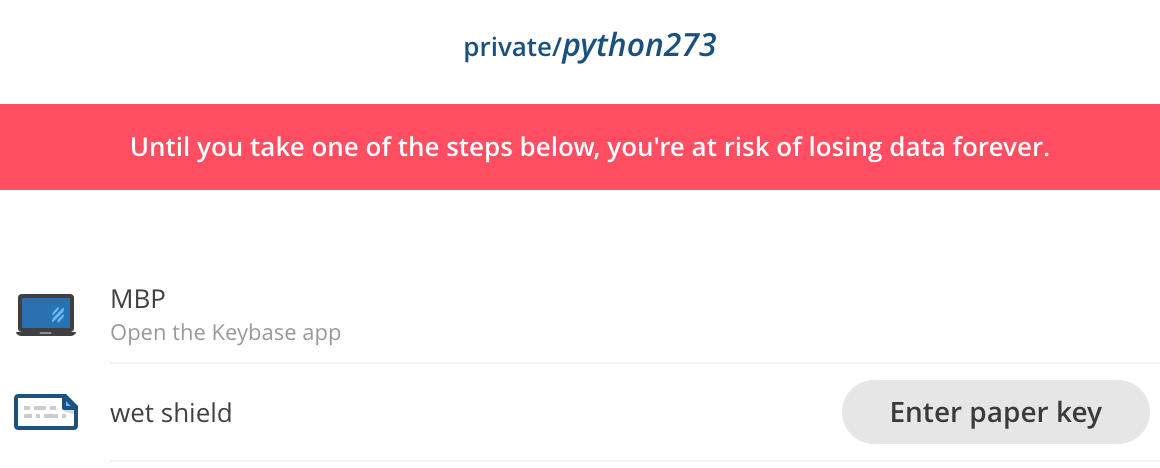
Entering paper key doesn't help ¯\_(ツ)_/¯
 python273
on 14 Dec 2017
python273
on 14 Dec 2017
We had a bug this morning, it should be fixed now, LMK if not?
maxtaco
on 14 Dec 2017
So I've had this rekey issue for a while. I only use keybase to occasionally chat with friends, so I've been a terrible open-source user and ignored it. Last night, I tried to rekey with a paper key, and it said it was a success and would take a few minutes. But I couldn't press Okay, and the dialogue box remained indefinitely.
I ran keybase log send about half an hour ago and it seems to be frozen, as well. I don't have anything on KBFS if this calls for a DB Nuke.
 silentsilas
on 26 Apr 2018
silentsilas
on 26 Apr 2018
@Poeticode log send should take about 10 seconds. Can you try again?
maxtaco
on 26 Apr 2018
Sure, @maxtaco ! I just ran the command again, and it's still getting stuck. The message looks odd, too.
$ keybase log send
This command will send recent keybase log entries to keybase.io
for debugging purposes only.

These logs donât include your private keys or encrypted data,
but they will include filenames and other metadata keybase normally
canât read, for debugging purposes.
are you behind a proxy or firewall?
can you try
keybase -d log send
?
maxtaco
on 26 Apr 2018
Ah, sorry about that. I was using Git Bash on Windows, which seemed to mess things up. I was successfully able to send a log using the regular command prompt.
Log ID: cdddfd6bcb59365b2b25b41c
silentsilas
on 26 Apr 2018
@strib seems like @Poeticode can't rekey his private folder...
maxtaco
on 26 Apr 2018
ah, looks like KBFS is running....
maxtaco
on 26 Apr 2018
@Poeticode @maxtaco: The folder being complained about was reset in #6516, and isn't currently used. So we just have to mark it broken on the server. It should be fixed after the next server deploy.
strib
on 26 Apr 2018
Wow, I completely forgot that I had that issue. Thank you once again, @strib !
silentsilas
on 26 Apr 2018
I am having the same issue. I think it is due to an ignored folder I no longer need ... how do I nuke it?
 ryanpcmcquen
on 2 Dec 2018
ryanpcmcquen
on 2 Dec 2018
@ryanpcmcquen please keybase log send and respond here with a log ID. We will take a look.
 jzila
on 5 Dec 2018
jzila
on 5 Dec 2018
@jzila, tracking at #14896.
ryanpcmcquen
on 5 Dec 2018
Thanks!
jzila
on 5 Dec 2018
Related issues
 caronni
·
3Comments
caronni
·
3Comments
 iqballher
·
3Comments
iqballher
·
3Comments
 heartwithyou
·
3Comments
heartwithyou
·
3Comments
 hkjels
·
4Comments
hkjels
·
4Comments
 dwhagar
·
3Comments
dwhagar
·
3Comments