Client: Chat shows message contents when screen is locked
When the MacOS Keybase client receives an incoming chat message, it sends a notification through Apple's desktop notification system, which causes a box/bubble to appear on the screen, even if the screen saver is active and the screen is locked.
The problem is, this notification contains the content of the received chat message. If I'm chatting with somebody about something which needs to remain private, and I lock the screen while I step away from my desk, anybody who happens to walk by my desk and glance at the screen while I'm away can read those incoming chat messages.
MacOS - Keybase 1.0.23-20170522181119+8a8aea0
 kg4zow
All 11 comments
Also, I just noticed the Copyright message at the bottom of the "About" window says "2015" rather than "2015,2016,2017" (i.e. every year during which changes were made to the code.)
kg4zow
on 5 Jun 2017
You can turn off lock screen notifications per-app in MacOS
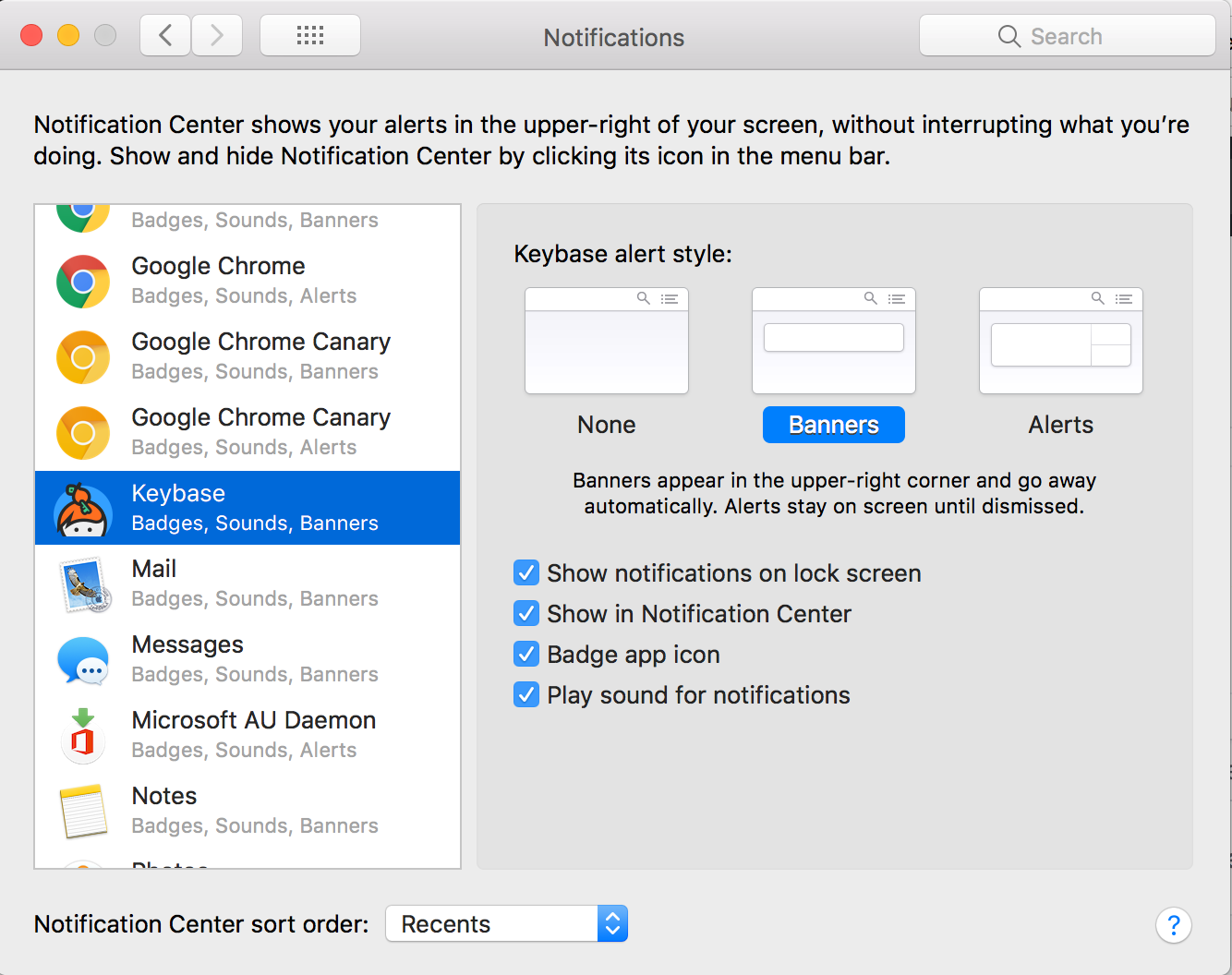
It'd still be nice if they were either off by default or provided some message content obfuscation.
 seth-outreach
on 4 Jan 2018
seth-outreach
on 4 Jan 2018
The problem isn't that the notifications exist, although turning off the "Show notifications on lock screen" checkbox is a valid work-around until the problem can be fixed.
The problem is that the notifications contain the actual text of the message that somebody sent to me.
kg4zow
on 25 Jan 2018
The problem is that the notifications contain the actual text of the message that somebody sent to me.
Yeah that's a problem. I can see that we can disable "mobile plaintext notifications", but can we also disable "desktop plaintext notifications"?
 huyz
on 7 Mar 2018
huyz
on 7 Mar 2018
+1 -- I've had a chat message flash up before when showing something on my screen to a coworker that I really did not want him to see and I do not see how to turn that off.
Ideally I'd love to see it the way slack does it -- Options for show notification with content, show notification with just name of sender, and don't show notification.
 tomcallahan
on 23 Mar 2018
tomcallahan
on 23 Mar 2018
Is this the official channel for leaving feedback / asking for feature requests? Honest question, first timer with Keybase, and I also want this feature to exist.
 brokenthumbs
on 17 Oct 2018
brokenthumbs
on 17 Oct 2018
@brokenthumbs This is the official repository for the Keybase client's code, and assuming they're using Github the way it was designed, this "issue" is on their list of things to look at. It doesn't look like anybody above is one of the developers so it's possible they haven't seen it yet, but I'm sure at some point they will.
For now I've just turned notifications off on the work machine, since I also get notifications on my phone and iPad. It's not ideal, but it does keep message content from unexpectedly showing up on the screen (or in whatever logs Apple may keep for their notification system.)
kg4zow
on 21 Oct 2018
Was just about to create this ticket myself. The worst part about this is that it is on by default and has no settings to disable within the app. Not just hiding message contents, but even disabling desktop notifications at all.
It looks like it's been 5 months since this issue was created -- should the maintainers be pinged somewhere else?
 izcet
on 20 Feb 2019
izcet
on 20 Feb 2019
It looks like issues should be reported here:
https://github.com/keybase/keybase-issues
 jeremysears
on 21 Feb 2019
jeremysears
on 21 Feb 2019
^ Other issue created at that repo, thanks @jeremysears!
izcet
on 21 Feb 2019
closed via #17337
 joshblum
on 7 May 2019
joshblum
on 7 May 2019
Related issues
 dwhagar
·
3Comments
dwhagar
·
3Comments
 tyrion
·
3Comments
tyrion
·
3Comments
 lukefrasera
·
3Comments
lukefrasera
·
3Comments
 veddermatic
·
3Comments
veddermatic
·
3Comments
 iqballher
·
3Comments
iqballher
·
3Comments
Most helpful comment
+1 -- I've had a chat message flash up before when showing something on my screen to a coworker that I really did not want him to see and I do not see how to turn that off.
Ideally I'd love to see it the way slack does it -- Options for show notification with content, show notification with just name of sender, and don't show notification.