Client: [Windows] File Explorer - Integrate a Cloud Storage Provider: Drop down sub paths
WIll be nice have owncloud client be integrated in file explorer like Dropbox and one Drive, having the shortcut in the left side underneath quick Access. with the option to click in the > and see the folder inside owncloud. see pics
More info can be found at: https://msdn.microsoft.com/en-us/library/windows/desktop/dn889934%28v=vs.85%29.aspx?f=255&MSPPError=-2147217396


 JarbyDev
All 26 comments
How much effort would that be?
 hodyroff
on 17 Nov 2016
hodyroff
on 17 Nov 2016
I would really like to see this moving forward. Having this not solved makes owncloud feel like a second class citizen on Windows 10 systems, as everybody (Dropbox, Onedrive, etc.) has full integration, but owncloud does not.
I am willing to hack this in. The MSDN article makes the needed registry handling pretty clear. Could you point me to the respective source files where I could add the integration?
I've already taken a look at the windows shell integration folder, but having a hard time finding the entry point into the code. Or maybe this should be a third module beside shell integration and explorer overlay?
 svolke
on 1 Apr 2017
svolke
on 1 Apr 2017
shell_integration/windows is the right place and this could just be integrated directly in the code.
The challenging part however is that we pre-build those DLLs on developer machines, which means that we can't put any icon or brand name (like ownCloud) in the code unless we build the whole client with MSVC (#2717).
Another option is to pass all branding-related resources through the SocketAPI like we currently do with the Share menu title, but this would mean passing icons on the socket every single time an application opens an explorer window (even if not navigating to the ownCloud folder), so not sure if users will like this.
Maybe this is only done by registry hacks though, in that case there might be an easier solution as this could be done by the client itself and not the extension.
 jturcotte
on 3 Apr 2017
jturcotte
on 3 Apr 2017
I've been looking at implementing this but the fact that we support multiple accounts and folders makes this difficult to implement while making sure that:
- Uninstalling the client will remove all the namespace icon from Explorer's root
- We're not cluttering explorer by adding a root namespace for every account+folder
OneDriver and Dropbox, for example, only seem to support a single sync folder and account, so it's pretty straightforward. But in our case this makes things quite complicated. I've thought of the following solutions:
Add a namespace icon at the root of the explorer tree for every folder connection
- This solution would make it difficult to remove everything when we uninstall, we'd need to add complex logic to the uninstaller to walk over all namespaces and look for something that binds them to the client being uninstalled. Re-installing (when updating) would also need to re-add all those entries by parsing the existing config.
- This will clutter the explorer view of the user when using multiple accounts or folder connections. The only way it seems to be possible is by editing the registry so we'd need to somehow allow the user to customize this through the client's interface
Only add the first folder connection as a namespace
This would make it easier and would be fine for most users but would be an incomplete solution and still not trivial to implement and maintain.
Implement a custom Shell Namespace Extensions to show a tree of accounts/folders registered
This could be a nice solution if it's possible to create a shell extension to handle only the root folder, allowing us to delegate to regular Shell Instance Objects for each sync root. The problem is that we'd probably put this in the same DLLs as the overlay icons and context menu extensions, and this means that the only way to fetch the list of root folder would be through the SocketAPI (since it's the same binary for every branding). This means that the root folder would be empty when the client is not running, unlike Dropbox or OneDrive namespaces which still work perfectly fine when their sync client isn't running.
Just keep using Quick Access folders like we already do
This is what I'm currently going for in https://github.com/owncloud/client/issues/2446. This works well, we can have one icon for every sync root and the users can edit them as they wish.
So unless you see other benefits than having an icon to adding ownCloud to the root level of the Navigation Pane, I think we should stick with favorite links. Another advantage of favorites is that the correct path appears in the address bar, while a Navigation Pane namespace creates hides the path on disk and shows itself as a logical root.
jturcotte
on 11 Aug 2017
Sorry for the long silence. Unfortunately, I cannot allocate time to help out on this one.
However, I want to share some thoughts...
A proper integration needs two things:
- a sync root provider for every owncloud account
- the integration into the navigation pane
All of this is done through the registry, and requires updates only when sync roots change or the client is uninstalled.
The branding-related things (in this case only the client name and the icon location) could be passed through the socket on these rare events.
Sync root provider
Windows needs one sync root provider per account. This marks the directory where the account is synced to and associates it with ownCloud. Basically, it allows Windows to query who is responsible for this directory.
We do not need to worry about the individual folders that are synced for the account, as all of them are located in the same sync root.
So an update of the registry entries is only needed, when the sync root changes.
Required information for the registry are:
- Name of the sync client ("DIsplayNameResource")
- Icon location of the sync client ("IconResource")
- Sync root location ("UserSyncRoots")
- ID of the account that is synced to this root
- ID of the sync client
Navigation Pane integration
This one is harder.
The best way (in my opinion) would be the implementation of a custom shell extension. The guide in https://msdn.microsoft.com/en-us/library/windows/desktop/dn889934%28v=vs.85%29.aspx?f=255&MSPPError=-2147217396 shows how to integrate one sync provider and hook it under the desktop folder.
We could use this guide to add one virtual ownCloud folder to the navigation pane.
Then, for every sync account, we just register the sync root as a child of this virtual folder. Since the sync root folder can be configured as a link to the actual sync root, again we do not need to worry about synced folders, but only about the sync root itself.
Information needed:
- Client name and client icon location for the virtual root folder
- Account name for every sync root folder
svolke
on 26 Aug 2017
We do not need to worry about the individual folders that are synced for the account, as all of them are located in the same sync root.
Humm I think a sync root by definition is something that has a different root folder on the local disk. This is what we call "Folder Sync Connection" in the client is. By default we only have one, but we do support having multiple for each account.
Personally I don't think it's just a matter of implementing it, my impression is that we take more from the user than what we give them by implementing this feature because:
- They won't be able to use the integration unless the client is running if we implement a custom shell extension
- The uninstallation might either be difficult to maintain or might not work as expected if we cut some corners.
Both issues essentially because we need to continue supporting multiple accounts and folders.
Meanwhile, I believe the navigation pane integration doesn't give much over our current use of Quick Access bookmarks. So we shouldn't just implement this blindly, we should first look at what this would give the user vs. Quick Access bookmarks, and evaluate if the cost is worth the benefit. @pmaier1 should probably be involved in this decision.
That Dropbox and OneDrive support it is not a good argument by itself since they don't need to support multiple accounts and therefore didn't face the same issues.
jturcotte
on 26 Aug 2017
With Dropbox, you can connect multiple accounts on the server-side. It looks like only one account on the device is needed:
https://www.dropbox.com/help/4270
OneDrive can have multiple accounts on one device. Each account has an own integration, and each account has it's own settings window:

Could creation be an option in the wizard for each account/folderpair ?
 michaelstingl
on 4 Sep 2017
michaelstingl
on 4 Sep 2017
@michaelstingl It could be an idea of the wizard, yes. If users choose what to put in explorer, enabling them to add/remove each folder integration through the UI this would make the "Add a namespace icon at the root of the explorer tree for every folder connection" option above a good way to go (the user can control the explorer clutter).
We'd need to find a way for the installer to read the client config file to know which one to remove on uninstall, and which one to add on reinstall/update. Maybe something that would be easier to do once we have the MSI installer (#860)?
And what do you see as an advantage to implement all this? What is the user getting in exchange?
jturcotte
on 5 Sep 2017
What is the user getting in exchange?
@jturcotte Users would get their ownCloud data back. In Win 10, it's very difficult to find your ownCloud data. Here is an example when you try open a file with text editor (no ownCloud, but OneDrive everywhere):

Accessing ownCloud data from Word 2016 on Win 10, is nearly impossible:

This is the feedback I've got from an ownCloud admin:
Our institutions often prepare the computers for the end-users and the immediate appearance of ownCloud/
$APPLICATION_NAMEis important for usage.
As an 🍎-fanboy, I wasn't aware about this issue, but in the last time I've heard this feedback more often.
00008190
michaelstingl
on 8 Sep 2017
I now agree with @michaelstingl and think this is quite important to have. Else it's hard to use the client on Windows.
It could be an idea of the wizard, yes
Wizard won't work for EXISTING sync folder (connections)
Maybe something that would be easier to do once we have the MSI installer
This sidebar explorer stuff should be the default, no setting in client or installer please.
Just keep using Quick Access folders like we already do
So there is no favorites in quick access anymore in win 10 anymore? :-(
(BTW, saw a .reg to change that on https://www.tenforums.com/tutorials/2714-add-remove-favorites-quick-access-windows-10-a.html )
This means that the root folder would be empty when the client is not running,
As a first step, this might not be so bad, we can change this later by having the shell extension read the config or (probably better?) cache the sync folders somewhere.
(Hmmmm having testpilotcloud and owncloud installed at same time but only one explorer DLL hmm)
 guruz
on 11 Sep 2017
guruz
on 11 Sep 2017
@michaelstingl OK I thought that our favorite code was still working with the Quick Access, I must have pinned mine manually (which users can still do).
But I can see this as a better solution since MS doesn't seem to expose any official API to modify the Quick Access pins.
jturcotte
on 11 Sep 2017
Hi, I think I was the admin that Michael mentioned:
Our institutions often prepare the computers for the end-users and the immediate appearance of ownCloud/$APPLICATION_NAME is important for usage.
In this regard, our largest institution is asking for a timeline. I understand from the above that the development is rather difficult and at a very early stage, but could you make any prediction?
 CorneeldH
on 28 Sep 2017
CorneeldH
on 28 Sep 2017
@jturcotte @guruz How to proceed? I really would like to improve here…
michaelstingl
on 19 Oct 2017
@michaelstingl It's currently being worked on for 2.5, it semi-works :-)
guruz
on 20 Oct 2017
As mentioned in #6113, this will fix the "File Explorer namespace" part of the MS documentation link above, but the "sync root provider" is still missing.
I haven't had time to look at it, but the additional registry keys to add/remove can probably be added to the existing code. The difficult part might be to find the right "Windows SID" and find a way to generate an "Account ID" that works for individual sync roots (which is different than an ownCloud "account", it's might match better to our folders).
So I'd suggest not closing this issue should until the "sync root provider" part is also implemented.
I'm still not sure what the sync root provider is supposed to do, I couldn't find a way to test this, but I suspect this is what allows Word to display the account in @michaelstingl's screenshot at https://github.com/owncloud/client/issues/5295#issuecomment-328187191. Somebody with access to Office could have a look.
Here are my notes for manual testing, in case this could give some inspiration to @SamuAlfageme:
- Enabling/disabling in settings should remove entries from explorer (or at least change the registry)
- Adding a folder while the setting is disabled shouldn't add an entry
- Adding an account while the setting is disabled shouldn't add an entry
- Adding/removing a second account should add the account name to the entries title
- Uninstalling should remove everything from the registry
- First start after reinstall should re-add everything
- Test with non-admin user (for SyncRootManager as this is in HKEY_LOCAL_MACHINE, but on my machine it has some special permissions that make it look like it should work)
jturcotte
on 24 Oct 2017
@jturcotte amazing work 💯
Somebody with access to Office could have a look.
Will do asap:
So I'd suggest not closing this issue should until the "sync root provider" part is also implemented.
Agreed, that's the schema I was looking for in https://github.com/owncloud/client/issues/6100
 SamuAlfageme
on 24 Oct 2017
SamuAlfageme
on 24 Oct 2017
I used todays testpilotcloud-2.5.0.8981-nightly20180112-setup.exe and - here you go

 gidhap
on 13 Jan 2018
gidhap
on 13 Jan 2018
@gidhap thanks for sharing this.
I installed the latest nightly build and the owncloud appears pinned in the normal explorer window :)
but using another application (for example MS Word 2016, or pick whatever program you want) and open directories from within the application, the owncloud pin does not show up (dropbox, gdrive and onedrive do)
so current nightly is only the first step to the solution :)
 DanielHilpoltsteiner
on 6 Feb 2018
DanielHilpoltsteiner
on 6 Feb 2018
@DanielHilpoltsteiner The problem could be if it is a 32 bit application? See https://github.com/owncloud/client/blob/7860876b547bb396b58bb76f6115c5e01c49cc04/src/common/utility_win.cpp#L153
Maybe you can verify this in task manager?
guruz
on 8 Feb 2018
thanks @guruz , you're completely right.. :)
does the installer decide itself which version gets installed (32 bit vs 64 bit)?
I feel a bit blind, as there seems to be no separate 64 bit version (http://download.owncloud.com/desktop/daily/)
DanielHilpoltsteiner
on 8 Feb 2018
I opened a new issue for the MS Office 2016 integration: https://github.com/owncloud/client/issues/6394
michaelstingl
on 19 Mar 2018
https://github.com/owncloud/client/pull/6113 seems to work fine in the daily builds. @dschmidt Plz check what needs to be done in MSI?
michaelstingl
on 20 Mar 2018
Can be closed as the File Explorer integration is working as expected for both NSIS and MSI installers (64bit only for the latter, discussion on 32bit is meant to happen on https://github.com/owncloud/client/issues/6565 - @DanielHilpoltsteiner we could use your input on the issue)
SamuAlfageme
on 4 Jun 2018
WIN10
OK: msi setup wizard offers the explorer integration, default on.
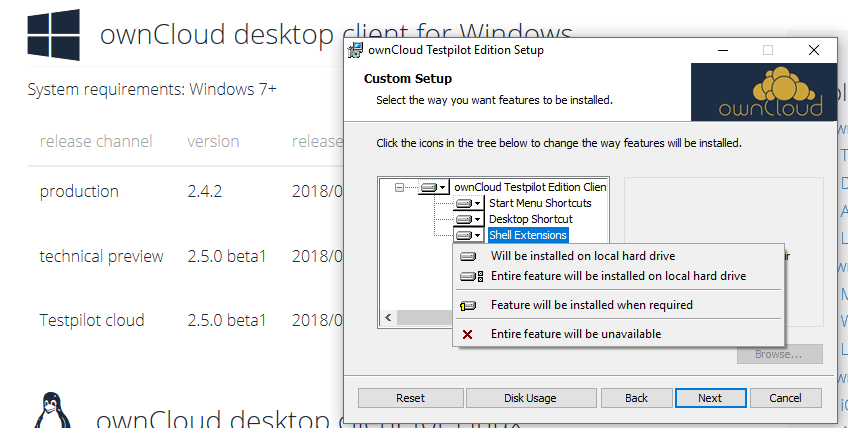
OK: when setup finishes, user is asked to close windows explorer
Restart explorer can fail. Reason was 'files in use'

But okay. There is a system restart suggested after that error. That is safe.
OK: overlay icons and right click menu works as expected. (even without a reboot).

 jnweiger
on 8 Aug 2018
jnweiger
on 8 Aug 2018
@jnweiger Overlay icons, right click menus and the sidebar are 3 different implementations :-)
Do you see the testpilotcloud sidebar icon like in https://github.com/owncloud/client/issues/5295#issuecomment-357442323 ?
guruz
on 10 Aug 2018
Yeah, three things. Sorry.
Here is the third:

OK
very nice! It's even above onedrive :-)
jnweiger
on 10 Aug 2018
Related issues
 ogasser
·
4Comments
ogasser
·
4Comments
 denniskhong
·
4Comments
michaelstingl
·
4Comments
denniskhong
·
4Comments
michaelstingl
·
4Comments
 moscicki
·
4Comments
moscicki
·
4Comments
 ahmedatawfik
·
5Comments
ahmedatawfik
·
5Comments
Most helpful comment
@michaelstingl It's currently being worked on for 2.5, it semi-works :-)