Cli: Paths with spaces crash on Windows
Moving https://github.com/react-native-community/react-native-releases/issues/79#issuecomment-464828893 there
cc @Sharlaan
 thymikee
All 13 comments
Ok thanks for the move, copy-pasting the original issue :
Environment:
- Windows10
- Node 11.10
- expo: 32.0.0
- react: 16.5.0, then 16.8.2 (new hooks)
- react-native: sdk-32.0.0 then 0.59.0-rc.2
I made a fresh test with expo init which worked flawlessly :

... but after upgrading, red screen (LAN mode) :

Installing RN@next (v0.59-rc.2) ...
then expo start crashes with :
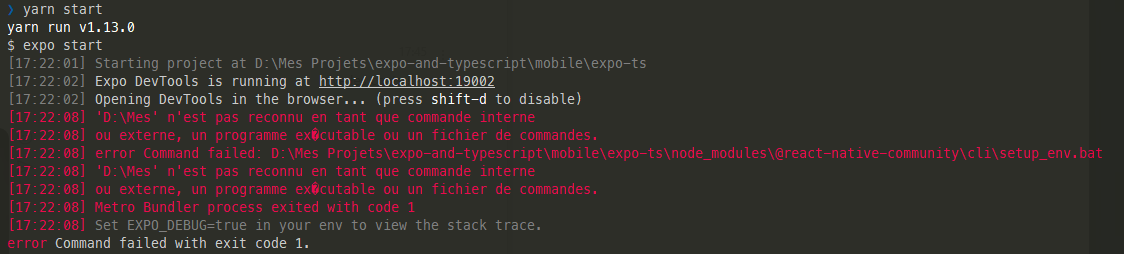
error Command failed: D:\Mes Projets\expo-and-typescript\mobile3\expo-ts\node_modules\@react-native-community\cli\setup_env.bat
'D:\Mes ' is not recognized as internal command.
The issue definitely does not seem to come from expo-cli, since it worked with the RN@exotic version.
======================================
From: @thymikee
I don't have a Windows machine, and paths with spaces work on UNIX. I'd appreciate your help on that. The relevant code is here: https://github.com/react-native-community/react-native-cli/blob/760d384ae199ccd6552805459c195ed5aa3969fc/packages/cli/src/cliEntry.js#L142-L146
It may be an Expo issue as you say, but it's possible that we can make it easier for them on our side.
 Sharlaan
on 19 Feb 2019
Sharlaan
on 19 Feb 2019
I made a few research about childProcess.execFile and found this in Node documentation :
https://nodejs.org/api/child_process.html#child_process_spawning_bat_and_cmd_files_on_windows
(especially last example)
Any space in the argument passed to childProcess.execFileSync tells it there is a command executable.
So maybe the solution would be to enclose the whole path string in quotes (using JSON.stringify) ?
Sharlaan
on 19 Feb 2019
Please give it a try on Windows machine and let us know. AFAIK none of core contributors to this project use Windows, so that would be a huge help
thymikee
on 19 Feb 2019
@Sharlaan FYI we remove this script because it's just a placeholder and there's currently nothing it does, so no need to break stuff for anybody. We also guard this spawn call so it should fix your issue.
See: https://github.com/react-native-community/react-native-cli/pull/182
Let me know if this fixes your use case and if other spawns are also affected
thymikee
on 20 Feb 2019
It's a small change, easiest thing would be to adjust node_modules and see the outcome
thymikee
on 20 Feb 2019
ok i used this snippet into build/cliEntry.js
async function setupAndRun() {
  const isWindows = /^win/.test(process.platform);
  if (!isWindows) {
    const setupEnvScript = _path().default.join('..', 'setup_env.sh');

    _child_process().default.execFileSync(
      _path().default.join(__dirname, setupEnvScript),
    );
  }
...
it didnot crash at this, but later on it did crash again, after message Loading dependency graph, done. :
error: bundling failed: Error: Unable to resolve module
react-native/Libraries/Components/View/ViewStylePropTypesfromD:\Mes Projets\expo-and-typescript\mobile3\expo-ts\node_modules\react-native-reanimated\src\createAnimatedComponent.js: Modulereact-native/Libraries/Components/View/ViewStylePropTypesdoes not exist in the Haste module map
This might be related to https://github.com/facebook/react-native/issues/4968
Sharlaan
on 20 Feb 2019
I don't think there's more this CLI can do for you then. Shall we close once #182 is merged? I think the best you can do is to create a smallest possible repro (as a GitHub repository) and post to Metro issue tracker: https://github.com/facebook/metro/issues
thymikee
on 20 Feb 2019
Yep let's close this.
Thanks for your help.
Too bad native development with RN is not smooth ...
Sharlaan
on 20 Feb 2019
We'll get there! :D
thymikee
on 20 Feb 2019
This issue is still present. I use expo with project in space-including path. It fails on
UnhandledPromiseRejectionWarning: Error: Command failed: C:\Users\Jakub\Documents\HTML & JS\dev\mtaa\receptar.app\node_modules\react-native\local-cli\setup_env.bat
'C:\Users\Jakub\Documents\HTML' is not recognized as an internal or external command, operable program or batch file.
 trogper
on 30 Mar 2019
trogper
on 30 Mar 2019
@trogper you'll need to wait for Expo to update to RN 0.59 and use this CLI.
thymikee
on 30 Mar 2019
I have the same issue on windows when I run react-native run-android:
info JS server already running.
info Building and installing the app on the device (cd android && gradlew.bat app:installDebug)...
Picked up _JAVA_OPTIONS: -Xmx512M
Task :app:installDebug
07:53:08 V/ddms: execute: running am get-config
07:53:09 V/ddms: execute 'am get-config' on 'TO85SCSKRGGQRCTC' : EOF hit. Read: -1
07:53:09 V/ddms: execute: returning
Installing APK 'app-debug.apk' on 'A1601 - 5.1' for app:debug
07:53:09 D/app-debug.apk: Uploading app-debug.apk onto device 'TO85SCSKRGGQRCTC'
07:53:09 D/Device: Uploading file onto device 'TO85SCSKRGGQRCTC'
07:53:09 D/ddms: Reading file permision of C:laragonwwwAwesomeProjectandroidappbuildoutputsapkdebugapp-debug.apk as: rwx------
07:53:18 V/ddms: execute: running pm install -r -t "/data/local/tmp/app-debug.apk"
07:53:26 V/ddms: execute 'pm install -r -t "/data/local/tmp/app-debug.apk"' on 'TO85SCSKRGGQRCTC' : EOF hit. Read: -1
07:53:26 V/ddms: execute: returning
07:53:26 V/ddms: execute: running rm "/data/local/tmp/app-debug.apk"
07:53:26 V/ddms: execute 'rm "/data/local/tmp/app-debug.apk"' on 'TO85SCSKRGGQRCTC' : EOF hit. Read: -1
07:53:26 V/ddms: execute: returning
Installed on 1 device.
BUILD SUCCESSFUL in 20s
26 actionable tasks: 1 executed, 25 up-to-date
'C:UsersNasser' n?est pas reconnu en tant que commande interne
ou externe, un programme ex�cutable ou un fichier de commandes.
info Starting the app (C:UsersNasser AbachiAppDataLocalAndroidSdk/platform-tools/adb shell am start -n com.awesomeproject/com.awesomeproject.MainActivity...
Starting: Intent { cmp=com.awesomeproject/.MainActivity }
And it stops tracking the app running on the device.
 abachi
on 10 Apr 2019
abachi
on 10 Apr 2019
We're happy to accept help as none of us uses Windows machines for development.
thymikee
on 10 Apr 2019
Related issues
 gitowiec
·
3Comments
gitowiec
·
3Comments
 patrickkempff
·
4Comments
patrickkempff
·
4Comments
 sibelius
·
3Comments
sibelius
·
3Comments
 Jarred-Sumner
·
3Comments
Jarred-Sumner
·
3Comments
 openmaya
·
4Comments
openmaya
·
4Comments