Cli: heroku login is not a heroku command how can i solve it ?
Do you want to request a feature or report a bug?
i have this error
error : heroku login is not a heroku command
how can i solve it ?
What is the current behavior?
i cant make my first heroku windows64 8
What is the expected behavior?
7.0.9 windows 8 64 bit
 loaiabdalslam
All 46 comments
You're probably using an old version or the deprecated package 'heroku-cli'. The new one is just called 'heroku'
Uninstall that by npm uninstall -g heroku-cli
Then install the new package npm i -g heroku
 mkdorff
on 5 Jun 2018
mkdorff
on 5 Jun 2018
unbelievable I spend whole morning trying to install heroku with the official instruction, it failed in every way, this simple word: npm i -g heroku saved my ass. Thanks!
 yangmars88
on 7 Sep 2018
yangmars88
on 7 Sep 2018
Thanks, it worked!
 gabyguzmandev
on 26 Sep 2018
gabyguzmandev
on 26 Sep 2018
fall victim for heroku instruction of installing it with brew, npm was the way to go,
 jimmywarting
on 28 Sep 2018
jimmywarting
on 28 Sep 2018
It's probably a PATH issue. This is likely happening because the old ruby CLI is installed. Using npm only worked because that uses an earlier PATH directory.
rm $(which heroku) would fix this issue and allow it to use a new install. It may need to be run multiple times.
 jdxcode
on 28 Sep 2018
jdxcode
on 28 Sep 2018
thanks
 saladinjake
on 12 Dec 2018
saladinjake
on 12 Dec 2018
Thanks, it worked!
 wakidur
on 2 Jan 2019
wakidur
on 2 Jan 2019
I did this
Uninstall that by npm uninstall -g heroku-cli
Then install the new package npm i -g heroku
But when I tried to run heroku it said
deprecated [email protected]: cross-spawn no longer requires a build toolchain, use it instead
npm WARN checkPermissions Missing write access to /usr/local/lib/node_modules
npm ERR! path /usr/local/lib/node_modules
npm ERR! code EACCES
npm ERR! errno -13
npm ERR! syscall access
npm ERR! Error: EACCES: permission denied, access '/usr/local/lib/node_modules'
npm ERR! { [Error: EACCES: permission denied, access '/usr/local/lib/node_modules']
npm ERR! stack:
npm ERR! 'Error: EACCES: permission denied, access \'/usr/local/lib/node_modules\'',
npm ERR! errno: -13,
npm ERR! code: 'EACCES',
npm ERR! syscall: 'access',
npm ERR! path: '/usr/local/lib/node_modules' }
npm ERR!
npm ERR! The operation was rejected by your operating system.
npm ERR! It is likely you do not have the permissions to access this file as the current user
npm ERR!
npm ERR! If you believe this might be a permissions issue, please double-check the
npm ERR! permissions of the file and its containing directories, or try running
npm ERR! the command again as root/Administrator (though this is not recommended).
 ashokvas
on 19 Jan 2019
ashokvas
on 19 Jan 2019
If you are still having issues, I recommend that you uninstall heroku and download the installer from their site: https://devcenter.heroku.com/articles/heroku-cli#download-and-install. This worked for me
 Nanared1
on 20 Jan 2019
Nanared1
on 20 Jan 2019
Thanks for the advice
But I am quite new to this and just wanted to know about how to
unistall heroku.
What code do I use?
Also it seems that my GIT does not have permissions?
Awaiting your reply
Regards
Ashok
On Sun, Jan 20, 2019 at 7:02 AM Nana Abekah notifications@github.com
wrote:
If you are still having issues, I recommend that you uninstall heroku and
download the installer from their site:
https://devcenter.heroku.com/articles/heroku-cli#download-and-install.
This worked for me—
You are receiving this because you commented.
Reply to this email directly, view it on GitHub
https://github.com/heroku/cli/issues/855#issuecomment-455829629, or mute
the thread
https://github.com/notifications/unsubscribe-auth/AYL-DhmcN2wt093z8NZlKbJTKT3rsP0Rks5vE8cjgaJpZM4UFx57
.
ashokvas
on 20 Jan 2019
Thanks for the advice
But I am quite new to this and just wanted to know about how to unistall heroku.
What code do I use?
Also it seems that my GIT does not have permissions?
Awaiting your reply
Regards
ashokvas
on 20 Jan 2019
I just tried to unistall heroku by running this command ( I am using a Macbook)
rm -rf /usr/local/heroku /usr/local/lib/heroku /usr/local/bin/heroku ~/.local/share/heroku ~/Library/Caches/heroku
It said permissions denied
How do I set permissions?
ashokvas
on 20 Jan 2019
I tried to run
$ git config --list
It says
-bash: $: command not found
Seems like there is a problem with my GIT installation
I installed it using the Mac installer
Anyone understand what is the problem?
ashokvas
on 20 Jan 2019
To uninstall Heroku, use " npm uninstall -g heroku "
Nanared1
on 20 Jan 2019
I just ran the command and I got the response
"up to date in 0.705s"
It seems to have run successfully
ashokvas
on 20 Jan 2019
I ran the installer for heroku and it has installed succefully
I ran the following
Apples-MacBook-Pro:~ Apple$ heroku --version
heroku/7.19.4 darwin-x64 node-v11.3.0
ashokvas
on 20 Jan 2019
I tried to login with heroku
Apples-MacBook-Pro:~ Apple$ $ heroku login
-bash: $: command not found
NO luck
ashokvas
on 20 Jan 2019
Oh, just do " heroku login "
Nanared1
on 20 Jan 2019
Apples-MacBook-Pro:~ Apple$ heroku login
heroku: Press any key to open up the browser to login or q to exit:
ashokvas
on 20 Jan 2019
Logging in... done
Logged in as [email protected]
Apples-MacBook-Pro:~ Apple$
THanks a lot
ashokvas
on 20 Jan 2019
will I remain logged in once I close my macbook ? or do I have to login again?
ashokvas
on 20 Jan 2019
I am not sure about that
Nanared1
on 20 Jan 2019
Where to download the heroku toolbet from? I cant find it on the Dev center?
ashokvas
on 20 Jan 2019
Am not sure or may have not used toolbelt before. It may have downloaded with the installer. Regardless, I was able to deploy on heroku with just the installer
Nanared1
on 20 Jan 2019
I did this
Uninstall that by npm uninstall -g heroku-cli
Then install the new package npm i -g herokuBut when I tried to run heroku it said
deprecated [email protected]: cross-spawn no longer requires a build toolchain, use it instead
npm WARN checkPermissions Missing write access to /usr/local/lib/node_modules
npm ERR! path /usr/local/lib/node_modules
npm ERR! code EACCES
npm ERR! errno -13
npm ERR! syscall access
npm ERR! Error: EACCES: permission denied, access '/usr/local/lib/node_modules'
npm ERR! { [Error: EACCES: permission denied, access '/usr/local/lib/node_modules']
npm ERR! stack:
npm ERR! 'Error: EACCES: permission denied, access '/usr/local/lib/node_modules'',
npm ERR! errno: -13,
npm ERR! code: 'EACCES',
npm ERR! syscall: 'access',
npm ERR! path: '/usr/local/lib/node_modules' }
npm ERR!
npm ERR! The operation was rejected by your operating system.
npm ERR! It is likely you do not have the permissions to access this file as the current user
npm ERR!
npm ERR! If you believe this might be a permissions issue, please double-check the
npm ERR! permissions of the file and its containing directories, or try running
npm ERR! the command again as root/Administrator (though this is not recommended).
Try to use this command : brew tap heroku/brew && brew install heroku
For me it is working now.
 ncuti
on 3 Apr 2019
ncuti
on 3 Apr 2019
And I See this:
Any help over here
$ heroku login
heroku: Press any key to open up the browser to login or q to exit:
Error: self signed certificate in certificate chain
 riteshkonduru
on 29 Jul 2019
riteshkonduru
on 29 Jul 2019
I did this
Uninstall that by npm uninstall -g heroku-cli
Then install the new package npm i -g heroku
But when I tried to run heroku it said
deprecated [email protected]: cross-spawn no longer requires a build toolchain, use it instead
npm WARN checkPermissions Missing write access to /usr/local/lib/node_modules
npm ERR! path /usr/local/lib/node_modules
npm ERR! code EACCES
npm ERR! errno -13
npm ERR! syscall access
npm ERR! Error: EACCES: permission denied, access '/usr/local/lib/node_modules'
npm ERR! { [Error: EACCES: permission denied, access '/usr/local/lib/node_modules']
npm ERR! stack:
npm ERR! 'Error: EACCES: permission denied, access '/usr/local/lib/node_modules'',
npm ERR! errno: -13,
npm ERR! code: 'EACCES',
npm ERR! syscall: 'access',
npm ERR! path: '/usr/local/lib/node_modules' }
npm ERR!
npm ERR! The operation was rejected by your operating system.
npm ERR! It is likely you do not have the permissions to access this file as the current user
npm ERR!
npm ERR! If you believe this might be a permissions issue, please double-check the
npm ERR! permissions of the file and its containing directories, or try running
npm ERR! the command again as root/Administrator (though this is not recommended).Try to use this command : brew tap heroku/brew && brew install heroku
For me it is working now.
use sudo snap install --classic heroku
 frankkode
on 14 Aug 2019
frankkode
on 14 Aug 2019
then use $ heroku login -i
frankkode
on 14 Aug 2019
thanks mkdorff it worked for me!!!
 sunnyDev1161
on 19 Sep 2019
sunnyDev1161
on 19 Sep 2019
thanks hihi
 aritri12
on 8 Oct 2019
aritri12
on 8 Oct 2019
You're probably using an old version or the deprecated package 'heroku-cli'. The new one is just called 'heroku'
Uninstall that bynpm uninstall -g heroku-cli
Then install the new packagenpm i -g heroku
Thank you SO MUCH!! I've been trying to figure it out all morning and I was about to give up when I found this issue. You saved my website!
 MrNobody1166
on 28 Nov 2019
MrNobody1166
on 28 Nov 2019
do not uninstall. thats a huge process. just write the following command.
heroku login --interactive or heroku login -i
 Dennis6223
on 21 Jan 2020
Dennis6223
on 21 Jan 2020
heruko : The term 'heruko' is not recognized as the name of a cmdlet, function,
script file, or operable program. Check the spelling of the name, or if a path was
included, verify that the path is correct and try again.
At line:1 char:1
- heruko login
~~
- CategoryInfo : ObjectNotFound: (heruko:String) [], CommandNotFoundExc
eption - FullyQualifiedErrorId : CommandNotFoundException
- CategoryInfo : ObjectNotFound: (heruko:String) [], CommandNotFoundExc
How to fix this?
Thank you
 KenKen19
on 26 Feb 2020
KenKen19
on 26 Feb 2020
heruko : The term 'heruko' is not recognized as the name of a cmdlet, function,
script file, or operable program. Check the spelling of the name, or if a path was
included, verify that the path is correct and try again.
At line:1 char:1
- heruko login
<ul>
<li>CategoryInfo          : ObjectNotFound: (heruko:String) [], CommandNotFoundExc<br />
eption</li>
<li>FullyQualifiedErrorId : CommandNotFoundException<br />
How to fix this?
Thank you
You might want to try spelling it "heroku", not "heruko". Hope that helps!
MrNobody1166
on 27 Feb 2020
Thanks a lot
 kensothy
on 7 Mar 2020
kensothy
on 7 Mar 2020
heroku : The term 'heroku' is not recognized as the name of a cmdlet, function, script file, or operable program. Check the spelling of the name, or if a path
was included, verify that the path is correct and try again.
At line:1 char:1
- heroku login
~~
- CategoryInfo : ObjectNotFound: (heroku:String) [], CommandNotFoundException
- FullyQualifiedErrorId : CommandNotFoundException
This is my error in Visual Studio code terminal
 maviyashaikh
on 21 Mar 2020
maviyashaikh
on 21 Mar 2020
You're probably using an old version or the deprecated package 'heroku-cli'. The new one is just called 'heroku'
Uninstall that bynpm uninstall -g heroku-cli
Then install the new packagenpm i -g heroku
Thanks a lot! It worked for me too
 aprlster
on 28 Mar 2020
aprlster
on 28 Mar 2020
thanks, it's working. awesome
 harunKhairy
on 21 Apr 2020
harunKhairy
on 21 Apr 2020
heroku : The term 'heroku' is not recognized as the name of a cmdlet, function, script file, or operable program. Check the spelling of the name, or if a path
was included, verify that the path is correct and try again.
At line:1 char:1
- heroku login
<ul>
<li>CategoryInfo          : ObjectNotFound: (heroku:String) [], CommandNotFoundException</li>
<li>FullyQualifiedErrorId : CommandNotFoundException<br />
This is my error in Visual Studio code terminal
me too !
 HansPeterMaxwell
on 2 May 2020
HansPeterMaxwell
on 2 May 2020
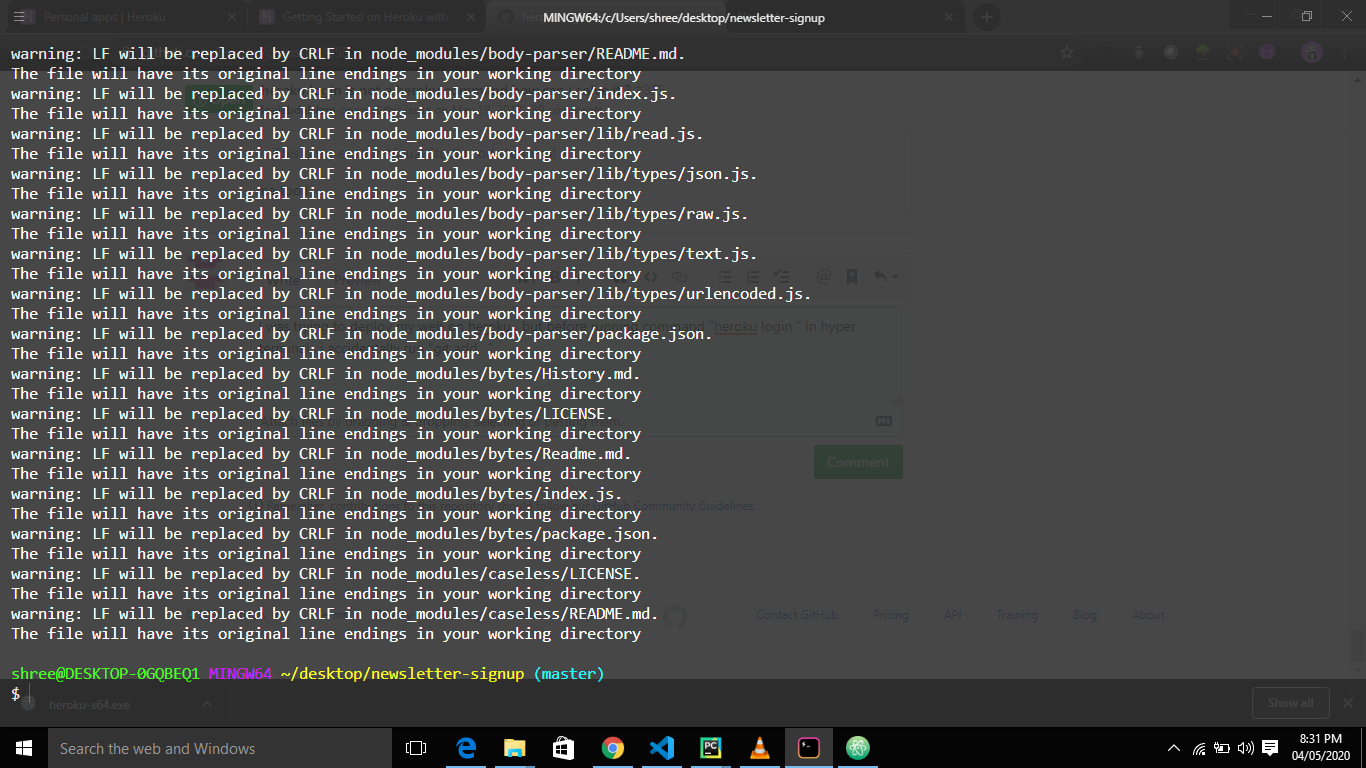
I was trying to deploy my web on heroku , but before running command "heroku login " in hyper terminal , i accidentally run "git add . ". showing me like this .
and now if do again the "heroku login ".
error : bash : heroku : command not found
 ketan0078
on 4 May 2020
ketan0078
on 4 May 2020
If anybody are unable to use heroku cli in vscode terminal (Windows10)...install
https://marketplace.visualstudio.com/items?itemName=pkosta2005.heroku-command
restart vscode by closing & reopening it.
 aadhar41
on 17 May 2020
aadhar41
on 17 May 2020
heroku login -i
 Ijemay19
on 18 Jun 2020
Ijemay19
on 18 Jun 2020
This worked for me. Thank you
Ijemay19
on 18 Jun 2020
Worked! Thank You .
 Roop7
on 2 Aug 2020
Roop7
on 2 Aug 2020
You're probably using an old version or the deprecated package 'heroku-cli'. The new one is just called 'heroku'
Uninstall that bynpm uninstall -g heroku-cli
Then install the new packagenpm i -g heroku
i have the same problem , but i am installing from heroku website
 comefrombeginning
on 17 Oct 2020
comefrombeginning
on 17 Oct 2020
It worked!! you are my saviour. THanks a loT!
 YeonghunKO
on 27 Dec 2020
YeonghunKO
on 27 Dec 2020
Related issues
 zeke
·
7Comments
zeke
·
7Comments
 noenthu
·
7Comments
noenthu
·
7Comments
 ValentinTrinque
·
3Comments
ValentinTrinque
·
3Comments
 dking74
·
7Comments
dking74
·
7Comments
 imujjwal96
·
6Comments
imujjwal96
·
6Comments
Most helpful comment
You're probably using an old version or the deprecated package 'heroku-cli'. The new one is just called 'heroku'
Uninstall that by
npm uninstall -g heroku-cliThen install the new package
npm i -g heroku