Cli-microsoft365: Failed test spfx project rename
Description
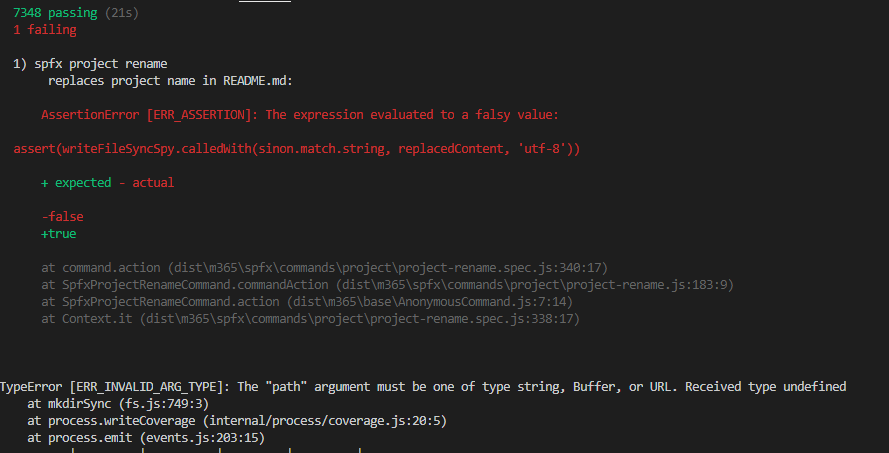
Test 'replaces project name in README.md' fails.
Steps to reproduce
- npm run test
Expected result
All tests passing
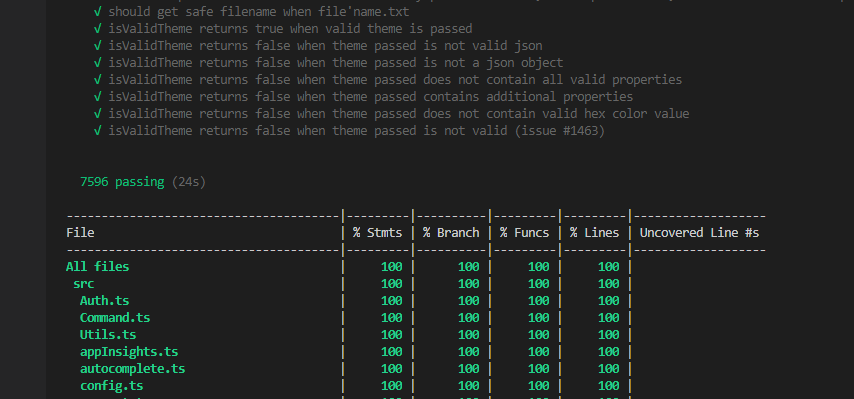
Actual result
1 test failing
Environment
O365 CLI v3.2.0
 Abderahman88
All 50 comments
I'm not seeing the failing test on Mac OS.
- Are you on Windows?
- Do you have the latest changes in your feature branch?
Try the below to update your local master and refresh your local version of the CLI.
git pull --rebase upstream master
rm -rf node_modules/
npm i
npm run clean && npm run build && npm link
npm t
 garrytrinder
on 25 Oct 2020
garrytrinder
on 25 Oct 2020
Yes, I am on Windows. I will try it. @garrytrinder
Abderahman88
on 25 Oct 2020
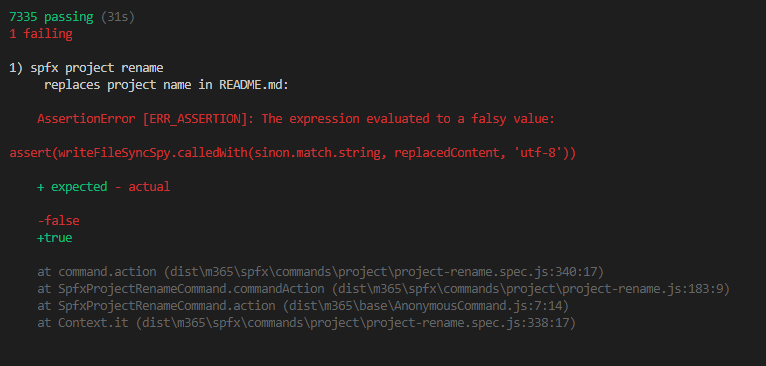
@garrytrinder Did all the required steps. Same issue.
Abderahman88
on 25 Oct 2020
@pnp/cli-for-microsoft-365-maintainers is anyone able to reproduce this failing test on Windows?
garrytrinder
on 26 Oct 2020
Hello @garrytrinder - Pardon me for pitching in. Even I am getting the same failed test in Windows. (Node Version : 12.14.0).
There is a good chance that I might not have realized that since I complete the test cases by restricting to the respective commands and not executing the complete one _(Laziness 🤦♂️)._ My Bad!!
Plus, since it do not impact the code coverage, I might not have noticed due to that too.. 🤔
 arjunumenon
on 28 Oct 2020
arjunumenon
on 28 Oct 2020
Just did a bit of drilling down out of sheer curiosity. My initial observation is that, it has to something with the utf-8 matching which is getting failed due to some characters in the ReadMe.md replaced content. Couldn't pin point the exact reason.
Adding to that, removal of the failing test case will not impact the code coverage. So I guess we can remove that if it is not needed. Not at all the best solution. 😑
arjunumenon
on 28 Oct 2020
Could it be that it's related to BOM by any chance? Has anything changed in the related readme.md file recently that would indicate why this test is breaking now?
 waldekmastykarz
on 28 Oct 2020
waldekmastykarz
on 28 Oct 2020
Hey @waldekmastykarz - Based on your question to understand whether this is something which has crept up recently, I had done some more drilling down into this to understand what is happening.
My suspicion is that, the error was there right from the beginning of the implementation. How did I conclude is that,
As per the closure notes for the issue #1349 which did this implementation, it was released part of V12.2
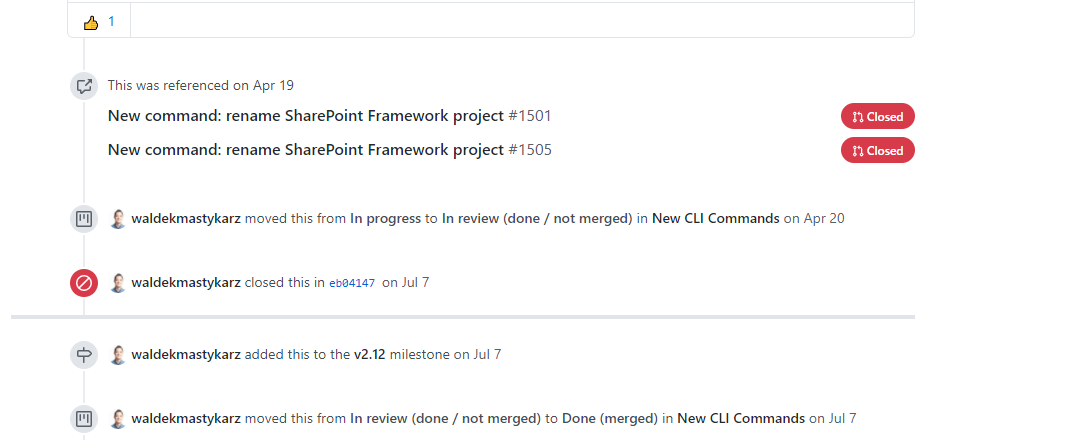
I had executed the test for that version in my local and it did have a similar failed test case.
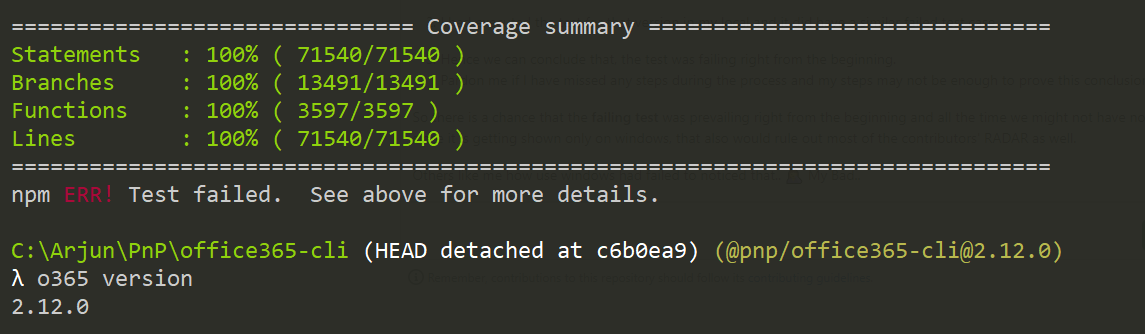
Hence we can conclude that, the test was failing right from the beginning.
Pardon me if I have missed any steps during the process and my steps may not be enough to prove this conclusion. I might be wrong completely too.
So there is a chance that the failing test was prevailing right from the beginning and all the time we might not have noticed it. Plus since it is getting shown only on windows, that also would rule out most of the contributors' RADAR as well.
Others like me how use windows had failed to noticed that.. 🤦 My Bad..
arjunumenon
on 2 Nov 2020
Thanks for the investigation @arjunumenon. While we have some contributors on Windows, it's very good possible that we missed it. Let's see if we can find a proper solution for it 💪
waldekmastykarz
on 2 Nov 2020
I can confirm this in windows @garrytrinder @waldekmastykarz but not in macOs
 rabwill
on 9 Nov 2020
rabwill
on 9 Nov 2020
@appieschot weren't you looking into this?
waldekmastykarz
on 20 Nov 2020
I found the problem of this issue.
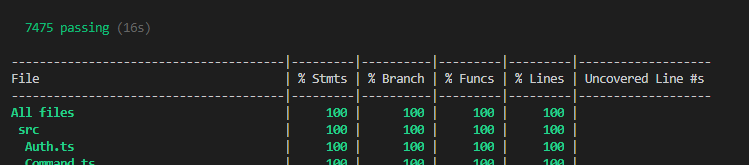
The spy returns in Windows the following string:

The replacedContent-string:

The test fails because the 2 strings are not the same.

Abderahman88
on 23 Nov 2020
Nice catch! Any thoughts on how to fix it? Could we change the default behaviour of this specific windows test?
 appieschot
on 23 Nov 2020
appieschot
on 23 Nov 2020
@appieschot I was thinking about replacing all occurrences of r\n to \n and then compare the 2 strings.
This will work for both Linux and Windows users.
BTW You may assign this one to me.
Abderahman88
on 23 Nov 2020
@Abderahman88 there is a problem with this solution. If we used it and our code changed to always output \n no matter the OS, then the test would pass, but we'd end up with erroneous behavior where we'd be replacing new lines with \n no matter the OS, which isn't desireable.
The gist of the test is to verify that the only thing that has changed is the project name.
On macOS, both the test project and test file where we have the string to be compared show LF as line endings. Is this the same on Windows or is one (both) of the files showing CRLF? If the files are still LF, and we keep seeing the issue, it would indicate that the fault is with fs.writeFileSync and we should update our assert to use the os.EOL which should correctly match line endings across OS'es.
waldekmastykarz
on 23 Nov 2020
After some further digging, I found some interesting things.
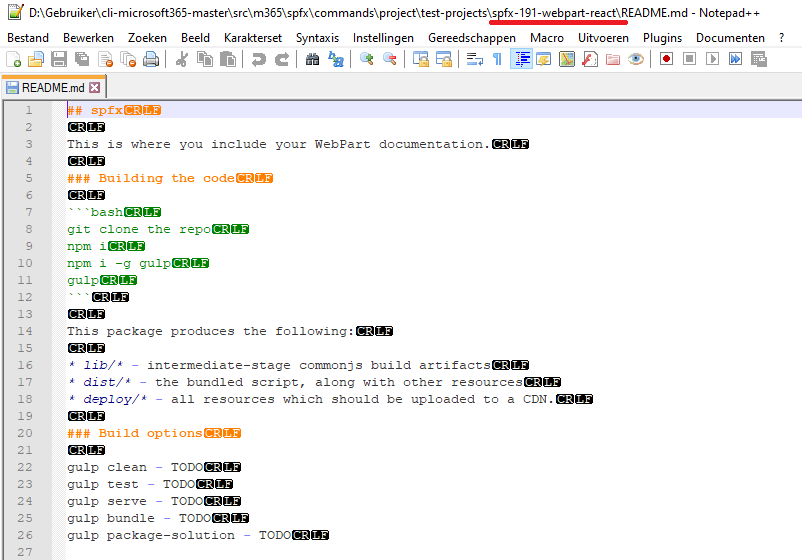
When cloning the repo on my Windows-machine, git was replacing all LF's to CRLF.
This was due to an incorrect settting of git config (core.autocrlf) on my machine.
By adding a .gitattributes file, the problem is solved.
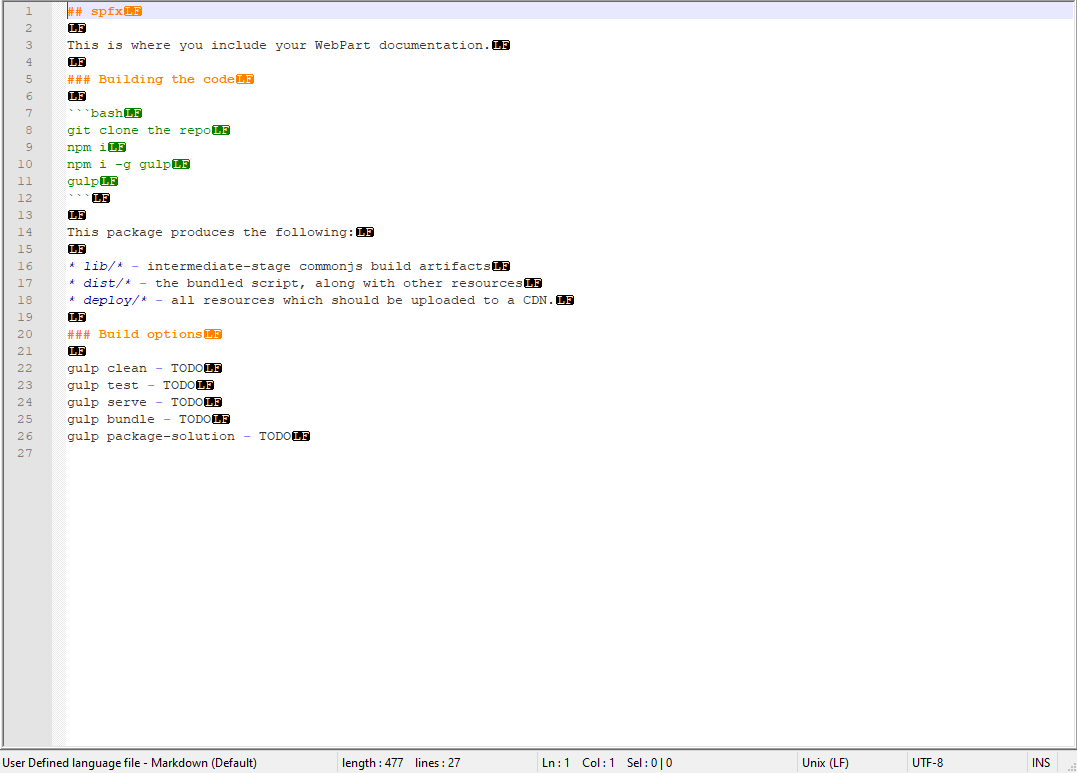
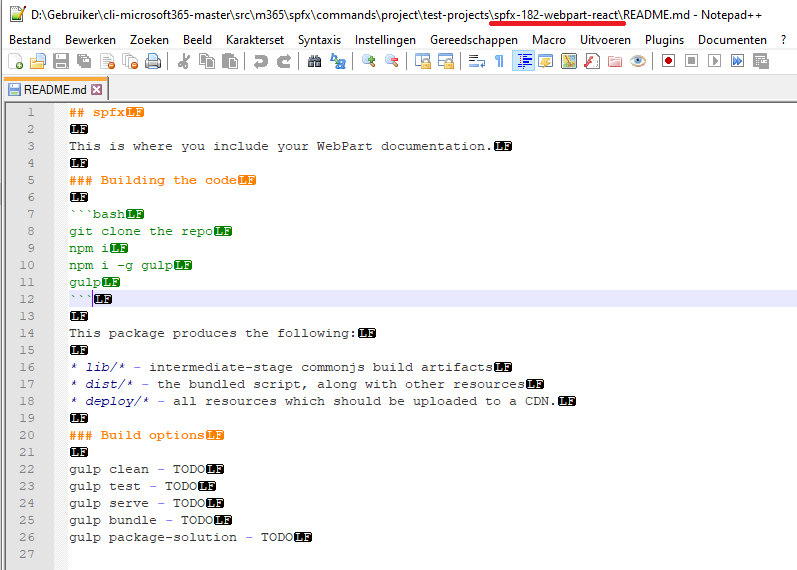
PS: There is an inconsistency in README-files of the different spfx-projects.
The test is performed on the README in project 'spfx-182-webpart-react'.
const projectPath: string = 'src/m365/spfx/commands/project/test-projects/spfx-182-webpart-react';
This file contains LF's (as anticipated), but other projects have CRLF's. I think that some projects are created on MacOS and others on Windows. Can someone confirm this? Maybe it's better to ensure that all README's for all projects are with LF.
Abderahman88
on 28 Nov 2020
Good find. I wonder though if this isn't something that we want to keep to ensure that CLI works correctly on both Windows and Linux/macOS, rather than assuming that all files that we'll be working on will have LF-line endings.
waldekmastykarz
on 29 Nov 2020
@waldekmastykarz If we just replace all newlines (\n for Linux and r\n for Windows) for replacedContent in the test to os.EOL?
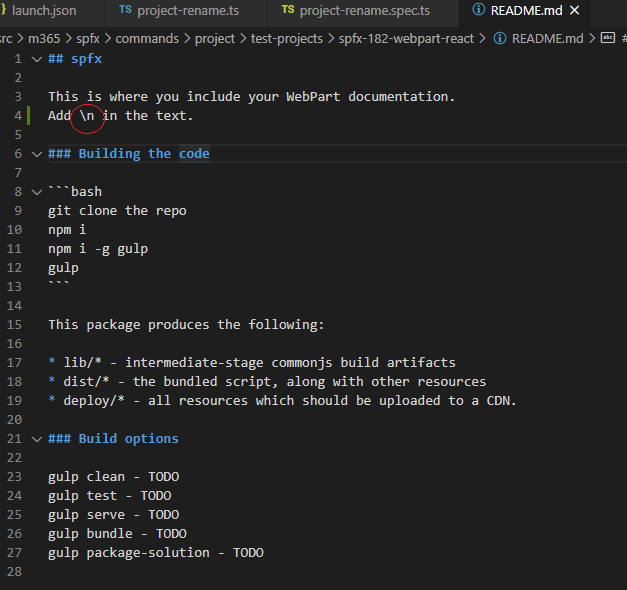
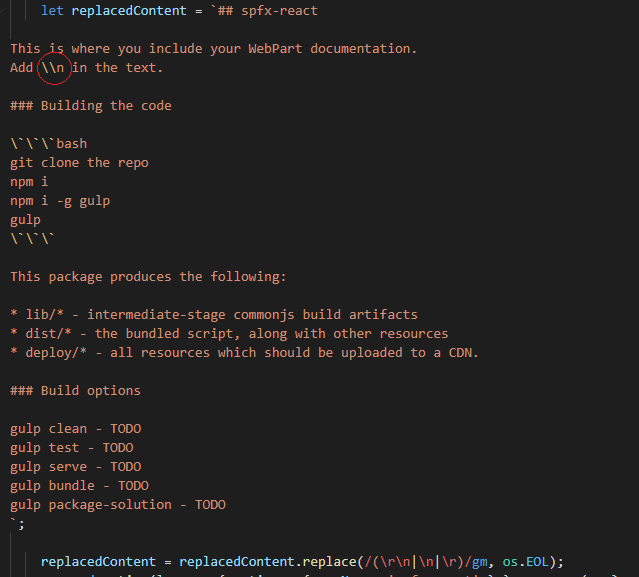
As test I tried putting a \n as text in the README and the test passes.
This approach will (I think 😄) work on both OS's without manipulating fs.writeFileSync. Or am I missing something? 😕
Abderahman88
on 29 Nov 2020
I'm not worried about tests passing on all platforms. Instead, I'm concerned about not catching something platform-specific in our code, because we assume that new lines are always \n.
waldekmastykarz
on 30 Nov 2020
The code at this moment works with both LF and CRLF line endings. (Tested with a README in CRLF)
The test projects are not platform bound. I just saw there's a difference between the SPFx-versions, but this is not a problem.
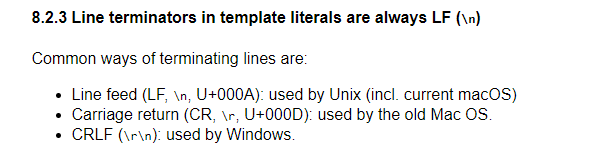
It's only the test for Windows that fails because the line endings for the template literal _replacedContent_ are always \n and the output of fs.writeFileSync is r\n
That's why I added this line in the test:
_replacedContent = replacedContent.replace(/(r\n|\n|r)/gm, os.EOL);_
Another option is not using a template literal for replacedContent
Abderahman88
on 30 Nov 2020
This is a good find! So knowing that line terminators in template literals, which we use in tests, are always LF, shall we replace them with os.EOL before running the assert? Should that fix our issue in a cross-platform safe way?
waldekmastykarz
on 1 Dec 2020
@waldekmastykarz I think this will work cross-platform. I will do some tests (with LF and CRLF files) and get back to you with the results.
Abderahman88
on 2 Dec 2020
Awesome! Appreciate your help @Abderahman88
waldekmastykarz
on 4 Dec 2020
@waldekmastykarz
There is an issue with the proposed solution. This will not work in all cases.
This line of code will not work:
replacedContent = replacedContent.replace(/(\r\n|\n|\r)/gm, os.EOL);
To get the desired result, we need something like this:
replacedContent = replacedContent.replace(/(\r\n|\n|\r)/gm, [Line terminator that is used in the README]);
Depending on which OS the testproject is created, the README-file could have LF/CRLF endings.
So matching it with os.EOL will be wrong.
Example:
- Original testproject generated with a Mac --> README = LF
- Me (on Windows) --> all line endings are replaced to os.EOL for replaceContent --> replaceContent = CRLF
- Test fails
With this logic only 2 cases will pass:
- Testproject is generated on Windows and test is run on Windows
- Testproject is generated on Mac and test is run on Mac
Any ideas?
Abderahman88
on 6 Dec 2020
I think the only reasonable thing to do is to change the README.md in question to use LF and accept the possible risk that we could mess up endings if we're not careful and our tests wouldn't pick it up.
waldekmastykarz
on 7 Dec 2020
Is the issue still there in the master branch? I can't repro it on Windows in PowerShell v7.0.1.
waldekmastykarz
on 22 Dec 2020
Hello @waldekmastykarz - I had tried in the Windows from my end. Unfortunately the issue still persists.
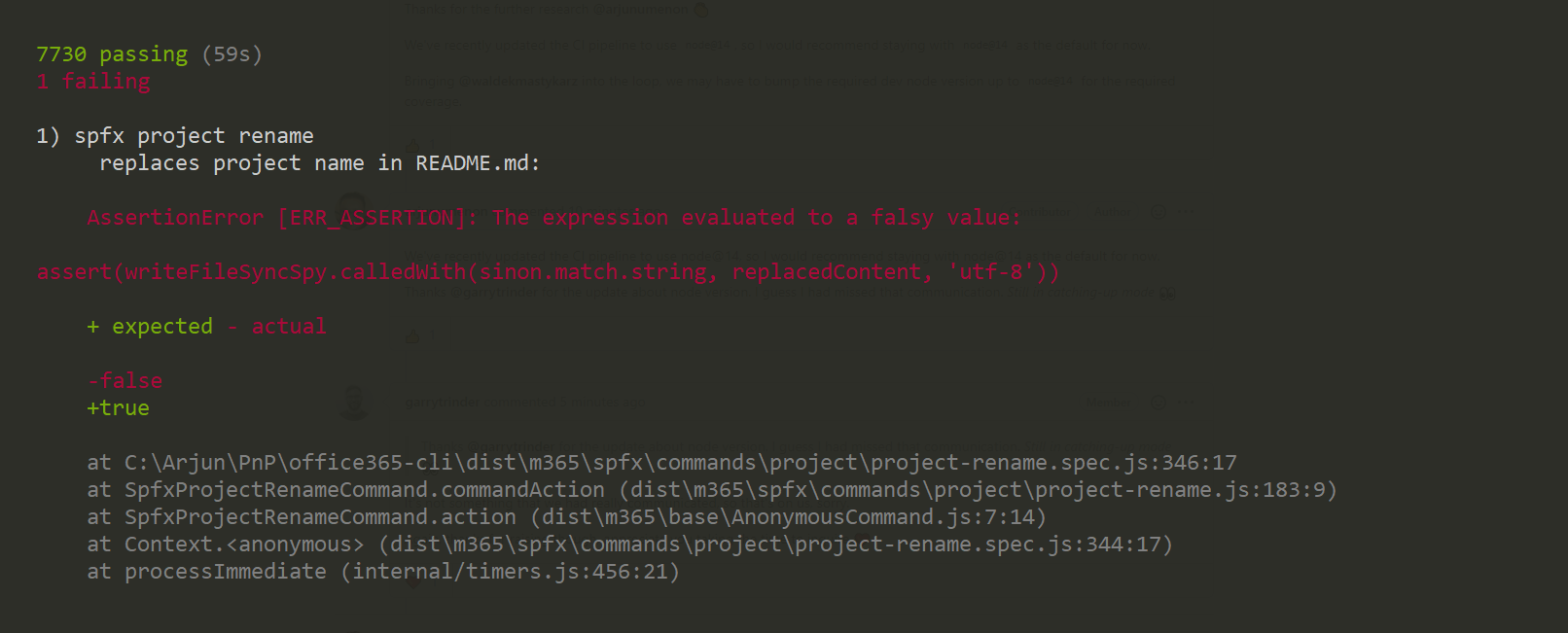
My environment is,
Node : 14.0.0
OS : Windows 10
PowerShell Version : 5.1.16.
Not sure whether it is failing due to a PowerShell version difference which you are using.
arjunumenon
on 23 Dec 2020
You could have 2 Windows-users and for one the test will pass and the other not.
I think it has to do with your git global settings (https://docs.github.com/en/free-pro-team@latest/github/using-git/configuring-git-to-handle-line-endings)
If a user does a git clone (without correct git settings) the original README in the repo with LF-endings is converted to CRLF-endings. Thus failing the test.
So I presume @waldekmastykarz, your local README-file has LF-endings and @arjunumenon has CRLF-endings. Can you both confirm if this is the case?
Abderahman88
on 23 Dec 2020
Thanks @Abderahman88 for the tip. It did work like a charm. Following is the recap of the steps which I followed.
- Changed the autocrlf settings to
trueby running this commandgit config --global core.autocrlf true - Did a clone of the forked M365CLI Repo
- Did npm build and test
- All tests were passing.
Just out of curiosity, I also had done another step
- Change autoclrf to false by executing the command
git config --global core.autocrlf false - Did a clone of the forked M365CLI repo
- Did npm build and test
- All tests were passing.
- Even after changing the default settings to false, it was working as expected.
- So problem might be the LF-endings for the files which were already there in my local folder which was causing the test to fail.
- So probably, it may work without any issue for a freshly cloned repo. Not sure, a wild thought.. 🤔
So I am assuming when you do a fresh clone of the repo, it is working as expected. And may be, clrf settings does not matter.
arjunumenon
on 24 Dec 2020
So the question remains @Abderahman88, how do we reproduce it?
waldekmastykarz
on 27 Dec 2020
@waldekmastykarz
Steps to reproduce on Windows:
1) git clone https://github.com/pnp/cli-microsoft365.git
2) npm i
3) npm run build
4) npm t
Result:
Test is failing
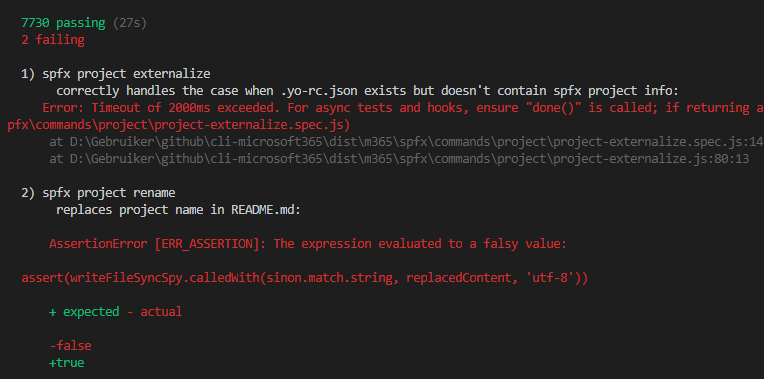
Reason:
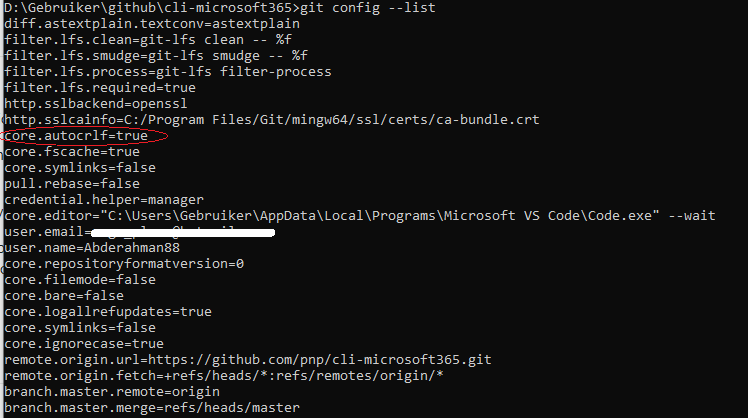
Installing 'Git for Windows' sets core.autocrlf=true as default config. This will turn LF line endings into CRLF when cloning the repo. (https://github.community/t/git-config-core-autocrlf-should-default-to-false/16140)
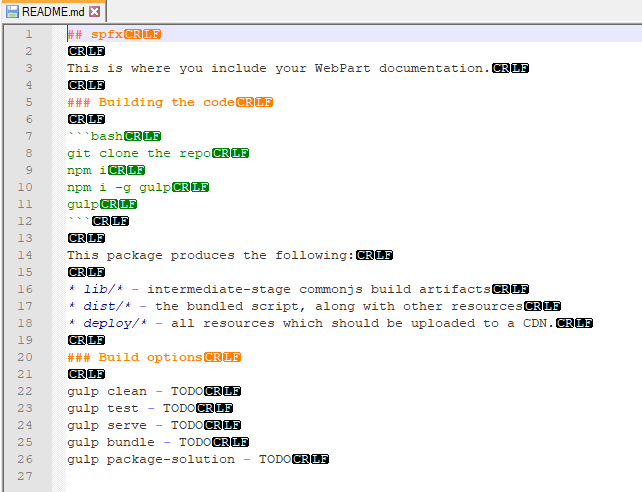
Cloned README-file has CRLF-endings (but the original file has LF-endings)
Solution:
We need to ensure that LF-endings are not converted during a git clone/checkout.
There are 2 possibilities to solve the problem
1) setting core.autocrlf to false (@arjunumenon answer / https://git-scm.com/book/en/v2/Customizing-Git-Git-Configuration)
-->This is not ideal, because it's a global config and not desirable for some users.
2) add gitattributes-file in the repo (https://www.edwardthomson.com/blog/git_for_windows_line_endings.html)
--> Better solution. The setting is only applied on the repo.
Abderahman88
on 27 Dec 2020
@arjunumenon If you set git config --global core.autocrlf true and then a git clone, I would expect failing tests. 🤷
Abderahman88
on 27 Dec 2020
@Abderahman88 as I mentioned previously, I followed these steps but were unable to reproduce the issue
waldekmastykarz
on 28 Dec 2020
@arjunumenon If you set
git config --global core.autocrlf trueand then agit clone, I would expect failing tests. 🤷
Hello @waldekmastykarz / @Abderahman88 - After @Abderahman88 's suggestion, I am able to recreate the issue from my end, Following is what I did.
- Executed the command
git config --global core.autocrlf true - Cloned my forked repo
https://github.com/arjunumenon/cli-microsoft365.git - Excuted
npm inpm run cleannpm run buildnpm test - The test fails
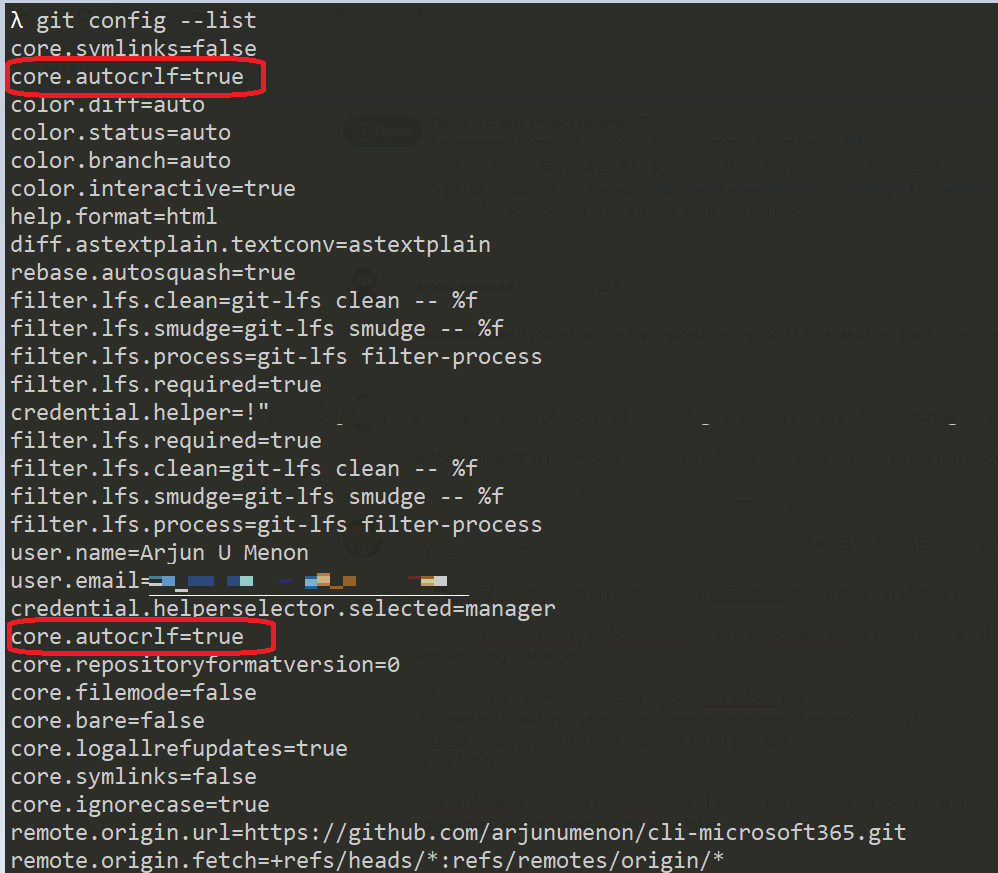
@Abderahman88 - Just out of curioisty, when I execute the command git config --list, there are 2 entries over there for core.autocrlf. Any idea which one would be taken into consideration?
arjunumenon
on 28 Dec 2020
Thanks for the extra check @arjunumenon. I'll see if I can repro this on my end as well.
waldekmastykarz
on 28 Dec 2020
Thanks for re-confirming the issue @arjunumenon.
There are different types of configs :
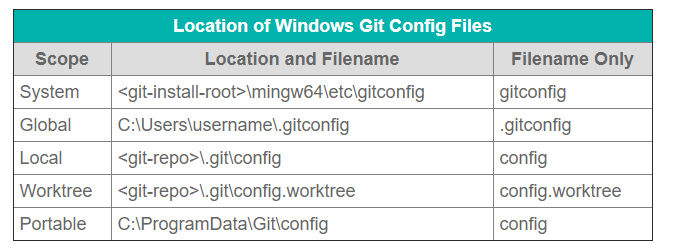
(https://www.theserverside.com/blog/Coffee-Talk-Java-News-Stories-and-Opinions/Where-system-global-and-local-Windows-Git-config-files-are-saved)
You can run git config --list --show-origin to see what type it is. So core.autocrlf=true is showing twice. One time as a system variable (set by the Git for Windows-installer) and one time as a global variable (set by the command git config --global core.autocrlf true). Technically setting the global config core.autocrlf=true was not necessary, because it was already set as a system variable 😄 (only setting it to false or different value, would have an effect)
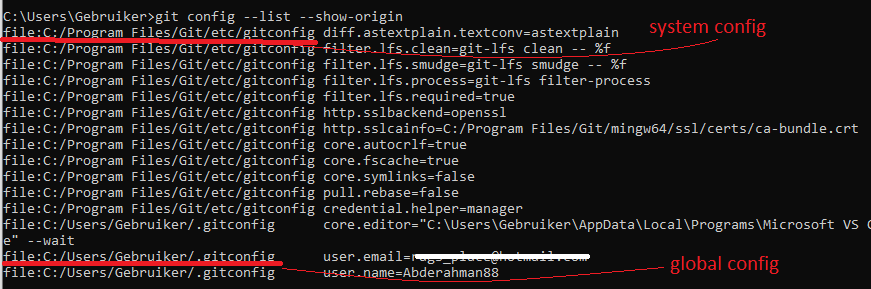
As for the order --> local overrides global and global overrides system.
PS: you can remove a config using unset f.e git config --global --unset core.excludesfile
Abderahman88
on 28 Dec 2020
Hi @waldekmastykarz.
Before you try to reproduce the issue, can you check the line endings of the README-file
Steps (with NotePad++) :
- Open the README-file used in the test (../test-projects/spfx-182-webpart-react)
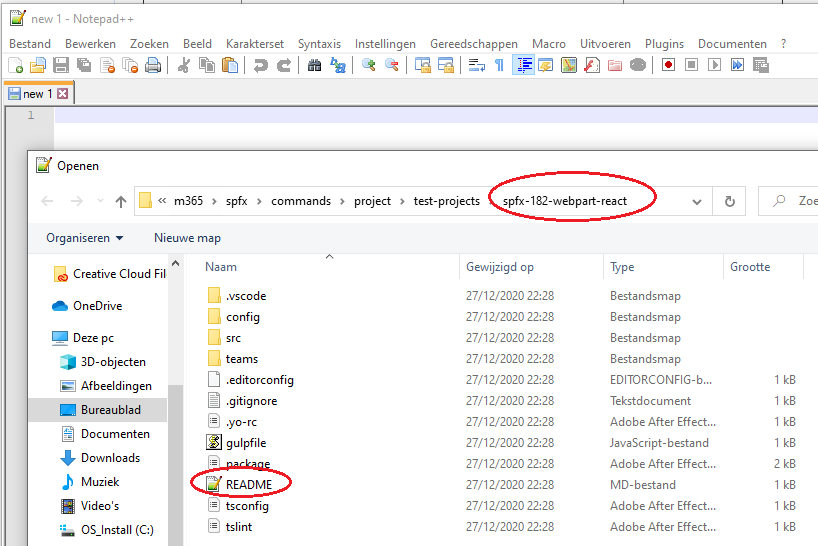
- Show line endings in the file. (View -> Show Symbol -> Show end of line)
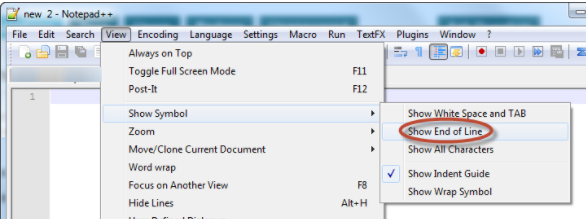
Does your file show CRLF or LF endings?
Abderahman88
on 28 Dec 2020
I've got LF on Windows. I'm using default git setup without changing anything
waldekmastykarz
on 28 Dec 2020
Ok. This explains why the tests are passing on your side.
If you run git config --list do you also have core.autocrlf=true ?
Btw are you using a Windows machine or a virtual machine?
Abderahman88
on 28 Dec 2020
Thanks for re-confirming the issue @arjunumenon.
There are different types of configs :
Thanks a lot @Abderahman88 for the detailed explanation. IT did explain in detail about various Git configs which I was not aware of myself. I really feel enlightened now.. Thanks again. I am so happy that I asked the question.. 🙌🙌.
I had changed the settings to core.autocrlf to false and realized that local takes precedence over the global. But I was not sure the duplicate entry. Now everything is clear after your detailed explanation.
Members like you make the PnP community super awesome. ✨
arjunumenon
on 29 Dec 2020
@Abderahman88 I'm using a brand new Windows VM. I don't have the setting configured
waldekmastykarz
on 29 Dec 2020
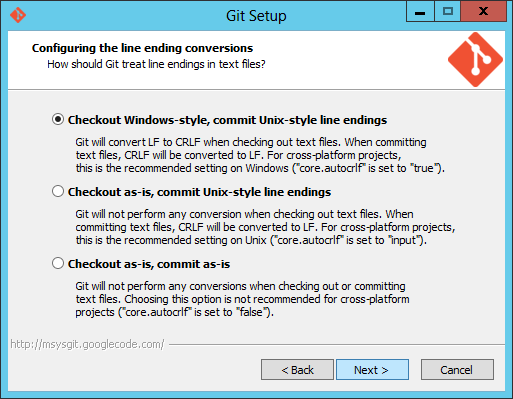
@waldekmastykarz Ok. This makes sense why you don't have any issues. Now the question becomes, why the setting is not present in your configuration?
How did you install git on the machine? With "Git for Windows"-installer?
During the setup, it will ask about core.autocrlf-setting. Default, it is set to true.
Abderahman88
on 29 Dec 2020
Sorry, but I don't recall the exact settings used to install git on that VM. What I wonder about though is, if there is a way to acomodate all the different settings for us in a reliable way?
waldekmastykarz
on 29 Dec 2020
We can't rely on the global git configuration. Adding a local git config to the repo (.gitattributes file) will override the global config and gives us the right behaviour. Don't see any other options at the moment 🤷♂️
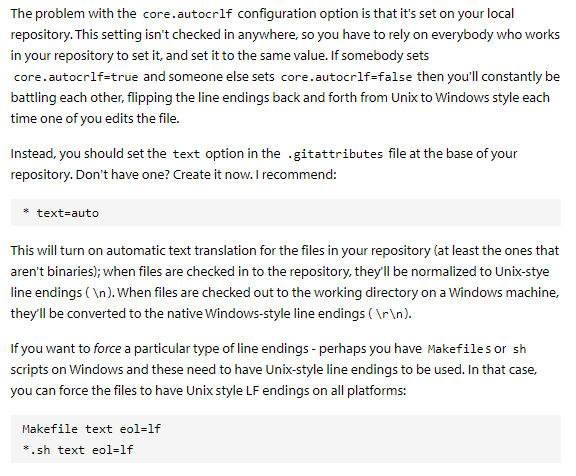
(Source: https://www.edwardthomson.com/blog/advent_day_1_gitattributes_for_text_files.html)
Abderahman88
on 29 Dec 2020
Correction, I might have been looking in the wrong place: I've got core.autocrlf=false on my VM where I can't repro the issue. Since CLI is x-platform, it might make sense indeed to follow the recommendation and use local core.autocrlf=true instead.
waldekmastykarz
on 1 Jan 2021
While there is something to say for using core.autocrlf=true to ensure cross-platform line ending consistency, I don't think it's going to help us with testing. Like I mentioned before: I find it dangerous to assume that line endings are always LF or CRLF where in reality they vary per platform. I'm afraid such an assumption could lead to us not spotting errors related to EOL only until we shipped it and ran the CLI on the particular OS.
I wonder if we shouldn't split the problem in two:
- CLI code files and tests should have consistent LF EOL
- SPFx test projects should have a mix of LF and CRLF so that we can ensure that we don't make platform-specific assumptions
Specifically for this particular case, perhaps it's the best to adjust the test so that it doesn't take line endings into account and then we create a separate issue to address the two problems I outlined above.
waldekmastykarz
on 11 Jan 2021
@waldekmastykarz I agree. Re-writing the test could be the safest option.
Abderahman88
on 11 Jan 2021
@Abderahman88 sounds like a plan then. Would you like to adjust your PR (or open a new one) and change the broken test so that it works across all supported platforms?
waldekmastykarz
on 12 Jan 2021
Yes, will work on it 👍
Abderahman88
on 12 Jan 2021
I changed the test. I removed the line endings in the test, so it's independent from OS.
Tested on Windows with both CRLF/LF endings and it passed both times.
Abderahman88
on 14 Jan 2021
Related issues
waldekmastykarz
·
3Comments
 thomyg
·
3Comments
thomyg
·
3Comments
 StfBauer
·
3Comments
waldekmastykarz
·
3Comments
arjunumenon
·
3Comments
StfBauer
·
3Comments
waldekmastykarz
·
3Comments
arjunumenon
·
3Comments
Most helpful comment
I found the problem of this issue.
The spy returns in Windows the following string:

The replacedContent-string:

The test fails because the 2 strings are not the same.