Cli-microsoft365: New command: `teams report pstncalls`
Usage
teams report pstncalls [options]
Description
Get details about PSTN calls made within a given time period
Options
| Option | Description |
| ----------------------- | ----------------------------------------- |
| --fromDateTime <fromDateTime> | The start of time range to query. UTC, inclusive. |
| --toDateTime [toDateTime] | The end time range to query. UTC, inclusive. Defaults to current DateTime if omitted |
| -o, --output [output] | Output type. json,text. Default text |
| --verbose | Runs command with verbose logging |
| --debug | Runs command with debug logging |
Additional Information
- callRecord: getPstnCalls: https://docs.microsoft.com/en-us/graph/api/callrecords-callrecord-getpstncalls?view=graph-rest-beta
- Example request:
GET https://graph.microsoft.com/beta/communications/callRecords/getPstnCalls(fromDateTime=2019-11-01,toDateTime=2019-12-01) - Requires
CallRecords.Read.AllApplication permission
 garrytrinder
All 22 comments
Hi All - I am happy to take this on as my first issue. Might need a little hand holding if I get stuck - but hopefully the first of many contributions.
 leeford
on 24 Aug 2020
leeford
on 24 Aug 2020
Awesome 😎 Thanks for your help @leeford 👍🏻
It’s all yours, feel free to reach out if you have any questions 👍🏻
garrytrinder
on 24 Aug 2020
Hey @leeford, are you still working on this? Can we help with anything? 🙂
 waldekmastykarz
on 16 Sep 2020
waldekmastykarz
on 16 Sep 2020
Hey @waldekmastykarz. Apologies I haven't gotten to it yet. Everything has been a bit full on. Hoping to get to it in the next few days - if that is OK?
leeford
on 17 Sep 2020
Totally! Thanks for the update 👍
waldekmastykarz
on 18 Sep 2020
Following the closure of https://github.com/microsoftgraph/microsoft-graph-docs/pull/9859 the permission required for this endpoint is now CallRecords.Read.All.
garrytrinder
on 19 Sep 2020
I'll add the permission to our AAD app after the PR is approved. Until then, in dev, you can use a custom AAD app with this permission @leeford
waldekmastykarz
on 21 Sep 2020
Thank you, planning to start on it shortly :-)
leeford
on 28 Sep 2020
Sorry, finally getting around to working on this now...
For the fromDateTime and toDateTime options in the table above, should I be using <option> or [option] as they are different. Does [option] signify optional?
leeford
on 13 Oct 2020
No problem, thank you for getting back to us. I've updated the spec so that we use the actual option's name rather than [option]. Square brackets [] indicate an optional value whereas angle brackets <> indicate a required value. Thank you for checking 👍
waldekmastykarz
on 14 Oct 2020
Hi All,
Using a cert managed to connect via custom AAD App and can pull the data from Graph.
A couple of questions:
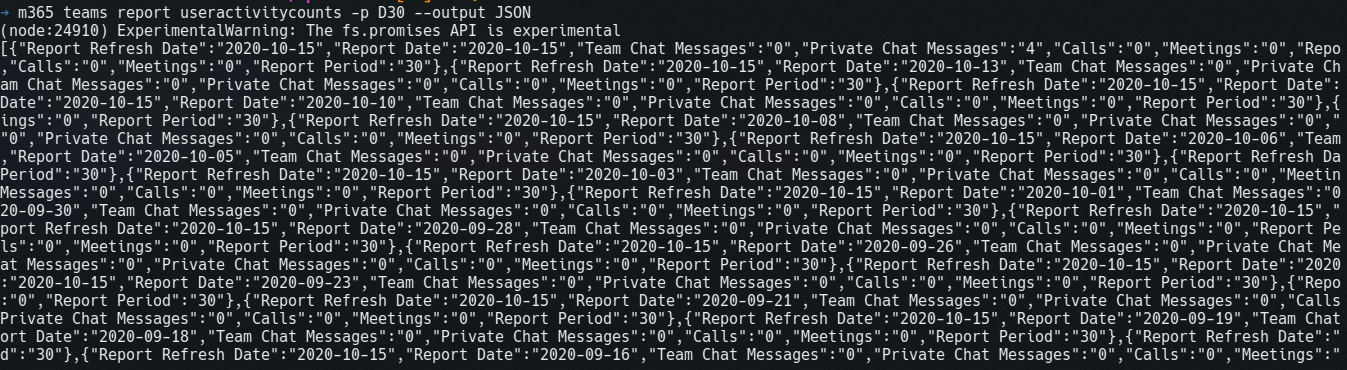
- When outputting as JSON, is this the expected format for JSON within the CLI?
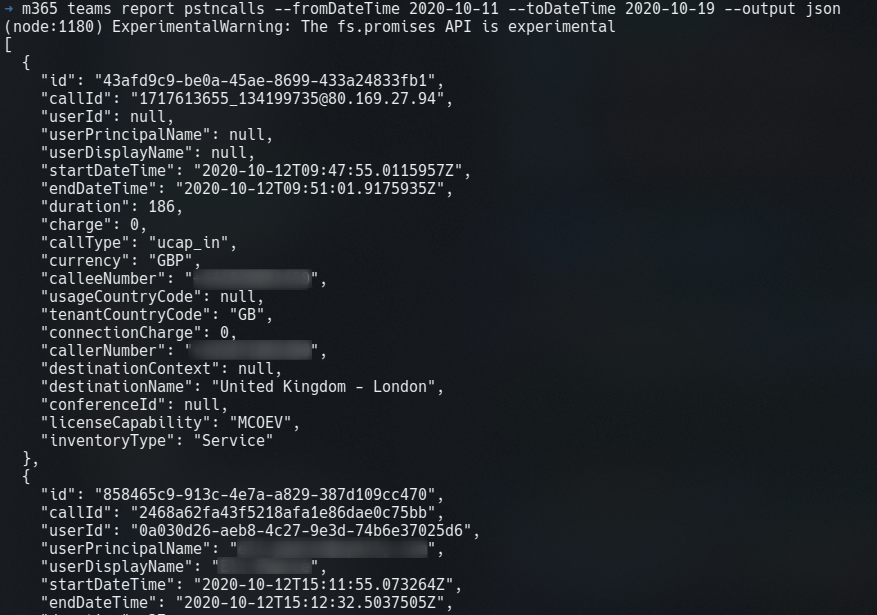
The reason I ask is, looking at another Teams report (m365 teams report useractivitycounts), the JSON was minified - do I need to do the same?
- For text output, there is quite a few columns for this report, which doesn't make it very readable. Do you have any advice on what you typically do in this scenario?
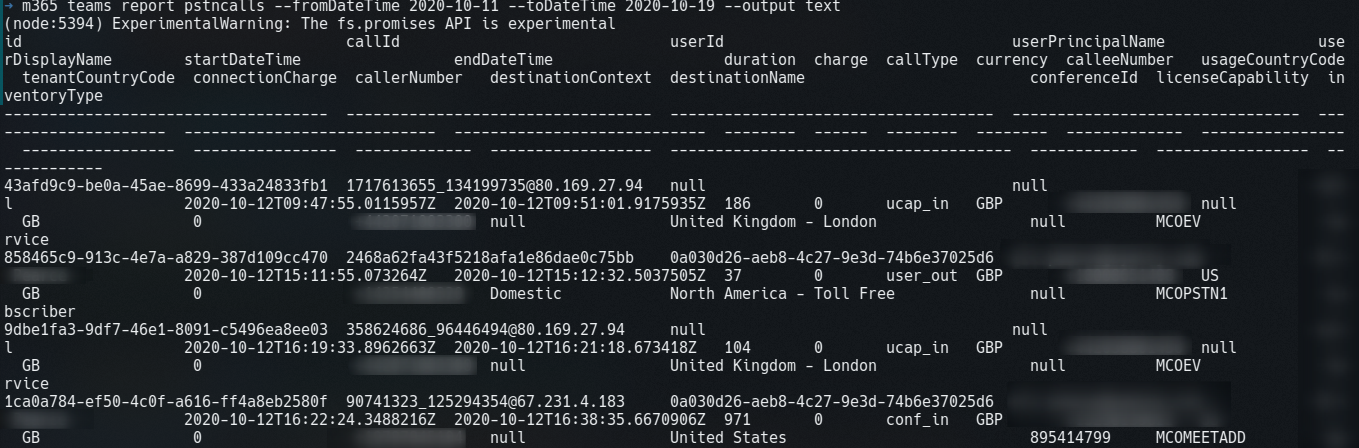
(I also noticed some text reports seemed to be in csv format, again, is that what is required?
Sorry for all the questions :-)
leeford
on 19 Oct 2020
These are all valid questions: @leeford. Let's take them one by one:
- Yes. In the recent version of the CLI, we have changed the default output mode to be prettified. You mentioned a command that doesn't do that, which is not by design. Let's log it as a potential issue so that we can investigate it.
- In the text output, how about we included:
id,calleeNumber,callerNumber,startDateTime(in this order)?
waldekmastykarz
on 20 Oct 2020
Thanks for clearing that up. Will get back to work!
leeford
on 23 Oct 2020
Hey @leeford, are you still working on this?
waldekmastykarz
on 21 Nov 2020
Apologies, I am - sorry, been a fair bit going on!
leeford
on 23 Nov 2020
No problem. Do you want to still work on it or shall we mark it as available and let others pick it up?
waldekmastykarz
on 23 Nov 2020
No problem. Do you want to still work on it or shall we mark it as available and let others pick it up?
I am happy to work on it, will be working on it today :-)
leeford
on 1 Dec 2020
Awesome! Appreciate your help!
waldekmastykarz
on 1 Dec 2020
Update:
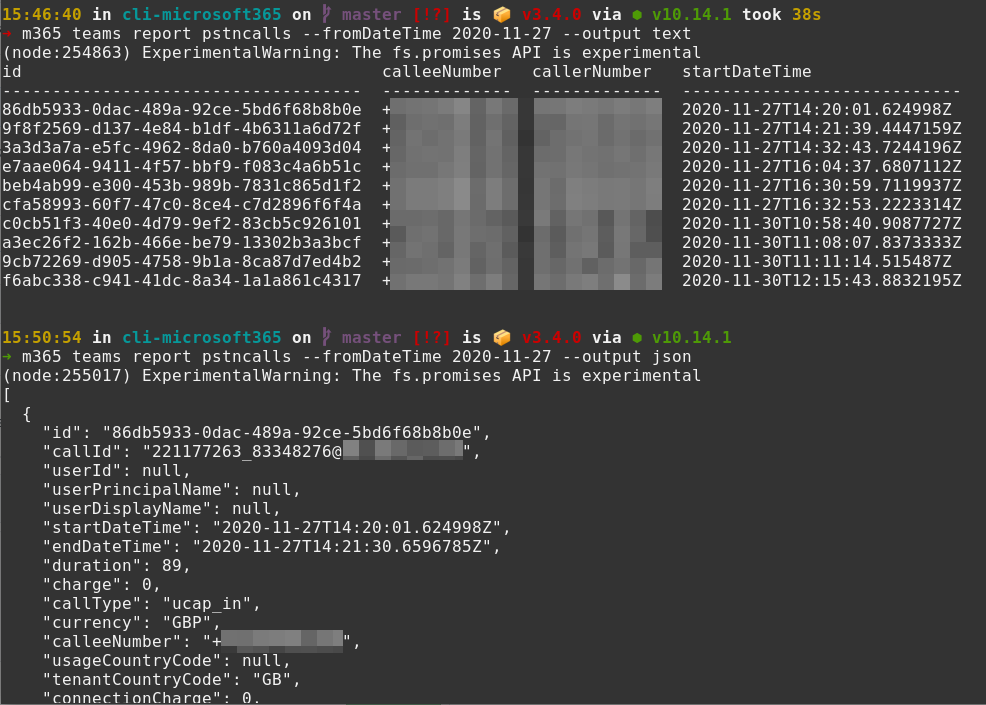
I have reduced the columns in text output and the JSON is prettified. I have also added ISO date validation from the existing Utils file.
One thing I have noticed is that you cannot report on a period greater than 90 days on a single Graph call... I am thinking we should be checking for this so will add it in as an extra validation step to avoid a 406 - agree @waldekmastykarz?
I think the only parts left after that are the tests and documentation
leeford
on 1 Dec 2020
Thank you for the update @leeford 👍🏻
One thing I have noticed is that you cannot report on a period greater than 90 days on a single Graph call...
Sounds sensible, we should certainly validate a maximum date range to ensure the command behaves consistently and in a user friendly way.
Nothing in the docs about a 90 day limit, just that calls are returned in pages of 1000, maybe something we should feed back to the Graph team.
garrytrinder
on 1 Dec 2020
Nothing in the docs about a 90 day limit, just that calls are returned in pages of 1000, maybe something we should feed back to the Graph team.
I've submitted a PR for the docs - https://github.com/microsoftgraph/microsoft-graph-docs/pull/10883
leeford
on 2 Dec 2020
Great move @leeford. Let's indeed include validation to help users do the right thing 👍
waldekmastykarz
on 2 Dec 2020
Related issues
waldekmastykarz
·
3Comments
waldekmastykarz
·
3Comments
 arjunumenon
·
3Comments
arjunumenon
·
3Comments
 plamber
·
3Comments
plamber
·
3Comments
 andrewconnell
·
3Comments
andrewconnell
·
3Comments
Most helpful comment
Hi All - I am happy to take this on as my first issue. Might need a little hand holding if I get stuck - but hopefully the first of many contributions.