Cli-microsoft365: Bug report: scp or role claim need to be present error when using app-only authN (using cert)
Description
I am using O365 CLI with Certificate authN. Even though I assigned proper 'application' permissions (Sites.FullControl), it still fails to execute commands like 'spo site list'.
Steps to reproduce
Once you have an app-only/cert based authN setup for your O365 CLI. Add Sites.FullControl.All application permission.

Then try to run below command:
spo site list
Expected result
See list of sites.
Actual result
Error: 403 AccessDenied Either scp or roles claim need to be present in the token.

Environment
OS: Windows 10 v1909
PS: ver 5.1.18362.752
O365 CLI: 2.12.0
 svarukala
All 8 comments
I looked at the AccessToken and it contains the Role claims.
If I add "user.read.all" application permission on Microsoft Graph resource, then the commands start working as expected. It feels like user.read.all is a pre-requisite for CLI to run commands (at least for app-only).
See below I added the user.read.all permissions:

Then the command works fine:
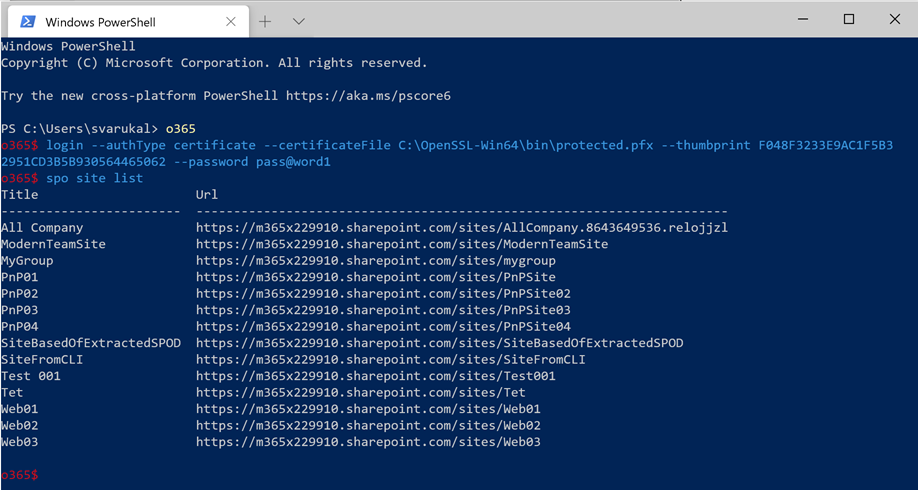
I verified by removing the user.read.all permission and then the issue was back.
svarukala
on 26 Jul 2020
Hi @svarukala
That is a strange behaviour of the underlying Microsoft Identity Platform that the CLI is using to get the token. By reading this post https://stackoverflow.com/questions/35839675/graph-api-either-scp-or-roles-claim-need-to-be-present-in-the-token and looking at your app permissions setup I assume that the Microsoft Graph User.Read single delegated user permissions in absence of other Graph application permission can actually be the cause.
Could you please leave only Sites.FullControl.All application permission and remove the rest of the granted permissions? By leaving just the Sites.FullControl.All we would find out if the single delegated User.Read Graph permission was the cause of the last error message. The Sites.FullControl.All should definitely be sufficient to create sites and list lists.
 VelinGeorgiev
on 26 Jul 2020
VelinGeorgiev
on 26 Jul 2020
@VelinGeorgiev, Sounds like a plausible explanation. I just tried after removing all perms except Sites.FullControl.All. But still I am seeing the same issue.
Here is the screenshot of perms now:


I than checked the debug output. It's using Microsoft Graph endpoint (https://graph.microsoft.com/v1.0/sites/root?$select=webUrl) and not SPO REST API. After adding MS Graph perms (Sites.FullControl.All) it started working fine.
But going back to my original observation where it worked with SPO perms (Sites.FullControl) but only when MS Graph was given User.Read.All perm. With this combination of perms, its not using MS Graph, instead its making REST calls based on admin site (example: https://contoso-admin.sharepoint.com/_api/contextinfo). Debug output shows its making multiple REST calls. Although its still not clear why it needs user.read.all permission on MS Graph.
svarukala
on 27 Jul 2020
Thank you very much for the detailed research @svarukala!
This is definitely something new to me and it seems that the CLI has dependency on the two and it must be documented.
Let me double check the code and then we will document it so the people will know that they will have to grant their app with graph user read together with sites full.
VelinGeorgiev
on 27 Jul 2020
Hi @svarukala ,
The minimum set of Azure AD app permissions to use the o365 spo site list with app is:
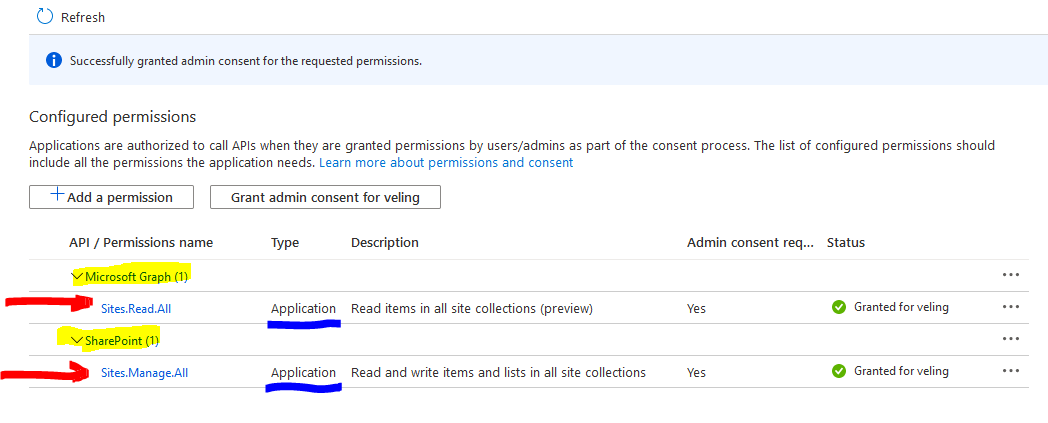
- You need the Microsoft Graph Sites.Read.All permissions because the
o365 logincommand is using https://graph.microsoft.com/v1.0/sites/root?$select=webUrl API to dynamically find the root SharePoint site URL and use it to dynamically get token for the SharePoint resource from Microsoft Identity. - You need SharePoint Sites.Manage.All to list the sites since the CLI is using the SharePoint APIs to do that from the
spo site listcommand and the minimum permissions to list sites seems Sites.Manage.All.
Here is my result:

As a follow up, I will try to document this in the official documents in some way. It could be added as sample to the samples gallery. I am yet to decide with the rest of the team how to document it.
Please let me know if that worked for you.
VelinGeorgiev
on 31 Jul 2020
@VelinGeorgiev - I confirm that the minimum permissions that you listed worked. Thanks so much for your efforts.
Updating the documentation will be helpful to others. Look forward to seeing those updates. Thanks again!
svarukala
on 31 Jul 2020
Splendid work researching this issue @VelinGeorgiev & @svarukala 👏
I'd say that as this is issue refers to permissions required, we shouldn't be considering this as a bug in the CLI, but I absolutely agree that we should add a remark into our docs to explain the need to also apply the Microsoft Graph Sites.Read.All permission when using a custom Azure AD app registration as the identity for the CLI.
May I suggest that we convert this to a discussion, marking @VelinGeorgiev reply, https://github.com/pnp/office365-cli/issues/1738#issuecomment-667054146 as the answer and create a new issue to carry out the work required to update the docs?
 garrytrinder
on 2 Aug 2020
garrytrinder
on 2 Aug 2020
Hey guys, lets close this.
I created a document that demonstrates this case. If there is a need please open new issue.
https://pnp.github.io/cli-microsoft365/user-guide/cli-certificate-caveats/
Srinivas (@svarukala) and all, thank you very much for your help!
VelinGeorgiev
on 3 Sep 2020
Related issues
garrytrinder
·
3Comments
 plamber
·
3Comments
plamber
·
3Comments
 OodapowUiPath
·
3Comments
OodapowUiPath
·
3Comments
 phillipharding
·
3Comments
phillipharding
·
3Comments
 thomyg
·
3Comments
thomyg
·
3Comments
Most helpful comment
Hey guys, lets close this.
I created a document that demonstrates this case. If there is a need please open new issue.
https://pnp.github.io/cli-microsoft365/user-guide/cli-certificate-caveats/
Srinivas (@svarukala) and all, thank you very much for your help!