Cli-microsoft365: New command: spo userprofile get
Usage
spo userprofile get [options]
Description
Get SharePoint user profile for the specified user
Options
| Option | Description |
| ----------------------- | ----------------------------------------- |
| -u, --userName<userName> | Account name of the user |
| -o, --output [output] | Output type. json,text. Default text |
| --verbose | Runs command with verbose logging |
| --debug | Runs command with debug logging |
Command example
spo userprofile get --name '[email protected]'
Example for calling the SharePoint UserProfiles APIs.
This is REST action that can be implemented in the command. It uses fetch that will have to change within a CLI command with the request library.
fetch(`https://mytenant.sharepoint.com/sites/finder-en/_api/contextinfo`, {
    headers: {
        "Accept": "application/json;odata=nometadata",
        "Content-type": "application/json;odata=verbose"
    },
    method: "POST"
}).then((response) => {
    if (!response.ok) {
         console.log(response);
    }
    return response.json();
}).then((response) => {
    console.log(response);

    fetch(`https://mytenant.sharepoint.com/sites/finder-en/_api/SP.UserProfiles.PeopleManager/GetPropertiesFor(accountName=@v)?@v='${encodeURIComponent('i:0#.f|membership|[email protected]')}'`, {
        headers: {
            "Accept": "application/json;odata=nometadata",
            "Content-type": "application/json;odata=verbose",
            "X-RequestDigest": response.FormDigestValue
        },
        method: "GET"
    }).then((response) => {
        if (!response.ok) {
            reject(response);
        }
        return response.json();
    }).then((response) => {
        console.log(response);
    })
})
Additional Information
Get-PnPUserProfileProperty - https://docs.microsoft.com/en-us/powershell/module/sharepoint-pnp/get-pnpuserprofileproperty?view=sharepoint-ps
 VelinGeorgiev
All 15 comments
I'd suggest we go with [email protected]. Like you mentioned, it's user-friendly. No one will ever know how to put in the upn.
Also, I'd suggest we change the command's description to Get SharePoint user profile for the specified user. With the current description Gets user profile properties for a SharePoint user my first impression was that the command would retrieve a list of specific properties.
Finally, wouldn't -u, --userName be a better choice for the user name option? I think -u would be more intuitive also for other user profile commands where we set properties. In these commands -n is ambiguous between user name and property name. With -u we could have a consistent short. What do you think?
 waldekmastykarz
on 25 Jun 2020
waldekmastykarz
on 25 Jun 2020
Changes made. Thanks for the feedback!
VelinGeorgiev
on 26 Jun 2020
@VelinGeorgiev
I am done with #1674 and raised pull request for the same.
I can take this up too... can you please assign to me? I would like to give my contribution to it.
 dips365
on 1 Jul 2020
dips365
on 1 Jul 2020
All yours @dips365. Appreciate your help! 👏
waldekmastykarz
on 1 Jul 2020
Thanks @waldekmastykarz
dips365
on 2 Jul 2020
@waldekmastykarz Should i add new folder with name "userprofile" under spo?
dips365
on 2 Jul 2020
Yes, please do
waldekmastykarz
on 2 Jul 2020
Thank you @waldekmastykarz
dips365
on 2 Jul 2020
Thank you for checking with us 👍
waldekmastykarz
on 2 Jul 2020
@waldekmastykarz @VelinGeorgiev
I started work with the command.
I would like to get guidance from you regarding how to display output?
Currently i got the output as below.
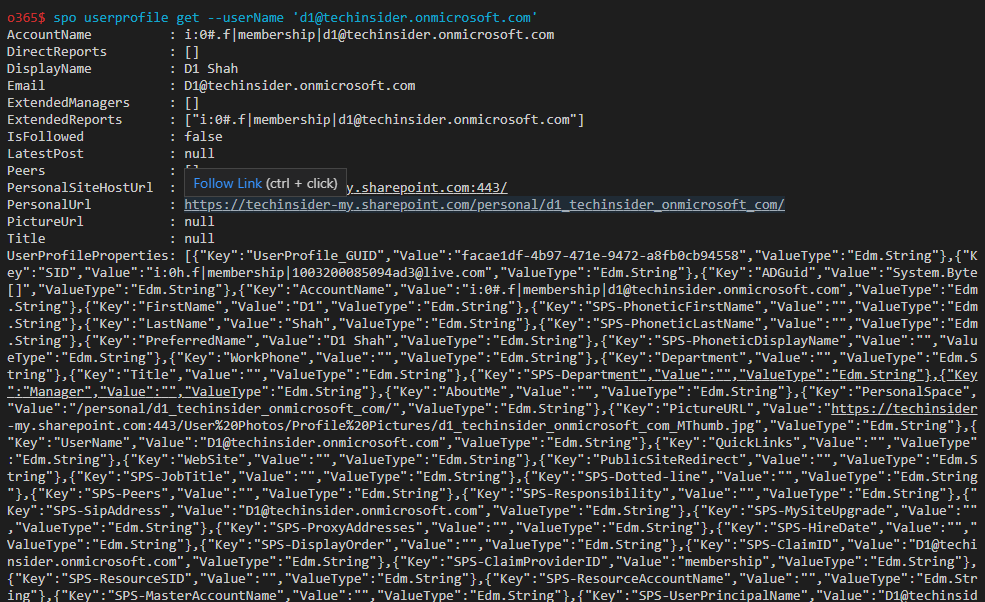
Does it work or needs any change?
Thought?
dips365
on 6 Jul 2020
Good catch Dipen,
It might be hard to read when output is text, but which property to leave in the output if it to be filtered 😄 . @waldekmastykarz what do you think?
VelinGeorgiev
on 6 Jul 2020
Perhaps in the text mode, we could print userprofileproperties as: prop1: value1, prop2: value 2 so that it's more readable than the default JSON string?
waldekmastykarz
on 7 Jul 2020
Hey @waldekmastykarz
Does any method that includes in "Office365-CLI" project to handle the complex array structure?
As i found that UserProfileProperties Array has 106 entries with the 3 properties Key, Value and ValueType.
Any help how to print in readable format in text mode?
dips365
on 10 Jul 2020
I don't think we have anywhere else such complex data structure but I could be wrong. If what I proposed is still not workable, then I don't think there is any other solution than skip rendering properties in the text mode and show them only in JSON mode.
waldekmastykarz
on 11 Jul 2020
Thank you @waldekmastykarz
dips365
on 11 Jul 2020
Related issues
 arjunumenon
·
3Comments
waldekmastykarz
·
3Comments
arjunumenon
·
3Comments
waldekmastykarz
·
3Comments
 thomyg
·
3Comments
waldekmastykarz
·
3Comments
thomyg
·
3Comments
waldekmastykarz
·
3Comments
 vineet2907
·
3Comments
vineet2907
·
3Comments