Cli-microsoft365: spfx project upgrade seems to break gulp bundle --ship
Description
Firstly, not sure if this a bug or indeed can be fixed easily with any file modifications.
Gone through the steps as listed in upgrade report and referenced in Issue#1574 . See also my comments on the incorrect spfx version:
Enhancement: Extend SPFx project version detection with checking if .yo-rc.json and package.json are in sync issue #1488 .
Steps to reproduce
Went through the steps as listed in the upgrade report.
npm install
Expected result
The spfx project should be gulp bundle happy!
Actual result
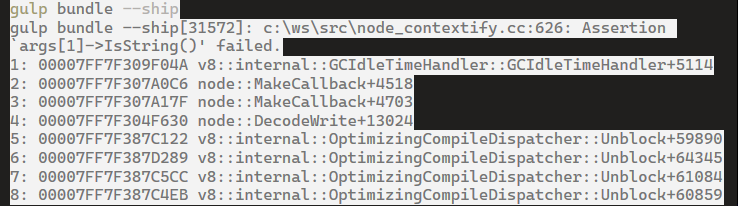
Note: there might be some more steps as hinted at in the recommendations but this is a bit unclear IMHO 😐.
Environment
npm install -g @pnp/office365-cli@next
2.10.0-beta.4206056
 westerdaled
All 15 comments
Thanks for bringing this to our attention @westerdaled!
- Which version of Node.js do you use?
- Have you run
npm dedupeafter upgrading all packages? If not, could you please see if it helps? - In odd cases, I noticed that the previously existing lockfile leads to issues similar like yours. If
npm dedupedoesn't help, could you try deleting the lockfile and runningnpm installagain to see if that helps?
Sorry for the trouble.
 waldekmastykarz
on 15 May 2020
waldekmastykarz
on 15 May 2020
Thanks for replying. The irony, is I wanted to quickly upgrade this project; so I could help out on those "good first issues", but I kept running into issues 😏. _Note to self: run away from elderly SPFx 1.2 project upgrades!_
Anyway, Node version
* 10.15.3 (Currently using 64-bit executable)
Late last night, I created a local standalone repo of the upgraded project . With some assistance, from @hugoabernier the project upgrade is now fixed.
I can also test out your suggestions on a copy of the standalone repo to see how this compares with the work undertaken last night.
westerdaled
on 15 May 2020
Thanks for bringing this to our attention @westerdaled!
- Which version of Node.js do you use?
- Have you run
npm dedupeafter upgrading all packages? If not, could you please see if it helps?- In odd cases, I noticed that the previously existing lockfile leads to issues similar like yours. If
npm dedupedoesn't help, could you try deleting the lockfile and runningnpm installagain to see if that helps?Sorry for the trouble.
λ npm dedupe
up to date in 1.893s
found 0 vulnerabilities
2) after deletingpakage-lock.json and then running npm install
λ gulp bundle --ship
Build target: SHIP
[13:39:15] Using gulpfile D:\Dev\Pnp\Backup\PnPwork\react-application-regions-footer - attempt2 backup - Waldek\gulpfile.js
[13:39:15] Starting gulp
[13:39:15] Starting 'bundle'...
[13:39:15] Starting subtask 'configure-sp-build-rig'...
[13:39:15] Finished subtask 'configure-sp-build-rig' after 6.66 ms
[13:39:15] Starting subtask 'pre-copy'...
[13:39:16] Finished subtask 'pre-copy' after 42 ms
[13:39:16] Starting subtask 'copy-static-assets'...
[13:39:16] Starting subtask 'sass'...
[13:39:16] Finished subtask 'sass' after 131 ms
[13:39:16] Starting subtask 'tslint'...
[13:39:18] [tslint] tslint version: 5.12.1
[13:39:18] Starting subtask 'tsc'...
[13:39:18] [tsc] typescript version: 3.3.4000
[13:39:18] Finished subtask 'copy-static-assets' after 2.36 s
[13:39:18] Error - [tslint] error TS5023: Unknown compiler option 'include'.
error TS5023: Unknown compiler option 'exclude'.
[13:39:18] Finished subtask 'tslint' after 2.84 s
[13:39:22] Error - [tsc] tsconfig.json(6,5): error TS5023: Unknown compiler option 'include'.
[13:39:22] Error - [tsc] tsconfig.json(9,5): error TS5023: Unknown compiler option 'exclude'.
[13:39:22] Error - 'tsc' sub task errored after 4.36 s
 exited with code 2
[13:39:22] 'bundle' errored after 6.73 s
[13:39:22]
[13:39:23] ==================[ Finished ]==================
Error - [tslint] error TS5023: Unknown compiler option 'include'.
error TS5023: Unknown compiler option 'exclude'.
Error - [tsc] tsconfig.json(6,5): error TS5023: Unknown compiler option 'include'.
Error - [tsc] tsconfig.json(9,5): error TS5023: Unknown compiler option 'exclude'.
Error - 'tsc' sub task errored after 4.36 s
 exited with code 2
[13:39:23] Project spfx-yammer-footer version:0.0.1
[13:39:23] Build tools version:3.12.1
[13:39:23] Node version:v10.15.3
[13:39:23] Total duration:27 s
[13:39:23] Task errors:4
The build failed because a task wrote output to stderr.
Exiting with exit code: 1
Thanks for the info. Could you share the contents of your tsconfig.json file?
waldekmastykarz
on 19 May 2020
Hi yes,
tsconfig.zip
Note, this is from the repo that has all the changes applied as per the upgrade report.
I do have another version of the repo that @hugoabernier and I worked on, which has addtional changes retro fitted from a newly scaffolded #SPFx extension project.
westerdaled
on 19 May 2020
OK, so the problem is with the include and exclude options. I've tripped a few times about it myself. Currently, they're nested in the compilerOptions property:
{
  "compilerOptions": {
    "inlineSources": false,
    "strictNullChecks": false,
    "noUnusedLocals": false,
    "include": [
      "src/**/*.ts"
    ],
    "exclude": [
      "node_modules",
      "lib"
    ],
    "target": "es5"
}
Instead, they should be on the same level:
{
  "include": [
    "src/**/*.ts"
  ],
  "exclude": [
    "node_modules",
    "lib"
  ],
  "compilerOptions": {
    "inlineSources": false,
    "strictNullChecks": false,
    "noUnusedLocals": false
}
Ah I see as in they should be outside compilerOptions .Is this a recent bug as in affects 1.10.0 upgrades and not the earlier upgrades?
westerdaled
on 19 May 2020
include/exclude was introduced to tsconfig.json in SPFx v1.6.0
waldekmastykarz
on 19 May 2020
@westerdaled if you're okay with it, I'll close this issue as there are no further actions on our end, ok?
waldekmastykarz
on 1 Jun 2020
@waldekmastykarz if the issue has been fixed, and tested on other samples then yes pls close. I am happy to try the project upgrade again, if needed.
westerdaled
on 1 Jun 2020
@westerdaled based on our exchange earlier I understood that there is no issue in the CLI itself and the issue was caused by the include / exclude properties being in the wrong place in your tsconfig.json file. Did I misunderstand it?
waldekmastykarz
on 2 Jun 2020
oK
When I generated the report ( prior to making any changes) the
tsconfig
{
  "compilerOptions": {
    "target": "es5",
    "forceConsistentCasingInFileNames": true,
    "module": "commonjs",
    "jsx": "react",
    "declaration": true,
    "sourceMap": true,
    "experimentalDecorators": true,
    "types": [
      "es6-promise",
      "es6-collections",
      "webpack-env"
    ]
  }
}
Looks like this bunch instruction confused me , and hence user error 🙄( doh!) . Maybe if the generated upgrade report could group the compilerOptions together, then the includes and exlcudes. Also Is there any schema intellisense that could be referenced to stop newbies like me making this sort of mistake?
{
  "compilerOptions": {
    "outDir": "lib"
  }
}
Update tsconfig.json include property:
{
  "include": [
    "src/**/*.ts"
  ]
}
Update tsconfig.json exclude property:
{
  "exclude": [
    "node_modules",
    "lib"
  ]
}
Update module type in tsconfig.json:
```json
{
"compilerOptions": {
"module": "esnext"
}
}
westerdaled
on 2 Jun 2020
In the latest version we have released a new upgrade report format based on VS Code CodeTour (https://developer.microsoft.com/en-us/sharepoint/blogs/office-365-cli-2-10/). That reports points exactly where in code the particular change belongs. We have currently an issue with properly highlighting lines in JSON files but @hugoabernier is working on it (#1602) and hopefully we'll see some improvements in this area shortly. I wonder if this report would be more helpful for you.
waldekmastykarz
on 3 Jun 2020
Ah Yes, @hugoabernier did give me a quick demo of that. Yes, being guided whilst making the changes will be great.
westerdaled
on 3 Jun 2020
It would be great if you could give it a try and tell us what you think. Meanwhile, since there are no specific next steps, I'll close this issue. Thanks again for your input! 👏
waldekmastykarz
on 4 Jun 2020
Related issues
 joshua-probst
·
3Comments
joshua-probst
·
3Comments
 VelinGeorgiev
·
3Comments
VelinGeorgiev
·
3Comments
 plamber
·
3Comments
plamber
·
3Comments
 garrytrinder
·
3Comments
garrytrinder
·
3Comments
garrytrinder
·
3Comments
garrytrinder
·
3Comments
Most helpful comment
Ah Yes, @hugoabernier did give me a quick demo of that. Yes, being guided whilst making the changes will be great.