Cli-microsoft365: New command: verify environment configuration for using the given version of SharePoint Framework
Usage
spfx doctor [options]
Description
Verifies environment configuration for using the specific version of the SharePoint Framework
Options
_Doesn't introduce additional options_
Additional Information
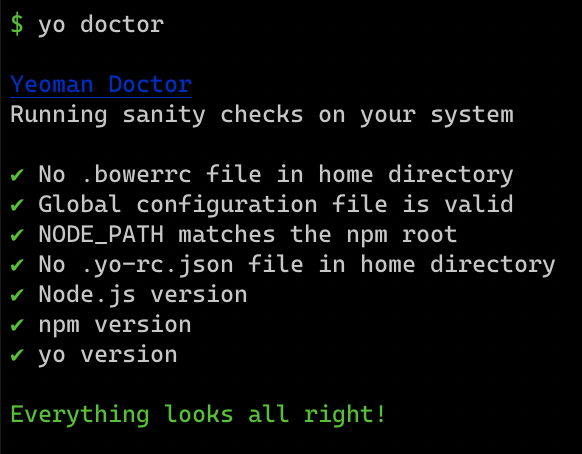
The command is an equivalent of the yo doctor command provided with Yeoman. Its purpose is to help developers to verify that their machine is correctly configured for using the particular version of the SharePoint Framework.
The command starts with detecting the version of the SharePoint Framework installed either locally, in the current folder, based on package.json, or globally if no local version has been found. Then, it checks if the current version of node, npm, Yeoman and Gulp match the detected SPFx version.
The output is similar to yo doctor but then with checks relevant to SPFx:
 waldekmastykarz
All 13 comments
Cool!!! I will hijack this in the possible pnp/spfx generator cli 😜
 StfBauer
on 13 Feb 2020
StfBauer
on 13 Feb 2020
Here is what I have so far:

Originally I'd check for the correct version of yo and gulp but after talking to @StfBauer we came to the conclusion that it doesn't really matter which version you use as long as you have them both installed.
To start, I'm using @hugoabernier SPFx matrix (https://tahoeninjas.blog/2019/12/30/spfx-compatibility-matrix/) and Node.js and npm versions overview (https://nodejs.org/en/download/releases/).
With regards to checking the TypeScript version, currently I want to settle on verifying that there is no typescript package installed explicitly in the project and the typescript package bundled with SPFx is used.
Anything else that we should check for and that we're missing?
@hugoabernier, @PopWarner, @andrewconnell
waldekmastykarz
on 16 Feb 2020
This is....AWESOME!!!!
Couple questions:
- You mentioned that it first detects the version of SPFx, so is it safe to assume that is the highest checkpoint in the hierarchy? Then you check to see if the current version of Node matches the installed version of SPFx. When you say "current version of Node", does this mean the current version of node "installed" or current version of Node "available" to be installed...aka the scenario I'm thinking about is if an older version of SPFx is installed, do you check it's supported version of Node, possibly an older version of Node and then validate that older version of Node is installed?
- When something fails..for example, SPFx 1.10 installed and being that Node 10.19 just released almost a couple weeks ago, if I have Node 10.18.1 installed, I'm guessing it will flag it as not current? Does it provide the command and/or the version I should install to? (Thinking similar to how the project-upgrade command gives a report of commands to help accelerate the upgrade process)
This is super cool and I CANNOT wait to see it live...gonna definitely do a video on it! 👍
 PopWarner
on 17 Feb 2020
PopWarner
on 17 Feb 2020
First... great idea and well done. Especially like you're not reinventing the wheel (_using yo doctor as your motivation_). 👏👏🤘🤘
What about the case for SP2016 developers who need to use Node v8? If you have Node v8 installed, does it flag that as a good / bad? Any consideration for --check=sp2016 or something like that?
Is your bar to check for what's supported, or what works? For instance, Yarn/PNPM or newer Gulp?
This is for checking your environment, but what about a way to check a project? For instance, "you're using a newer version of TypeScript, but you forgot to edit the tsconfig.json."
 andrewconnell
on 17 Feb 2020
andrewconnell
on 17 Feb 2020
Thanks for your feedback gents!
@PopWarner:
does this mean the current version of node "installed" or current version of Node "available" to be installed
currently the command checks the version of Node that is currently installed on your machine and registered with the node executable. If you use something like nvm, it will pick up the currently active version. If you run it in a docker container, it will pick up the version in the container etc.
When something fails..for example, SPFx 1.10 installed and being that Node 10.19 just released almost a couple weeks ago, if I have Node 10.18.1 installed, I'm guessing it will flag it as not current?
SPFx v1.10 runs on Node v10.x so whether you have 10.18.1 or 10.19 both will pass the check. The goal of the command is (at least right now) not to get you on the latest supported version of the toolchain but any version that satisfies the requirements of the particular version of SPFx that you're using.
Does it provide the command and/or the version I should install to?
Not at the moment but I've considered it and now that you ask about it, it does absolutely make sense to include it to simplify fixing the environment and keep it consistent with the project upgrade command.
@andrewconnell
What about the case for SP2016 developers who need to use Node v8? If you have Node v8 installed, does it flag that as a good / bad? Any consideration for
--check=sp2016or something like that?
The command starts by detecting the version of SPFx that you want to use: either by looking for the globally installed version of @microsoft/generator-sharepoint or a local one in the current project. If it can't find the generator, it will try to detect the version based on the @microsoft/sp-core-library in the current project. (❓ do you think this is the right order or should we instead start with the local version of @microsoft/sp-core-library and fallback to the generator). Based on the detected version, it will grab the corresponding required versions of Node, npm and other tools. So if you're in an [email protected] project, the command will pass only if it finds Node 6 or 8. If you use any other version, it will fail.
Is your bar to check for what's supported, or what works? For instance, Yarn/PNPM or newer Gulp?
I wanted to start with what's supported because that's an easier place to start with. What works would be more practical but could be harder to verify around the edge cases. If we had a reliable source of what works, we could absolutely use it in this command and could even go as far as making a distinction between _works_ and _supported_.
This is for checking your environment, but what about a way to check a project? For instance, "you're using a newer version of TypeScript, but you forgot to edit the tsconfig.json."
Yes! That would be a great addition for sure that would also fit the version matrix.
One more question to both of you: how would you name this command? spfx doctor is broad enough and allows us to check both the environment and project, but it doesn't quite fit our naming convention in the Office 365 CLI where the last word is always a verb. My instinct was to name it spfx doctor since doctor commands are known from other CLIs (yo, npm, etc) but it could look odd to folks unfamiliar with the stack and stick out from other commands in the CLI. Something like spfx environment check or spfx project check would more in line with other commands in the O365 CLI but wouldn't be as intuitive as spfx doctor.
What would be your preferred name?
waldekmastykarz
on 18 Feb 2020
@waldekmastykarz said:
The command starts by detecting the version of SPFx that you want to use: either by looking for the globally installed version of
@microsoft/generator-sharepointor a local one in the current project. If it can't find the generator, it will try to detect the version based on the@microsoft/sp-core-libraryin the current project. (❓ do you think this is the right order or should we instead start with the local version of@microsoft/sp-core-libraryand fallback to the generator).
I don't think that's the correct order. The guidance is to always install the latest version of the generator, regardless of what you're targetting. I'd make the current project's local version of @microsoft/sp-core-library the first option.
Otherwise, if someone has v1.10 installed, but they are working on SP2016 projects, the command will never give them the proper context details we need for troubleshooting.
@waldekmastykarz said:
how would you name this command?
spfx doctor | spfx environment doctor | spfx project doctor... doctor always knows best... I like the 1st option the most, which is an alias for the 2nd.
andrewconnell
on 18 Feb 2020
I don't think that's the correct order. The guidance is to always install the latest version of the generator, regardless of what you're targetting. I'd make the current project's local version of @microsoft/sp-core-library the first option.
You're right. Thanks!
waldekmastykarz
on 18 Feb 2020
@waldekmastykarz said:
Not at the moment but I've considered it and now that you ask about it, it does absolutely make sense to include it to simplify fixing the environment and keep it consistent with the project upgrade command.
Awesome....I agree! 🧡💜
SPFx v1.10 runs on Node v10.x so whether you have 10.18.1 or 10.19 both will pass the check. The goal of the command is (at least right now) not to get you on the latest supported version of the toolchain but any version that satisfies the requirements of the particular version of SPFx that you're using.
This makes sense and you are spot-on for what I was thinking. Allowing for any supported version of Node based on the determined version of SPFx makes sense.
how would you name this command?
I dig the spfx project doctor. To me, it combines the best of both. Since spfx project upgrade is already familiar to CLI users, you get that benefit and because doctor is also familiar, it seems to be a good marriage. Additionally if in the future we find the need for some new functionality, you will already have the model in place for spfx project YadaYada
PopWarner
on 18 Feb 2020
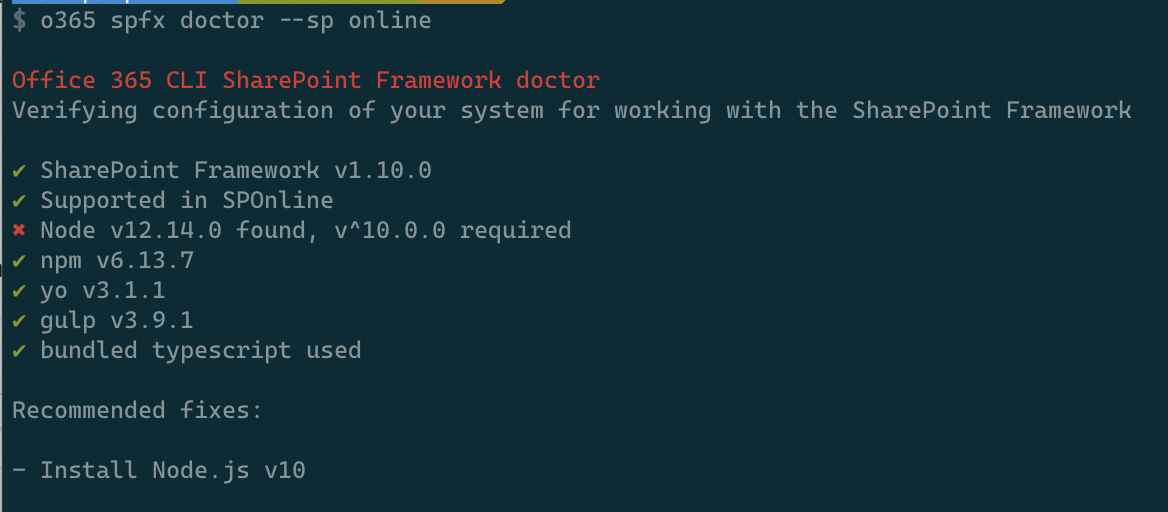
@andrewconnell looking back at what you've said, I've added a SharePoint version compatibility check so now you can also specify for which SharePoint version you want to be building and doctor will tell you if the current version is supported or not:

@PopWarner now also with fixes 👍
waldekmastykarz
on 19 Feb 2020
Maybe too nit-picky, but why not --spo | --sp2016 | --sp2019?
IMHO, --sp by itself is feels weird... why not just make it a flag?
If not, then I'd prefer --env spo | --env sp2016 | --env sp2019
andrewconnell
on 19 Feb 2020
Flag to me indicates that you could use multiple which I don't think is the case here. We could absolutely use env instead of sp if that's clearer 👍
waldekmastykarz
on 19 Feb 2020
Makes sense. Oh... one more nit-picky thing - change the description text from red to something other than red/yellow. Those to me mean bad stuff.
andrewconnell
on 19 Feb 2020
@waldekmastykarz, this is manually merged into dev now. Thank you very much for your efforts on this!
 VelinGeorgiev
on 9 Mar 2020
VelinGeorgiev
on 9 Mar 2020
Related issues
 aakashbhardwaj619
·
3Comments
aakashbhardwaj619
·
3Comments
 garrytrinder
·
3Comments
garrytrinder
·
3Comments
 arjunumenon
·
3Comments
VelinGeorgiev
·
3Comments
andrewconnell
·
3Comments
arjunumenon
·
3Comments
VelinGeorgiev
·
3Comments
andrewconnell
·
3Comments
Most helpful comment
Cool!!! I will hijack this in the possible pnp/spfx generator cli 😜