Cli-microsoft365: Enhancement: Handle forbidden response when performing authentication
When during the authentication process a 403 HTTP Status code is returned (=forbidden). It should be handled in such a way that the user is presented with a useful error message.
For example:
You are not authorized to perform the required service calls. Use option --debug for more information about which request failed.
This will prevent errors occurring further down the line which may lead to confusion.
See issue #1088 for an example
 stijnbrouwers
All 6 comments
@stijnbrouwers how can I repro it? Even if I create an AAD with nothing but the User.Read permission, I can still successfully call MS Graph and retrieve root site URL.
 waldekmastykarz
on 6 Sep 2019
waldekmastykarz
on 6 Sep 2019
Hi Waldek, tbh I haven't tried reproducing it yet.
I based this ticket on the findings in the related ticket #1088 .
I'll try reproducing it one of these days.
I'll keep you posted
stijnbrouwers
on 6 Sep 2019
Cool! Thank you. It would be very helpful to have repro steps for this 👍
waldekmastykarz
on 6 Sep 2019
@waldekmastykarz
I did a quick check and was able to reproduce.
However, you don't need look to long into it, you can just assign the ticket to me if you'd like (?)...
Here are the steps to reproduce:
- Create a new app registration
- Keep the permissions restricted to 'User.Read'
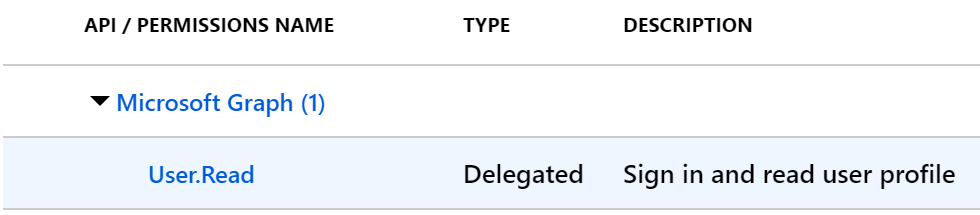
- Generate a self signed certificate
See: https://docs.microsoft.com/en-us/sharepoint/dev/solution-guidance/security-apponly-azuread - Edit the manifest file
See: https://docs.microsoft.com/en-us/sharepoint/dev/solution-guidance/security-apponly-azuread - Open a new terminal window
- Run the following commands to login with certificate
> export OFFICE365CLI_AADAPPID="xxx"
> export OFFICE365CLI_TENANT="xxx"
> o365
o365> login --authType certificate -c /mnt/c/temp/BrouwersStijn.pfx --thumbprint xxx --password 'xxx' - Try a command that does the call to retrieve the site url like in ticket #1088

- And with the --debug option we can see the forbidden http status that's being returned

stijnbrouwers
on 6 Sep 2019
Awesome! I appreciate your help with digging into this and helping out with working on a fix. All yours. Thank you!
waldekmastykarz
on 7 Sep 2019
@waldekmastykarz
No problem, happy to help!
stijnbrouwers
on 8 Sep 2019
Related issues
 andrewconnell
·
3Comments
andrewconnell
·
3Comments
 vineet2907
·
3Comments
vineet2907
·
3Comments
 plamber
·
3Comments
plamber
·
3Comments
 garrytrinder
·
3Comments
garrytrinder
·
3Comments
 rabwill
·
3Comments
rabwill
·
3Comments