Cli-microsoft365: Why doesn't O365 CLI keep track of executed commands from previous sessions (like powershell)?
As stated in the title, I'd like to be able to scroll through the previously run commands (from previous sessions) as I do with PowerShell. Saves a lot of time and effort when specific commands have been run previously - and seems to be a standard-issue now with Terminal on Mac OSX as well as PowerShell in Windows.
Is this something that needs to be implemented as a feature or maybe a configuration I'm not aware of?
 BassemNKhalil
All 19 comments
Hi @BassemNKhalil ,
Are you running the CLI in interactive mode or non-interactive mode?
What I have noticed is that when I run commands in non-interactive mode, I have the past history stored in my terminal.
For example instead of typing o365 and waiting the CLI to enter in interactive mode you can execute the command directly from the terminal like for example:
o365 spo web get -u https://contoso.sharepoint.com. This will allow most of the terminal based programs to store your previous command.
 VelinGeorgiev
on 4 Aug 2019
VelinGeorgiev
on 4 Aug 2019
Hi Velin,
Thanks for the swift response. While I understand your approach, it would
mean I’d lose auto complete since Terminal itself wouldn’t recognise O365
commands.
I’d understand if it’s too much work for little payoff or if there’s a
certain technical limitation stopping it but it just seems like a standard
behaviour this day and age.
On Mon, 5 Aug 2019 at 12:54 am, Velin Georgiev notifications@github.com
wrote:
Hi @BassemNKhalil https://github.com/BassemNKhalil ,
Are you running the CLI in interactive mode or non-interactive mode?
What I have noticed is that when I run commands in non-interactive mode, I
have the past history stored in my terminal.
For example instead of typing o365 and waiting the CLI to enter in
interactive mode you can execute the command directly from the terminal
like for example:
o365 spo web get -u https://contoso.sharepoint.com. This will allow most
of the terminal based programs to store your previous command.—
You are receiving this because you were mentioned.
Reply to this email directly, view it on GitHub
https://github.com/pnp/office365-cli/issues/1050?email_source=notifications&email_token=ACYXL6SGJTPO7XEKAQU3UG3QC3UUDA5CNFSM4IJFP7J2YY3PNVWWK3TUL52HS4DFVREXG43VMVBW63LNMVXHJKTDN5WW2ZLOORPWSZGOD3QDKWQ#issuecomment-518010202,
or mute the thread
https://github.com/notifications/unsubscribe-auth/ACYXL6TZT5CLW6X7EP6TT6DQC3UUDANCNFSM4IJFP7JQ
.
BassemNKhalil
on 4 Aug 2019
To further clarify, I use the interactive mode and that's where I'd like history to be available.
Using non-interactive mode loses the auto-complete functionality which is quite useful especially since the commands are not named in line with the corresponding PowerShell commands.
BassemNKhalil
on 4 Aug 2019
Yep, I understand your pain.
The underlying command library the CLI uses is vorpal and as far as I know it is stateless, meaning that it does not have a mechanism to store history.
We can definitely do something about that, but it would be a custom implementation that would require design and discussion. So my initial thought is that we can introduce a sql lite or similar portable database that can store your past actions, but we need such approach blessed by @waldekmastykarz. Once he agrees on approach we will deliver it.
Bear in mind that this could to be even a separate feature (if blessed by @waldekmastykarz :)) since there might be implications due to the fact that this portable db will store data for the commands some of witch could be sensitive.
VelinGeorgiev
on 4 Aug 2019
Hi @VelinGeorgiev
CC @waldekmastykarz
I did a bit of digging on my own and I found this - seems like it was brought up with the vorpal community and got included with v1.5 onwards. Would that make it more palatable to implement? Keen to hear back what you think.
BassemNKhalil
on 6 Aug 2019
This is a great catch @BassemNKhalil !
Lets wait for some feedback from @waldekmastykarz , then we can investigate and try enable that feature if there are no implications.
VelinGeorgiev
on 6 Aug 2019
Hey @BassemNKhalil, if I understand correctly what you mean, then it's a shell feature, not an application feature. If you were to run the CLI in PowerShell, would you be able to use it the way you mentioned?
 waldekmastykarz
on 18 Aug 2019
waldekmastykarz
on 18 Aug 2019
Hi, @waldekmastykarz (and welcome back 😃).
You're correct in that this can be achieved by using the CLI via PowerShell (or terminal as I use Mac) which is what @VelinGeorgiev referred to as 'non-interactive mode' - downside is that there isn't support for auto-complete. I'm hoping to find a way to have both of these features (auto-complete and history).
My understanding is that Vorpal can do so. Question is whether there are any existing alternatives to have both auto-complete and history and if not, would this be beneficial?
BassemNKhalil
on 18 Aug 2019
Good catch. Since we would be persisting confidential data in plain-text (URLs, user names, secrets, etc) I'd say this feature should be an opt-in rather than default, but definitely something we could consider.
Please note that we do offer autocomplete in non-interactive mode for some shells: https://pnp.github.io/office365-cli/concepts/completion/
waldekmastykarz
on 19 Aug 2019
Sounds like there's enough there to make this work - I seem to be unable to get it working tho .. based on my understanding from your link, I only need to run o365 --completion:sh:setup and restart terminal. Am I missing a step or is this not supported with the mac terminal?
BassemNKhalil
on 20 Aug 2019
Reading Omelette's setup guide, which we use for autocompletion, it should work. If it doesn't, could you please create a new issue with repro steps so that we can investigate it further?
waldekmastykarz
on 22 Aug 2019
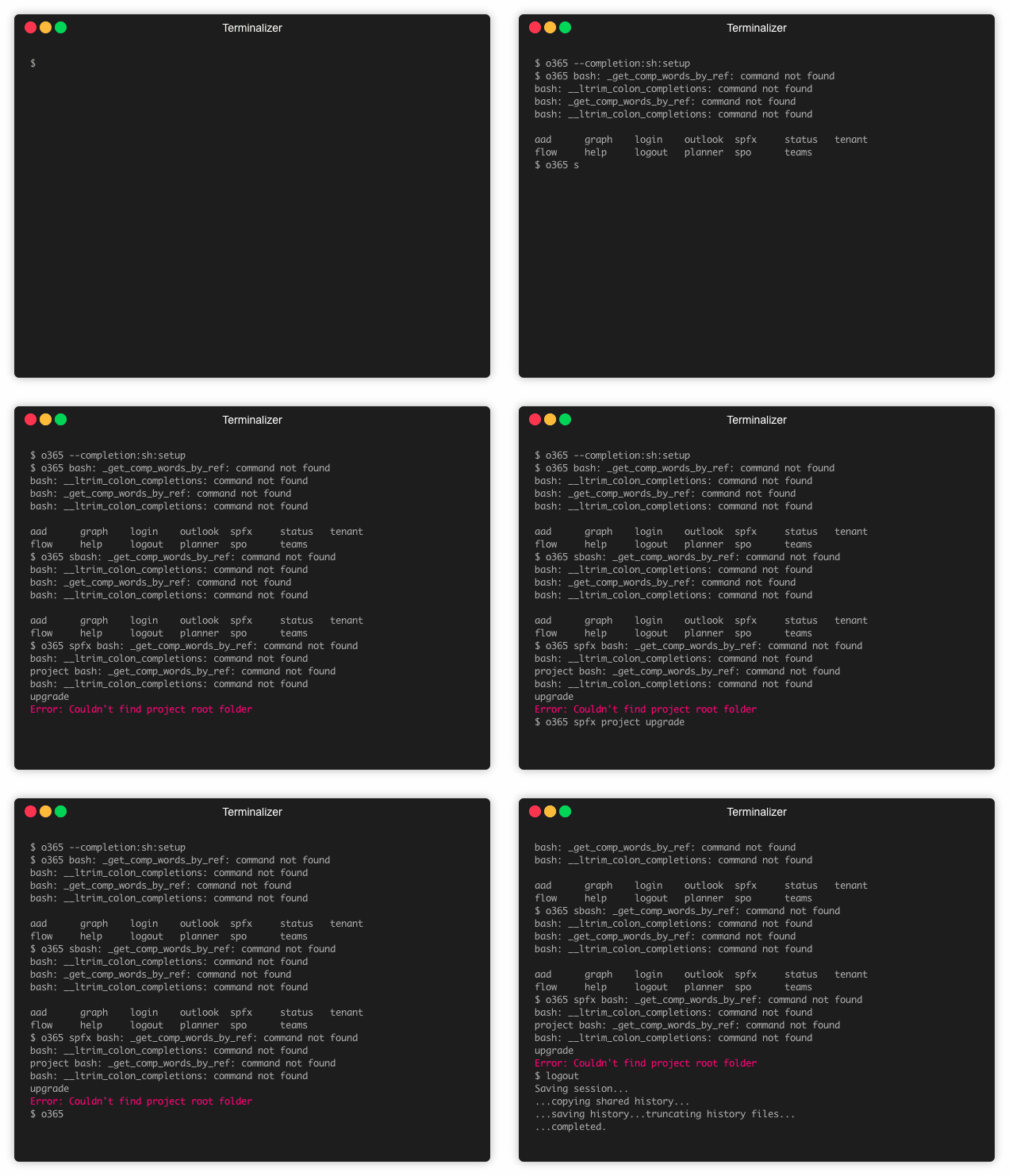
Had another go at it today - seems to be somewhat working but throwing an error every time I press tab to auto-complete (although it returns the auto-completion result). I've added a gif below with the run results, I'm trying to auto-complete o365 spfx project upgrade
BassemNKhalil
on 27 Aug 2019
Just to double check: that's default shell on macOS, right?
waldekmastykarz
on 28 Aug 2019
That’s correct - I’m assuming when you said ‘it should work’ that meant in my settings using Mac terminal, right?
BassemNKhalil
on 28 Aug 2019
Yes, theoretically Omelette, which we use for completion should support it, but since I'm using zsh myself, I've never verified it in the standard shell.
waldekmastykarz
on 28 Aug 2019
Looking at this issue https://github.com/kubernetes/kubernetes/issues/48575 could it be that you don't have bash-completion installed which could explain that issues you're experiencing?
waldekmastykarz
on 1 Oct 2019
Not likely. I installed bash-completion and tried again, fresh install of o365 CLI too (and I re-ran the o365 --completion:sh:setup as well)
This is what I get when I type _o365_ then press _TAB_
o365 -bash: _get_comp_words_by_ref: command not found
-bash: __ltrim_colon_completions: command not found
This is what I get when I type _o365 spfx_ then press _TAB_ (note how it returns project after the error)
$ o365 spfx -bash: _get_comp_words_by_ref: command not found
-bash: __ltrim_colon_completions: command not found
project
Did some more digging, it seems to be a Mac shell & bash-completion known issue. I could fix this by adding source /usr/local/etc/profile.d/bash_completion.sh to ~/.bashrc as per this one
I believe it could be beneficial to update the documentation for o365 CLI auto-completion (although I can see that Mac terminal is not specifically listed as one of the supported shells) - in all cases, this can be closed now, thank you.
BassemNKhalil
on 2 Oct 2019
It would be helpful to include this workaround in the docs. Would you like to submit a PR? Appreciate your help 👏
waldekmastykarz
on 3 Oct 2019
Related issues
VelinGeorgiev
·
3Comments
 aakashbhardwaj619
·
3Comments
aakashbhardwaj619
·
3Comments
 joshua-probst
·
3Comments
joshua-probst
·
3Comments
 garrytrinder
·
3Comments
garrytrinder
·
3Comments
 rabwill
·
3Comments
rabwill
·
3Comments
Most helpful comment
This is a great catch @BassemNKhalil !
Lets wait for some feedback from @waldekmastykarz , then we can investigate and try enable that feature if there are no implications.