Cli-microsoft365: Authenticating via certificate: 'client_assertion' should not be presented
Trying to authenticate via certificate gives me the following:
λ o365 spo login https://eurocanterbury.sharepoint.com --authType certificate --certificateFile cert.pem --thumbprint [THUMBPRINT]
Error: AADSTS700025: Client is public so 'client_assertion' should not be presented.
Trace ID: 41186365-0199-40b7-a4e5-fc8459890e00
Correlation ID: 57861a01-d3cd-4872-9376-27b287ebfb9c
Timestamp: 2019-04-25 07:38:27Z
I have had this on multiple tenants.
I'm not sure which parts of the AD app are relevant, but here's a few things from the manifest:
"allowPublicClient": false,
"replyUrlsWithType": [
        {
            "url": "https://login.microsoftonline.com/common/oauth2/nativeclient",
            "type": "Web"
        }
    ],
"oauth2AllowIdTokenImplicitFlow": true,
"oauth2AllowImplicitFlow": true,
Let me know if you need to see more of the config.
I have already granted admin consent for the application.
 JakeStanger
All 18 comments
You need to set _allowPublicClient_ to true. For more information see the docs at https://pnp.github.io/office365-cli/concepts/authorization-tokens/#azure-ad-application-used-by-the-office-365-cli.
 waldekmastykarz
on 25 Apr 2019
waldekmastykarz
on 25 Apr 2019
Switiching it to true does not change the error. It does change the displayed application type in Azure to Native, which is why I presumed it had to be set to false.
JakeStanger
on 25 Apr 2019
CLI is a native app from the auth point of view, because it's not capable of doing a web-based redirect to a URL. Have you seen this thread? https://github.com/pnp/office365-cli/issues/895
waldekmastykarz
on 25 Apr 2019
Makes sense. I hadn't seen that thread before but after re-tracing the steps they took to fix their issue, I can't find anything in there that makes a difference. I've tried setting the OFFICE365CLI_ env variables and I'm getting the same error.
JakeStanger
on 25 Apr 2019
Could you try to write the exact steps you've taken which we could use to reproduce the issue in our environments? Without it, it will be hard to find out exactly what's wrong and where. Appreciate your help.
waldekmastykarz
on 25 Apr 2019
Here's everything we've done as far as I can remember:
- Go to Azure portal > AAD app registrations (preview)
- Create new application, leave account types as default, add dummy web redirect URI
- Add API permissions for SharePoint
- Generate certificates using PS scripts from MS docs
- Use OpenSSL to convert the encrypted PFX into a decrypted pem file for use with the O365 tool
- Copy the key credentials from the PS script output into the manifest as per the documentation
- Visit
https://login.microsoftonline.com/<tenant>/adminconsent?client_id=<application id>&state=12345as per the docs, and grant permissions to the application - Attempt to log in using O365 tool using the command in my original post
- Try all combinations of enabling access tokens, ID tokens, changing the supported account type, and making the client public, trying the command again for each combination
- Remove the web redirect URL and add the
nativeclientredirect URL as a public client - Changing the supplied thumbprint (I guess it validates this next so it's not getting this far)
As it currently stands:
- The application is public
- Access and ID token grant flow is enabled
- Supported account types is set to Account sin this organizational directory only
- The redirect URL is
https://login.microsoftonline.com/common/oauth2/nativeclientfor public clients
JakeStanger
on 25 Apr 2019
Thank you! I'll have a look asap
waldekmastykarz
on 25 Apr 2019
So it seems like, if you want to authenticate using certificate, you shouldn't use a public client.
Here's what's working for me:


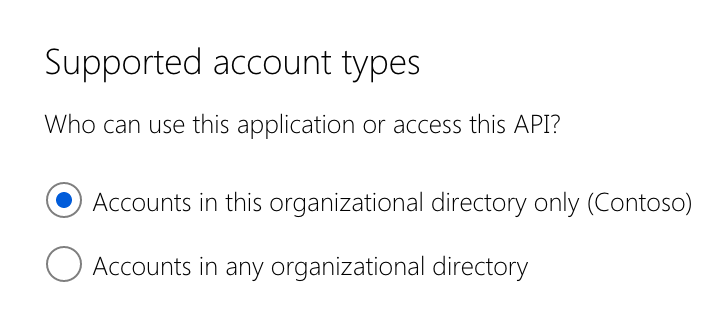
I'm starting the CLI specifying the ID of my tenant and AAD app (you could also specify both values using environment variables):
OFFICE365CLI_AADAPPID=9bfbe493-9255-4b7a-b369-65a5f31f8a13 OFFICE365CLI_TENANT=e10fe273-8686-4cf5-b3a8-c52e127fa8d0 o365
Then in the CLI, I'm logging in to SharePoint:
spo login https://contoso-admin.sharepoint.com --authType certificate --certificateFile ./localhost.pfx --thumbprint 64115196A03F0095E31564DB3FF15273BE757FB7
Hope this helps.
waldekmastykarz
on 26 Apr 2019
I deleted the existing application and re-traced the documentation exactly, and made sure to exactly match your config (which appears to be the defaults conveniently). I've managed to get it working twice so I don't know what was happening before.
There are a couple of differences, being that this time I'm using my home Linux machine outside of our enterprise network so I'll have to do some investigation there.
Thanks for your help!
One last (hopefully really simple) thing (sorry!):
I'm getting Error: Access denied. You do not have permission to perform this action or access this resource. when trying to add an app. I've granted the following permissions to my app:
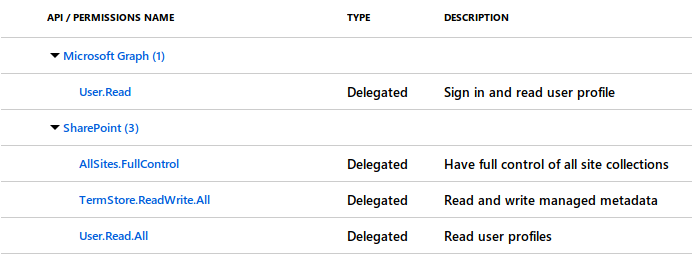
Am I missing something?
JakeStanger
on 27 Apr 2019
You mean when calling spo app add?
waldekmastykarz
on 27 Apr 2019
Yep. Should have specified that, sorry.
JakeStanger
on 27 Apr 2019
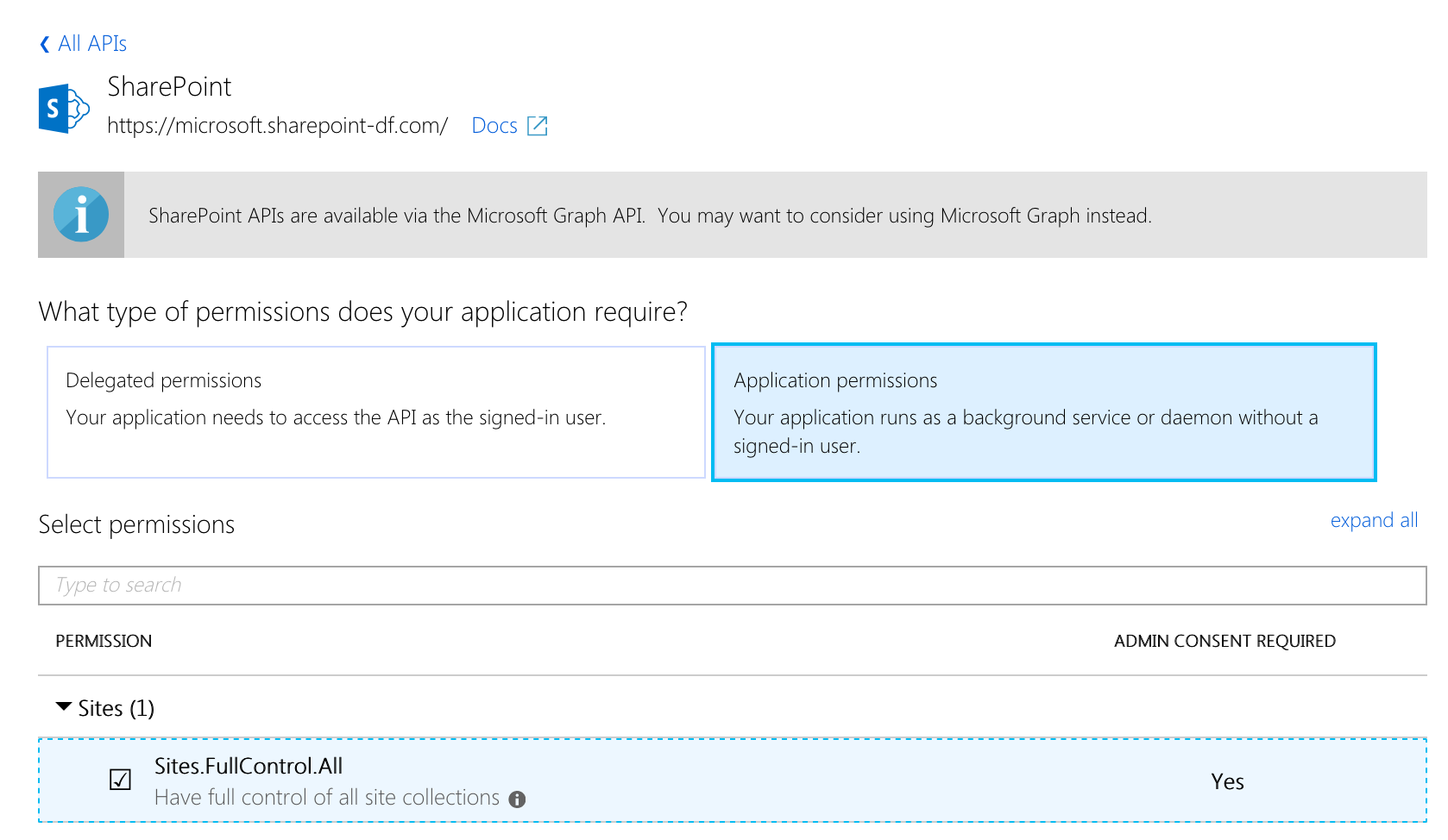
Looking at the screenshot above, it seems that you've granted delegated permissions to your AAD application. Delegated means on behalf of the user. Because you're signing in using a certificate without the user context, you should assign Application permissions instead.
waldekmastykarz
on 28 Apr 2019
Hm, I tried that first but it didn't work initially. I've just tried it again and it worked though, so thanks.
I suppose it makes sense - I saw the PnP application uses delegated permissions, but that signs in as a user, where as this signs in as an app.
Everything seems to be working now, so many thanks!
JakeStanger
on 29 Apr 2019
Glad to hear it's working!
waldekmastykarz
on 29 Apr 2019
I got the following Error:
AADSTS700025: Client is public so neither 'client_assertion' nor 'client_secret' should be presented.
Trace ID: 919964fc-5644-4dc7-8f91-5dfcd6a52e00
Correlation ID: b5b16187-8b67-4291-b308-a95c74fcd830
Timestamp: 2019-10-10 18:00:58Z
Can someone assist?
 nikagarwal25
on 10 Oct 2019
nikagarwal25
on 10 Oct 2019
Post the command and your app registration config and somebody might be able to.
JakeStanger
on 10 Oct 2019
@nikagarwal25 I'd recommend you create a new issue, please give as much detail as you can 👍🏻
 garrytrinder
on 10 Oct 2019
garrytrinder
on 10 Oct 2019
@nikagarwal25 have you tried setting Public Client to No
see: https://github.com/pnp/office365-cli/issues/948#issuecomment-487145809
 phillipharding
on 11 Oct 2019
phillipharding
on 11 Oct 2019
Related issues
 plamber
·
3Comments
waldekmastykarz
·
3Comments
plamber
·
3Comments
waldekmastykarz
·
3Comments
 VelinGeorgiev
·
3Comments
phillipharding
·
3Comments
waldekmastykarz
·
3Comments
VelinGeorgiev
·
3Comments
phillipharding
·
3Comments
waldekmastykarz
·
3Comments
Most helpful comment
Hm, I tried that first but it didn't work initially. I've just tried it again and it worked though, so thanks.
I suppose it makes sense - I saw the PnP application uses delegated permissions, but that signs in as a user, where as this signs in as an app.
Everything seems to be working now, so many thanks!