Cli-microsoft365: New command: Export Microsoft Teams team to a template
Usage
teams export [options]
Description
Exports the specified Microsoft Teams team to a template
Options
| Option | Description |
| ----------------------- | ----------------------------------------- |
| -i, --teamId <teamId> | The ID of the team to export |
| -p, --filePath <filePath> | The path to the file where the exported template should be stored |
Additional Information
Original discussion #794
Please note that at this moment there is no API to export an existing team to a template so the whole logic will need to be implemented in the command.
 waldekmastykarz
All 31 comments
From my understanding the export should be build by the following graph calls:
- GET /teams/{id} to get the base values from the team
- GET /teams/{id}/channels to get all the channels (if needed GET /teams/{id}/channels/{id} to get all the channel data)
- GET /teams/{id}/channels/{id}/tabs to get all the tab data
- GET /teams/{id}/installedApps to get all the installed apps
The exported file will contain a lot of Ids so we won't be able to simply reuse the file as a template for a new team, should there be an option to create something "template ready" if possible?
 thomyg
on 14 Apr 2019
thomyg
on 14 Apr 2019
I haven't looked in detail into creating teams from a template: does it require us to provide unique IDs each time we create a team or does it only require names and structure and creates the IDs itself?
waldekmastykarz
on 16 Apr 2019
Will double check that, at the moment I'm assuming that the team creation won't be happy with a json file containing URLs. For example, the channelId ist used a URL parameter in the web client, and when you look at the difference between a "General" channel in different teams, the URL only changes in terms of that ID, that's why I thought it won't be able to add a channelId in the definition.
As soon as the export is good enough for testing the result as a template we will know, should be there in the next couple of days.
thomyg
on 17 Apr 2019
I have the first version of the export ready:
graph teams export -i 851bce33-1196-4ca6-9358-25139ebd2975 --verbose --debug -p out.json
gives me the following output:
https://solvionat-my.sharepoint.com/:u:/g/personal/thomas_goelles_solvion_net/ES3e5yXQhZhDvXkrvMacs1MBP7C_EA3EG5RavypEnQF8nw?e=bSN4l3
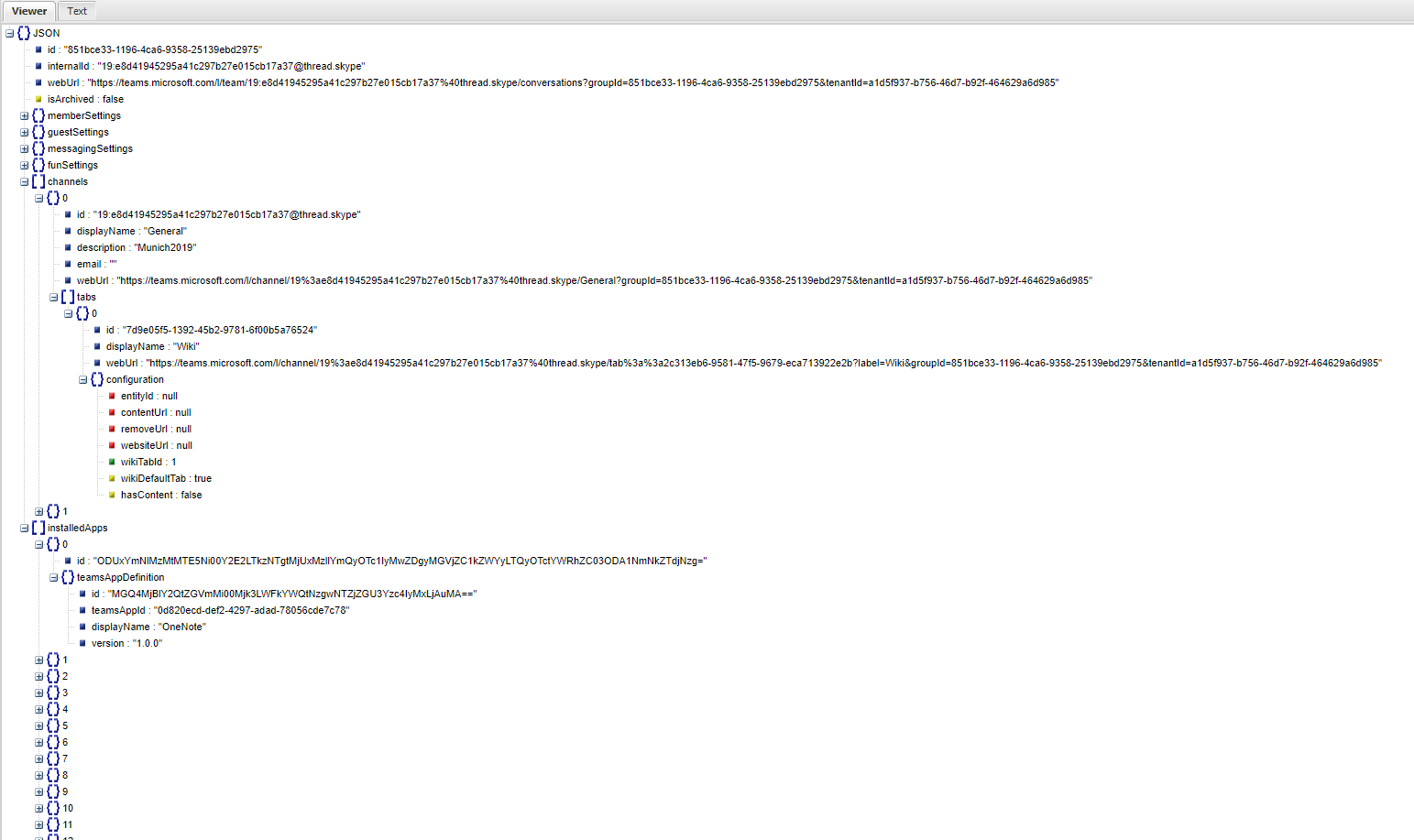
Looks quite ok for the first shot. But of course, needs polishing and I need to get an idea on how to test and validate the export.
Can you @waldekmastykarz @VelinGeorgiev or anyone else spare some minutes and maybe have a look at the export file to check for obvious errors I don't see anymore? Thank you
thomyg
on 18 Apr 2019
Awesome @thomyg 👏 The best way to validate the export is to create a new Team from the exported template and compare it to the source
waldekmastykarz
on 19 Apr 2019
Are you still working on it @thomyg?
waldekmastykarz
on 19 May 2019
Setting as free to pick up due to lack of response
waldekmastykarz
on 13 Jul 2019
Updated OP to use new command template
 garrytrinder
on 3 Feb 2020
garrytrinder
on 3 Feb 2020
@waldekmastykarz @garrytrinder - Is this being worked on?
 anoopt
on 30 Mar 2020
anoopt
on 30 Mar 2020
Nope, interested @anoopt? 😁
waldekmastykarz
on 30 Mar 2020
@waldekmastykarz - I will give it a shot. So the aim is to export json of the specified team, that can then be used by Microsoft Graph to create a team right?
anoopt
on 30 Mar 2020
Correct @anoopt
waldekmastykarz
on 31 Mar 2020
Hey @anoopt, are you still working on this?
waldekmastykarz
on 24 May 2020
Sorry. Yes I'll work on it in the coming days.
On Sun, 24 May 2020, 19:15 Waldek Mastykarz, notifications@github.com
wrote:
Hey @anoopt https://github.com/anoopt, are you still working on this?
—
You are receiving this because you were mentioned.
Reply to this email directly, view it on GitHub
https://github.com/pnp/office365-cli/issues/871#issuecomment-633270504,
or unsubscribe
https://github.com/notifications/unsubscribe-auth/ACJ6YEKFVHL7XIQPXIVZ5ZTRTFP5XANCNFSM4G5536EQ
.
anoopt
on 24 May 2020
Cool! Thank you!
waldekmastykarz
on 25 May 2020
Hey @anoopt, are you still working on this?
garrytrinder
on 15 Jul 2020
Sorry yes. There was a pause. Back on it now.
anoopt
on 16 Jul 2020
Thanks for the update, appreciate your help 👍🏻
Don't hesitate to reach out if you require any assistance, we are here to help.
garrytrinder
on 16 Jul 2020
@garrytrinder apologies I'm not able to work on this currently. I'll revisit this in a few weeks.
anoopt
on 28 Jul 2020
Thanks for the update @anoopt
Are you happy for me to open this issue to other contributors?
If in a few weeks you are still free to work on this and it's available, then we can always assign it back.
garrytrinder
on 28 Jul 2020
Ok @garrytrinder that is fine. Thank you.
anoopt
on 29 Jul 2020
Hello @garrytrinder - Is this issue available to be picked up for? Haven't tried my hands on Teams command before and where will we find better option than this,.. 🙌
Do you mind assigning this issue to me?
 arjunumenon
on 1 Oct 2020
arjunumenon
on 1 Oct 2020
Absolutely, it's all yours!
Thanks for your help @arjunumenon 👍🏻
garrytrinder
on 2 Oct 2020
Hey @arjunumenon, are you still working on this?
waldekmastykarz
on 21 Nov 2020
Hey @waldekmastykarz - Sorry for not keeping you updated. My bad. My scheduled had been crazy for the past couple of weeks. Now I should be in a position to switch gears. Will start looking into this during this week.
Thanks for follow-up and sorry for not updating about that.
arjunumenon
on 23 Nov 2020
Don't worry. No harm done. Happens to all of us 👍
waldekmastykarz
on 23 Nov 2020
Hey @waldekmastykarz - My schedule is a bit tight for this week and next. I don't want this enhancement to be untouched because it is stuck with me.
Do you think it make sense to un-assign me from this issue so that someone else can pick it up. As of now, I am thinking of relaxation of my tight schedule by next week. Once I am back, I will be more than happy to take a stab at this.
Sorry for keeping it on zero progress for quite long time 😔
arjunumenon
on 3 Dec 2020
Hey @arjunumenon absolutely no trouble, we appreciate you letting us know, as @waldekmastykarz has said, no harm done 😊
Lets open this up, if it is still open when you have free time, by all means let us know and we will be more than happy to assign it back to you.
garrytrinder
on 3 Dec 2020
Thanks @garrytrinder for your understanding and appreciate that. Will do that once my schedule relatively relaxes. 🤞
arjunumenon
on 4 Dec 2020
Hello @waldekmastykarz / @garrytrinder - Can I take a stab at this issue if you guys are fine with that. Hopefully this time, I will be be able to complete without discontinuing in between. 🤞
arjunumenon
on 31 Dec 2020
All yours! Looking forward to seeing it in action! 👏
waldekmastykarz
on 1 Jan 2021
Related issues
waldekmastykarz
·
3Comments
thomyg
·
3Comments
garrytrinder
·
3Comments
waldekmastykarz
·
3Comments
 aakashbhardwaj619
·
3Comments
aakashbhardwaj619
·
3Comments
Most helpful comment
Thanks @garrytrinder for your understanding and appreciate that. Will do that once my schedule relatively relaxes. 🤞