Cli-microsoft365: New command: spo tenant deletedsite list
Lists the deleted site collections in the tenant recycle bin.
Command: spo tenant deletedsite list
Options:
--includePersonalSite [includePersonalSite] | Include Personal Sites with the returned results (switch parameter like --verbose)
--includeOnlyPersonalSite [includeOnlyPersonalSite] | Only include Personal Sites in the returned results (switch parameter like --verbose)
For each deleted site the following fields should be shown:
- Url
- StorageMaximumLevel
- UserCodeMaximumLevel
- DeletionTime
- DaysRemaining
If output is set to JSON include all properties
 arjenbloemsma
All 21 comments
@waldekmastykarz Is my assumption correct that convention dictates that switch parameters like '--verbose' don't have a shorthand version?
If you agree with this proposal then please assign to me.
arjenbloemsma
on 1 Nov 2018
What do you think if we added it to the existing spo site classic list command? That way, it would be in sync with the spo site classic remove command which already has the ability to remove things from the recycle bin.
 waldekmastykarz
on 1 Nov 2018
waldekmastykarz
on 1 Nov 2018
Wouldn't that be confusing? Since - if I understood correctly - most of the times we use the SPO Powershell cmdlets as 'examples' on how to implement a certain functionality in the CLI. So in this case I looked at the cmdlet 'Get-SPODeletedSite' which fires a query which make no difference between a classic or a modern site and thus will return all site collections in the recycle bin; classic as wel as modern.
arjenbloemsma
on 2 Nov 2018
Unless I've missed something, removed modern sites are not moved to the recycle bin, so this functionality applies only to classic site. Or have you seen it work otherwise?
waldekmastykarz
on 3 Nov 2018
Well, you missed this "hidden gem" in Office 365 where it all depends how the modern site is created and deleted. 🤓
I took the following steps to create a modern team site, that will show up in the list of deleted sites that the Get-SPODeletedeSite cmdlet will generate:
- Create a new team via MS Teams, which will also create a modern site.
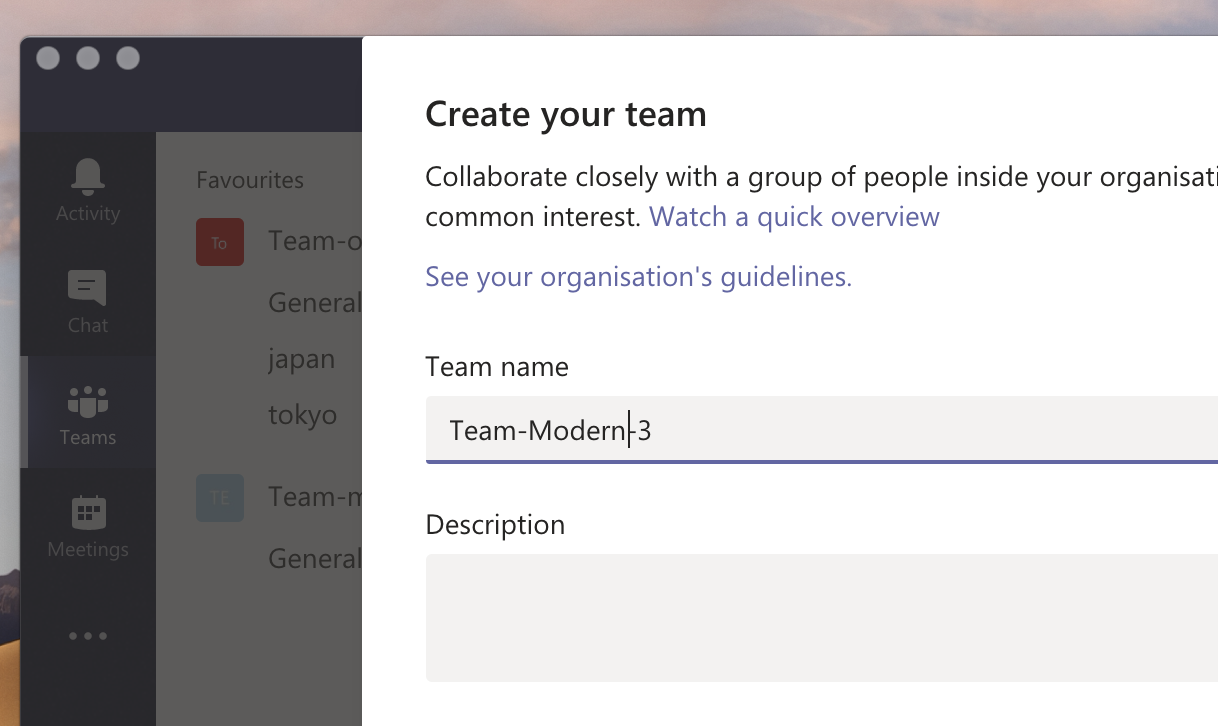
- Navigate to the SharePoint site belonging to that Team
- Go to 'Site Information' (by clicking the gear symbol) and click the 'Delete site' link at the bottom.
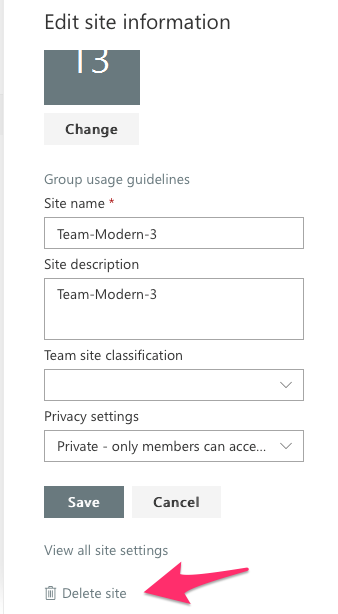
- In the pop-up confirm by checking the 'Yes' checkbox and clicking the 'Delete' button.
- This site will not appear in the tenant Recycle Bin, but will appear in the output of the Get-SPODeletedeSite cmdlet.

Or maybe I did not stumble upon a hidden gem but a bug? 😜
arjenbloemsma
on 6 Nov 2018
So this is indeed interesting behavior. @VesaJuvonen, care to shed some light if this is desired behavior?
waldekmastykarz
on 6 Nov 2018
@waldekmastykarz @VesaJuvonen Any updates on this?
arjenbloemsma
on 20 Nov 2018
@VesaJuvonen?
waldekmastykarz
on 20 Nov 2018
Hi @waldekmastykarz, how should we proceed with this?
arjenbloemsma
on 13 Dec 2018
I'm trying to get some answers. Let's wait a bit longer
waldekmastykarz
on 13 Dec 2018
OK, got some more info, so the behavior is intentional and apparently you can see deleted modern sites in the modern admin center. Either way, to keep it consistently with graph o365group list what if we extended the existing spo site list command with the --deleted option?
waldekmastykarz
on 13 Dec 2018
That sounds good to me Waldek 😎 If you like you can assign this one me.
arjenbloemsma
on 13 Dec 2018
Hey @arjenbloemsma, are you still working on this?
waldekmastykarz
on 2 Feb 2019
Hi @waldekmastykarz, yes I am :-) Currently a little bit busy between work and moving, but whenever I have some time I'll work on this one.
arjenbloemsma
on 5 Feb 2019
Good luck!
waldekmastykarz
on 5 Feb 2019
Hey @arjenbloemsma, just checking if you have room to work on this one or if we'd better let others chime in and you can pick up something else when you have time again?
waldekmastykarz
on 11 Mar 2019
Hi @waldekmastykarz, just created a pull request 😎
However the bad news is, while locally all tests run successful, remote they are failing 🥺 The cause seems to be in the spec file at line 523 and 592, where the JSON for the promise.resolve is specified. Thus far I was not able to reproduce this error on my machine. Do you have an idea what could be the issue?
arjenbloemsma
on 16 Mar 2019
I stand corrected; the line numbers on the build server are referring to the outputted JS files. Not the TS files. 🤦🏼♂️ So then the problem seems to be in this line: assert(cmdInstanceLogSpy.calledWith([
arjenbloemsma
on 16 Mar 2019
I'll have a look if I can repro the issue
waldekmastykarz
on 17 Mar 2019
Resetting as open for taking due to lack of response
waldekmastykarz
on 19 May 2019
Closing this issue due to its inactivity and the change in direction during the discussion. A new issue to enhance the existing spo site list command has been created to replace this.
 garrytrinder
on 2 Feb 2020
garrytrinder
on 2 Feb 2020
Related issues
 andrewconnell
·
3Comments
andrewconnell
·
3Comments
 rabwill
·
3Comments
rabwill
·
3Comments
 plamber
·
3Comments
plamber
·
3Comments
 VelinGeorgiev
·
3Comments
VelinGeorgiev
·
3Comments
 StfBauer
·
3Comments
StfBauer
·
3Comments