Clementine: Make CPU usage lower
_From madura.x86 on December 12, 2010 17:32:21_
Clementine is using too much CPU for a player(when considered with Amarok 1.4 and IMHO). It uses about 12% of CPU when playing a MP3 without any visualization. I think this should improve, other than this it's great!
_Original issue: http://code.google.com/p/clementine-player/issues/detail?id=1079_
 Clementine-Issue-Importer
All 89 comments
_From guillaumeavril on December 12, 2010 12:07:21_
Same on ubuntu 10.10 on intel atom n270 (clemetine 0.6)
Clementine: 17%
MPlayer from command line: 3%
I think there is room for enhancement!
Clementine-Issue-Importer
on 6 Dec 2013
_From goetzchrist on December 13, 2010 08:40:39_
@ madura.x86, guillaumeavril, which OS? I suppose both us you use Linux.
madura.x86, which CPU? It depends on the frequency, number of cores, and some other things. Would also be good to know the CPU usage from for example mplayer from command line (like guillaumeavril did) to compare it.
Using Clementine 0.6 r2408 , in Kubuntu 10.10, with a Intel 2160 dual core CPU @ 1.80 GHz, playing an MP3 at 320 kbps:
program — % CPU usage — RAM usage
mplayer — 0< % <1 — 8 MB
clement. — 2 — 25-80 MB
ffplay — 3 — 8 MB
(no audio waves)
I don't see any high CPU usage, but the memory usage gets higher and high. It doesn't seems to be related to the playback (the memory usage is constant), but to other tasks.
Clementine-Issue-Importer
on 6 Dec 2013
_From ivanovnegro on December 13, 2010 09:03:55_
In my case it was higher, on the newest revision r2408 I have only 6% of CPU usage and about 50 MB of memory usage.
Before I had also about 20% CPU and more as 50 MB of memory, it seems there was already an improvement.
Im on Maverick, specs 1.9 GB; Intel Core Duo 2.00 GHz.
Clementine-Issue-Importer
on 6 Dec 2013
_From madura.x86 on December 13, 2010 18:53:44_
@goetzchrist
I'm on an i5 @ 2.4 GHz, Quodlibet uses 4% CPU when playing MP3s. My system is Ubuntu 10.10 with 2.6.37-rc3 amd64(if that matters). I installed Clementine on maverick using the deb file given in the download section.
Clementine-Issue-Importer
on 6 Dec 2013
_From ivanovnegro on December 15, 2010 09:49:15_
I noticed that the CPU usage is almost low it only goes up when you enable the info tabs about the artist or the song and then also the memory usage will be increased.
It is not so bad but maybe a little bit less ressource usage would not be bad with the info tabs in the side bar enabled, and I mean here more the CPU, the memory is great.
Clementine is doing it great with only loading lyrics or infos about the artists when you enable it and not the whole time, I think this is the way how it works.
Other players are loading everything even when you are not in the lyrics section or tab.
Clementine-Issue-Importer
on 6 Dec 2013
_From dtverder on January 14, 2011 00:46:55_
I think the CPU usage is excellent! Typically on my system (Fedora,Intel E8400) it is about 3%. This compares to Amarok 1.4 which used to regularly run at 80-90%!
Clementine-Issue-Importer
on 6 Dec 2013
_From goetzchrist on January 14, 2011 07:06:00_
If it's ~80% with Amarok, then comparing to something broken it not fair :) Also, Amarok can use many different backends through Phonon.
Clementine-Issue-Importer
on 6 Dec 2013
_From ivanovnegro on January 24, 2011 06:56:05_
I made some observations now and I noticed when I have Clementine open a long time and with large playlists the CPU will increase about 20%. I can live with it, I like Clementine too much but it would be not bad to reduce the CPU usage especially when Firefox is open and Clementine, my computer begins to be noticeable loud.
Clementine-Issue-Importer
on 6 Dec 2013
_From keirangtp on January 29, 2011 03:16:47_
Issue 1388 has been merged into this issue.
Clementine-Issue-Importer
on 6 Dec 2013
_From ivanovnegro on January 31, 2011 02:50:47_
I encountered a new thing about the CPU usage, its related to the analyzers, the default one seems to be less ressource hungry as the others also if you disable all of them the CPU will be lower, under 20 %.
Clementine-Issue-Importer
on 6 Dec 2013
_From [email protected] on February 10, 2011 23:50:00_
If you turn off window of clementine(music still playing it lowers to 8% for me... It still pretty big.
Clementine-Issue-Importer
on 6 Dec 2013
_From ivanovnegro on February 11, 2011 07:51:14_
8%, big? Im not sure about it. In my opinion not and I wish I would have constantly only 8%. The problem is, after using Clementine for more time it increases the rate.
Clementine-Issue-Importer
on 6 Dec 2013
_From Oleksandr.Brezhniev on February 28, 2011 03:02:39_
My top on AMD Athlon II X2 215:
- playing stream, with analyzer: 15-17%
- playing stream, w/o analyzer: 10-12%
- playing stream, minimized to tray: 8-11%
- not playing anything: 4-6%
On my old PC with P4 Celeron 1.7Ghz, when playing and window is open, CPU usage goes to 100%.
Clementine-Issue-Importer
on 6 Dec 2013
_From davidsansome on March 16, 2011 10:32:46_
Issue 1581 has been merged into this issue.
Clementine-Issue-Importer
on 6 Dec 2013
_From [email protected] on March 18, 2011 05:45:13_
on OS X 10.6.6 with clementine 0.6 r2991 _not playing_ any music, the different visualizations take between 5%-20% cpu load (that's what the os x activity monitor tells me). only when turning off the visualizations the process sleeps.
Clementine-Issue-Importer
on 6 Dec 2013
_From JohnSC301 on March 28, 2011 11:24:43_
Kubuntu 10.10 64bit kde 4.6.1
When launching Clementine 64bit 0.7 cpu is very high ~maybe 30-40% increase then will die down a bit. The ram is ~100mb while other music players do not even reach 40mb. Clementine needs major performance improvements.
Clementine-Issue-Importer
on 6 Dec 2013
_From nowrep on April 01, 2011 05:27:50_
You should try disabling equalizer and now CPU usage when main window is hidden gets back to same value as rhytmbox has.
Clementine-Issue-Importer
on 6 Dec 2013
_From JohnSC301 on April 01, 2011 10:44:32_
For me, I have equalizer off and cpu is still very high.
Clementine-Issue-Importer
on 6 Dec 2013
_From keirangtp on April 06, 2011 07:35:28_
Issue 1700 has been merged into this issue.
Clementine-Issue-Importer
on 6 Dec 2013
_From alphadeltapapa on April 06, 2011 14:22:47_
I see that you merged my issue 1700 into this one, but I think it's important to note that in my issue, the excessive CPU usage is shown for the X process, not for the Clementine process. But it's directly caused by Clementine, even though it shows up under X.
Clementine-Issue-Importer
on 6 Dec 2013
_From jkflying on April 06, 2011 23:34:37_
Have you tried disabling the 'glowing' option in Preferences --> Playback? I've found that this reduces the X usage down to normal levels.
Clementine-Issue-Importer
on 6 Dec 2013
_From alphadeltapapa on April 07, 2011 12:02:41_
You're right: I disabled that and it's down to normal. I'm not sure,
but I don't remember this being a problem with Amarok 1.4. I never
turned off the glowing in it.
Clementine-Issue-Importer
on 6 Dec 2013
_From gmandx on April 07, 2011 12:53:30_
Amarok 1.4 used Qt3, now with Qt4 things may change... I think that disabling visual effects for an audio player it's Ok, but to disable the equalizer it not a correct answer. Music players are about music, I want the best experience regarding sound! If the equalizer is consuming too much power, the it should be reviewed, not just disabled.
Clementine-Issue-Importer
on 6 Dec 2013
_From goetzchrist on April 07, 2011 13:43:29_
I don't have that problem, but if you have, and disabling the glowing helps, then maybe it is a bug in your graphics driver or somewhere in the graphics stack that affects you, with your particular software versions and configurations. Try enabling/disabling composition, in a Live-CD of another distribution, etc.
We could maybe narrow this problem down, by giving more information about the affected system, like the version of the video driver, mesa, kernel, distribution, etc.
Clementine-Issue-Importer
on 6 Dec 2013
_From jkflying on April 07, 2011 13:55:19_
I was also wondering if there might be a bigger, non-clementine issue that clementine happens to stumble upon here. One idea I had was that each time a frame in the glowing or in the equalizer updates it might cause an entire redraw of all the objects in the window under certain drivers.
Clementine-Issue-Importer
on 6 Dec 2013
_From ivanovnegro on April 07, 2011 14:03:04_
I have obviously other hardware but I can assure that in my case nothing is broken.
If I have to disable everything then that is not the solution to make the CPU usage lower. Even with everything disabled Clementine consumes more as I would expect from it.
Clementine-Issue-Importer
on 6 Dec 2013
_From alphadeltapapa on April 07, 2011 14:21:02_
I'm running:
Kubuntu Maverick 10.10
Linux 2.6.35-28-generic #49-Ubuntu SMP Tue Mar 1 14:40:58 UTC 2011 i686 GNU/Linux
nvidia-current:
Installed: 260.19.06-0ubuntu1
Candidate: 260.19.06-0ubuntu1
Version table:
*** 260.19.06-0ubuntu1 0
500 http://us.archive.ubuntu.com/ubuntu/ maverick/restricted i386 Packages
100 /var/lib/dpkg/status
libgl1-mesa-dri:
Installed: 7.9~git20100924-0ubuntu2
Candidate: 7.9~git20100924-0ubuntu2
Version table:
*** 7.9~git20100924-0ubuntu2 0
500 http://us.archive.ubuntu.com/ubuntu/ maverick/main i386 Packages
100 /var/lib/dpkg/status
kde-window-manager:
Installed: 4:4.6.1-0ubuntu1~maverick1~ppa1
Candidate: 4:4.6.2a-0ubuntu1~maverick1~ppa2
Version table:
4:4.6.2a-0ubuntu1~maverick1~ppa2 0
500 http://ppa.launchpad.net/kubuntu-ppa/backports/ubuntu/ maverick/main i386 Packages
*** 4:4.6.1-0ubuntu1~maverick1~ppa1 0
100 /var/lib/dpkg/status
(Ah, 4.6.2 got packaged. Time to upgrade...)
I use KWin with desktop effects active, OpenGL compositing, Texture from Pixmap, direct rendering, and vsync.
That's all I can think of. :)
Clementine-Issue-Importer
on 6 Dec 2013
_From [email protected] on April 15, 2011 09:20:53_
Still seems high on Fedora 14.
clementine-0.7.1-1.fc14.i686
kdelibs-4.6.2-1.fc14.i686
qt-4.7.2-8.fc14.i686
Clementine-Issue-Importer
on 6 Dec 2013
_From ivanovnegro on April 25, 2011 15:31:57_
Ok, alphadel also mentioned Xorg CPU usage is high when Clementine is playing, I can confirm this with a different graphics card, Intel integrated, for me this is definiteley a Clementine issue, other players are not increasing the CPU usage of X.
I hope that could be fixed somehow.
I tested it with the same machine on Ubuntu Maverick, PCLinuxOS KDE 4.6.2 and on Kubuntu Natty, Xorg is showing a CPU usage of about 20% and when Clementine is not playing it is about 1% or a little bit higher.
Now I tested also Amarok 2.4, its incredible, apart form the high RAM usage of this app it only needs between 4 and 6% of my CPU, that is really great.
Clementine seems lightweight because of the RAM it uses but that is increasing always until 200 MB or more after using it more then 12 hours, ok not a big deal but the CPU usage is a horror.
Instead Amarok is constantly using the same amount of both.
My conclusion, Clementine has a resource lack.
Clementine-Issue-Importer
on 6 Dec 2013
_From jonjermey on May 31, 2011 02:01:58_
I would prefer to see the lowest possible CPU use settings as the default, and then people can add eye candy if they want to. For the record, under Mint 11:
Window open, current track glowing -- starts at 20% then drops to 16%
Window closed, current track glowing -- 8%
Window open, current track not glowing -- 4%
Window closed, no glow -- 0%
Clementine-Issue-Importer
on 6 Dec 2013
_From pieter.[email protected] on September 08, 2011 05:21:02_
I would also suggest to disable all CPU-eating features like the glow and visualizations by default.
Clementine-Issue-Importer
on 6 Dec 2013
_From markfurneaux on January 31, 2012 12:23:59_
Through my own testing, I have noticed that Clementine continually causes CPU wakeups; far more than would seem necessary. While running Clementine with the main window visible without any visualizations, glow, or an analyser, it causes my i7 2760QM CPU to use 5-7 watts more power continually than when running with the main window closed. This ruins my battery life, decreasing total runtime by about an hour. On a related note, Clementine also does not seem to cache audio files very much. Instead it streams them from the HDD which also increases power consumption. Increasing the buffer size does not seem to have a major difference.
Clementine-Issue-Importer
on 6 Dec 2013
_From jkflying on February 01, 2012 01:56:11_
I assume you've disabled the 'glow'?
What operating system are you using?
Clementine-Issue-Importer
on 6 Dec 2013
_From markfurneaux on February 01, 2012 10:30:16_
Yes, as I previously mentioned, I have disabled all 'fancy' features including the glow.
Sorry, I forgot to include OS version. I am running Ubuntu 11.10 with a 3.2 kernel. (It's an ASUS K53SV-DH71 laptop if anyone finds that relevant)
Clementine-Issue-Importer
on 6 Dec 2013
_From TJHockless on February 04, 2012 09:44:11_
VLC uses 16 MB.
Clementine uses 200
I'm on Fedora 16 64bit
Clementine-Issue-Importer
on 6 Dec 2013
_From john.maguire on June 06, 2012 14:44:51_
Issue 2969 has been merged into this issue.
Clementine-Issue-Importer
on 6 Dec 2013
_From akylen on September 12, 2012 12:11:48_
As soon as I double click a song and Clementine starts it 'eats' 140% of my CPU and then drops to 115%. I think it's because is loading cover and song lyrics.
If I quit the player and open again and start playing the same album it only 'eats' 20% (I still think its a little too much).
Everytime I add a new album it does that. Eats a lot of CPU and then drops to 20%.
Disabled the glow and analyzers.
Using Clementine 1.0.1-650-g0fae2e1 on OS X 10.8.1; 2.3 Ghz i5 and 8GB RAM
PS: I love clementine because it lets me play my music through file browsing instead of organizing my whole music like iTunes. I import songs from folders or double click them.
Clementine-Issue-Importer
on 6 Dec 2013
_From rodrigue.villetard on October 09, 2012 07:07:18_
same on ubuntu 12.10 64bits (quantal) clementine 1.0.1
linux kernel 3.5.0-17-generic
gnome 3.6.0
core i5-2467M
Clementine-Issue-Importer
on 6 Dec 2013
_From ckujau on November 25, 2012 23:36:30_
Disabling this "glow" setting really does cut on CPU time, from 12% to 7% here (MacBook Pro, 2x2.53GHz). Please change its default to "off".
Clementine-Issue-Importer
on 6 Dec 2013
_From purplishwords on November 28, 2012 10:20:43_
My Clementine runs at about 20-30% CPU (2.26 GHz Intel Core 2 Duo). I just turned the glow off and while playing an mp3 it is still hovering at 27%. I have noticed a lot of glitches in playback recently.
Clementine-Issue-Importer
on 6 Dec 2013
_From [email protected] on November 28, 2012 11:36:28_
With glow, pre-generated moodbars and 60 FPS bar visualizer, Clementine runs at 2-3% on 1.8GHz Core 2 Duo. The person above, make sure your library isn't updating and that you aren't in the middle of loading moodbars when you are looking at your usage.
Here on 32-bit Gentoo and Version 1.1.1-106-g7b678b3
Clementine-Issue-Importer
on 6 Dec 2013
_From purplishwords on November 28, 2012 17:50:08_
I have my library set to auto-update, but it displays in the status bar when it is doing so. I do have a very large library. Would this explain high CPU usage constantly? I'm not playing anything right now and it is at 18%.
Clementine-Issue-Importer
on 6 Dec 2013
_From dgtlmoon on November 29, 2012 05:31:46_
Same issue here, really annoying
Clementine-Issue-Importer
on 6 Dec 2013
_From emailofchris on December 10, 2012 21:12:15_
I'm running Clementine on a 2011 Macbook Pro (i5) and right now, playing an Ogg Vorbis file, CPU is sporadic, anywhere from 20% to 35%. MP3 performance seems to be more stable, sticking around 19%-20%. Regardless, it's always too high, when VLC can play music with around 4% CPU usage, and MPlayer OS X Extended gets 2-3%. Maybe that's a bit unfair of a comparison, but the point is, there's a lot of room to improve.
Clementine-Issue-Importer
on 6 Dec 2013
_From john.maguire on December 11, 2012 05:15:27_
Labels: Restrict-AddIssueComment-Commit
Clementine-Issue-Importer
on 6 Dec 2013
_From davidsansome on December 13, 2012 15:28:03_
Issue 3355 has been merged into this issue.
Clementine-Issue-Importer
on 6 Dec 2013
Having the same CPU peaks (with waking up the CPU) described in #issuecomment-29995519 (markfernaux), but with window closed, album cover loading disabled. Doesn't matter whether the mini-visualizer is on or off. Glow is off, but mostly because it reduced readability.
Single CPU usage always jumps up to 100% = 25%, keeping the system busy, when loading a new track. Sometimes, this issue is gone, but it resurfaces every once in a while. Cannot really pinpoint it, because closing, killing and completely reloading Clementine didn't help either. Hasn't occured for the last 2 months or so, but it's back again .. _sighs_
Clementine Version: 1.1.1
System: i5-2400, 24 GB RAM, 24/7-optimized
Distribution: Linux Mint 12
Kernel: 3.1.4
cu, w0lf.
 ginsterbusch
on 27 Apr 2014
ginsterbusch
on 27 Apr 2014
Same issue. Sometimes it seems incredibly ineffective power-wise.
Shows 120+% CPU load _without_ any reasons to do so.
 tehmindflare
on 9 Nov 2014
tehmindflare
on 9 Nov 2014
I experience 120% CPU for some m4a file. And normally 30% CPU for ordinary lossless file. Much higher than other players.
 xgdgsc
on 10 Nov 2014
xgdgsc
on 10 Nov 2014
I've used clementine on both yosememite and mavericks on my mba 2013 (both clean installs). Clementine uses absurd amount of cpu while playing music on both. when I'm playing a song it just sits there using constant 20-30% cpu usage at all times.
I've disabled all of clementine's more cpu heavy features (moodbar generation, current track animation, analyzer, equalizer) and it didn't make a lick of difference.
I don't even have a local library, just playing tracks from a subsonic share.
 bwat47
on 14 Jan 2015
bwat47
on 14 Jan 2015
@xgdgsc , @bwat47 is it actual still?
 JulianVolodia
on 9 Mar 2016
JulianVolodia
on 9 Mar 2016
Yes, I still see this with clementine 1.2.2 on OSX 10.11.3
bwat47
on 9 Mar 2016
Still issue on latest version on El Cap.
Even if it is idle it consumes around 17 - 20 % of cpu on MBP mid 2015.
 vukasin-nikodijevic
on 9 Mar 2016
vukasin-nikodijevic
on 9 Mar 2016
Still surfacing once in a while, even with the latest nightly.
System: Thinkpad T520, i5, 8 GB RAM
OS: Linux Mint 17.2 / x86_64
Kernel: 3.16
cu, w0lf.
ginsterbusch
on 9 Mar 2016
Any idea why could it be? Some plugins, cores? Maybe some scrobble timer?
JulianVolodia
on 9 Mar 2016
No plugins (are there still any around?) installed or enabled. Happens with or without enabled last.fm. Mostly without, because I dont have it set up for clementine (doesnt make sense; I use clementine mostly for quick prelistening songs and testing whether that nasty cue file worked out or not; MoC is my main player).
cu, w0lf.
ginsterbusch
on 9 Mar 2016
Even if I do not scrobble could notice:
01:54:31.227 DEBUG MainWindow:1473 position 0 scrobble point 31 status 0
01:54:41.227 DEBUG MainWindow:1473 position 10 scrobble point 31 status 0
01:54:51.227 DEBUG MainWindow:1473 position 20 scrobble point 31 status 0
JulianVolodia
on 10 Mar 2016
I notice sth about 5% and only when window is open. Could you agree that CPU usage is lower when active "in tray" and window is closed?
JulianVolodia
on 10 Mar 2016
up!
10% CPU if window closed.
20-30% If opened
OSX 10.10.5
 iHile
on 16 Apr 2016
iHile
on 16 Apr 2016
@iHile - I can confirm similar on el. capitan
closed ~ 7 - 8%
hidden ~ 13 - 15%
open ~ 20 - 30%
vukasin-nikodijevic
on 16 Apr 2016
@vukasin0 and @iHile nice that you confirm that :)
JulianVolodia
on 17 Apr 2016
Confirmed in OSX El Capitan. 24.2% CPU and included in Apps Using Significant Energy
 ismailsunni
on 30 May 2016
ismailsunni
on 30 May 2016
+1 Ubuntu Xenial, Core i5
0% while stopped. ~10% while playing 320Kbps Mp3, no visualizations.
 earthfront
on 9 Jun 2016
earthfront
on 9 Jun 2016
@ismailsunni and @earthfront , but... what difference when intray/hidden or opened window?
JulianVolodia
on 21 Jun 2016
Hi @JulianVolodia
OSX
Playing:
Open : ~30%
Hidden : ~5%
Stop:
Open: ~10%
Hidden: < ~1%
ismailsunni
on 21 Jun 2016
@ismailsunni thanks! Any differences in mem usage? Any changes in mem usage?
JulianVolodia
on 21 Jun 2016
OSX
Play:
Open: 72 MB
Closed: 65MB
Stop:
Open: 68 MB
Closed: 55MB
So, not so much difference.
ismailsunni
on 22 Jun 2016
@JulianVolodia
No difference open vs hidden:
Play:
Open: ~%9
Hidden: ~%9
Stopped:
Open: %0
Hidden: %0
Other audio programs playing same files:
Audacious: ~%5 (total, across multiple processes)
VLC: ~%10 (multiple processes total)
earthfront
on 22 Jun 2016
OSX specific bug? :(
JulianVolodia
on 23 Jun 2016
Not sure if it helps, but using the ubuntu "audiotools" package playing the same files runs ~3.5% CPU. Uses the default PulseAudio backend
earthfront
on 23 Jun 2016
Thanks for looking into this.
earthfront
on 23 Jun 2016
@earthfront:
Not sure if it helps, but using the ubuntu "audiotools" package playing the same files runs ~3.5% CPU. Uses the default PulseAudio backend
Could you diff that with your previous comment?
PS thanks for help.
JulianVolodia
on 23 Jun 2016
@JulianVolodia
Could you diff that with your previous comment?
Sorry, I don't understand. Diff the performance, stopped vs playing? Same usage (which is a bug on their end :-/ ).
earthfront
on 27 Jun 2016
Sorry, I don't understand. Diff the performance, stopped vs playing? Same usage (which is a bug on their end :-/ ).
Sorry, you answered everything - I just mixed something ;)
JulianVolodia
on 28 Jun 2016
MacBook Air 13'', mid 2012, macOS Sierra
Have similar situation with @ismailsunni.
I have noticed that turning analyzer on or off also affects CPU usage much. (25% and 40% with turned off and on respectively).
 FiodarM
on 2 Oct 2016
FiodarM
on 2 Oct 2016
any logs? more info?
JulianVolodia
on 7 Oct 2016
Still happening on Thinkpad T520 / i5 / 8 GB RAM / SSD / Ubuntu 16.04 LTS, as well as Thinkpad T400 / Core 2 Duo / 8 GB / SSD / Bunsen Labs (essentially GNU/Debian 8.0 with some additions / backports from Unstable + Ubuntu). But then, I'm not actively pursuing this issue any more. Clementine is just around for testing purposes, e.g. if CUE file tagging did work etc.
cu, w0lf.
ginsterbusch
on 8 Oct 2016
I've taken a look at this, since it bothers me a lot. I just found out that there are a couple of bugs or issues with Qt. In my case, I use qt5, and there are some controls which are being redrawn for no reason. Also the moodbar seems to be taking quite a lot of CPU. The glowing in the file list takes some too. I'll update later and maybe push some patch.
 davidgfnet
on 10 Oct 2016
davidgfnet
on 10 Oct 2016
This gives me a jump from 20% CPU to 10% in clementine process, but UI processes like cinnamon or Xorg go down from 20+% to 5-8%
I did some testing using the user/real times using "time" and the real user time went down quite significantly. That user time is pushing pixels to Xorg and folks, therefore reducing the overall CPU a lot.
You will need to clear some of your settings (maybe it's worth deleting them all), since I just changed the default and you will have the original ones stored in your .cfg
I tested this on the Qt5 branch so no idea about Qt4/OSX, I suspect should get a nice CPU reduction. Please build and report! Thanks!
davidgfnet
on 11 Oct 2016
IMO, it would be great to have single "plain jane" UI switch which would remove all the bells and whittles. I pick a station or files locally and listen to sound, is all; I'm not watching shiny bits on the screen. Streaming, it went from ~26% to ~15% after manually unchecking "Show a glowing animation on the current track". That seems rather voracious still; yes, winning the OSX CPU eating contest by a wide margin.
BTW, thanks for a great app! Not being hostage to iTunes is worth some cycles.
Hey! Right-click on the bottom popcorn maker, select "No Analyzer", and CPU goes down to ~10%. We're getting somewhere... Any other hidden treasures of "less is more" ?
 jeanrajotte
on 18 Oct 2016
jeanrajotte
on 18 Oct 2016
Other things that come to mind:
- Disabling the background image in Clementine (probably won't help much except when changing tracks).
- Crossfading tracks (again this will likely have near zero impact except when changing tracks).
- Monitoring the library for changes (I assume we're using something that doesn't require polling, but even stuff like Linux's inotify has some overhead).
- Not saving stats or ratings to files in the library.
- Disable moodbar generation (even if you aren't displaying any moodbars, Clementine still generates them unless specifically told not to).
- Turn off the network remote functionality if you're not using it (I doubt this will have much impact, but it's a good idea from a security perspective too).
- Disable ReplayGain if you have it enabled and don't care about it (this needs to do real-time processing on playback, so if it is actually being used (which is not likely unless you configured it yourself), it will eat some processor time during playback).
 Ferroin
on 18 Oct 2016
Ferroin
on 18 Oct 2016
@Ferroin thanks. Most of those were already off. Still, it's about less-is-best practices. Good to have this documented.
jeanrajotte
on 18 Oct 2016
With Clementine 1.3.1 under Ubuntu 16.10, I experience the same problem: leaving the window open eats 20-30% (blaming xorg) more CPU than with the window closed, even after disabling «candy» effects, as suggested by @Ferroin
 ludenticus
on 10 Nov 2016
ludenticus
on 10 Nov 2016
I just tried @davidgfnet changes under Linux, and the CPU usage went down from ~8.5% to 5% playing and with the window maximized.
Hiding the window or disabling the (blocks) analyzer makes it drop to <2%.
 santigl
on 17 Mar 2017
santigl
on 17 Mar 2017
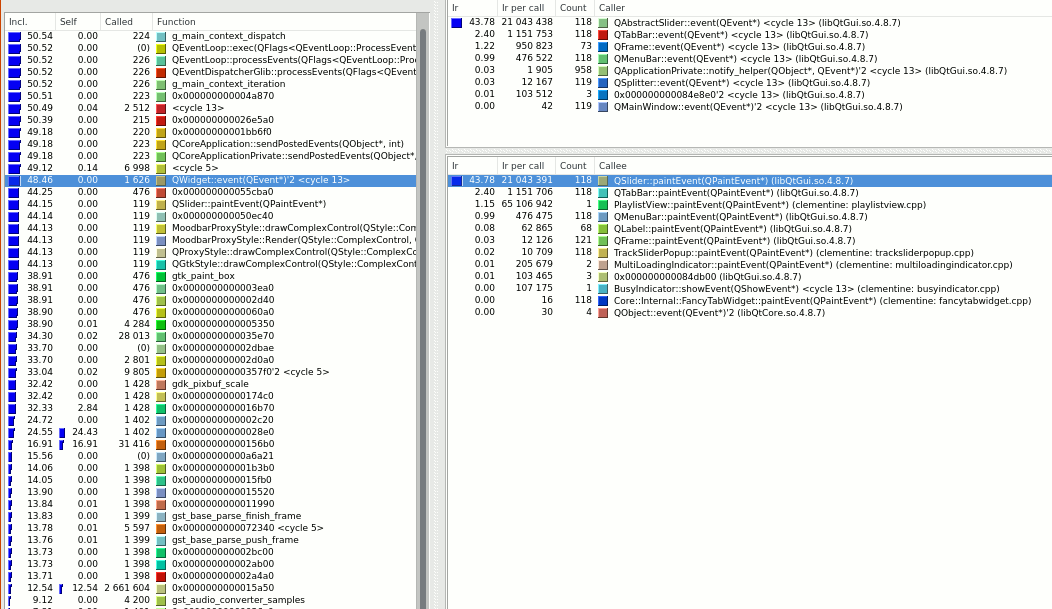
Can also observe a threefold reduction of maximized window's CPU load after applying https://github.com/clementine-player/Clementine/pull/5511 (22% vs. 5-8%).
Some naive profiling shows painting of QSlider was indeed the most likely culprit.
 kernc
on 6 Jul 2017
kernc
on 6 Jul 2017
Constant 25% CPU usage on 3 diff computers when playing audio/internet radio with the latest clementine portable build (Version 1.3.1-386-g62d1eb4).
No difference with everything possible disabled and unchecked. (internet/sources/lyrics/searches/library/analyzer/mood etc). CPU drops when not playing.
Playing the same audio with a different player is 0-1% CPU.
 jsnx11
on 19 Jul 2018
jsnx11
on 19 Jul 2018
Two years later... macOS shows 9-12% CPU streaming SomaFM without any extra UI shiny bits turned on. As plain as possible and still voracious. The hungriest app running by a wide margin! :(
jeanrajotte
on 19 Jul 2018
@jsnx11 I've long ago switched to music on console. Active usage is somewhere around 1 - 3% CPU.
Enhanced and supplemented by exo, its a pretty decent resource-saving solution. Yeah, not a GUI, but a TUI. Oh, and available in next to all linux distributions that have some kind of package repository. And Windows. And Mac OS X. I've even heard of early stages of an Android port ..
But for "real" GUI, I recently stumbled upon Sayonara Player, and have been using since it since its beta stages.
If the hubris of "our regular users are too dumb to understand how to open the sidebar" would disappear, AND this CPU overusage, Clementine could become my favorite cross-platform player again.
cu, w0lf.
ginsterbusch
on 20 Jul 2018
@jeanrajotte I know that time passed, but have question if you use any other than MacOS platform and see the issue there?
Could you please send us Sample output generated from Active Monitor feature described here?
http://www.thexlab.com/faqs/activitymonitor.html
Best regards.
JulianVolodia
on 15 Nov 2019
Related issues
 MiguelTremblay
·
6Comments
Clementine-Issue-Importer
·
6Comments
MiguelTremblay
·
6Comments
Clementine-Issue-Importer
·
6Comments
 SystemParadox
·
5Comments
SystemParadox
·
5Comments
 Pulfer
·
3Comments
Pulfer
·
3Comments
 MavropaliasG
·
3Comments
MavropaliasG
·
3Comments