Clarity: Filter popup is closed when selecting month/year in a date picker
Describe the bug
When a grid has a filter with a date picker in it, when you open the date picker and click on the year (or month), the filter popup is closed.
How to reproduce
https://stackblitz.com/edit/clarity-v3-light-theme-fkbqxn
Steps to reproduce the behavior:
- Open filter
- Open datepicker
- Click on year (or month)
Expected behavior
The filter popup stays open. So you can select a year (and day and month) and go back to the filter popup.
Versions
App
- Angular: 9.2.3
- Node: 13.10.1
- Clarity: 3.1.0
Additional notes
This is important for us because we have a filter popup with a date range. So if you select the start date, the filter popup is closed and you have to reopen it in order to select the end date.
This is also annoying in karma tests because we search for elements in the date picker via the filter popup, but when the filter popup closes, we can't find the elements inside the date picker popup.
We didn't have this problem in clarity 2.
 BramMeerten
All 15 comments
Oh interesting, this is nested popovers and isn't a case we had originally designed for. We'll need to investigate this, but its related to the popover refactorings.
 gnomeontherun
on 14 May 2020
gnomeontherun
on 14 May 2020
You actually need to open the filter dialog three times (the last one to click the Apply button) :(
 duzenko
on 9 Jul 2020
duzenko
on 9 Jul 2020
At the moment I fixed it by injecting ClrPopoverEventsService into my filter component and then setting in ngAfterViewInit
this.clrPopoverEventsService.outsideClickClose = false;
 real-artswan
on 9 Jul 2020
real-artswan
on 9 Jul 2020
I'm wondering, are you going to fix this? Cause my "hack" looks like a "hack" and it is not what ppl wait from a good UI framework
real-artswan
on 10 Jul 2020
Hi @real-artswan
We need to investigate and triage this issue. It seems that my putting the has-workaround label on the issue brought up concerns for you that we have de-prioritized this issue.
That is not the case.
It will be going through our usual triage process.
Thanks for checking in!
 mathisscott
on 10 Jul 2020
mathisscott
on 10 Jul 2020
@Jinnie what is the workaround for date picker inside the signpost?
 muruganG
on 1 Oct 2020
muruganG
on 1 Oct 2020
@Jinnie Is there any plan to fix the date picker inside signpost ?
muruganG
on 30 Oct 2020
We don't expect to have explicit support for a date picker inside of a signpost, because signposts are not intended to be used that way. It sounds like you want a modal there instead.
From our documentation about signposts: https://clarity.design/documentation/signposts
Usage
Signposts should be used when you want to show a small amount of contextual help of information without taking the user out of the current context. Use sparingly as a supplemental element and not as a primary method of adding detail.
- When the amount of content won't fit in a tooltip
- When you want to include a header, image or text/image links in the content
- When the information presented needs to stay in view at length (Unlike tooltips, signposts stay in view until the user interacts with another element)
Recommendations
- The popover should not be so large that it dominates the screen
- Make sure that the popover doesn't obstruct other important information on the screen
- With the exception of text/image links, don't insert any actionable components, such as buttons, in the dialog
- Don't rely on signposts as a primary method of displaying additional information - i.e. as a way to save space on a page
- Use sparingly as a device to add immediate, relevant information
It would possibly cause accessibility concerns as well.
gnomeontherun
on 30 Oct 2020
At the moment I fixed it by injecting ClrPopoverEventsService into my filter component and then setting in ngAfterViewInit
this.clrPopoverEventsService.outsideClickClose = false;
This is the current workaround. Few comments up in the thread.
 Jinnie
on 2 Nov 2020
Jinnie
on 2 Nov 2020
@Jinnie when i try to call ClrPopoverEventsService ,getting some error for outsideClickClose assignment related issue below iam sharing the snapshot console error
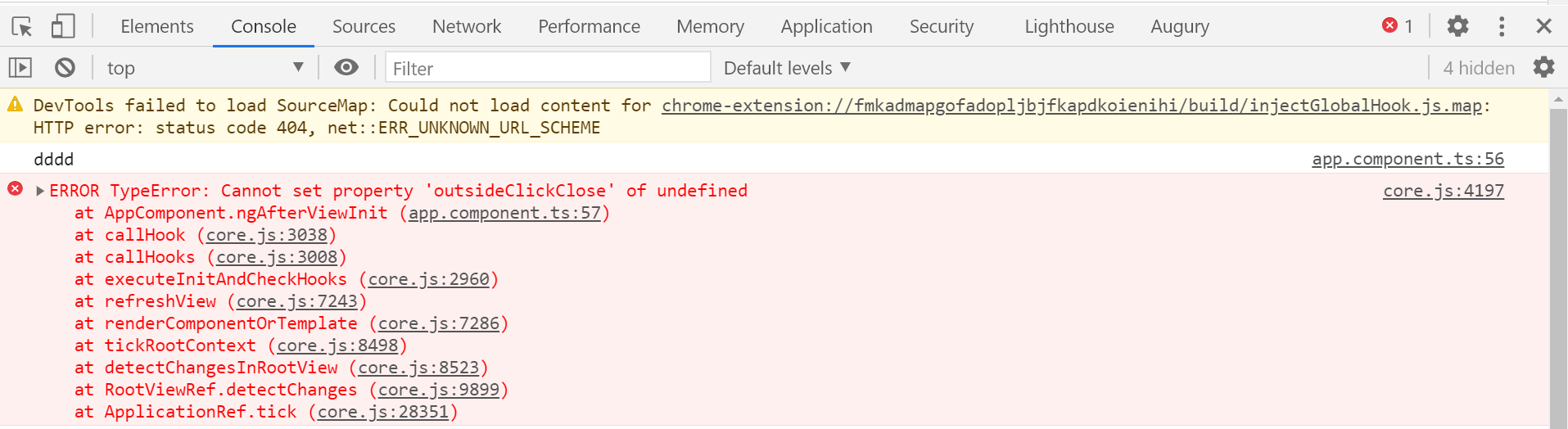
below the code part anything missed for assignment
variable declare with imported ClrPopoverEventsService
clrPopoverEventsService:ClrPopoverEventsService;
inside the class called the ngAfterViewInit()
ngAfterViewInit(){
this.clrPopoverEventsService.outsideClickClose=false;
}
muruganG
on 8 Nov 2020
@muruganG you must inject ClrPopoverEventsService in constructor the same way as you inject any other services.
Like constructor(private clrPopoverEventsService: ClrPopoverEventsService) {}
real-artswan
on 9 Nov 2020
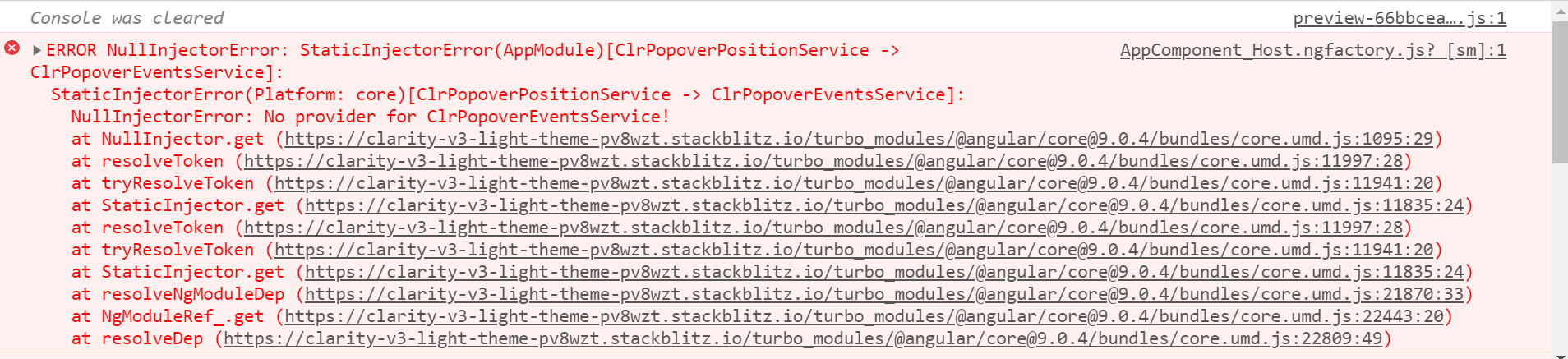
@real-artswan i tried above you given comment ,facing some other issue in angular 9 , also i shared the reproduceable code link and console error , can you check and let me know which clarity version it will work.
Reproduceable code link stackblitz below .
https://stackblitz.com/edit/clarity-v3-light-theme-pv8wzt?file=src%2Fapp%2Fapp.module.ts
muruganG
on 19 Nov 2020
I tried it myself and I see some transpilation and inheritance related issues with v3. It may be problematic to get a reliable workaround in v3. Also, I am curious to know how @real-artswan gets the correct providers for the position service in his case.
Though date-picker in a signpost is not a case we accept as important, the datepicker in a filter is something different.
Jinnie
on 20 Nov 2020
Our date filter is an implementation of ClrDatagridFilterInterface:
export class ClrDgDateFilterComponent<T = any> implements ClrDatagridFilterInterface<T, any>, AfterViewInit {

    constructor(filterContainer: ClrDatagridFilter, private clrPopoverEventsService: ClrPopoverEventsService) {
...
    }

    ngAfterViewInit() {
        this.clrPopoverEventsService.outsideClickClose = false;
    }
...
We use it in a grid like this
<clr-datagrid class='grid' (clrDgRefresh)="reloadItems($event)" [clrDgLoading]="loading">
...
    <clr-dg-column clrDgField="proposalDate" [clrDgSortOrder]="-1">Proposal Date
        <clr-dg-filter [clrDgFilter]="proposalDateFilter">
            <app-clr-dg-date-filter property="proposalDate" #proposalDateFilter></app-clr-dg-date-filter>
        </clr-dg-filter>
    </clr-dg-column>
...
Thanks, that makes sense then.
edit: still, the transpilation/inheritance errors remain in v3.
Jinnie
on 20 Nov 2020
Related issues
gnomeontherun
·
27Comments
 gracesnoh
·
41Comments
gracesnoh
·
41Comments
 Harsh072
·
23Comments
Harsh072
·
23Comments
 gitnarendra
·
27Comments
gitnarendra
·
27Comments
 hippee-lee
·
25Comments
hippee-lee
·
25Comments