Clarity: Column overlaps in Datagrid when using expandable rows
Describe the bug
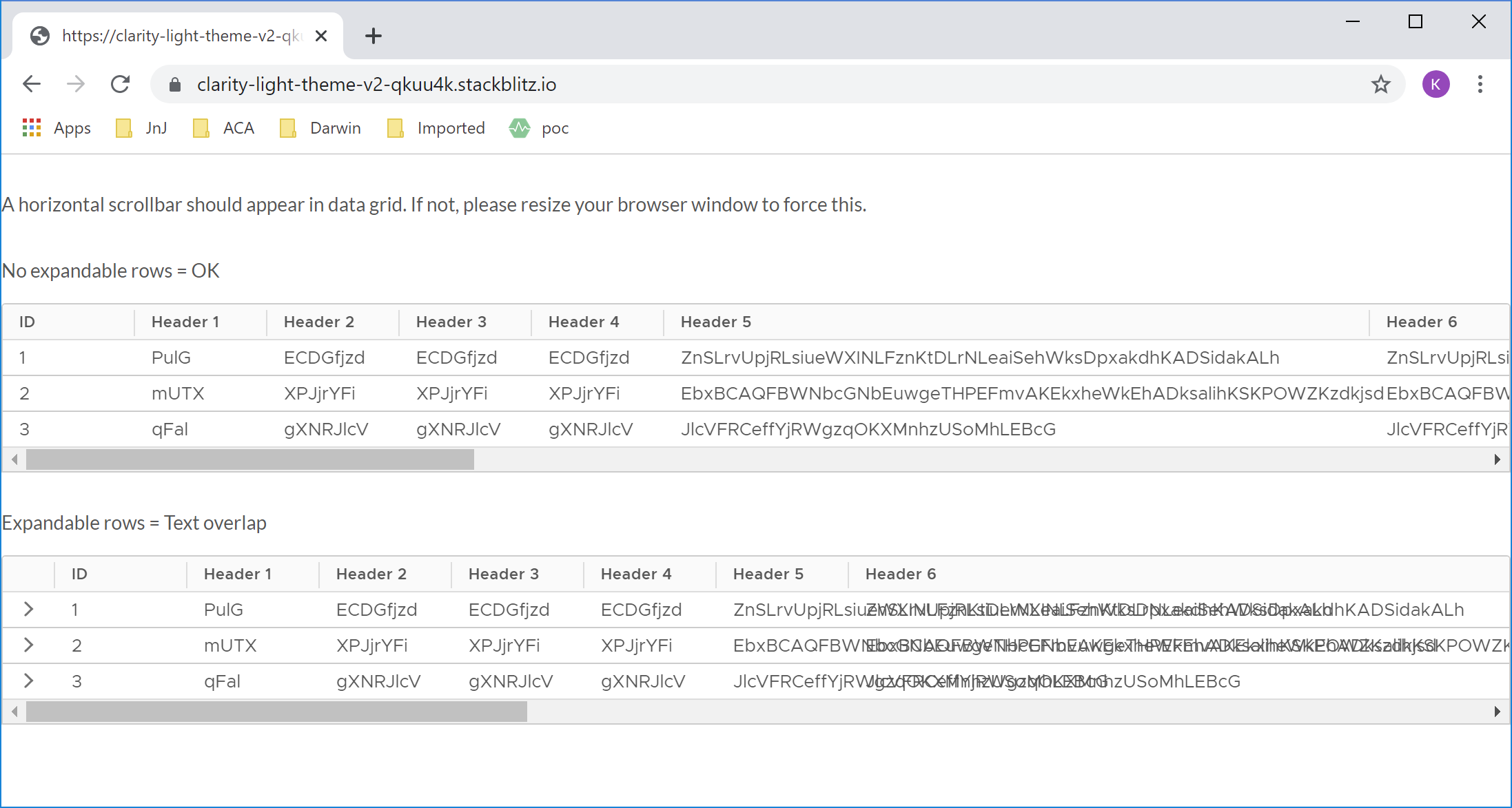
_A Datagrid with horizontal scrollbar and long text values can produce overlapping text when expandable rows are used._
How to reproduce
_https://stackblitz.com/edit/clarity-light-theme-v2-qkuu4k_
Steps to reproduce the behavior:
- Go to 'https://clarity-light-theme-v2-qkuu4k.stackblitz.io/'
- See overlapping text in columns
Expected behavior
_Column text should not overlap as is the case when no expandable rows are used._
Versions
App
- Angular: [8]
- Node: [8.9.4]
- Clarity: [2.0.0]
Device:
- Type: [ThinkPad]
- OS: [Windows 10]
- Browser [chrome]
- Version [78.0.3904.97]
 kvanthi
All 7 comments
Thanks for the report, something is indeed strange here. Updated to Clarity 2.3.1 and still see it happening, but there seems to be some bizarre calculation problem only for some of the columns. Will need to investigate.
 gnomeontherun
on 13 Nov 2019
gnomeontherun
on 13 Nov 2019
It looks as if the calculated widths for the headers are shifted by 1 column. The width of header x should be the width of header x+1, etc...
kvanthi
on 15 Nov 2019
Any progress on this reported bug?
 tnuttin1
on 24 Dec 2019
tnuttin1
on 24 Dec 2019
No progress yet, please review our labels to get a sense of what is being worked on or not.
gnomeontherun
on 24 Dec 2019
One workaround for now is to put an explicit width if you have an issue with a column like this.
gnomeontherun
on 10 Jan 2020
Another workaround
clr-dg-cell {
overflow: hidden;
text-overflow: ellipsis;
}
or
clr-dg-cell element-around-your-text {
overflow: hidden;
text-overflow: ellipsis;
}
 ezekeal
on 27 Jul 2020
ezekeal
on 27 Jul 2020
There is a workaround available for this issue, and we recommend using it for Clarity Angular. We would consider a contribution to address this issue if someone is able to work out a solution. As we build Clarity Core implementations, we expect that this issue won’t be an issue or will be configurable on the application side. To help us clean up our backlog, we are going to close this with a functional workaround available and suggest you follow updates for Clarity Core for enhancements that can support your use case with Clarity Core components.
gnomeontherun
on 2 Feb 2021
Related issues
 gperdomor
·
3Comments
gperdomor
·
3Comments
 reddolan
·
3Comments
reddolan
·
3Comments
 Vad1mo
·
3Comments
Vad1mo
·
3Comments
 BugsyFTW
·
3Comments
BugsyFTW
·
3Comments
 ChrisKaun
·
3Comments
ChrisKaun
·
3Comments
Most helpful comment
Thanks for the report, something is indeed strange here. Updated to Clarity 2.3.1 and still see it happening, but there seems to be some bizarre calculation problem only for some of the columns. Will need to investigate.