Clarity: Extra spacing between tab and tab content in IE 11
Describe the bug
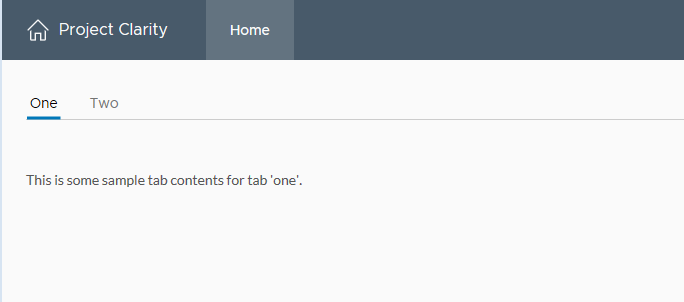
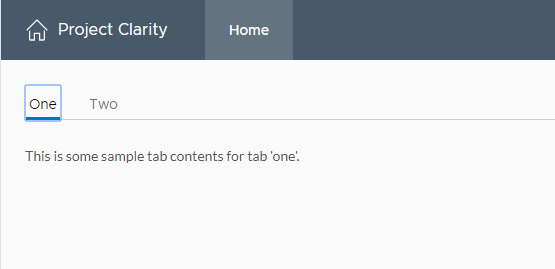
There appears to be extra spacing (or offset) between tab and tab content in IE 11.
IE 11:
Chrome:
How to reproduce
I have provided a stackblitz.io example:
https://angular-fhovtt.stackblitz.io
Expected behavior
I would expect the output would be similar given that no additional application styling has been applied.
Versions
App
- Angular: 8.0
- Node: 12.9
- Clarity: 2.0
Device:
- Type: Dell Latitude
- OS: Windows 7 Pro
- Browser IE 11, Chrome
- Version IE (11.0.9600.19403), Chrome (76.0.3809.100)
Additional notes
_Add any other notes about the problem here._
 davidrourke
All 11 comments
Thanks for reporting this. We will triage it and get it put in the backlog.
 hippee-lee
on 27 Aug 2019
hippee-lee
on 27 Aug 2019
I investigated this problem and I found out that there is a display: inline that cause this issue.
If you remove it, the extra spacing disappear. I tested it on Chrome, Mozilla, Edge and IE 11 and seems like this fix doesn't affect the usability.
Can I start working on it?
If so, can you assign the issue to me?
Thanks!
 florin-borceanu
on 27 Aug 2019
florin-borceanu
on 27 Aug 2019
Sure. Could you also test it on Safari?
Thanks, @florin-borceanu
 mathisscott
on 27 Aug 2019
mathisscott
on 27 Aug 2019
I just testing this fix in v2.3.0 and it does correct the issue with extra spacing, however it broke the layout of components within the tab control. In v2.2.2, a Datagrid component within a tab control would render to fill the width of the page. In v2.3.0 in does not. The also has a major impact on Flex Grid layouts which render with almost no width at all (which I recently reporting in #4035).
davidrourke
on 10 Dec 2019
@davidrourke Does the demo from #4035 cover this scenario as well?
 gnomeontherun
on 13 Dec 2019
gnomeontherun
on 13 Dec 2019
@gnomeontherun The tab spacing issue from this scenario was fixed, however as you can see from the screenshots and the demo, the fix introduced a bug in the layout of components.
davidrourke
on 13 Dec 2019
Any update on when this will be fixed? I am stuck on v2.1.2 and could really use some of the other fixes in newer release, but I can't because of issue's I've reported with IE 11.
davidrourke
on 8 Jan 2020
Given the holidays, some things have not been picked up. I'm marking it for review at next backlog review.
gnomeontherun
on 9 Jan 2020
@gnomeontherun can you tell me when this is going to be fixed? We have a large customer base that is still using IE11. I really would like to update to your latest v2.x release, but I can't because if this issue and the other's that I reported.
davidrourke
on 17 Feb 2020
I understand its a problem for you, and this could be a great contribution candidate since we haven't had capacity to prioritize this work. If you are able to help us isolate and identify a fix, we'd be happy to get it in.
gnomeontherun
on 21 Feb 2020
Hi there 👋, this is an automated message. To help Clarity keep track of discussions, we automatically lock closed issues after 14 days. Please look for another open issue or open a new issue with updated details and reference this one as necessary.
![github-actions[bot] picture](https://avatars.githubusercontent.com/in/15368?v=4&s=40) github-actions[bot]
on 25 Aug 2020
github-actions[bot]
on 25 Aug 2020
Related issues
 mayesgr
·
3Comments
mayesgr
·
3Comments
 ph55
·
3Comments
ph55
·
3Comments
 thojo
·
3Comments
thojo
·
3Comments
 JohannesRudolph
·
4Comments
JohannesRudolph
·
4Comments
 gperdomor
·
3Comments
gperdomor
·
3Comments
Most helpful comment
I investigated this problem and I found out that there is a
display: inlinethat cause this issue.If you remove it, the extra spacing disappear. I tested it on Chrome, Mozilla, Edge and IE 11 and seems like this fix doesn't affect the usability.
Can I start working on it?
If so, can you assign the issue to me?
Thanks!