Clarity: Request <clr-control-succes> for input
Summary
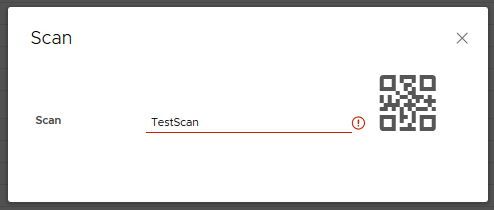
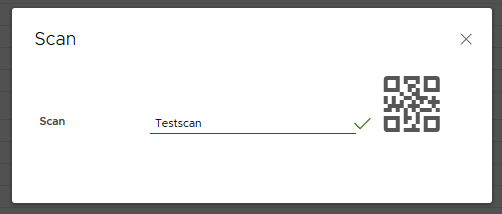
Clarity allows to apply an error state <clr-control-error></clr-control-error> after form validation. In certain circumstances it would be nice to have a standardized 'succes' <clr-control-succes></clr-control-succes> status for the validated input field.
Use case
In our current application we use a modal in which different kind of barcodes can be scanned, After input of a barcode string the form will be validated; when successful the modal will be closed and the current 'route' is changed after a time-out. When the barcode format is unknown, the clr-control-error will be set until the input is adjusted. Since the modal is closed by the application the user should be sure that the input is valid.
Additionally it can be a useful feature when a form with lots of inputs needs to be evaluated.
Examples
<clr-control-error></clr-control-error>
<clr-control-success></clr-control-success>
Workarounds
Not investigated
 Ergnos
All 6 comments
This can be useful for other async validators like valid username, valid credit card number and this kind of things
 Kangcor
on 29 Apr 2019
Kangcor
on 29 Apr 2019
This is an interesting suggestion, thank you for it. We’ll consider it and see what kind of design we need to make something like this possible.
 gnomeontherun
on 29 Apr 2019
gnomeontherun
on 29 Apr 2019
Small note:
looks like success check should be in rounded border as already exist in <clr-control-error></clr-control-error>.
<clr-icon shape="check-circle"></clr-icon> perfectly fit for it.
 pumano
on 13 May 2019
pumano
on 13 May 2019
Good request changing to needs design - will be an enhancement to inputs.
 colinreedmiller
on 12 Aug 2019
colinreedmiller
on 12 Aug 2019
@bdryanovski
Color spec in Figma:
https://www.figma.com/file/jG7B8SSsHwuj6GWqTUkn2d/Inputs-success-3326?node-id=0%3A1
colinreedmiller
on 28 Apr 2020
Hi there 👋, this is an automated message. To help Clarity keep track of discussions, we automatically lock closed issues after 14 days. Please look for another open issue or open a new issue with updated details and reference this one as necessary.
![github-actions[bot] picture](https://avatars.githubusercontent.com/in/15368?v=4&s=40) github-actions[bot]
on 26 Aug 2020
github-actions[bot]
on 26 Aug 2020
Related issues
 nkolchakov
·
3Comments
nkolchakov
·
3Comments
 BugsyFTW
·
3Comments
BugsyFTW
·
3Comments
 ChrisKaun
·
3Comments
ChrisKaun
·
3Comments
 JohannesRudolph
·
4Comments
JohannesRudolph
·
4Comments
 amellnik
·
3Comments
amellnik
·
3Comments
Most helpful comment
This can be useful for other async validators like valid username, valid credit card number and this kind of things