Clarity: Tree View ⇄ Datagrid Drag & Drop (design spec)
Description
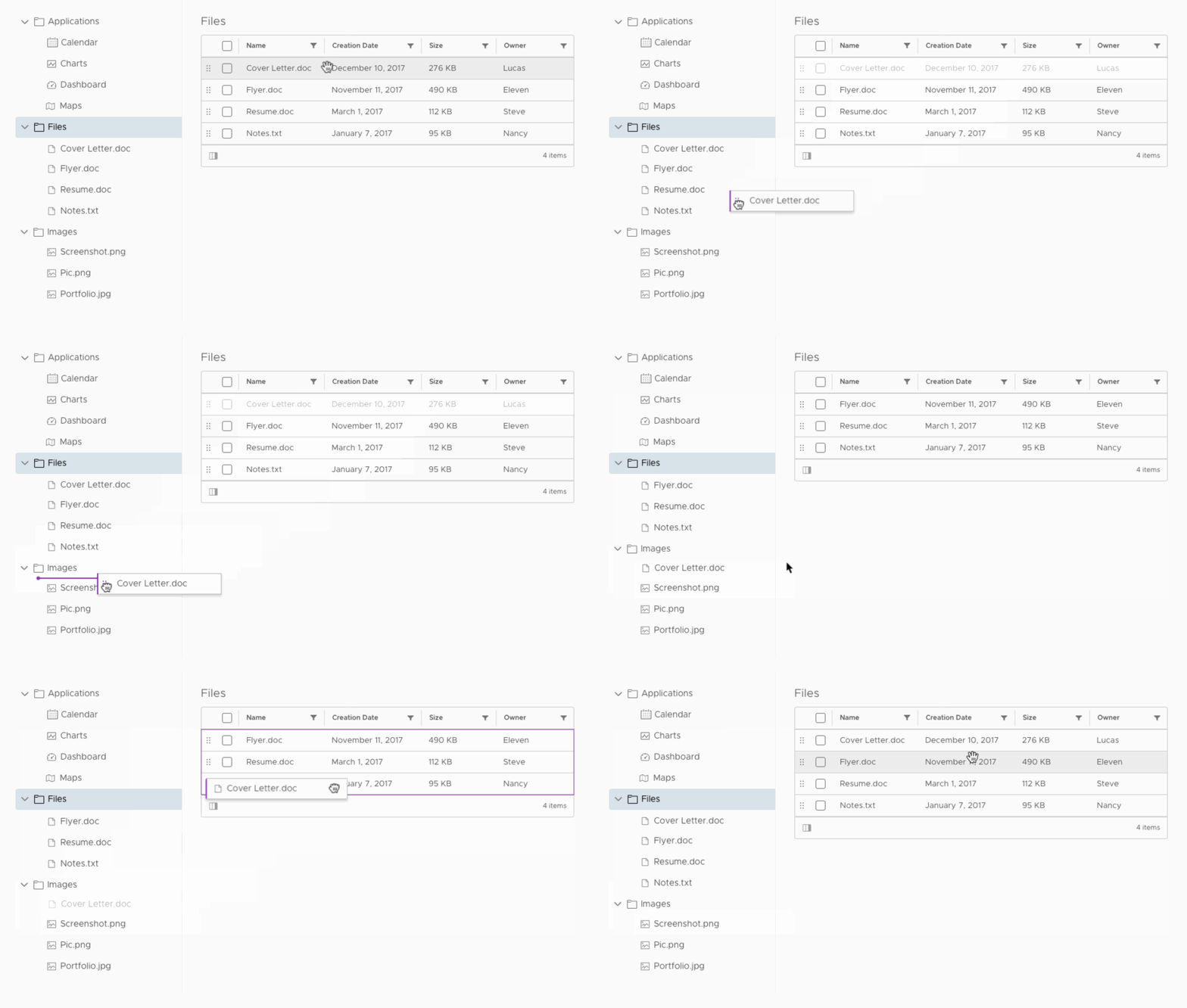
Items in a tree view can be dragged into a datagrid and items in a datagrid can be dragged into a tree view
Usage
To change the global organization and hierarchy of objects within an application across multiple components (in this case, between tree view and datagrid).
Behavior
Tree View to Datagrid
See documentation for Tree View Drag & Drop for general tree view dragging behavior.
When a tree node is dragged to a datagrid, the entire datagrid body (container that holds all of the rows) is highlighted as a drop target. Position drop targets do not appear because users cannot specify the order of datagrid items when filtering or sorting is enabled on the datagrid.

The drop target is triggered when the center of the dragged node enters the datagrid body.
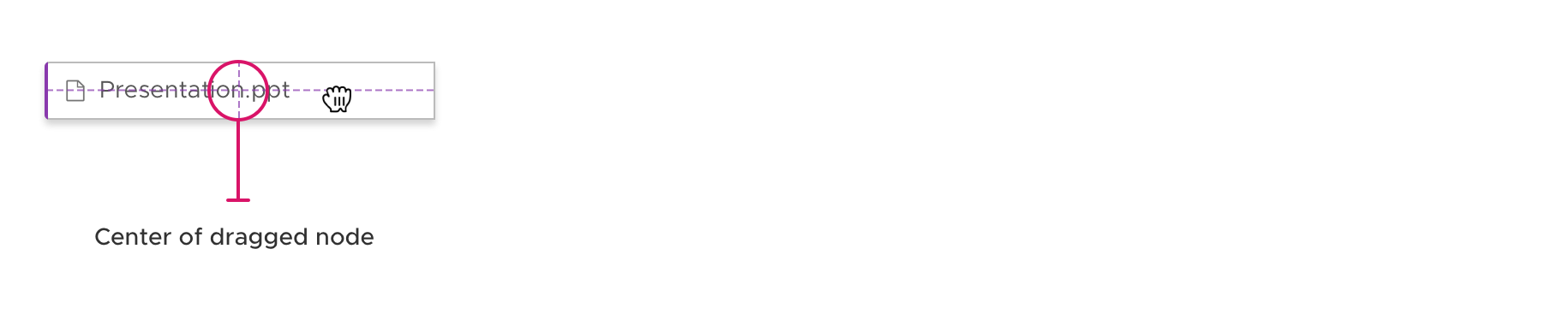
Unless the datagrid is filtered or sorted, the dropped node will appear at the top of the list of datagrid items by default for visibility.
Datagrid to Tree View
Datagrid rows have drag handles on the left edge and are represented by six-dot icons. Handles serve as visual affordances for drag & drop.

While handles act as visual indicators that drag and drop is an available action, the row is draggable from anywhere inside its container. All clickable elements inside of a datagrid row remain clickable but are also draggable.

When a datagrid item is dragged, a new element containing only the first column cell will drag with the cursor. The original datagrid item is greyed out, indicating its previous position.
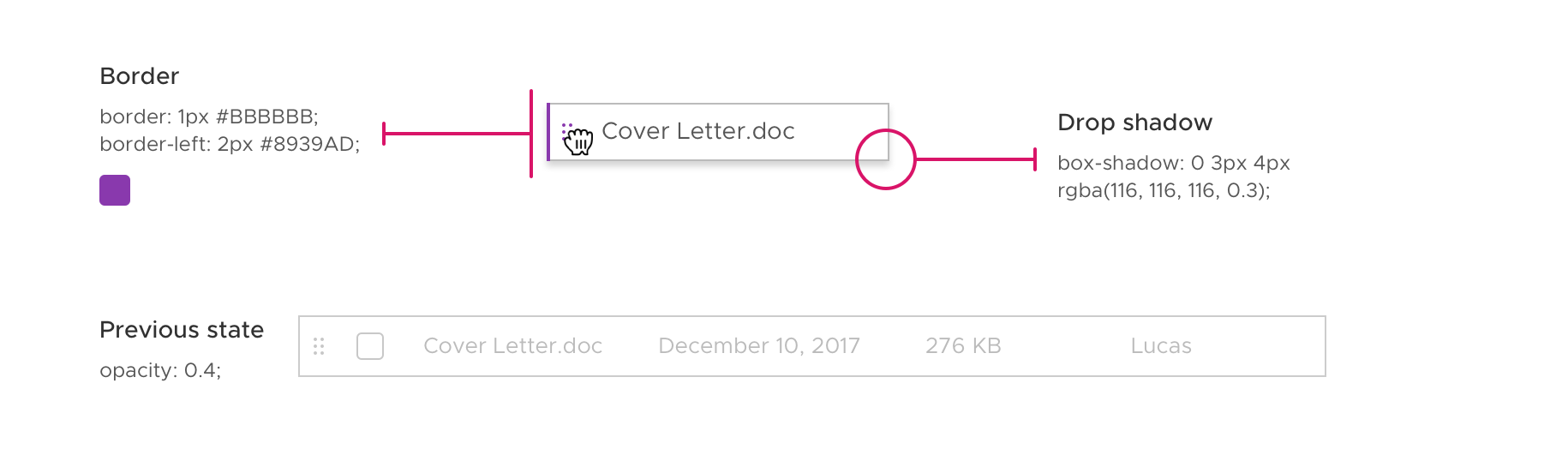
See documentation for Tree View Drag & Drop for default drop target behaviors.
If a child already exists within a parent node, that parent node will not have a parent target. For example, “Cover Letter.doc” exists in the parent node “Files”, so dragging it over the “Files” tree node will not trigger a parent drop target.
Keyboard Accessibility
Users can conduct drag & drop between tree view and datagrid using keyboard controls.
Tree View to Datagrid
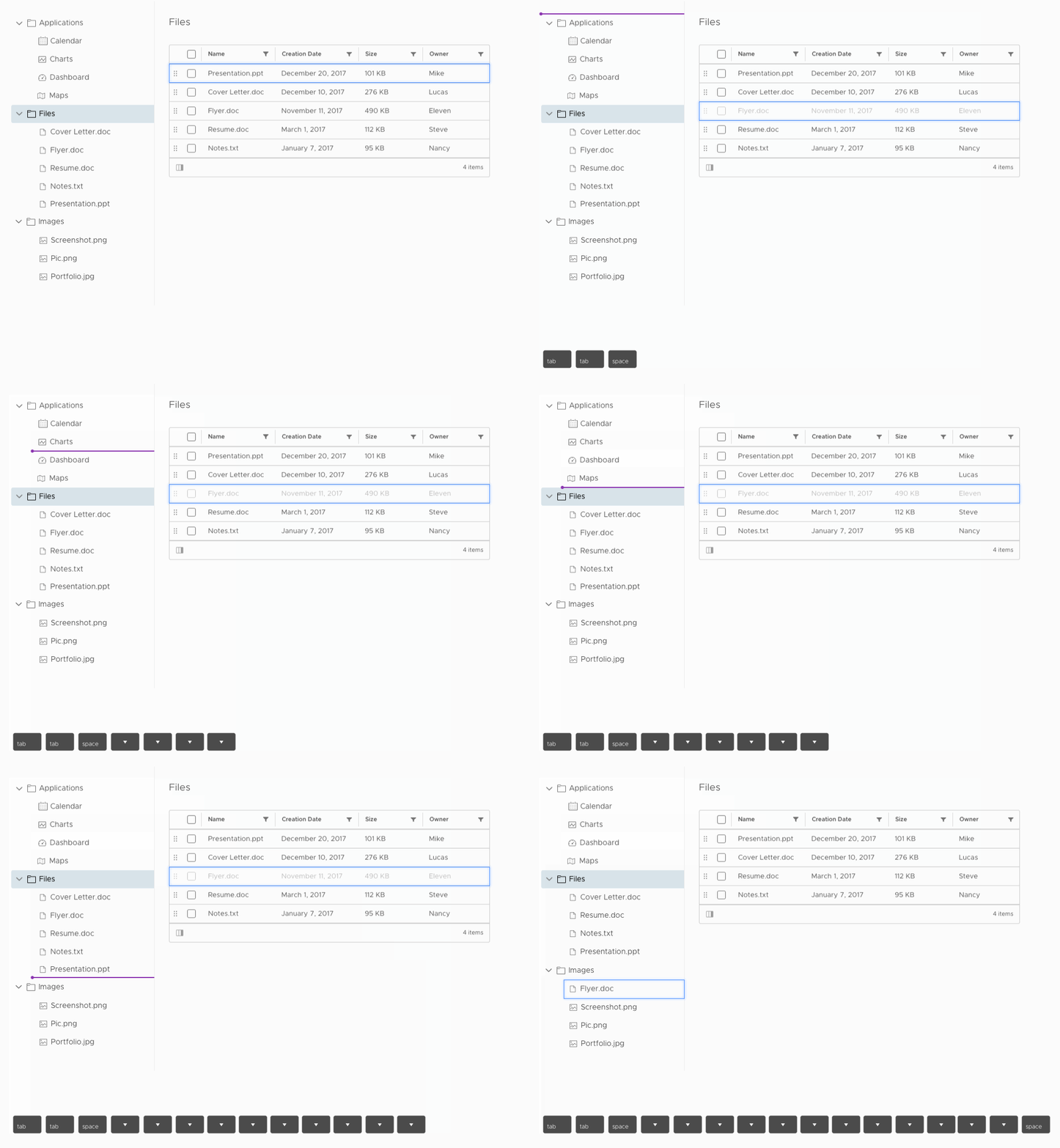
Tabbing to a node and pressing space bar will activate a dropdown allowing users to either jump to the datagrid or stay within the tree view. This enables users to bypass tabbing through long tree views in order to move objects between a tree view and datagrid.
Pressing spacebar again will drop the item where the drop target currently is.

Datagrid to Tree View
Tabbing to a datagrid item and pressing spacebar will automatically shift the drop target to the top of the tree view. Using the arrow keys, users can navigate the drop target to the desired location, and press spacebar again to confirm the drop.
Related Issues: #406 and #620
 gracesnoh
All 9 comments
Great work! Any ideas for a milestone?
 adestis-ds
on 7 Mar 2018
adestis-ds
on 7 Mar 2018
@adestis-ds
This isn't on our roadmap for the near term. What is your use case for it and when were you looking for it to land?
 mathisscott
on 7 Mar 2018
mathisscott
on 7 Mar 2018
Same use case as for #1826 and #1821. Basically we have a product catalog where the groups are displayed as a tree (left side) and the products within the groups are within a grid (right side). Looks exactly as in your design preview. We need drag and drop functionality in order to reorder groups within the tree (or place groups in other groups), to reorder the products within a group (there is by intention no sorting in place - marketing!) and to put products inside groups (or to change group assignments). It is possible to do it without drag and drop (e.g. by creating a dialog where you can change the parent group) however this is not the user experience we really want to create.
We plan to release a first version in May 2018 and major update in June. So first half year 2018 would be awesome.
adestis-ds
on 8 Mar 2018
Hi @adestis-ds
Our drag-and-drop work is focused primarily on the initial MVP deliverable. That work can be tracked here in #145.
I'm very confident that we will get the initial deliverable in place in your time frame. But I can't commit us to delivering both #1821 and #1825 in time for you to introduce it into your product in a stable fashion by May or June. I can say with high confidence that dragging and dropping within a single Treeview Will land before dragging and dropping from a Treeview to a data grid and vice-versa.
Once we have our MVP in place, we will have a better idea of how long a feature like these two would take. Right now, there are too many unknowns.
mathisscott
on 8 Mar 2018
Very important feature for me. I have same use case and relations between tree view and datagrid. I'm also waiting for it!
 pumano
on 22 Mar 2018
pumano
on 22 Mar 2018
Any update regarding the new roadmap for version 1.0? I have checked the milestones at https://github.com/vmware/clarity/milestones but could not find this issue there. Would be nice if you could provide the new release timeframe.
adestis-ds
on 26 Jun 2018
@adestis-ds we have not prioritized this feature yet because it is dependent upon other work, so that is why it is not in the milestones yet. Keep an eye on this ticket to know when its prioritized and work has started.
 gnomeontherun
on 26 Jun 2018
gnomeontherun
on 26 Jun 2018
Have we considered the case where a user drags an item to a datagrid which is filtered such that the dropped item joins the datagrid in an out of view position? This could even be a different page. In this case the user might assume the drag-and-drop operation was unsuccessful - the absence of the item from the tree view should suggest otherwise, but without some feedback they could be uncertain of the outcome and would need to scroll / paginate the datagrid to confirm success. In the example the datagrid receives a violet outline when it is activated as the drop target - perhaps if it were to flash on/off on release of the dropped item it would convey the necessary feedback that the operation was successful.
 colinreedmiller
on 10 Oct 2019
colinreedmiller
on 10 Oct 2019
The feature request here has been captured into our list and we’re going to take it into consideration as we develop Clarity Core capabilities. In an effort to clean up our backlog and focus our attention, I’m going to close this as captured in our feature requests. Please follow our development and releases to see when we release relevant components to make this possible. Future feature requests can be made in our GitHub Discussions.
gnomeontherun
on 4 Feb 2021
Related issues
 vzayko
·
3Comments
vzayko
·
3Comments
 ph55
·
3Comments
ph55
·
3Comments
 JohannesRudolph
·
4Comments
JohannesRudolph
·
4Comments
 srikanthps
·
3Comments
srikanthps
·
3Comments
 BugsyFTW
·
3Comments
BugsyFTW
·
3Comments
Most helpful comment
Great work! Any ideas for a milestone?