Ckeditor5: Grid layout / columns layout plugin?
Hi there,
Thank you for a great editor 🎉
Currently, I have a problem with creating a grid (or flex) layout inside CKEditor. The goal is to allow the user to create an two columns layout with content inside (full-screen width), maybe two images side by side for example.
I researched half of day and I think I can achieve it with Table plugin, but it seems too complex for normal users (our UX designer rejected me 😢 ), because the user must manual style each cell (set width of them). They only want to auto-create two columns with fullscreen width by default
This is example from Wordpress editor (TinyMCE):

So is there anyway else to achieve it with current CKEditor plugins? Or is it possible for me to create a plugin for this purpose?
Sorry for my stupid questions and sorry for my bad English too 😢
Thank you so much!
If you'd like to see this feature implemented, add a 👍 reaction to this post.
 bahung1221
All 3 comments
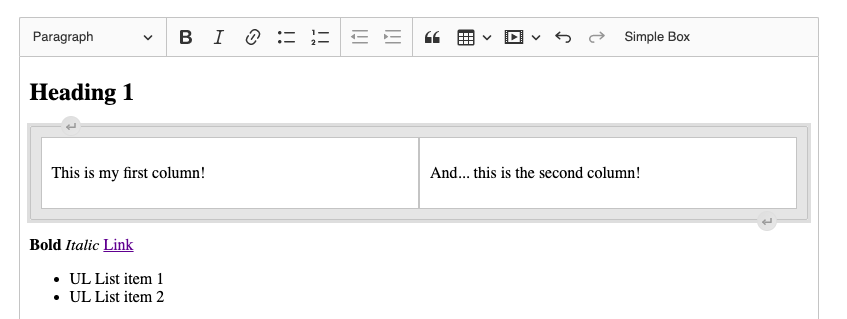
Hi! I believe the best way to achieve it will be creating a block widget with columns. I've created a really basic PoC based on our implementing a block widget guide. It should give you an idea how this stuff should be handled.
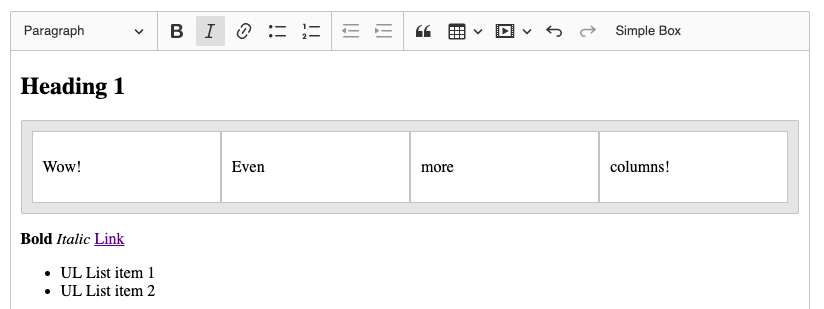
I've made a container display: flex and children width: 100% to make a column layout. You can style your elements the way you want. Also, I've removed simpleBoxTitle element (from the guide) and defined columns variable which tells how many elements should be in your container. Basically, createSimpleBox() function (at the end of the snippet) is the one which should interest you. Here is a code (it's mostly the one from our block widget guide):
import Plugin from '@ckeditor/ckeditor5-core/src/plugin';
import { toWidget, toWidgetEditable } from '@ckeditor/ckeditor5-widget/src/utils';
import Widget from '@ckeditor/ckeditor5-widget/src/widget';
import Command from '@ckeditor/ckeditor5-core/src/command';
import ButtonView from '@ckeditor/ckeditor5-ui/src/button/buttonview';

class SimpleBox extends Plugin {
    static get requires() {
        return [ SimpleBoxEditing, SimpleBoxUI ];
    }
}

class SimpleBoxUI extends Plugin {
    init() {
        console.log( 'SimpleBoxUI#init() got called' );

        const editor = this.editor;
        const t = editor.t;

        // The "simpleBox" button must be registered among the UI components of the editor
        // to be displayed in the toolbar.
        editor.ui.componentFactory.add( 'simpleBox', locale => {
            // The state of the button will be bound to the widget command.
            const command = editor.commands.get( 'insertSimpleBox' );

            // The button will be an instance of ButtonView.
            const buttonView = new ButtonView( locale );

            buttonView.set( {
                // The t() function helps localize the editor. All strings enclosed in t() can be
                // translated and change when the language of the editor changes.
                label: t( 'Simple Box' ),
                withText: true,
                tooltip: true
            } );

            // Bind the state of the button to the command.
            buttonView.bind( 'isOn', 'isEnabled' ).to( command, 'value', 'isEnabled' );

            // Execute the command when the button is clicked (executed).
            this.listenTo( buttonView, 'execute', () => editor.execute( 'insertSimpleBox' ) );

            return buttonView;
        } );
    }
}

class SimpleBoxEditing extends Plugin {
    static get requires() {
        return [ Widget ];
    }

    init() {
        console.log( 'SimpleBoxEditing#init() got called' );

        this._defineSchema();
        this._defineConverters();

        this.editor.commands.add( 'insertSimpleBox', new InsertSimpleBoxCommand( this.editor ) );
    }

    _defineSchema() {
        const schema = this.editor.model.schema;

        schema.register( 'simpleBox', {
            // Behaves like a self-contained object (e.g. an image).
            isObject: true,

            // Allow in places where other blocks are allowed (e.g. directly in the root).
            allowWhere: '$block'
        } );

        schema.register( 'simpleBoxDescription', {
            // Cannot be split or left by the caret.
            isLimit: true,

            allowIn: 'simpleBox',

            // Allow content which is allowed in the root (e.g. paragraphs).
            allowContentOf: '$root'
        } );

        schema.addChildCheck( ( context, childDefinition ) => {
            if ( context.endsWith( 'simpleBoxDescription' ) && childDefinition.name == 'simpleBox' ) {
                return false;
            }
        } );
    }

    _defineConverters() {
        const conversion = this.editor.conversion;

        // <simpleBox> converters
        conversion.for( 'upcast' ).elementToElement( {
            model: 'simpleBox',
            view: {
                name: 'section',
                classes: 'simple-box'
            }
        } );
        conversion.for( 'dataDowncast' ).elementToElement( {
            model: 'simpleBox',
            view: {
                name: 'section',
                classes: 'simple-box'
            }
        } );
        conversion.for( 'editingDowncast' ).elementToElement( {
            model: 'simpleBox',
            view: ( modelElement, viewWriter ) => {
                const section = viewWriter.createContainerElement( 'section', { class: 'simple-box' } );

                return toWidget( section, viewWriter, { label: 'simple box widget' } );
            }
        } );

        // <simpleBoxDescription> converters
        conversion.for( 'upcast' ).elementToElement( {
            model: 'simpleBoxDescription',
            view: {
                name: 'div',
                classes: 'simple-box-description'
            }
        } );
        conversion.for( 'dataDowncast' ).elementToElement( {
            model: 'simpleBoxDescription',
            view: {
                name: 'div',
                classes: 'simple-box-description'
            }
        } );
        conversion.for( 'editingDowncast' ).elementToElement( {
            model: 'simpleBoxDescription',
            view: ( modelElement, viewWriter ) => {
                // Note: You use a more specialized createEditableElement() method here.
                const div = viewWriter.createEditableElement( 'div', { class: 'simple-box-description' } );

                return toWidgetEditable( div, viewWriter );
            }
        } );
    }
}

class InsertSimpleBoxCommand extends Command {
    execute() {
        this.editor.model.change( writer => {
            // Insert <simpleBox>*</simpleBox> at the current selection position
            // in a way that will result in creating a valid model structure.
            this.editor.model.insertContent( createSimpleBox( writer ) );
        } );
    }

    refresh() {
        const model = this.editor.model;
        const selection = model.document.selection;
        const allowedIn = model.schema.findAllowedParent( selection.getFirstPosition(), 'simpleBox' );

        this.isEnabled = allowedIn !== null;
    }
}

function createSimpleBox( writer ) {
    // Define a number of columns in the container.
    const columns = 2;

    const simpleBox = writer.createElement( 'simpleBox' );

    for ( let i = 0; i < columns; i++ ) {
        const column = writer.createElement( 'simpleBoxDescription' );

        writer.append( column, simpleBox );

        // There must be at least one paragraph for the description to be editable.
        // See https://github.com/ckeditor/ckeditor5/issues/1464.
        writer.appendElement( 'paragraph', column );
    }

    return simpleBox;
}
.simple-box {
    padding: 10px;
    margin: 1em 0;

    background: rgba( 0, 0, 0, 0.1 );
    border: solid 1px hsl(0, 0%, 77%);
    border-radius: 2px;

    display: flex;
}

.simple-box > .ck-editor__nested-editable.simple-box-description {
    padding: 10px;
    margin: 0;

    background: #FFF;
    border: solid 1px hsl(0, 0%, 77%);

    width: 100%;
}
And the final result:
 Mgsy
on 30 Jun 2020
Mgsy
on 30 Jun 2020
I'll leave this issue as a feature request, so everyone interested in this feature, feel free to add :+1: to the first post to bump its popularity.
Mgsy
on 30 Jun 2020
Thank you for the guide, I got it, I will try it. BTW, I really appreciate this feature if it was supported by CKEditor officially 🎉 🎉
bahung1221
on 30 Jun 2020
Related issues
 Reinmar
·
3Comments
Reinmar
·
3Comments
 pomek
·
3Comments
pomek
·
3Comments
 PaulParker
·
3Comments
PaulParker
·
3Comments
 MCMicS
·
3Comments
MCMicS
·
3Comments
 MansoorJafari
·
3Comments
MansoorJafari
·
3Comments
Most helpful comment
Hi! I believe the best way to achieve it will be creating a block widget with columns. I've created a really basic PoC based on our implementing a block widget guide. It should give you an idea how this stuff should be handled.
I've made a container
display: flexand childrenwidth: 100%to make a column layout. You can style your elements the way you want. Also, I've removedsimpleBoxTitleelement (from the guide) and definedcolumnsvariable which tells how many elements should be in your container. Basically,createSimpleBox()function (at the end of the snippet) is the one which should interest you. Here is a code (it's mostly the one from our block widget guide):And the final result: