Ckeditor5: CKEditor crashes on Chrome 80
📝 Provide detailed reproduction steps (if any)
type few sentences, focus in the middle of previous sentence some letters, start to type, error in console appears, user can type but can't go to new line or delete characters
ckeditorerror.js:89 Uncaught TypeError: Cannot read property 'name' of undefined
at Differ.getChanges (differ.js:627)
at tableLayoutPostFixer (table-layout-post-fixer.js:240)
at eval (table-layout-post-fixer.js:231)
at Document._callPostFixers (document.js:517)
at Document._handleChangeBlock (document.js:373)
at Model._runPendingChanges (model.js:952)
at Model.enqueueChange (model.js:295)
at deleteSelectionContent (injectunsafekeystrokeshandling.js:129)
at handleUnsafeKeystroke (injectunsafekeystrokeshandling.js:100)
at Document.view.document.on.priority (injectunsafekeystrokeshandling.js:45)
from some tests on other computers it seems that on chrome79 and on firefox is OK
✔️ Expected result
no error in console, normal functioning of editor
❌ Actual result
error in console causes problems with basic ckeditor usage
📃 Other details
- Browser: chrome80
- OS: osx/win
- CKEditor version: ckeditor5-react @ 2.1.0, custom but basic build from 16.0.0 packages (but can be reproduced on 15.0.0 packages as well)
Installed CKEditor plugins:
"@ckeditor/ckeditor5-basic-styles": "16.0.0",
"@ckeditor/ckeditor5-core": "16.0.0",
"@ckeditor/ckeditor5-dev-utils": "12.0.7",
"@ckeditor/ckeditor5-editor-classic": "16.0.0",
"@ckeditor/ckeditor5-essentials": "16.0.0",
"@ckeditor/ckeditor5-font": "16.0.0",
"@ckeditor/ckeditor5-heading": "16.0.0",
"@ckeditor/ckeditor5-highlight": "16.0.0",
"@ckeditor/ckeditor5-image": "16.0.0",
"@ckeditor/ckeditor5-list": "16.0.0",
"@ckeditor/ckeditor5-paragraph": "16.0.0",
"@ckeditor/ckeditor5-react": "2.1.0",
"@ckeditor/ckeditor5-table": "16.0.0",
"@ckeditor/ckeditor5-theme-lark": "16.0.0",
"@ckeditor/ckeditor5-ui": "16.0.0",
"@ckeditor/ckeditor5-word-count": "16.0.0",
 wojciechkoszyk
All 28 comments
I can confirm this issue, I started to experience it since Chrome 80 has been rolled out too. It looks like a severe issue to me.
Here's an example screencast on our demo:
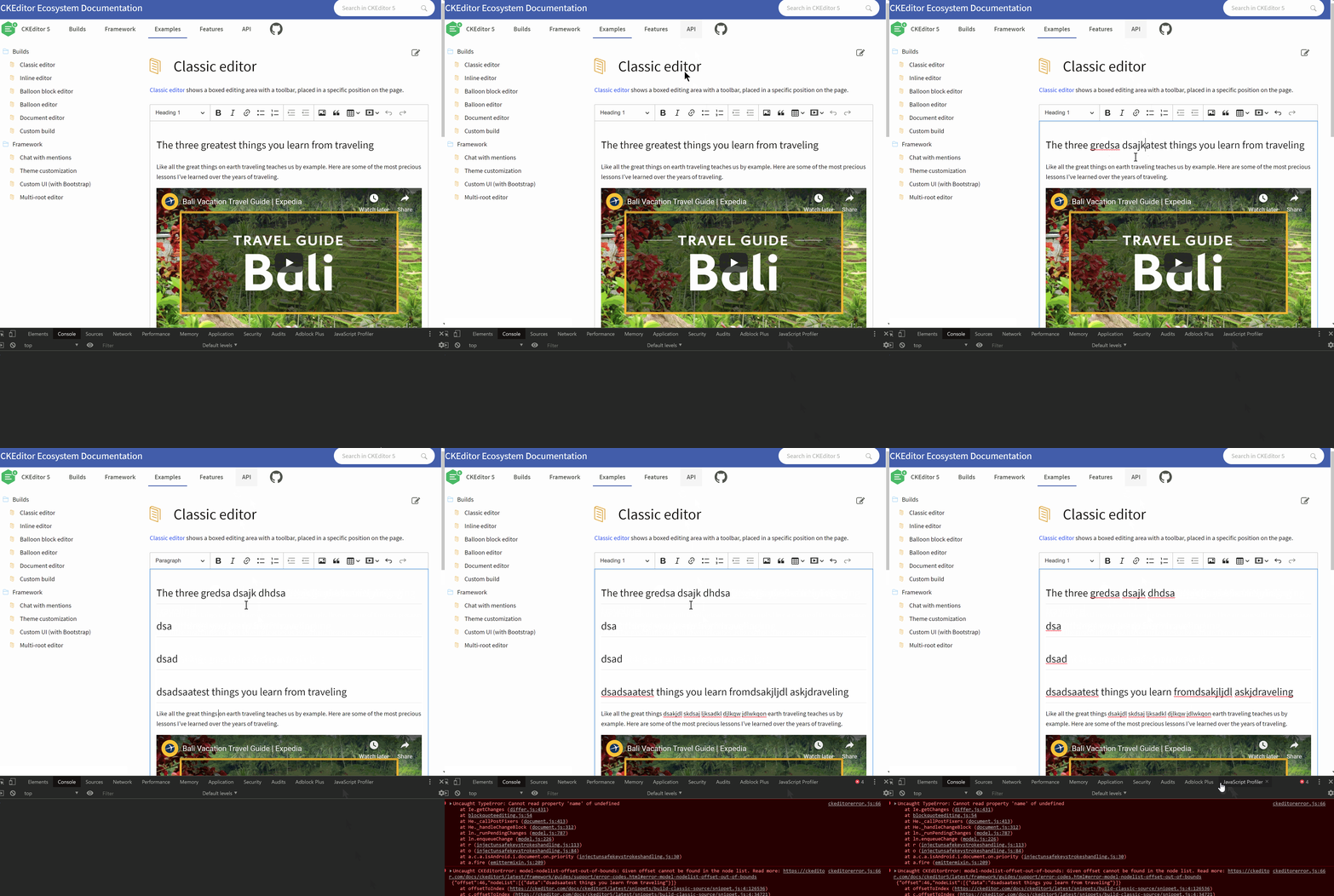
In this case it happened when I started to overwrite a ranged selection.
 mlewand
on 11 Feb 2020
mlewand
on 11 Feb 2020
I dont know whats with chrome80 but I cant even edit my ticket on github.com :( anyway, here's the video showing the problem: https://drive.google.com/file/d/1I63hC03jya1hVDBhfQZKWOWKWEVWUKam/view
we have "clean" browser without any plugins like grammarly etc.
wojciechkoszyk
on 11 Feb 2020
Thanks @wojciechkoszyk for detailed information. That's actually in line with my assumption, overwriting a ranged selection seems to be causing the error.
mlewand
on 11 Feb 2020
Thank you for confirming. Do you have any idea how to quickly fix it or is there any workaround for that? Am I right that Chrome80 is responsible for that bug?
wojciechkoszyk
on 11 Feb 2020
We'll update this issue as soon as we have some workaround, though it doesn't seem to be trivial at the first glance.
Yes, you're correct that Chrome 80 seems to be causing this, we didn't pick these issues earlier - so temporarily going back to v79 is a short term workaround.
mlewand
on 11 Feb 2020
Note: It occurs also in the previous CKEditor 5 releases >= 11.1.0. I can't reproduce it in 11.0.0.
 Mgsy
on 11 Feb 2020
Mgsy
on 11 Feb 2020
Thank you! I'll also try to find solution on my own
wojciechkoszyk
on 11 Feb 2020
I'm going to look into this. I know that Chrome 80 was released with a quite critical bug. I wonder if we're hitting it...
 Reinmar
on 11 Feb 2020
Reinmar
on 11 Feb 2020
@wojciechkoszyk / all there's one more thing you can do until the issue is resolved: there's a watchdog feature. It does some extra job to preserve the content and reload the editor in case of crash.
You'll find more information about this in the Watchdog guide.
Chrome@80 introduced some new bugs, like array.reduce being called wrong accumulator - this might be a reason for the issue.
mlewand
on 11 Feb 2020
seems like watchdog is not supported in ckeditor integrations (I'm using ckeditor5-react)?
wojciechkoszyk
on 11 Feb 2020
Unfortunately not yet :(
Reinmar
on 11 Feb 2020
This is a weird bug. So far I managed to reproduce it once. And then I clicked and clicked and clicked and nothing's happening.
Unfortunately, unless we have a scenario that keeps crashing in a more predictable way, I can't debug it.
@Mgsy, @mlewand do you have more luck here?
Reinmar
on 11 Feb 2020
Interesting. I've reproduced it, then instantly I tried to repeat the scenario and I'm not able to do it again. I'll keep trying and try to figure out some pattern.
Edit: Now I'm able to reproduce it again.

Edit: This scenario gives me 100% chance to reproduce:
- Open http://localhost:8125/ckeditor5-word-count/tests/manual/wordcount.html
- Put the caret at the end of the first paragraph.
- Type "dsa dsa dsa".
- Press Enter.
- Repeat step 3.
- Repeat step 4 and 5.
- Select some character in the second paragraph.
- Press "A" or any key.
Mgsy
on 11 Feb 2020
Few people from our company also have problems with reproducing it. For me it's 100% reproducable. And here is my quick finding:
file: ckeditor5-engine/src/model/nodelist.js
method getNodeStartOffset and getter maxOffset
if you change reduce function to forEach it just works... 😭
wojciechkoszyk
on 11 Feb 2020
So that's the reduce bug :D https://twitter.com/JanBenedictus/status/1227168801604677632
Thanks for letting us know. It means that we need to wait for the new Chrome version. It's going to ship faster than we'd ship (and people deploy) a hotfix in our code base. Also, we should probably also replace all other reduce() calls to avoid this issue.
Reinmar
on 11 Feb 2020
I can confirm that the workaround proposed by @wojciechkoszyk works:
diff --git a/src/model/nodelist.js b/src/model/nodelist.js
index 50aaa391..48cf1b26 100644
--- a/src/model/nodelist.js
+++ b/src/model/nodelist.js
@@ -99,7 +99,17 @@ export default class NodeList {
     getNodeStartOffset( node ) {
         const index = this.getNodeIndex( node );

-        return index === null ? null : this._nodes.slice( 0, index ).reduce( ( sum, node ) => sum + node.offsetSize, 0 );
+        return index === null ? null : sum( this._nodes.slice( 0, index ) );
+
+        function sum( nodes ) {
+            let sum = 0;
+
+            nodes.forEach( node => {
+                sum += node.offsetSize;
+            } );
+
+            return sum;
+        }
     }
The file to patch: https://github.com/ckeditor/ckeditor5-engine/blob/ecaf056af3280376e80e3fe5d0c2c8d883dbe236/src/model/nodelist.js#L102
If anyone's hitting this bug, this would be the first thing to try until the new version of Chrome is released.
However, there's a chance that some other use of reduce() in our codebase will also cause the editor to crash at some other scenario.
Reinmar
on 11 Feb 2020
OK now how to add that change into custom ckeditor build? 🤔 I've forked ckeditor5-core and ckeditor5-engine and use it in my project (pointed ckeditor5-core to my github fork and inside it in package.json pointed ckeditor5-engine to my github fork) and it builds fine but ckeditor doesn't load (this.config.names is not a function). Can you help applying that change? ;)
wojciechkoszyk
on 11 Feb 2020
Did you do the fix on the stable branch? The master branch may contain some breaking changes not compatible with older versions of other packages. Also, we don't allow that as it results often in a dependency duplication error.
 ma2ciek
on 11 Feb 2020
ma2ciek
on 11 Feb 2020
Thank you, seems like switching to stable branch did the job.
wojciechkoszyk
on 11 Feb 2020
Just FYI, Chrome released new version 80.0.3987.100 but unfortunately problem still occurs.
wojciechkoszyk
on 12 Feb 2020
The issue is on the Chrome side now officially closed (https://bugs.chromium.org/p/chromium/issues/detail?id=1049982#c75).
Reinmar
on 12 Feb 2020
The issue is on the Chrome side now officially closed (https://bugs.chromium.org/p/chromium/issues/detail?id=1049982#c75).
Thanks for the reply, if issue is fixed officially & closed, what would be the next step for us. Since writers are totally unable to write in ckeditor due to this issue.
Is there a way to know which upcoming version of chrome has this fix? and can we download this pre officially launched?
 danyal14
on 13 Feb 2020
danyal14
on 13 Feb 2020
If you need a quick fix you can introduce the patch mentioned in https://github.com/ckeditor/ckeditor5/issues/6222#issuecomment-584594975. This will instantly solve at least the one issue that we saw the most.
Unfortunately, IDK when the new version of Chrome will be available. Most likely in a couple of days. But whether it's tomorrow or on Wednesday, I can't tell.
Reinmar
on 13 Feb 2020
If you need a quick fix you can introduce the patch mentioned in #6222 (comment). This will instantly solve at least the one issue that we saw the most.
Unfortunately, IDK when the new version of Chrome will be available. Most likely in a couple of days. But whether it's tomorrow or on Wednesday, I can't tell.
We are using CDN version of CK Editor, where to put patch when using
https://cdn.ckeditor.com/ckeditor5/12.3.1/classic/ckeditor.js
And even if I host it by self the spaces are not allowed again.
danyal14
on 13 Feb 2020
It seems that the new version of Chrome will be available even today: https://bugs.chromium.org/p/chromium/issues/detail?id=1049982#c82
We are using CDN version of CK Editor, where to put patch when using
https://cdn.ckeditor.com/ckeditor5/12.3.1/classic/ckeditor.js
Unfortunately, you can't patch it if you use the CDN version. The other option for you would be to polyfill Array.prototype.reduce.
And even if I host it by self the spaces are not allowed again.
I don't understand what you mean.
Reinmar
on 13 Feb 2020
The fix has been deployed in 80.0.3987.106 which now available in Chrome stable channel.
mlewand
on 14 Feb 2020
Special thanks to @wojciechkoszyk and his team for providing the workaround ❤️
Reinmar
on 14 Feb 2020
From official tutorial for inline widget - still problem with cursor/focus in chrome (my version is 83.0.4103.106)
I've used code form here
https://ckeditor.com/docs/ckeditor5/latest/framework/guides/tutorials/implementing-an-inline-widget.html
 stasyabezruk
on 16 Jun 2020
stasyabezruk
on 16 Jun 2020
Related issues
 MCMicS
·
3Comments
Reinmar
·
3Comments
MCMicS
·
3Comments
Reinmar
·
3Comments
 PaulParker
·
3Comments
PaulParker
·
3Comments
 pomek
·
3Comments
pomek
·
3Comments
 pjasiun
·
3Comments
pjasiun
·
3Comments
Most helpful comment
Few people from our company also have problems with reproducing it. For me it's 100% reproducable. And here is my quick finding:
file: ckeditor5-engine/src/model/nodelist.js
method
getNodeStartOffsetand gettermaxOffsetif you change reduce function to forEach it just works... 😭