Ckeditor5: Expand selection when toggling bold and similar styles
🐞 Bug report
💻 Version of CKEditor: 5.x, in any form
📋 Steps to reproduce
- Select a word, make it bold
- Click in the middle of the bold word, and press "B" to unbold it
- The word is split into two halves with an empty block in the middle
✅ Expected result
In CKE4 the whole word would be unbolded.
❎ Actual result

It would make a lot of sense if it worked this way not only when unbolding, but also when making things bold. CKE4 didn't behave this way, but most other text editors (e.g. Word, Google Docs, OpenOffice, Aloha etc) do it.
So what I would expect:
- click in the middle of the word (probably only makes sense in the middle of a word, and not at the edges, the way it is implemented in most editors)
- click "B"
- the whole word is made bold
Here is an example video how OpenOffice handles that:
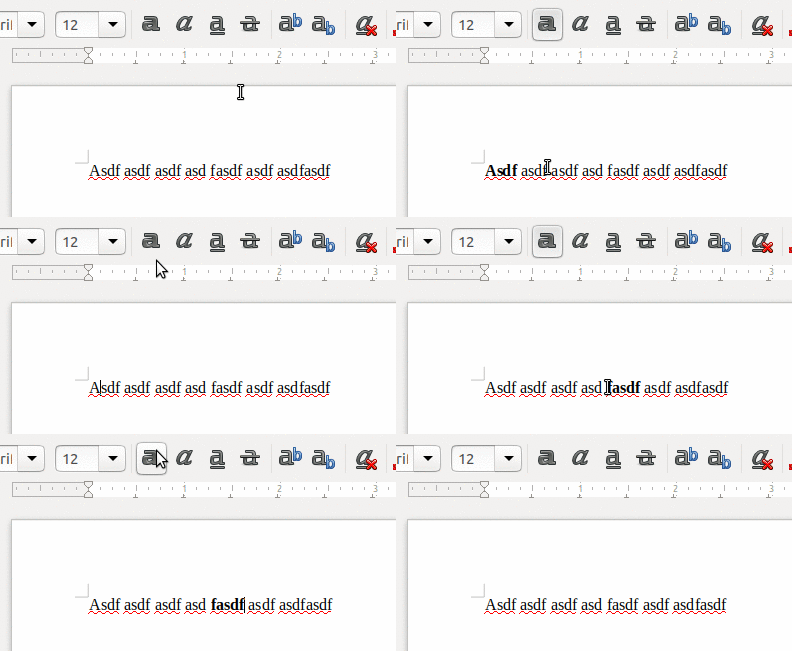
p.s. obviously what I've written is relevant not only to bold, but to any other formats as well
If you'd like to see this improvement implemented please add :+1: to this ticket.
 dimaip
All 13 comments
cc @oleq @Comandeer @fredck
 Reinmar
on 27 Jun 2018
Reinmar
on 27 Jun 2018
Note that, in CKEditor 4, the unbold behavior is not limited to words. It actually unbolds the whole bolded text that the selection is inside of (e.g. a bold paragraph). It doesn't happen in the boundaries of the bold text though, even if the bold button is "on".
 fredck
on 27 Jun 2018
fredck
on 27 Jun 2018
Note that, in CKEditor 4, the unbold behavior is not limited to words. It actually unbolds the whole bolded text that the selection is inside of (e.g. a bold paragraph).
Do you, guys, think this a useful behaviour? Or should this be limited to words?
Reinmar
on 27 Jun 2018
I see that Word has the same behavior. But it is not in the plain contenteditable (in Chrome, at least). anyway, I would tend to see this as a common feature, also because bolding in the middle of a word doesn't seem to have much sense :)
Not a critical feature, for sure.
fredck
on 27 Jun 2018
Hey! As our integration of CKE5 into Neos CMS progresses, this becomes more and more of a pressing issue. As I have learned, the issue lies in AttributeCommand. Here's some more input on how I think it should work:
- When unsetting, I think it should work unset the whole range with that attribute, even if it spans multiple words.
- When setting, if in the middle of the word, it should expand the selection to the whole word and set it.
If you want to, I could try to come up with a fix to AttributeCommand, but probably you'd spend more time reviewing it :)
dimaip
on 17 Jul 2018
When unsetting, I think it should work unset the whole range with that attribute, even if it spans multiple words.
When setting, if in the middle of the word, it should expand the selection to the whole word and set it.
The highlight feature works as you described (it does either removes highlight or changes if it has other style).
 jodator
on 17 Jul 2018
jodator
on 17 Jul 2018
The highlight feature works as you described (it does either removes highlight or changes if it has other style).
Only partially. It does not apply the highlight to the whole word if not highlighted already, though.
As our integration of CKE5 into Neos CMS progresses, this becomes more and more of a pressing issue.
Is this pressure comming from the end–users struggling to adapt to a different way of styling text? I mean: do you have any actual feedback confirming this is a serious UX issue for CMS users? It would certainly help us prioritize this issue.
 oleq
on 17 Jul 2018
oleq
on 17 Jul 2018
@oleq I can speak only on the behalf of 3 editors in my company, but yes, I asked them and that's the kind of behavior they are used to and they got upset once it stopped working.
Besides, it somehow leaves the editor in the broken state if I accidentally try to unbold the word without selecting all of it:

dimaip
on 17 Jul 2018
@f1ames Could you check that out ☝️? It looks like something related to https://github.com/ckeditor/ckeditor5-typing/issues/160 (or even the same?).
oleq
on 18 Jul 2018
Yes this is the same error as in https://github.com/ckeditor/ckeditor5-typing/issues/160 which means the renderer lost reference to or cannot find inline filler node. In the https://github.com/ckeditor/ckeditor5-typing/issues/160 it is caused by the fact the inline filler was modified by the browser (one ZWS removed), however in this case the cause may be different.
@dimaip Are there any particular steps/code which leads to this error (if it requires detailed description you may file a new issue to not clutter this one)?
 f1ames
on 30 Jul 2018
f1ames
on 30 Jul 2018
@f1ames don't think I can add any additional info here, it happens reliably within Neos CMS, but if I just try CKE demo it doesn't produce the error (though still it doesn't unbold the word).
dimaip
on 31 Jul 2018
it happens reliably within Neos CMS, but if I just try CKE demo it doesn't produce the error (though still it doesn't unbold the word)
@dimaip, just to clarify, so in Neos CMS it doesn't unbold the word and produces an error? Or it unbolds the word (is there any custom code/plugin which alters this behaviour) but throws an error?
f1ames
on 31 Jul 2018
@f1ames it doesn't unbold (rather splits the word in two tags, see original issue description) + throws the error.
No, we don't have any special plugins aimed at fixing this problem.
dimaip
on 31 Jul 2018
Related issues
 hamenon
·
3Comments
hamenon
·
3Comments
 devaptas
·
3Comments
devaptas
·
3Comments
 pandora-iuz
·
3Comments
pandora-iuz
·
3Comments
 MansoorJafari
·
3Comments
MansoorJafari
·
3Comments
 benjismith
·
3Comments
benjismith
·
3Comments