Current state in CKEditor 5
- Currently, the content is styled by features and these styles are built together with the editor UI styles.
- In a WYSIWYM editor it makes sense to propose content styles for editing. These styles don’t have to reflect the target page’s styles in 100%. After all, it’s all about the content. However, we're aware that in some cases developers will want to have the same styles in the editor as on the target pages.
- At the same time, certain features (tables, images) require careful styling also on the target page.
- The styles that we have are all prefixed with the
.ck-editor__editableclass. On the target pages such a class will not exist so those styles would not work OOTB anyway.
CKEditor 4
In CKEditor 4 there's contents.css – a separate file containing some of the feature's styles. The problem with this approach is that:
- It works automatically only in iframed editors. When you initialize an inline editor you need to load this style manually.
- It's really generic and not really useful for target pages. Actually, it's also not very useful for inline editors too because of its generic look.
- It's a single file which "knows" about all the features of the editor. Such file might have a tendency to grow. Especially that in CKEditor 5 more features use classes (e.g. font size feature, or highlights).
- In CKEditor 5 we can’t have a separate
contents.cssfile loaded automagically like in CKEditor 4 because CKEditor 5 must not load any additional resources itself. It neither can do this (because it requires dubious tricks) nor should (because it severely breaks DX – bundling becomes a nightmare).
The goal
The goal is to:
- Make it simpler for developers to learn about the content styles. To see a compiled version of all the editor content styles.
- If possible, make this stylesheet easily usable for them.
How?
Through a manually maintained guide in the docs. This is the simplest solution and perhaps completely satisfactory. We need some guide about this anyway so there's not a problem to copy&paste there all the features' styles. Of course, it means that we'll need to maintain this but these styles don't change so often. Also, to not forget about this we should have a comment in every content style CSS file saying that "a compilation of content styles can be found in".
In this guide, we could also mention that you need to prefix all these styles with your container's class/id. Or we could even leave the
.ck-editor__editableprefix or write them like:.your-container img { ... }By some API method (e.g.
ClassicEditor.getContentStyles())?It could accept a prefix-selector to be added to the content styles to ensure proper specificity
Editor content styles often cannot be reused 1:1 to style target website because of their low-specificity nature.This would be a better solution because it would let you retrieve the styles of exactly the features that you use and we wouldn't need to maintain anything manually. However, it's far more tricky to implement (I don't even know how we could do that).
 Reinmar
All 15 comments
This would be a better solution because it would let you retrieve the styles of exactly the features that you use and we wouldn't need to maintain anything manually. However, it's far more tricky to implement (I don't even know how we could do that).
This sounds like a nice solution to me, TBH. We'd need to have a registry of content styles like
// Image
editor.contentStyles.register( 'imageCaption', '.foo bar baz { color: "red" }' );
// Table
editor.contentStyles.register( 'table', '.a b c { background: "black" }' );
then developers can do that
editor.contentStyles.getStylesElement( someOptions ); //-> <style>...</style>
or
editor.contentStyles.injectStylesElement( where ); //-> Appends <style>...</style> to where
 oleq
on 19 Jan 2018
oleq
on 19 Jan 2018
A slightly related issue: https://github.com/ckeditor/ckeditor5-ui/issues/176.
oleq
on 19 Jan 2018
But what is with the use case for CMS? When the user want the frontend styles of the current active frontend template? Like in Wordpress for example, where you have a choice of millions of templates. Integrated styles seems not to be a solution in this case.
I'm missing the custom stylesheet like in the old version 4.
 rjgamer
on 10 Aug 2018
rjgamer
on 10 Aug 2018
We miss the ability to sandbox styles too. Unfortunately, that can only be provided if the content of the editor was wrapped with an <iframe> like in CKEditor 4 or Wordpress. But that has a huge number of implications. It allows sandboxing styles but causes many, many issues. Issues that we didn't want to battle initially and I'm not sure whether we'll decide to give it a try in the future too.
One possible solution (in the future) may be shadow DOM with its sandboxed styling. I'm not sure how would that work in practice and it's something to research. However, shadow DOM + contentEditable are not a thing yet, so we're waiting.
Reinmar
on 14 Aug 2018
You won't get the same success like with CKEditor 4 when you doesn't support sandbox styles. I know it is not easy implement and it is an OS project. But it is essential for an editor like CKEditor 5 to implement sandbox styles, to prevent losing market shares (not today, but in the coming few months/years).
I wish you the best to get it done soon. Because I really like the fast performance and fluid behaviour of your 5er version compared to your competitors. But sandbox styles (or external CSS) are a must for a success. :banana:
rjgamer
on 23 Aug 2018
@oleq, do you thunk it'd be possible to write a tool (e.g. a PostCSS plugin) that can extract all styles starting with .ck-content ... from our stylesheets? I'm thinking how best to document #1259.
Reinmar
on 24 Sep 2018
Yes, it's pretty easy in fact.
'use strict';
const log = require( '../logger' )();
const chalk = require( 'chalk' );
const postcss = require( 'postcss' );
module.exports = postcss.plugin( 'list-content-styles', function( options, callback ) {
return ( root, result ) => {
const contentRules = [];
root.walkRules( ( rule ) => {
rule.selectors.forEach( ( selector ) => {
if ( selector.match( '.ck-content' ) ) {
contentRules.push( rule );
}
} );
} );
for ( const rule of contentRules ) {
const ruleString = rule.toString()
.split( '\n' )
.map( line => '!' + line )
.join( '\n' );
log.info( `[ThemeImporter] Content style found:\n${ chalk.magenta( ruleString ) }\n` );
}
};
} );
then you add it to very end of the list of plugins in getPostCssConfig() and to check if it's working run the manual tests like npm run manual -- --files=core (or start a build to get all content styles for a build)
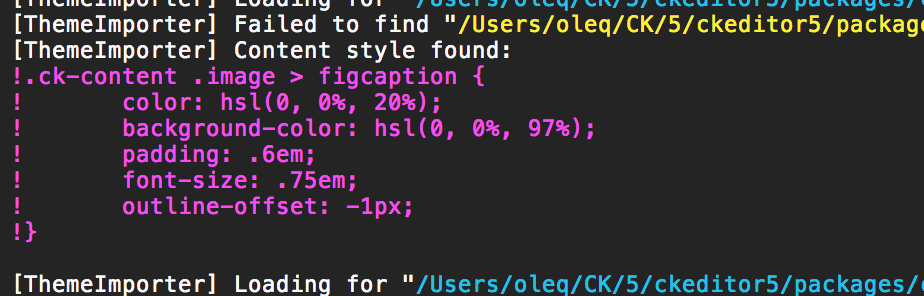
Then use some console magic like npm run manual -- --files=core | grep ! to filter out other logs.
Note that PostCSS processes things per file/import so there's no way to aggregate all styles and print them when it's all finished because the loader is running a new PostCSS process each time it finds a CSS file.
Then you can remove exclamation marks, run a code prettifier (unfortunately the output retains the deep nesting syntax from original CSS files) and you're done.
We could make it a part of ckeditor5-dev-utils controlled by some argument so we can call it on demand each time we create a build but spare us the noise when running manual tests.
Note that to get 100% of content styles the build/manual test/whatever must include all the features.
oleq
on 25 Sep 2018
Any update here?
rjgamer
on 3 Jan 2019
I also figured we could place all content styles in theme/content.css in all packages and then simply use webpack to extract those styles to an external CSS file:
plugins: [
    ...
    new MiniCssExtractPlugin( {
        filename: 'contentstyles.css'
    } )
],

module: {
    rules: [
        {
            test: /\.svg$/,
            use: [ 'raw-loader' ]
        },
        {
            test: /\.css$/,
            // ckeditor5-*/theme/content.css is never to be loaded using styles-loader
            exclude: /content\.css$/,
            use: [
                {
                    loader: 'style-loader',
                    options: {
                        // Note: "singleton" option does not work when sourceMap is enabled.
                        // See: https://github.com/webpack-contrib/style-loader/issues/134
                        sourceMap: true
                    }
                },
                {
                    loader: 'postcss-loader',
                    options: getPostCssConfig( {
                        themeImporter: {
                            themePath,
                            debug: true
                        },
                        sourceMap: true
                    } )
                },
            ]
        },
        {
            // All ckeditor5-*/theme/content.css goes to contentstyles.css
            test: /content\.css$/,
            use: [
                MiniCssExtractPlugin.loader,
                'css-loader',
                {
                    loader: 'postcss-loader',
                    options: getPostCssConfig( {
                        themeImporter: {
                            themePath,
                            debug: true
                        },
                        sourceMap: true
                    } )
                },
            ]
        },
        ...
    ]
},
This should solve
Make it simpler for developers to learn about the content styles. To see a compiled version of all the editor content styles.
If possible, make this stylesheet easily usable for them.
and all it requires from us is a code review in all packages so all .ck-content styles go to ckeditor5-*/theme/content.css.
These are the places:
/Users/oleq/CK/5/ckeditor5/packages/ckeditor5-basic-styles/theme/code.css
  6,1: .ck-content code {

/Users/oleq/CK/5/ckeditor5/packages/ckeditor5-block-quote/theme/blockquote.css
  6,1: .ck-content blockquote {

/Users/oleq/CK/5/ckeditor5/packages/ckeditor5-image/theme/image.css
  6,1: .ck-content .image {

/Users/oleq/CK/5/ckeditor5/packages/ckeditor5-image/theme/imagecaption.css
  6,1: .ck-content .image > figcaption {

/Users/oleq/CK/5/ckeditor5/packages/ckeditor5-image/theme/imagestyle.css
  10,1: .ck-content {

/Users/oleq/CK/5/ckeditor5/packages/ckeditor5-image/theme/imageuploadprogress.css
  11,1: .ck-content .image {

/Users/oleq/CK/5/ckeditor5/packages/ckeditor5-media-embed/theme/mediaembed.css
  6,1: .ck-content .media {

/Users/oleq/CK/5/ckeditor5/packages/ckeditor5-table/theme/table.css
  6,1: .ck-content .table {

/Users/oleq/CK/5/ckeditor5/packages/ckeditor5-theme-lark/theme/ckeditor5-image/imageuploadprogress.css
  11,1: .ck-content .image {
Yes, but what about the rendering? Without a content rendering in an iframe, the whole admin theme would get these styles.
rjgamer
on 7 Jan 2019
@rjgamer All content styles brought by CKEditor 5 are scoped under the .ck-content ... selector. They won't leak outside the editor.
oleq
on 7 Jan 2019
I hope we can have more than one instance of the editor with different look and feel.
 chiborator
on 7 Jan 2019
chiborator
on 7 Jan 2019
Forgive me if this is a stupid question, but I've tried searching the documentation and issues and this issue is the closest I found to my question and still not sure if it's relevant but my question is:
One of the CKEditor builds I'm using has a highlighter feature, I noticed that if I highlight text in green highlighter it makes use of CSS rules that came with the CKEditor npm package build.
It seems to me that if content is created using this editor and then posted to an API, and then a 3rd party implements their own website to consume the API and display the content, that their site will lack the CSS rules necessary to display the highlighting the same as it appears on my site.
I'm wondering if this is what you're talking about addressing when you say:
This would be a better solution because it would let you retrieve the styles of exactly the features that you use and we wouldn't need to maintain anything manually. However, it's far more tricky to implement (I don't even know how we could do that).
Does this mean that if this were how it was implemented, that one solution to ensure other parties could build sites that displayed the content in the same manner might be to provide a link (in the API responses that contained rich text content created by CKEditor) which would link to something like the contents.css of ckeditor4?
My initial thought was that the plugin would have to change to insert inline styles so that they would then result in the same look no matter where the content was later rendered but this seems like it would be bad practice.
 developingAlex
on 27 Feb 2019
developingAlex
on 27 Feb 2019
I'm wondering if this is what you're talking about addressing when you say:
Yes, that's exactly it. There should be a way for you to retrieve those styles and use them in the place where you display the editor content. It can be done via webpack outputting them, some CKEditor method (editor.getContentStyles()) or we could simply write a guide including such a snippet of CSS.
My initial thought was that the plugin would have to change to insert inline styles so that they would then result in the same look no matter where the content was later rendered but this seems like it would be bad practice.
CKEditor 5, at least for now, is focused on producing semantic content. Styles are not part of its data because they define how the content looks when being rendered. This is up to the developer who's integrating CKEditor 5 into his/her website to include there styles for that content. We only plan (for now) to provide developers the default styles that they could use.
Reinmar
on 28 Feb 2019
There's a working script that gathers the project's content styles implemented in #1805. Despite the script working properly I've got plenty of doubts:
- Is this what community actually needs?
- Are people gonna install
@ckeditor/ckeditor5only to generate the content styles (it's a@ckeditor/ckeditor5script FYI)? Most of the people don't use the root of the project but@ckeditor/ckeditor5-build-*or@ckeditor/ckeditor5-editor-*+ custom webpack/editor definition. - What about people who have their builds configured and they want content styles for their builds only?
- Similarly, what about people who have their features that bring their own
.ck-content ...styles and they'd love to see them included in the output of the script? - If the above is invalid, how and where to document this script?
- Should we maintain the up–to–date output of the script in the documentation? It boils down to
> Are people gonna install@ckeditor/ckeditor5...
cc @mlewand @Reinmar
oleq
on 1 Aug 2019
Related issues
 wwalc
·
3Comments
wwalc
·
3Comments
 pandora-iuz
·
3Comments
pandora-iuz
·
3Comments
 benjismith
·
3Comments
benjismith
·
3Comments
 metalelf0
·
3Comments
metalelf0
·
3Comments
 devaptas
·
3Comments
devaptas
·
3Comments
Most helpful comment
I also figured we could place all content styles in
theme/content.cssin all packages and then simply use webpack to extract those styles to an external CSS file:This should solve
and all it requires from us is a code review in all packages so all
.ck-contentstyles go tockeditor5-*/theme/content.css.These are the places: