Ckeditor5-react: CKFinder: Cannot read property 'modal' of undefined
I use CKFinder5 with React and cannot user the CKFinder. My Code:
import * as CKEditor from '@ckeditor/ckeditor5-react';
import * as DecoupledEditor from '@ckeditor/ckeditor5-build-decoupled-document';

[...]

<CKEditor
  editor={DecoupledEditor}
  onInit={(editor: any): void => {
    editor.ui.view.editable.element.parentElement.insertBefore(
      editor.ui.view.toolbar.element,
      editor.ui.view.editable.element
    );
  }}
  onChange={(event: any, editor: { getData(): string; }): void => {
    const data = editor.getData();
    this.onInputChange('body')(data);
  }}
  config={{
    toolbar: ['heading', '|', 'fontSize', 'fontFamily', '|', 'bold', 'italic', 'underline', 'strikethrough', 'link', '|', 'alignment:left', 'alignment:center', 'alignment:right', '|', 'numberedList', 'bulletedList', '|', 'ckfinder', 'insertTable', '|', 'undo', 'redo'],
    ckfinder: {
      uploadUrl: '/'
    }
  }}
  data={this.state.body}
/>
When I click the ckfinder button in my toolbar, the console throws the following error:
Uncaught TypeError: Cannot read property 'modal' of undefined
It seems like the error is thrown here:
window.CKFinder[e](n)
Any ideas? The rest is working fine.
 nsoeth
All 12 comments
Have you added ckfinder.js to a webpage? Check the CKFinder for CKEditor5 integration feature guide.
 jodator
on 3 Apr 2019
jodator
on 3 Apr 2019
No since the plugin is already enabed by the decoupled editor, I thought it would be initialized automatically. I'll try implementing it in my webpack-entry.
nsoeth
on 3 Apr 2019
@nsoeth The ckfinder.js is the CKFinder application code - it can be downloaded from our page as CKFinder 3 can be used as a standalone product.
jodator
on 3 Apr 2019
Thanks for clarification. It didn't work though, still the same error.
nsoeth
on 3 Apr 2019
I'm able to reproduce it. In CKEditor 5 builds integrated with React, clicking on the CKFinder icon throws the error in the console.
 Mgsy
on 11 Apr 2019
Mgsy
on 11 Apr 2019
And does it work without React? Are you able to check it out?
 pomek
on 11 Apr 2019
pomek
on 11 Apr 2019
And does it work without React? Are you able to check it out?
Sorry, I forgot to mention - it doesn't occur without React.
Mgsy
on 11 Apr 2019
Without TypeScript (pure JS / JSX), everything seems to work:
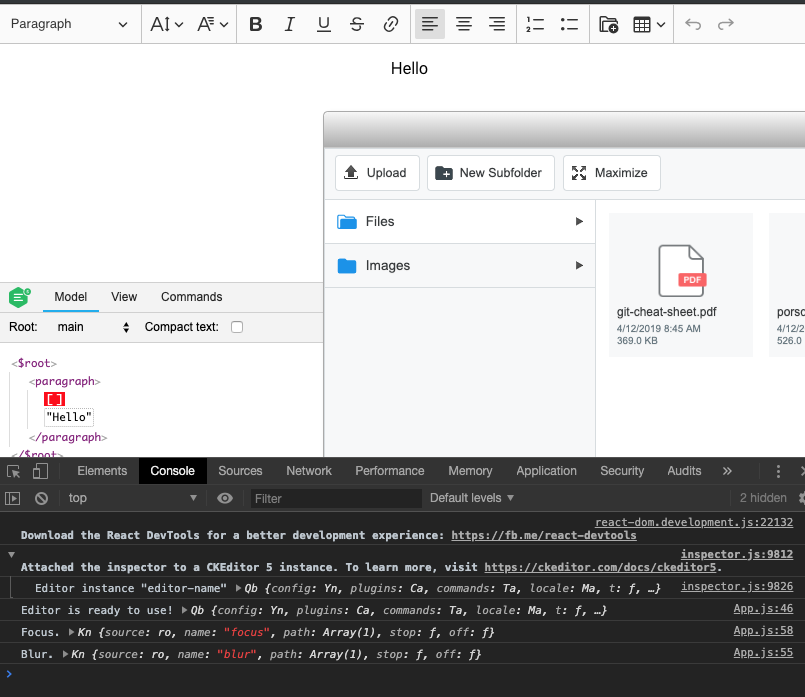
I added the following code before ending </head> tag in the main index.html file:
<script src="https://ckeditor.com/apps/ckfinder/3.4.5/ckfinder.js"></script>
<style>
  #ckf-modal {
    z-index: 10101 !important;
  }

  .ckf-file-preview-root {
    z-index: 10110 !important;
  }
</style>
Then I used ready-to-use @ckeditor/ckeditor5-build-decoupled-document from NPM (v12.1.0). Yesterday we released a new version of the build (and the rest of our packages). Maybe that's why everything works.
pomek
on 12 Apr 2019
@ckeditor/[email protected] works as well.
pomek
on 12 Apr 2019
Moving CKFinder asset at the end of the body tag does not change anything. It still works.
<body>
  <noscript>You need to enable JavaScript to run this app.</noscript>
  <div id="root"></div>
  <!--
    This HTML file is a template.
    If you open it directly in the browser, you will see an empty page.

    You can add webfonts, meta tags, or analytics to this file.
    The build step will place the bundled scripts into the <body> tag.

    To begin the development, run `npm start` or `yarn start`.
    To create a production bundle, use `npm run build` or `yarn build`.
  -->
  <script src="https://ckeditor.com/apps/ckfinder/3.4.5/ckfinder.js"></script>
</body>
I've reviewed it once again and I was able to successfully integrate CKFinder with CKEditor 5 + React. Make sure that your packages are updated.
Quick steps:
- Create an app with
create-react-app. npm install --save @ckeditor/ckeditor5-react @ckeditor/ckeditor5-build-decoupled-document.- Paste your code to the component.
- Add
<script src="https://ckeditor.com/apps/ckfinder/3.4.5/ckfinder.js"></script>to your page. yarn start.
Mgsy
on 15 Apr 2019

Similar problem has in Vue
"@ckeditor/ckeditor5-ckfinder": "^23.1.0"
 ghost
on 15 Jun 2021
ghost
on 15 Jun 2021
Related issues
 sirajalam049
·
10Comments
sirajalam049
·
10Comments
 RaulEscobarRivas
·
4Comments
RaulEscobarRivas
·
4Comments
 thtg88
·
7Comments
thtg88
·
7Comments
 varun-meka
·
14Comments
varun-meka
·
14Comments
 AnJooCo
·
5Comments
AnJooCo
·
5Comments
Most helpful comment
I've reviewed it once again and I was able to successfully integrate CKFinder with CKEditor 5 + React. Make sure that your packages are updated.
Quick steps:
create-react-app.npm install --save @ckeditor/ckeditor5-react @ckeditor/ckeditor5-build-decoupled-document.<script src="https://ckeditor.com/apps/ckfinder/3.4.5/ckfinder.js"></script>to your page.yarn start.