Ckeditor5-react: Using CKEditor Source with React JS
We are trying to use CKEditor5 with React app and we want to customize some of the feaures of CkEditor5 for our application. We are following the below steps:
1) Downloaded ckeditor5-react from npm.
2) Downloaded ckeditor5-classiceditor from npm.
3) Create a class ClassicEditor which is extending the classiceditor class.
4) The above class we have imported in our component which is responsible for rendering the CKEditor.
5) We are using the below code for rendering the CKEditor :+1:
Hello from CKEditor 5!
" />6) On rendering it gives an error on console
TypeError: Cannot read property 'getAttribute' of null in ckeditor.js of the ckeditor5-react module
Note : If we try to use ckeditor5-build-classic directly from the node_module the above code works and the editor is rendered. But since we need customization we cannot use the minified file from npm.
Can anyone please suggest some help.
 SKGGitHub
All 25 comments
Did you read the README – https://github.com/ckeditor/ckeditor5-react#integrating-ckeditor-5-from-source?
The error occurs because of a missing loader for SVG files in webpack configuration.
There is also a topic about the same error on SO – https://stackoverflow.com/a/50580493/3388924.
 pomek
on 2 Aug 2018
pomek
on 2 Aug 2018
I tried making the above configurations in the webpack but it started giving error such as
ERROR in ./node_modules/postcss-loader??ref--1-1!./node_modules/extract-text-webpack-plugin/dist/loader.js??ref--4-0!./node_modules/style-loader!./node_modules/css-loader!./node_modules/@ckeditor/ckeditor5-ui/theme/components/dropdown/dropdown.css
Module build failed: Error: Final loader didn't return a Buffer or String
any idea on the above.
SKGGitHub
on 2 Aug 2018
Hi @SKGGitHub, could you post the whole webpack config you have now? Probably you have a bug there.
 ma2ciek
on 2 Aug 2018
ma2ciek
on 2 Aug 2018
Please find the attached file
SKGGitHub
on 2 Aug 2018
You have duplicated loaders for the css files.
You need to uncomment this line: // Or /ckeditor5-[^/]+\/theme\/[\w-/]+\.css$/ if you want to limit this loader and use this regexp for the rule's test value
Uncomment the exclude in the second loader: // exclude: /ckeditor5-[^/\\]+[/\\]theme[/\\].+\.css/,
Alternatively, you can remove the second rule for the css, so all .css files will be parsed by the postcss and css loaders.
ma2ciek
on 2 Aug 2018
can anyone please go through the updated file as we are having trouble to understand the changes you mentioned above.
These are the new error for your reference
ERROR in ./node_modules/postcss-loader??ref--1-1!./node_modules/@ckeditor/ckeditor5-ui/theme/components/list/list.css
Module parse failed: Unexpected character '@' (6:0)
SKGGitHub
on 2 Aug 2018
The above config looks OK after changes.
But I don't know why the error shows up. I'll try to find it out. Something more related to the postcss configuration probably.
ma2ciek
on 2 Aug 2018
Hi...Can someone help us with this issue please.
SKGGitHub
on 6 Aug 2018
Hi, @SKGGitHub , it's very hard to reproduce it. Could you provide a very simple repository where we will see the error?
Note, that it's possible also to create custom editor builds, which you can use later in that guide https://github.com/ckeditor/ckeditor5-react#quick-start-using-ckeditor-5-builds. (You can copypaste the build to the react repository and import it like import ClassicEditor from 'path/to/the/editor/build';).
ma2ciek
on 6 Aug 2018
Hi @ma2ciek, fortunately my code is building now without above issue by making small changes as below:
"used css-loader instead of style-loader" to loader Ckeditor specific css files."
Although its building fine, but when I am trying to access the application editor doesn't shows up. Below attached is the error screen shot logged in console.

Other thing I was reading on website is that alone Css-loader of no use until it is combined with style-loader, so I had not full y removed style-loader but added css-loader.
Attached is the updated webpack file. Do you have any clue on it?
webpack.txt
SKGGitHub
on 10 Aug 2018
TypeError: Cannot read property 'getAttribute' of null means that SVG loader didn't load our SVG files correctly.
See how it should be configured for React-create-app – https://github.com/ckeditor/ckeditor5-react#changes-required-for-both-webpack-configurations-webpackconfigdevjs-and-webpackconfigprodjs because the rule is the same for other configurations too. Recently we resolved another problem – the SVG loader was duplicated and an invalid loader (from CKEditor 5 point of view) has higher priority (https://github.com/ckeditor/ckeditor5-react/issues/21#issuecomment-411297945). If CKEditor 5 needs specific loaders, most probably they must be valid only for CKEditor 5 assets so you need to exclude our assets from your loaders and your assets should not be parsed by CKEditor 5 loaders.
pomek
on 10 Aug 2018
In file that you attached I found:
            {
                test: /\.(png|jpg|gif|svg|eot|ttf|woff|woff2)$/,
                use: [{
                    loader: 'url-loader',
                    options: {
                        limit: 10000
                    }
                }]

            },
You need to exclude CKE5 SVG icons because both loaders catch SVG files and it produces an error that you have.
pomek
on 10 Aug 2018
Thanks for your help! Its going in right direction now. Editor is showing up now but not in very good shape. I would like to make you aware of few things before we proceed on this issue further:
To load CKEditor CSS files your documenation says to use style-loader whice generates a build error that "Can't find proper loader to load these files". So, I used CSS-Loader with Style-Loader which makes build successfull.
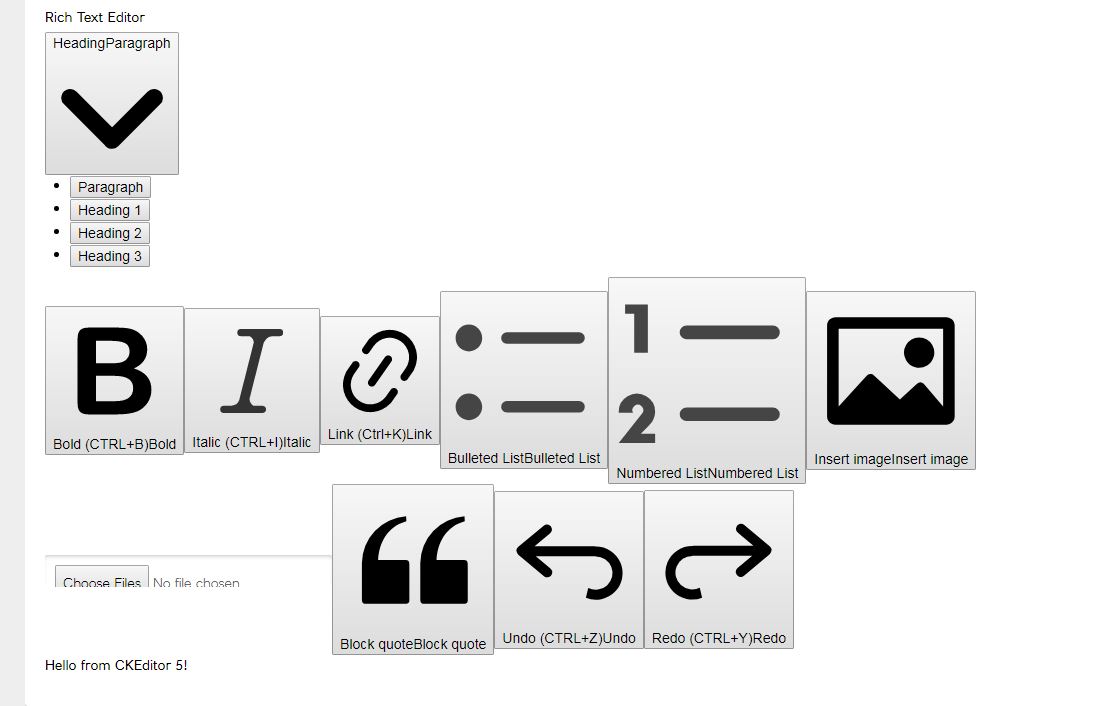
Now Build is successfull and editor is showing up but very distorted with big big icons of tollbar, in
very bad shape. Attached is the rendered image, Webpack file for ur reference please.I am using Webpack version "webpack": "^3.12.0"
 SKGGitHub
on 13 Aug 2018
SKGGitHub
on 13 Aug 2018
@SKGGitHub, quoting @ma2ciek:
it's very hard to reproduce it. Could you provide a very simple repository where we will see the error?
Even if you share your webpack configuration with us, it does not make any sense because we cannot run it in your environment.
Your problem could be solved a few days ago if we were able to install your minimal setup (in order to reproduce the issue) and call the build command. At this moment we are guessing whether something is broken on our side or may you have some mistake in the configuration…
pomek
on 13 Aug 2018
I don't know what does the bottom resolveLoader.alias do:
resolveLoader: {
    alias: {
       'css/css': 'style-loader'
    }
}
Is it necessary? Maybe it's somehow related to your problem?
To load CKEditor CSS files your documenation says to use style-loader whice generates a build error that "Can't find proper loader to load these files". So, I used CSS-Loader with Style-Loader which makes build successfull.
Could you make sure that css-loader and style-loader are installed?
These loaders without the css-loader should work. And if you use it, make sure that the importLoaders: 1 is set for the css-loader's options.
ma2ciek
on 13 Aug 2018
Yes both css-loader and style-loader are installed. Now I have updated webpack config as well to 4 but still rendered editor is having same distorted look. Attached is the pacage.json file to have look on installed dependancies. Does it make anydifference if we use webpack 4 or 3?
SKGGitHub
on 13 Aug 2018
Does it make anydifference if we use webpack 4 or 3?
Both versions should work well for our development environment.
But I've seen that you use ExtractTextPlugin, which works only for the webpack <=3.
ma2ciek
on 13 Aug 2018
I had moved to webpack 4 in a hope that it may resolve issue as CKeditor source build may support only webpack 4 but that is sorted now as u said it works well with 3 too.
To clarify your doubt, if you will notice carefully its just variable name but underline I am using mini-css-extract-plugin (which works well with webpack4) instead of extract-text-plugin.
Also, now I removed that resolveloader thing as well which u were doubting, but still i am in a need of css-loader to process ckeditor css files otherwise we get build issue like sample below and they are for every ckeditor css file.

And if I add css-loader like earlier, then editor is rendering on page but with very bad outlook as below:

SKGGitHub
on 13 Aug 2018
I was able to reproduce it with your latest config (modified a bit). It looks like something wrong happened with the postcss-loader as all styles disappeared. I'll try to find the bug.
ma2ciek
on 13 Aug 2018
That's gr8 news that at least we know where the bug is. I will keep watching this space for further update.
Appreciate your team for quick and kind support we get till the point.
SKGGitHub
on 13 Aug 2018
Ok, I've got it.
Please, remove these two lines:
 "postcss-cssnext": "^2.8.0",
 "postcss-import": "^8.0.2",
from the package.json and use that rule:
 { // To process CKEditor CSS files.
                test: /ckeditor5-[^/\\]+[/\\]theme[/\\].+\.css/,
                use: [
                    {
                        loader: 'style-loader',
                        options: {
                          singleton: true
                        }
                    },
                    {
                        loader: 'postcss-loader',
                        options: styles.getPostCssConfig( {
                            themeImporter: {
                                themePath: require.resolve('@ckeditor/ckeditor5-theme-lark')
                            },
                            minify: true
                        } )
                    }
                ]
            },
Run also rm -rf node_modules and npm i to make sure that the postcss stuff will install only from the @ckeditor/ckeditor5-dev-utils.
ma2ciek
on 13 Aug 2018
I had followed suggested steps and same loader issue still exists:
 SKGGitHub
on 13 Aug 2018
SKGGitHub
on 13 Aug 2018
Could you install [email protected] and test again?
I reinstalled it, maybe that caused the problem. Probably after upgrading it in package.json, a full reinstall is also needed.
ma2ciek
on 13 Aug 2018
@ma2ciek, @pomek, Its kind of working now with small changes. Thanks for your help and instant support.
SKGGitHub
on 14 Aug 2018
Could you describe what you needed to do? It will help other people in the future.
pomek
on 14 Aug 2018
Related issues
 nsoeth
·
12Comments
nsoeth
·
12Comments
 bipindubey-technoark
·
7Comments
bipindubey-technoark
·
7Comments
 thtg88
·
7Comments
thtg88
·
7Comments
 Slasherio
·
8Comments
Slasherio
·
8Comments
 c1trons
·
7Comments
c1trons
·
7Comments
Most helpful comment
Could you describe what you needed to do? It will help other people in the future.