Are you reporting a feature request or a bug?
I recently updated my ckeditor in aspnet web application with version 4.8. I wanted to take use of features like "paste from word".
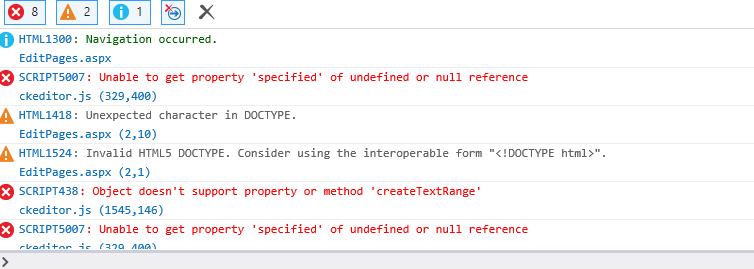
I downloaded the zip file from https://ckeditor.com/ckeditor-4/download/. Unzipped and replaced the complete folder in my solution. Now when I browse the website in edge and place my cursor in editor, it shows following errors:
SCRIPT438: Object doesn't support property or method 'createTextRange'
ckeditor.js (1545,146)
SCRIPT5007: Unable to get property 'specified' of undefined or null reference
ckeditor.js (329,400)
Due to this, other expected features also does not run as expected like loading image from local drive or flash.
Expected result
Shouldn't throw any error. And predefined features should run.
Actual result
No result.
If I try to add any image, dialogue box opens up, I enter the URL and click ok. Nothing happens instead shows following error yet again-
SCRIPT438: Object doesn't support property or method 'createTextRange'
ckeditor.js (1545,146)
SCRIPT5007: Unable to get property 'specified' of undefined or null reference
ckeditor.js (329,400)
Other details
I works fine in chrome and IE11.
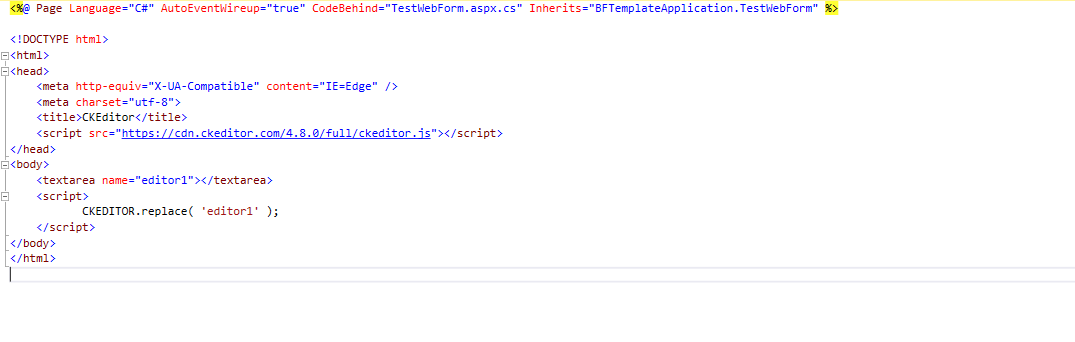
Works normal in edge if its plain html file. But when used in aspx file(aspnet web application), it does not work. PFA.
- Browser: Microsoft Edge 38.14393.1066.0
- OS: Windows 10
- CKEditor version: 4.8
- Installed CKEditor plugins:
Extra plugin- html5video
 banisirohi
All 8 comments
It does look like something is affecting CKEditor in your instance. Have you tried disabling extra plugins (html5video) to see if the problem still exists?
Are you able to reproduce the problem on our demos (https://ckeditor.com/ckeditor-4/ or https://sdk.ckeditor.com/samples/pastefromword.html)?
Maybe your asp website is including some extra plugins that affect the editor?
 mlewand
on 28 Dec 2017
mlewand
on 28 Dec 2017
Hi, It's been a while since we last heard from you. We're closing this issue for now. Still, feel free provide us requested feedback, so that we can reopen this issue.
mlewand
on 11 Jan 2018
Some how few of our company's security firewalls were not enabling ckeditor javascript to work as expected. Also had to add this line to get it work:
meta charset="utf-8"
It took a while to figure that out. So my apologies for late reply. This issue indeed can stay closed. Thanks for all your help.
banisirohi
on 4 Feb 2018
No prob, happy it worked for you. Thanks for the update.
mlewand
on 6 Feb 2018
I have the same problem, but in the version 4.9.1
I use tag meta charset = "utf-8"
is enable compatible mode of the ckeditor.
IE10 and IE11 sucess, but EDGE show errors.
Help?
 robsonkades
on 2 Apr 2018
robsonkades
on 2 Apr 2018
Hi @robsonkades, did it work for you? It's still giving me the same error.
 akashbiz
on 18 Apr 2018
akashbiz
on 18 Apr 2018
@robsonkades Can you please share what errors do you see running it in EDGE.
banisirohi
on 18 Apr 2018
I was able to solver...
my app module;
loadAssync(asyncDependencies).then(() => {
  if (loadDependences) {
return loadAssync(https://cdn.ckeditor.com/4.9.1/full/ckeditor.js)
.then(() => loadAssync(https://cdnjs.cloudflare.com/ajax/libs/ng-ckeditor/0.2.1/ng-ckeditor.js))
.then(() => dependencies.push("ngCkeditor"));
}
}).then(startAngularApp);
`
function startAngularApp() {
const app = angular
.module('app', dependencies)
.directive('ckeditor', ckEditor)
.config(config);
angular.element(document).ready(() => angular.bootstrap(document, [app.name]));
return app.name;
}
function ckEditor($rootScope) {
if (!loadDependences) return;
CKEDITOR.env.isCompatible = true
return {
require: 'ngModel',
link: function (scope, element, attr, ngModel) {
CKEDITOR.env.isCompatible = true;
scope.editorOptions = {
height : 250,
toolbar : 'Basic',
removePlugins : 'save'
}
}
}
}
my html
`
robsonkades
on 8 May 2018
Related issues
 jurajkapsz
·
3Comments
jurajkapsz
·
3Comments
 Mathiyazhagan07
·
4Comments
mlewand
·
5Comments
Mathiyazhagan07
·
4Comments
mlewand
·
5Comments
 dennisjsq
·
5Comments
dennisjsq
·
5Comments
 markdon
·
5Comments
markdon
·
5Comments
Most helpful comment
I have the same problem, but in the version 4.9.1
I use tag meta charset = "utf-8"
is enable compatible mode of the ckeditor.
IE10 and IE11 sucess, but EDGE show errors.
Help?