Ckeditor4: Cannot set property 'dir' of undefined
Are you reporting a feature or a bug?
Bug
Check if the issue is already reported
Maybe there is a link with #502
Provide detailed reproduction steps (if any)
CKEditor cannot instanciate.
This is the code :
            this.editorInstance = CKEDITOR.replace(this.htmlElement, {
                language_list: ["ar:Arabic:rtl", "fr:French", "es:Spanish", "en:English"],
                disableNativeSpellChecker: true,
                removeButtons: "Subscript,Superscript",
                extraPlugins: "colorbutton,print,font,autolink,justify",
                removePlugins: "sourcearea,maximize,image,stylescombo,scayt,wsc,elementspath,blockquote,link,specialchar,resize",
                title: this.title,
                readOnly: false,
                resize_enabled: false,
                autoGrow_minHeight: 200,
                autoGrow_bottomSpace: 50,
                autoGrow_onStartup: true,
                toolbarStartupExpanded: false,
                toolbarGroups: [
                    { name: 'others' },
                    { name: 'clipboard', groups: ['clipboard', 'undo'] },
                    { name: 'editing', groups: ['find', 'selection', 'spellchecker'] },
                    { name: 'links' },
                    { name: 'insert' },
                    { name: 'forms' },
                    { name: 'tools' },
                    { name: 'styles' },
                    '/',
                    { name: 'basicstyles', groups: ['basicstyles', 'cleanup'] },
                    { name: 'paragraph', groups: ['list', 'indent', 'blocks', 'align', 'bidi'] },
                    { name: 'colors' },
                    { name: 'document', groups: ['mode', 'document', 'doctools'] }
                ]
            });
Expected result
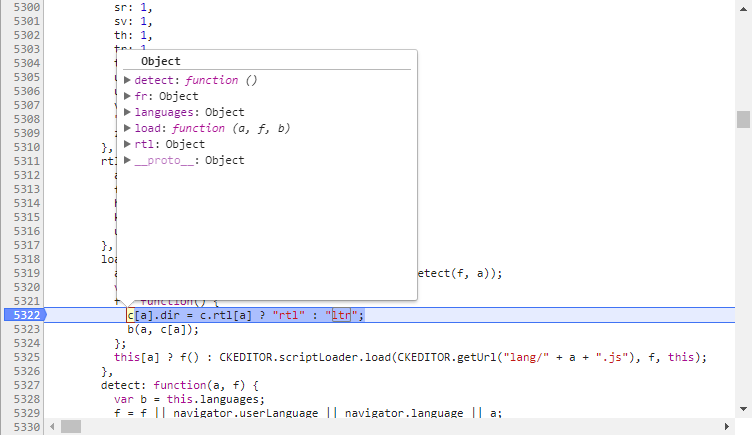
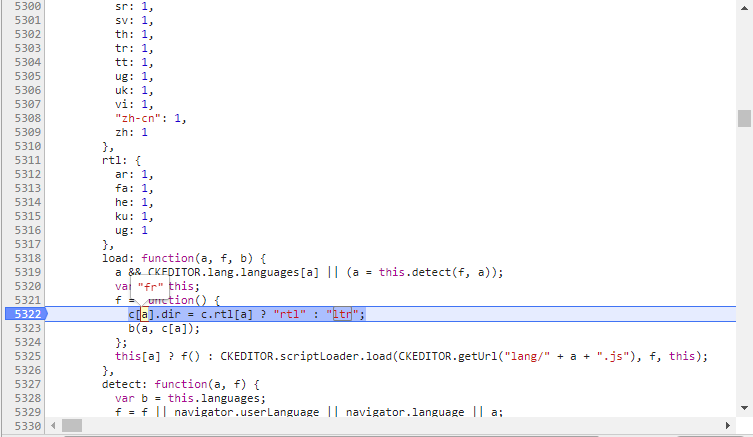
There should not be an error. There was no error with CKEditor 4.6.2 :
Actual result
There is no property "fr" on c, there was one in v4.6.2.
The result is the following error :

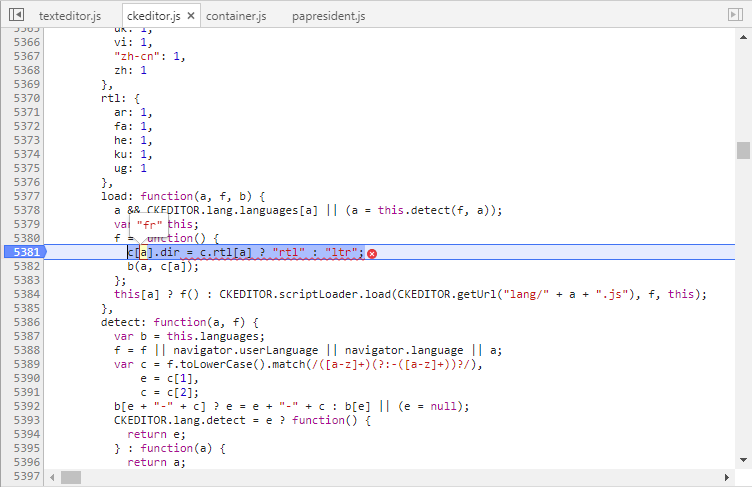
ckeditor.js:5381 Uncaught TypeError: Cannot set property 'dir' of undefined
    at Object.f (ckeditor.js:5381)
    at g (ckeditor.js:5413)
    at n (ckeditor.js:5420)
    at r (ckeditor.js:5431)
    at Object.load (ckeditor.js:5457)
    at Object.load (ckeditor.js:5384)
    at m (ckeditor.js:5749)
    at eval (ckeditor.js:5745)
    at b (ckeditor.js:10546)
    at Object.loadPart (ckeditor.js:10581)
    at h (ckeditor.js:5744)
    at a.eval (ckeditor.js:5738)
    at a.h (ckeditor.js:147)
    at a.window.CKEDITOR.window.CKEDITOR.dom.CKEDITOR.event.CKEDITOR.event.fire (ckeditor.js:207)
    at a.window.CKEDITOR.window.CKEDITOR.dom.CKEDITOR.editor.CKEDITOR.editor.fire (ckeditor.js:249)
    at a.fireOnce (ckeditor.js:220)
Other details
- Browser: Chrome 59.0.3071.86
- OS: Windows 7 Enterprise SP1
- CKEditor version: 4.7.0
- Installed CKEditor plugins: colorbutton,print, font, autolink, justify
 CedricMalfreytBL
All 21 comments
Hi,
I'm not able to reproduce described situation. Can you check my example (which work fine on my computer) and tell is this problem also occurs here? https://codepen.io/msamsel/pen/EXoagM?editors=1010
If not, then could you prepare some live example or describe more details how to reproduce this situation?
 msamsel
on 28 Jun 2017
msamsel
on 28 Jun 2017
Hi,
The problem doesn't occur on your example.
The problem doesn't occur anymore on my app (i didn't test since this bug report), i don't know why. The only change since i post this bug is Chrome (it has been updated to v 59.0.3071.115).
I think you can close this bug.
Thank you for the time you spent on it !
CedricMalfreytBL
on 28 Jun 2017
You're welcome :)
I'm happy that everything start to work fine in your app.
msamsel
on 29 Jun 2017
@msamsel - What did you have to do? I am using Angular 4.2.3 and Angular CLI and I am getting the same error messages.
 kattianita
on 9 Nov 2017
kattianita
on 9 Nov 2017
Hi @kattianita,
unfortunately Angular integration is not provided by CKEditor Team. As far as I know there are some community setups which provide integrations between Angular and CKEditor. You can try check stack overflow for some help or advice, maybe someone had similar problem already.
If you are able to reproduce error with clear HTML + CSS + JS environment, please provide detail steps how to obtain such error. Another option which might be helpful is to use not-minified version of ckeditor. You can download this repository and use it you project. This should give you more descriptive error message.
msamsel
on 14 Nov 2017
@kattianita to solve this problem in my angular 4.x app I simply added the CDN to the head tag in my src/index.html file.
<head>
  <meta charset="utf-8">
  <title>{{ title }}</title>
  <base href="/">

  <meta name="viewport" content="width=device-width, initial-scale=1">
  <link rel="icon" type="image/x-icon" href="favicon.png">
  <script src="https://cdn.ckeditor.com/4.5.11/full/ckeditor.js"></script>
</head>
 JWTappert
on 21 Dec 2017
JWTappert
on 21 Dec 2017
I encountered this error when I concat ckeditor.js file with other js libraries!
When attach ckeditor.js separately, everything is OK!
 morteza-gho
on 11 Jan 2018
morteza-gho
on 11 Jan 2018
This happens when ckeditor.js is integrated from angular-cli.json.
"scripts": [
        "assets/ckeditor/ckeditor.js"
      ],
Its works well if its removed from angular-cli.json & declared in index.html.
<head>
  <script type="text/javascript"  src="assets/ckeditor/ckeditor.js"></script>
</head>
 nasiruddin-saiyed
on 30 Jan 2018
nasiruddin-saiyed
on 30 Jan 2018
This problem is presented by not placing the language script in the file index.
<head>
<script type="text/javascript"  src="assets/ckeditor/lang/en.js"></script>
<script type="text/javascript"  src="assets/ckeditor/lang/es.js"></script>
<script type="text/javascript"  src="assets/ckeditor/lang/fr.js"></script>
</head>
Then, they should confirm that all the tags are in the scripts.
Regards!
 iczabalegui2h
on 18 Sep 2018
iczabalegui2h
on 18 Sep 2018
@kattianita had issues with angular as well..
including the language worked! <script type="text/javascript" src="assets/ckeditor/lang/en.js"></script>
thanks @iczabalegui2h
 mariohmol
on 15 Dec 2018
mariohmol
on 15 Dec 2018
In my project I just had to put the script with full-all
 lucascco
on 8 Feb 2019
lucascco
on 8 Feb 2019
Some of above issue was related to inserting CKEditor inside Angular. From good news I can say that we currently working on Angular integration with CKEditor4. You can get some details about it here: https://github.com/ckeditor/ckeditor-dev/issues/2481
msamsel
on 8 Feb 2019
Anybody had this problem and solved it when integrating with React?
 Amir2828
on 4 Apr 2019
Amir2828
on 4 Apr 2019
@Amir2828 Do you use official CKEditor React integration? If so could you report your issue in the integration repository?
 f1ames
on 4 Apr 2019
f1ames
on 4 Apr 2019
@f1ames I didnt use the CKEditor for react.
I have a React Project which contains a grapesJS section.
I would like to include CKEditor inside my grapesJS.
There is already an available plugin ( 'grapesjs-plugin-ckeditor'), which says I have to install CKEditor manually, So I did.
But for some reason CKEditor give me the problem mentioned above.
I imported CKEditor via import statement.
Amir2828
on 4 Apr 2019
I'm facing the same issue after building my AngularJs app with gulp.
I wonder if there is a solution for build tools like gulp where all the required vendor files are merged into one single file.
Ckeditor seems to use a relative path to load it's required files from the source folder.
Thank you
 simaosoares
on 23 Jul 2019
simaosoares
on 23 Jul 2019
@Amir2828 this issue is not reproducible with CKEditor 4 instance itself so it seems it is an integration issue. You may try to reach out to grapesjs-plugin-ckeditor authors to see if the issue is related to their plugin.
@simaosoares there are few external files which are loaded by CKEditor even in build CKEditor version and this files should be present where CKEditor looks for them. You may change the path by altering CKEDITOR.basePath.
There is also an official CKEditor 4 Angular integration which should solve this issue so you may consider switching to it in your application.
f1ames
on 24 Jul 2019
At The end I used a CDN link and I made it work, couldn't make it work with npm for some reason
Amir2828
on 24 Jul 2019
For others with this problem, if you have self-hosted the CKEditor script in your solution (for example for a classic ASP.NET application) and you do not have all the localization files of the plugin in your CKEditor folder, that can cause this issue to happen.
We for example only had the en.js file in our /CKEditor/lang/ folder, and the bug occurred when a user that had both english and danish as his browser languages. CKEditor tried to automatically set the language of the editor to Danish, and tried to load the /CKEditor/lang/da.js file, which did not exist (which caused a 404 error). Adding the following to the config.js file fixed the problem for us:
config.language = 'en';
 Loyalar
on 5 Aug 2019
Loyalar
on 5 Aug 2019
@kattianita had issues with angular as well..
including the language worked!
<script type="text/javascript" src="assets/ckeditor/lang/en.js"></script>thanks @iczabalegui2h
yes !! including the language worked!
 Jekin6
on 15 Aug 2019
Jekin6
on 15 Aug 2019
For others with this problem, if you have self-hosted the CKEditor script in your solution (for example for a classic ASP.NET application) and you do not have all the localization files of the plugin in your CKEditor folder, that can cause this issue to happen.
We for example only had the
en.jsfile in our/CKEditor/lang/folder, and the bug occurred when a user that had both english and danish as his browser languages. CKEditor tried to automatically set the language of the editor to Danish, and tried to load the/CKEditor/lang/da.jsfile, which did not exist (which caused a 404 error). Adding the following to the config.js file fixed the problem for us:
config.language = 'en';
It's worked, Thank you so much!
 sonnd08
on 24 Mar 2020
sonnd08
on 24 Mar 2020
Related issues
 markdon
·
5Comments
markdon
·
5Comments
 Mathiyazhagan07
·
4Comments
msamsel
·
5Comments
Mathiyazhagan07
·
4Comments
msamsel
·
5Comments
 DmitrySmolsky
·
4Comments
DmitrySmolsky
·
4Comments
 blackcoder87
·
4Comments
blackcoder87
·
4Comments
Most helpful comment
I encountered this error when I concat
ckeditor.jsfile with otherjslibraries!When attach
ckeditor.jsseparately, everything is OK!