Ckan: [Bug] KSP newest vers. 1.11 - moving mods from 1.10 to 1.11 error requires making history 1.10
Background
- Operating System: Win10
- CKAN Version: 1.29.2 (just updated Dec 17,2020)
- KSP Version(s): two instances
[Overall goal: duplicate ckan modpack from alpha to omega instance]
This is alpha instance - C:\Users\AorusDownloads\ksp-win64-1.10.1\KSP_win64
- KSP 1.10.1 for Windows
- Making History Expansion 1.10.1
- Breaking Ground Expansion 1.5.1
This is omega instance - C:\Kerbal Space Program
- KSP 1.11.0 for Windows, Some Reassembly Required
- Making History Expansion 1.11.0
- Breaking Ground Expansion 1.6.0
Have you made any manual changes to your GameData folder (i.e., not via CKAN)? NO
Problem
The problem is that it doesnt tell me which mod caused the issue, so maybe ckan is not yet ready for 1.11?
Steps to reproduce
Today I setup the 2nd instance of KSP (1.11 and both KSP major updated addons) here: (C:\Kerbal Space Program). I will call this omega.
First thing I did was look into ckan and figure out if exporting a modpack from alpha 1.10 would easily allow all my current mods to move from alpha to omega instance.
I used "manage KSP instances", added the new instance to ckan.
I saved/exported the modlist from alpha instance as "mymods20201217.ckan".
I selected omega instance as the new default.
I selected load the "mymods20201217.ckan".
The error says: (Installation error)
The following inconsistencies were found:
- MakingHistory-DLC 1.10.1 required, but an incompatible version is installed
Error during installation!
If the above message indicates a download error, please try again. Otherwise, please open an issue for us to investigate.
If you suspect a metadata problem: https://github.com/KSP-CKAN/NetKAN/issues/new/choose
If you suspect a bug in the client: https://github.com/KSP-CKAN/CKAN/issues/new/choose
Expected behavior
Screenshots (if applicable)
CKAN error code (if applicable):
PLACE CODE HERE !
 contact-one
All 19 comments
It looks like you had the "Save mod versions" checkbox checked when exporting your modpack. Can you try exporting it again, without that checkbox checked? Then CKAN shouldn't complain about mismatching DLC versions.
 DasSkelett
on 17 Dec 2020
DasSkelett
on 17 Dec 2020
Might also want to not include the DLCs in the pack.
 HebaruSan
on 17 Dec 2020
HebaruSan
on 17 Dec 2020
I dont have much ckan experience, I cant find the button for "dont
include dlc"..
I need step by step button clicking directions.. :)All I did from your email so far is this.. I unclicked the "include
versions" and tried again.. new error.. (this might be progress? Now
its moving down the list of mods to see which mods are 1.11 ready?)
installed-KSP-win64 2020.12.17.10.11.46 requires
EnvironmentalVisualEnhancements but it is not listed in the index, or not
available for your version of KSP.
Error during installation!
If the above message indicates a download error, please try again.
Otherwise, please open an issue for us to investigate.
If you suspect a metadata problem:
https://github.com/KSP-CKAN/NetKAN/issues/new/choose
If you suspect a bug in the client:
https://github.com/KSP-CKAN/CKAN/issues/new/choose
- OR - MAYBE - I didnt copy all the actual mod folders to the new instance
yet, soo that could be a problem? I wasnt sure how the export works, if it
just makes a list, or if it also copies all the directories info from where
they sit currently?
I have no idea what the rules for each step actually are.. so again, I need
more info, step by step..
On Thu, Dec 17, 2020 at 5:04 PM HebaruSan notifications@github.com wrote:
Might also want to not include the DLCs in the pack.
—
You are receiving this because you authored the thread.
Reply to this email directly, view it on GitHub
https://github.com/KSP-CKAN/CKAN/issues/3240#issuecomment-747729857, or
unsubscribe
https://github.com/notifications/unsubscribe-auth/ANEQAV4NPPMZ62Z3ZVVIUHTSVJ6AXANCNFSM4VAJ7IEA
.
contact-one
on 17 Dec 2020
- I dont have much ckan experience, I cant find the button for "dont include dlc".. I need step by step button clicking directions.. :)
While in the export screen, click on each DLC, then click the "Ignore" button towards the bottom to remove it from the pack.
HebaruSan
on 17 Dec 2020
For the EnvironmentalVisualEnhancements message, it looks like you have not set your compatible versions for the new instance yet. EVE was last updated for KSP 1.8.
https://github.com/KSP-CKAN/CKAN/wiki/User-guide#choosing-compatible-game-versions
HebaruSan
on 17 Dec 2020
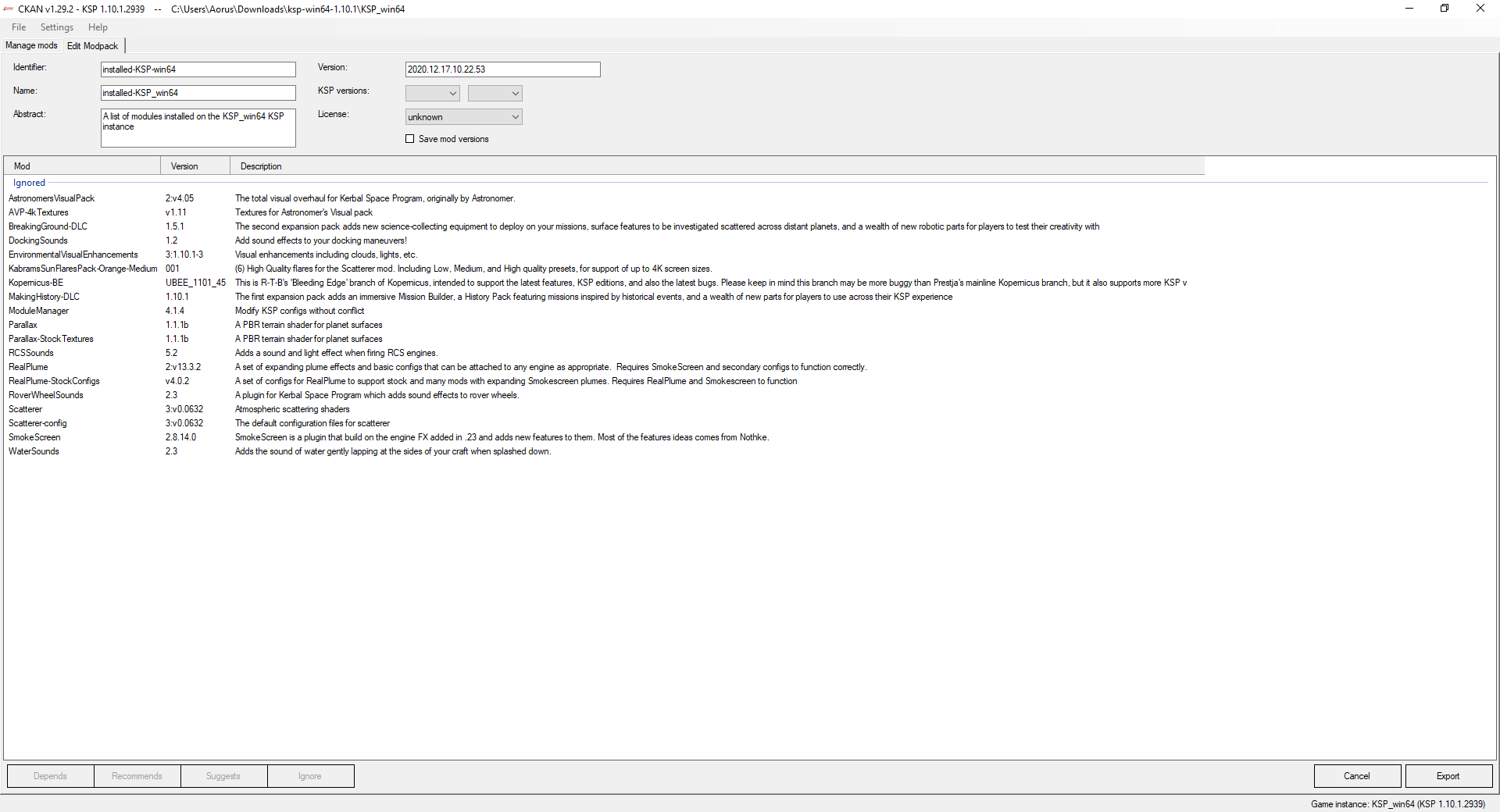
Now I went back to default instance, selected export, found the button which only says "ignore", and I shift clicked all the above entries to highlight them blue, then I clicked the "ignore" button. I exported, and went to the omega instance and imported.
This time no errors, also loading the game shows no results..
The screenshot shows the result.
But I am not sure this is right because:
- the ignore button doesnt mention dlc.. and I dont know if there is a reason..
- and logically I dont understand exporting mods if you tell me to ignore them.. why does this sound illogical? Again, I dont know the rules for this operation...
- after the import to the new instance omega, how do I continue to get it working?
- on the main screen, (not shown) there is a tiny checkbox in the upper right with some kind of text cutoff and unreadable.. do you know what this says and what it does? Am I using the wrong checkbox? I think this is a secondary issue, but I can screenshot if you need.
This screenshot shows some progress / they are all ignored.
contact-one
on 17 Dec 2020
shift clicked all the above entries to highlight them blue
That was where you went wrong; you removed all of the mods from the modpack. Only do that for the DLCs.
HebaruSan
on 17 Dec 2020
well I already mentioned that I dont understand what ckan is doing.
Because a mod is a "downloadable content".
The list you see in the screenshot is my total list.. there are no other items defined as dlc, I dont know what youre looking at when you say you see me ignoring a dlc.. and because none of the items in the list are separately labled as "dlc" or "not dlc", so how does anyone know?
How do you define the actions I should be taking? again, I need step by step directions with clear terminology.
And I cannot read the checkbox I already mentioned, do you know what it says or does?
it looks like you have not set your compatible versions
And I should mention, that those versions you talked about are all unchecked.. I didnt expect ckan to clear those, but now Ive set them back again.
contact-one
on 17 Dec 2020
These are the DLCs. The ones that are named after the game's official DLC and say "DLC" in their names.

HebaruSan
on 17 Dec 2020
I dont see any of these in the screenshot of mods I provided, so how am I ignoring them or not ignoring them? I cant even select on something that I dont see. Am I missing a checkbox somewhere again?
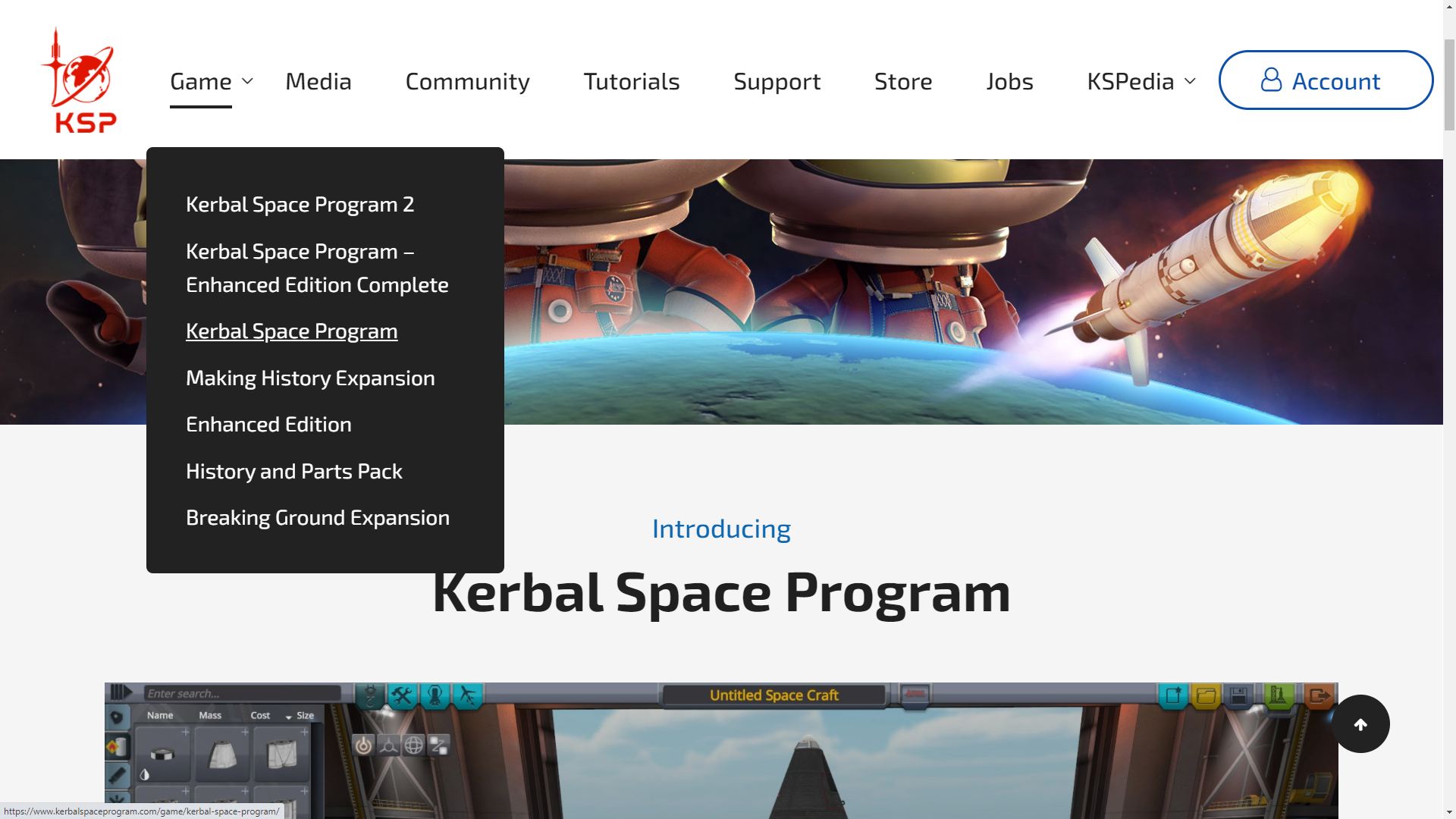
And maybe in the USA store page you can see in the screenshot below, the Making History, and Breaking Ground are not labeled as DLC.. they specifically have the words "Expansion" after each one of them.. so maybe you are looking somewhere I dont see?
Can you answer the other questions not answered yet from above (so I dont have to keep retyping them..)
Thanks for your help to this point, but loading the game does not yet show updated graphics.
contact-one
on 18 Dec 2020
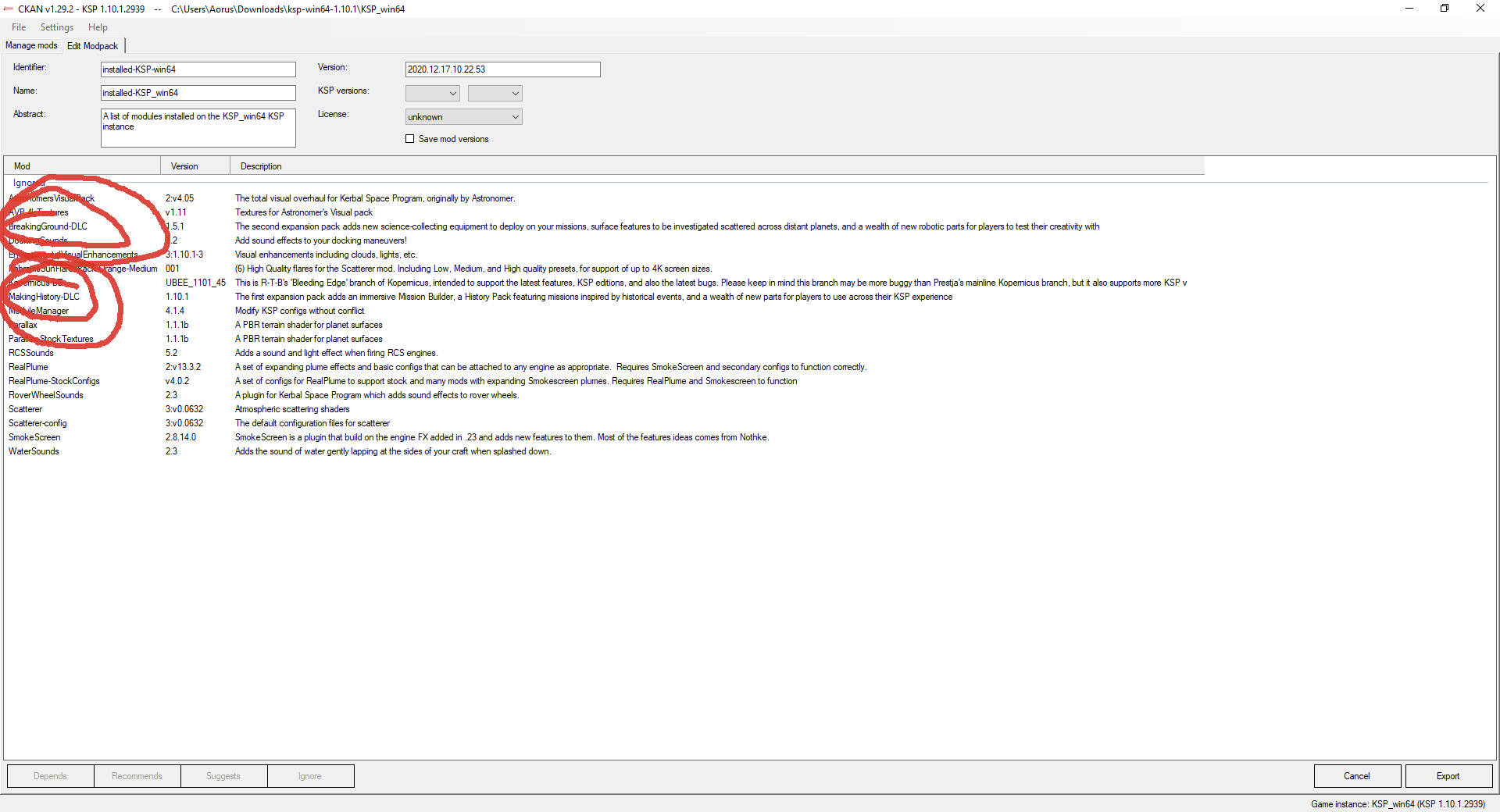
I dont see any of these in the screenshot of mods I provided, so how am I ignoring them or not ignoring them?
I literally copied and pasted those from the screenshot in your previous reply!
HebaruSan
on 18 Dec 2020
oh I found the letters DLC.. ok, what are the next steps?
contact-one
on 18 Dec 2020
If you've forgotten why we were trying to identify DLCs, scroll up and re-read. It's all still there.
HebaruSan
on 18 Dec 2020
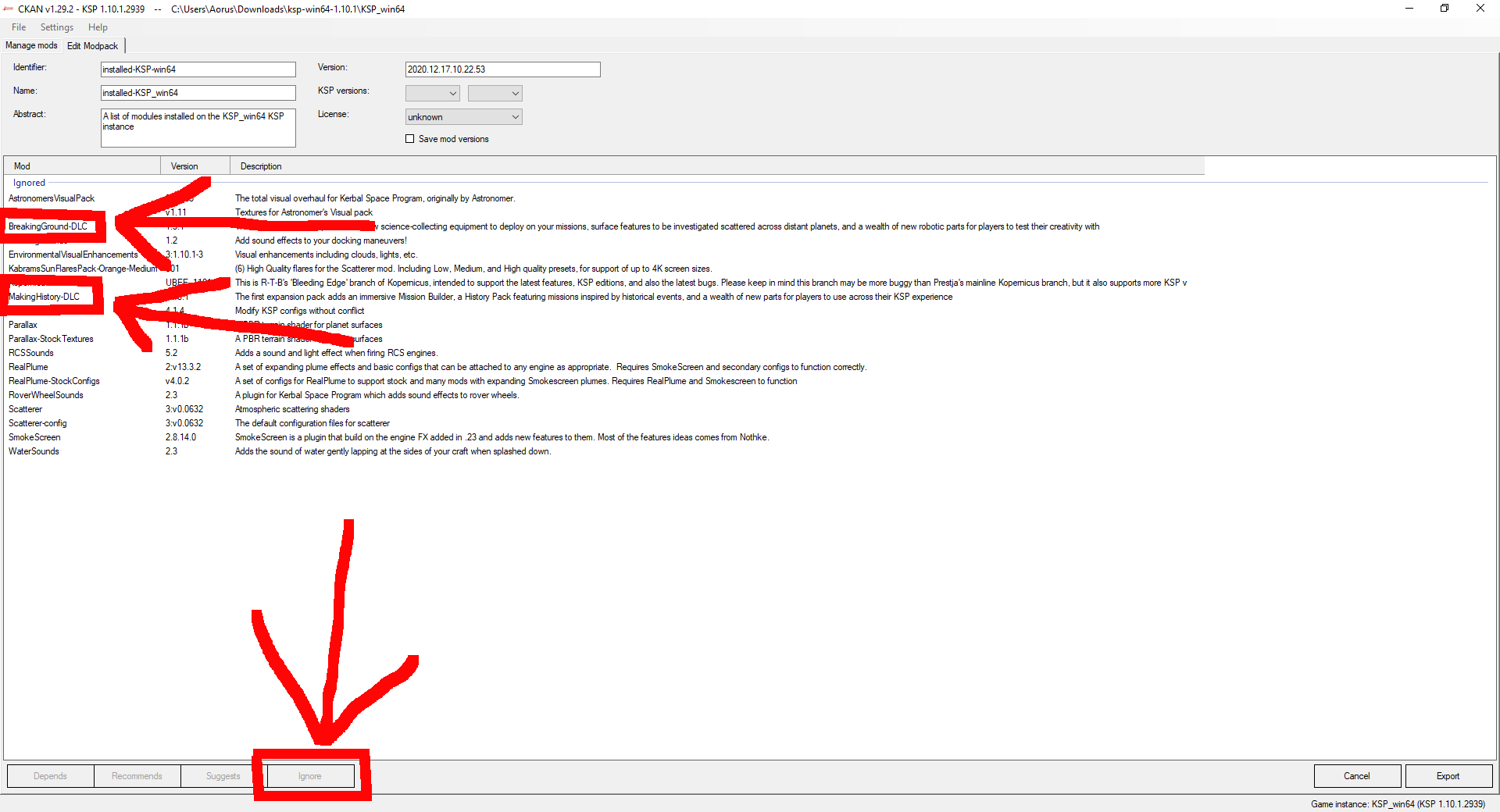
1) Select "BreakingGround-DLC"
2) Click "Ignore" on the bottom
3) Select "MakingHistory-DLC"
4) Click "Ignore" on the bottom
5) Click "Export" on the bottom right.
Nobody cares whether the DLCs are officially called DLCs or Addons or Expansions or something else. Neither should you.
DasSkelett
on 18 Dec 2020
I am making progress now, but the other question you havent talked about is 4.
on the main screen, (not shown) there is a tiny checkbox in the upper right with some kind of text cutoff and unreadable.. do you know what this says and what it does? Am I using the wrong checkbox? I think this is a secondary issue, but I can screenshot if you need.
In a few moments, I will be uninstalling a screen flare inconsistency that I ran into in my alpha instance, and then exporting a modlist again. But Im getting better at figuring out some of these other errors so far..
contact-one
on 18 Dec 2020
We're ignoring that because it isn't relevant to exporting or installing a modpack.
HebaruSan
on 18 Dec 2020
Well, there are no more errors. But I didnt receive the final instructions on how to get all the mods working?
I removed the sunflare issue from the alpha and exported without the expansions. Whats next?
I updated the compatible version list also.
Does ckan recognize the original mod folder from the alpha install?
contact-one
on 18 Dec 2020
Let's review. You wanted to set up a new KSP 1.11.0 instance with the same mods you had on KSP 1.10.1 by exporting a modpack file in the former and installing it in the latter. This is a valid idea, so we are trying to help you make it work rather than suggesting something else. You encountered a few problems:
- The export-modpack screen was configured to save the version of each mod, which turned out to be a problem specfically for the DLCs because they have only one version per game version, and the version of a DLC for KSP 1.10 cannot be used on KSP 1.11
- Your new instance could not install EnvironmentalVisualEnhancements because it was last updated for KSP 1.8
Accordingly you have made a few changes to your process:
- Unchecked the "Save mod versions" checkbox when exporting the modpack
- Also excluded the DLCs from the modpack (not necessarily required but a good idea in general)
- Add previous game versions as compatible in the new instance so EnvironmentalVisualEnhancements can be installed
The next step would be installing the modpack on the 1.11.0 instance again, with those changes in place.
HebaruSan
on 18 Dec 2020
Hey there! I'm a fun-loving automated bot who's responsible for making sure old support tickets get closed out. As we haven't seen any activity on this ticket for a while, we're hoping the problem has been resolved and I'm closing out the ticket automatically. If I'm doing this in error, please add a comment to this ticket to let us know, and we'll re-open it!
 netkan-bot
on 25 Dec 2020
netkan-bot
on 25 Dec 2020
Related issues
 mario-ragucci-sp
·
4Comments
mario-ragucci-sp
·
4Comments
 davidgiven
·
6Comments
davidgiven
·
6Comments
 motoboy98
·
6Comments
motoboy98
·
6Comments
 Unhunter
·
3Comments
Unhunter
·
3Comments
 btbonval
·
6Comments
btbonval
·
6Comments