Citra: Keyboard input is layout dependent
sorry for bothering , i binded citra input in english , i changed language ,then while i use citra input isnt working at all , i didnt know the problem so i restarted citra , the problem still the same , i pressed alt and shift again to be in english language , and citra control start working , first i though its normal and intentional , but while i use other emulator (desmume-mesen) it work in any situation no matter the language , is this a bug or something ???!!!
- on the other hand input tab in control menu really need some love from the devs, may be in 2019!!!
i am always use this image to configure citra input and have no idea about ( c stick - zr-zl )

 Moodie92
All 11 comments
Confirmed on Citra Nightly # 1001.
The original issue is not written too well, so here's my attempt at a rephrased bug report:
Citra's keyboard input is wrongly layout-dependent. If the user changes their keyboard layout - for example, from QWERTY to AZERTY, then Citra will fail to detect that they're pushing the same physical key on my keyboard.
How to test:
I've added the AZERTY keyboard layout to my system. FYI - you can switch between active keyboard layouts on the fly with the Alt+Shift key combination.
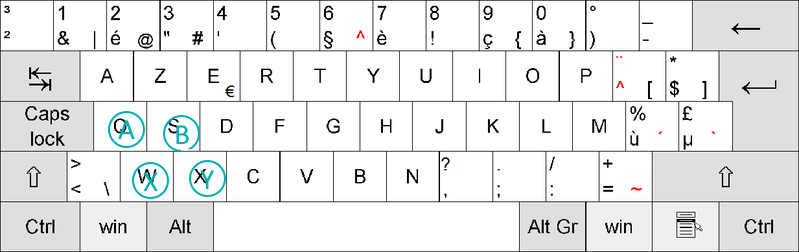
When on QWERTY with the default Citra configuration, the ABXY buttons are assigned like this:

However, when I switch to AZERTY, it changes to this:

The expected result is this:
Solution:
When it comes to input, Citra should only look at scancodes, not the letter they represent (keycode).
What the controls section of the configuration menu should display is debatable. I think it should show the character assigned to the scancode in the currently-active layout - i.e. it would LOOK different with the SAME settings if the user changes layout. It might even change appearance on the fly if the user changes layout while the configuration menu is open.
 NeatNit
on 28 Sep 2018
NeatNit
on 28 Sep 2018
Oh, apparently a duplicate of #1707.
NeatNit
on 28 Sep 2018
This is an issue that may not be that easy to resolve. We use QKeyEvent->key() to return what key was pressed http://doc.qt.io/qt-5/qkeyevent.html#key which apparently is affected by changing the keyboard layout. As you suggested, we could use scan codes, but http://doc.qt.io/qt-5/qkeyevent.html#nativeScanCode says that this doesn't even do anything on mac. So we'd still need to support key AND scancode which would take a bit of a redesign to handle.
 jroweboy
on 28 Sep 2018
jroweboy
on 28 Sep 2018
Right. I tried to make sense of this, and I think that nativeVirtualKey will give a layout-independent key code. I can't find a lot of info about the meaning of "virtual key", but from the little I did find, that does sound like what it does.
Edit: I should clarify: I've never touched C++ or Citra so I can't really test this.
NeatNit
on 29 Sep 2018
I've just tested this. nativeVirtualKey does produce a layout-independent code. To test I added this to keyPressEvent:
    LOG_CRITICAL(Frontend, event->text()
                               .toStdString()
                               .append(" ")
                               .append(std::to_string(event->key()))
                               .append(" ")
                               .append(std::to_string(event->nativeVirtualKey()))
                               .c_str());
Letter keys have the same key() and nativeVirtualKey(), but symbol keys like these ,./[]\ have a different code for each. For example for the key [, key() is 91 while nativeVirtualKey() is 221 - so it's not an ASCII code for sure, but I don't know what it comes from.
Citra should definitely use the nativeVirtualKey() rather than key(), but when making the change care should be taken to make sure people's current settings don't get ruined.
NeatNit
on 7 Oct 2018
I'm looking into this. I cannot find a simple way to convert nativeVirtualKey to its corresponding key name on the keyboard. Qt does not seem to have this ability.
For reference (for myself):
On Windows, these are the key codes: https://docs.microsoft.com/en-us/windows/desktop/inputdev/virtual-key-codes
For Mac, there's some answers here, but I don't own a Mac: https://stackoverflow.com/questions/3202629/where-can-i-find-a-list-of-mac-virtual-key-codes
As for Linux, I couldn't find any clear info online. First result on Google is this which is for a Windows app and is just a mirror of the Microsoft list. Some answers mention a showkey command which can be used to show scancodes (and probably virtual key codes too), but I don't currently have a Linux machine at the ready.
I need to look into whether SDL can convert virtual key codes to the corresponding key - SDL_GetKeyFromScancode perhaps?
If not, the only thing I can think of is to use platform-specific code for each platform to get the key name. For example, on Windows we'd use GetKeyNameTextW. I'm not gonna do that.
Edit: just to clarify, the issue is about what to display in the config menu, and specifically what to display when the settings are loaded and only the virtual key code is available.
Unfortunately, I'm not the first to find this feature missing from Qt, and there doesn't seem to be an answer: https://stackoverflow.com/questions/48592348/how-to-construct-qtkey-out-of-keysym-or-keycode
NeatNit
on 11 Oct 2018
I should have given up on this long ago but I haven't yet.
Messed around with GetKeyNameText (Windows only of course) trying to figure out why it was always giving me English names, even though the page says it's localized to the set locale. Turns out, it does work, but not for Hebrew which is what I used. Only after a few hours I decided to try installing German (as someone online said it worked), and yup, it showed German names. So that function DOES work and can be used for this... in Windows only.
Backspace in German screenshot:

Code I was using (from here):
#include <windows.h>

static QString getKeyName(int key_code) {
    unsigned int scanCode = MapVirtualKey(key_code, MAPVK_VK_TO_VSC);

    // because MapVirtualKey strips the extended bit for some keys
    switch (key_code) {
    case VK_LEFT:
    case VK_UP:
    case VK_RIGHT:
    case VK_DOWN: // arrow keys
    case VK_PRIOR:
    case VK_NEXT: // page up and page down
    case VK_END:
    case VK_HOME:
    case VK_INSERT:
    case VK_DELETE:
    case VK_DIVIDE: // numpad slash
    case VK_NUMLOCK:
        scanCode |= 0x100; // set extended bit
        break;

    }

    wchar_t keyName[50];
    if (GetKeyNameTextW(scanCode << 16, keyName, sizeof(keyName)) != 0) {
        return QString::fromWCharArray(keyName);
    } else {
        return "[Error]";
    }
}
Why am I posting this here? To document my descent into madness. To hope that someone tells me either to stop or that they'll take over.
This thing might be useful, at the very least it has some useful info on different platforms: https://github.com/depp/keycode
NeatNit
on 11 Oct 2018
my friend , it is a hard bug which need creative solution and also some one who understand qt very much , one suggest to put the code to pull requests so one of the developer may help in a better way
Moodie92
on 12 Oct 2018
I just released a library that's supposed to extract platform-independent keycodes out of QKeyEvent: https://github.com/nyanpasu64/qkeycode/
The library hasn't seen much real-world use yet, but I've done systematic testing to ensure it works on non-QWERTY and non-Latin keyboard layouts on Windows, Linux IBus, and emulated macOS. I also tried AutoHotkey on Windows (with amusing layout-dependent results).
I don't use Citra, but I think my code might resolve this particular situation.
 nyanpasu64
on 18 Jul 2020
nyanpasu64
on 18 Jul 2020
I just released a library that's supposed to extract platform-independent keycodes out of QKeyEvent: https://github.com/nyanpasu64/qkeycode/
That's awesome. I'm not really part of Citra in any way but I've shot them a note about this (I don't think any of them are subscribed to this issue).
I've skimmed through your headers and the available functions. Does the library offer a "Dom Code to layout-dependent key name" function, to get something to show to the user? I couldn't find one. Would be useful, Citra (and games) need to display the key under settings and it'd be best IMO to show the corresponding character/name under the active layout.
Although rare AFAIK, I wouldn't be surprised if some users out there don't have the QWERTY layout at all. So for such users QWERTY key names would always be wrong.
NeatNit
on 19 Jul 2020
Does the library offer a "Dom Code to layout-dependent key name" function, to get something to show to the user?
I don't think there is one. I think Dolphin (using DInput on Windows) displays QWERTY key names, but responds to hardware keys which may have different keyboard labels. I think that's a problem in Dolphin as well.
Qt can turn Qt::Key (layout-dependent and language-dependent, can be a Unicode codepoint if you have a non-Latin keyboard layout) into names via QKeySequence::toString().
QTest can send Qt::Key to a widget, but is unable to process either virtual keys (layout-dependent, not language-dependent) or scancodes (not dependent on layout/language).
qkeycode produces platform-independent codes, which is useful for default keybinds shipped with a program, but not essential for user configuration. Maybe it would be possible to convert a KeyCode=DomCode into a native scancode (or virtual key on Mac), then somehow get Qt to convert it into a Qt::Key? This seems difficult and maybe impossible given Qt's public API. I haven't researched this yet, and it's not my priority at the moment.
nyanpasu64
on 19 Jul 2020
Related issues
 EddyHg80
·
3Comments
EddyHg80
·
3Comments
 Gamemulatorer
·
4Comments
Gamemulatorer
·
4Comments
 kdex
·
4Comments
kdex
·
4Comments
 ANTHENA-CITRA
·
3Comments
ANTHENA-CITRA
·
3Comments
 teogorghin
·
3Comments
teogorghin
·
3Comments