Citra: [Feature request] Hold down a key to remove speed limit.
Hi, has the title says, add a key that when pressed sets the speed limit from 100% to the limit you set in the config.
Pretty much like the GBA emulators with the space bar.
I don't know if this is possible, but I thought it could be a handy thing to add :)
EDIT:
This is what I have in mind
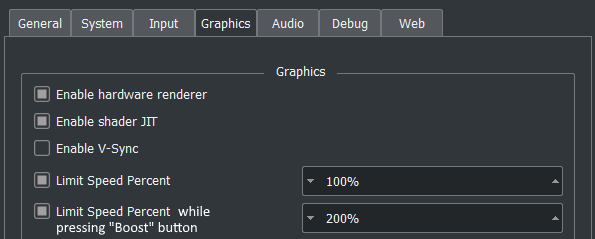
-if the first limiter is unchecked, the second option is disabled.
-if the second limiter is unchecked, the boost button simply unlimits the framerate
EDIT: design by B3n30 and jroweboy
Have a default speed limit of 100%. No checkbox to disable/enable that limit
Then have a speed modifier value in the config that you can set to values like 0.5, 1.5, 2, 2.5, 3, and unlimited. My suggestion would be to have that as a combo box in the ui but still have the ability to edit the value to any thing you want in the ini.
 EddyHg80
All 24 comments
I'll try to implement this sometime (maybe).
 adityaruplaha
on 2 Feb 2018
adityaruplaha
on 2 Feb 2018
I made a few minor modifications to add a hotkey called remove speed limit to do this. I have it mapped to tab right now by default. Would this work for you @EddyHg80?
Edit: I just realized that you were asking for a specific value set not to just remove the limit. Forgive me I'm tired. I should be able to do that quickly when I get some free time tonight.
 dolent
on 21 Feb 2018
dolent
on 21 Feb 2018
@dolent Yeah I think this is great!
You can already set the maximum speed in the settings, so it would make sense if the emulator wouldn't exceed that limit even when the button is pushed ;)
EddyHg80
on 21 Feb 2018
You can already set the maximum speed in the settings, so it would make sense if the emulator wouldn't exceed that limit even when the button is pushed ;)
That doesn't really make sense, since the emulator is already not exceeding that limit normally, and is the opposite of what this feature request proposes.
 MerryMage
on 21 Feb 2018
MerryMage
on 21 Feb 2018
@MerryMage oh right, sorry I didn't remember correctly.
Let's stick to what I said in the OP, 100% all the time, when you press the button go up the speed limit you set in the config.
And maybe add an option to have the system as is right now, where you just set the limit.
EddyHg80
on 21 Feb 2018
So, in order to avoid any misunderstandings, this is what I have in mind

-if the first limiter is unchecked, the second option is disabled.
-if the second limiter is unchecked, the boost button simply unlimits the framerate
I'm sorry for the confusion I made yesterday.
EddyHg80
on 22 Feb 2018
You mean 2 separate frame limits? One normal, & another while a button is pressed?
adityaruplaha
on 27 Feb 2018
Yeah, pretty much. On other emulators you can set the max speed even when you press the boost button (you can set x2, x3 ecc) which is basically a higher limit for the framerate I guess.
EddyHg80
on 28 Feb 2018
Is anyone working on this? I might give it a go.
 kirbyblox
on 1 Mar 2018
kirbyblox
on 1 Mar 2018
Nope. Good luck. Shouldn't be too hard, as the speed limit percentage is already in place.
adityaruplaha
on 2 Mar 2018
Also @EddyHg80 change the title to "change/remove speed limit".
adityaruplaha
on 2 Mar 2018
@adityaruplaha the title is fine as is
 BreadFish64
on 2 Mar 2018
BreadFish64
on 2 Mar 2018
Is anyone still working at this/ has a functional build? With the new gpu update this feature would be really awesome to have! And can there be an option for button press not hold, just like @dolent initially suggested?
 Eduard-Dumitrescu
on 11 Mar 2018
Eduard-Dumitrescu
on 11 Mar 2018
I don't think anyone is working on this. But I'll try doing it.
adityaruplaha
on 12 Mar 2018
I've nearly completed it @EddyHg80 @Eduard-Dumitrescu, but which key should be the "Boost" button?
adityaruplaha
on 14 Mar 2018
Well on the old emulators i think it was space, but if it's not to hard/ time consuming can the button also be edited in the config file(i don't remember if that's how it's called) so we can also map it to a controller button?
Eduard-Dumitrescu
on 14 Mar 2018
No, coz it's a hotkey, and I don't know if one can map hotkeys to a controller in the current state of Citra. I may try though.
Space is 👍
adityaruplaha
on 14 Mar 2018
Still don't like this idea. Or at least I don't like any of the designs presented here. Adding a second set of "Boost" options greatly complicates the settings without providing much benefit. We have a hard enough time with users that don't understand the existing "Limit Speed" dialog, so how are you expecting users to understand two options and the different ways they interact?
I'd much rather see a design thats simple than a design that covers every possible theoretical usecase that we can imagine.
Heres an example of something that I think would be much better. You are welcome to iterate on this as I didn't put too much effort into this design. The goal is to reduce the number of options while still meeting the goal for having a "Press tab to speed up"
[ ] Enable Frame Limit Speed Unlock Limit [ 200% ^v ]
Then add a hotkey for Speed Unlock to whatever you want (space or tab or whatever. we need more work done on a ui for remapping hotkeys). I chose the name Speed Unlock as its more descriptive than Boost because boost implies we are enhancing something like a clock rate, when in reality we are just reducing the wait time in between frames.
With this design we still can
- turn off frame limit for a max speed test
- configure how fast the boost key goes
and we lose the ability to
- run at a non 100% speed and then boost to a different speed (something i consider as a less common usecase)
- use the boost key to directly turn off the frame limiter (but you can still effectively do this by setting it to a large number)
I don't see those two as show stoppers. Here are the things i actually consider as issues with this new proposed design:
- Its not clear what speed boost is. We don't have tool tips to explain it, and our hotkeys are a mess right now so we can't put (Hotkey:
) in the description either. Its not exactly a discoverable feature without a way to show the use how this is used - Toggle versus Hold cannot be set. This is perhaps something that should be addressed with a full rework of the hotkey system instead of here.
I hope this helps someone to take the time to make a good design.
 jroweboy
on 14 Mar 2018
jroweboy
on 14 Mar 2018
Thanks for the review @jroweboy. I'll change the name. I'm ready to do stuff on the UI, as I don't like the names given either (is it ok if I don't change the names inside the code? I will if I have to). I also don't like the present design much & will definitely work on it. It seemed a little, cumbersome. I just wanted to follow the design by Eddy in his comment to get the stuff working first. That's why it's still WIP.
adityaruplaha
on 14 Mar 2018
@adityaruplaha I discussed that topic with @jroweboy and a probably even cleaner approach is:
Have a default speed limit of 100%. No checkbox to disable/enable that limit
Then have a speed modifier value in the config that you can set to values like 0.5, 1.5, 2, 2.5, 3, and unlimited. My suggestion would be to have that as a combo box in the ui but still have the ability to edit the value to any thing you want in the ini.
Finally have a hotkey to toggle the speed modifier. That way we still keep the current implementation plus adding your suggestion of a boost hotkey while in the ui there is just one setting, which is very clean and simple for the user.
If you are going to implement that please consider the following: We have to frontend so it is required for both. We have telemetry for the frame limit stuff, those should probably be reworked for the new implementation too. For that you have probably to coordinate with @chris062689
If you have further questions, please feel free to contact me in discord.
 B3n30
on 14 Mar 2018
B3n30
on 14 Mar 2018
I'm quite familiar with the telemetry backend, thanks to the search
function. But for some reason, Flamesage is not replying to my PMs on the
forum. But I'll contact him.
I like this design, but there's a problem. I'm a little confused that whether I should mix up the speed limit & the speed modifier into a single combo box, as it'll be even simpler, but we will lose the ability to jump to a higher limit.. If we press the hot key, it'll straight go to unlimited. We can't set specifically what limit it should go to. What do you think @B3n30 @jroweboy? Which comes first, overall simplicity or unusual functionality?
But I'll keep the percentage sign. Combo boxes are cake for me as I
already used them in quite a few .NET programs. I'll do it today (Maybe
around 1100 IST).
Might take some time though, as I have to rewrite a lot of code. And the
hotkeys REALLY need rewriting (took me ages to finally get it).
adityaruplaha
on 15 Mar 2018
Is anyone still working on this/ can it actually be done?A toggle for just the Limit speed percent would also be fantastic...
Eduard-Dumitrescu
on 29 Apr 2018
Hey, is there a build this would be implemented in? This issue seems to still be open and is not in the latest nightly-729 cf9bfe0 release.
 Tim3W4rp
on 12 Jun 2018
Tim3W4rp
on 12 Jun 2018
Now that #3786 is merged into the canary build can we close this issue?
Although that pull is missing 2 things:
-the ability to map the hotkey to an external controller
-the ability to choose between "hold down" and "press to toggle"
but those are general "missing features", not specific to this issue.
EddyHg80
on 10 Sep 2018
Related issues
 zaranrapu
·
4Comments
zaranrapu
·
4Comments
 kdex
·
4Comments
kdex
·
4Comments
 DeathWrench
·
3Comments
DeathWrench
·
3Comments
 teogorghin
·
3Comments
teogorghin
·
3Comments
 Schplee
·
3Comments
Schplee
·
3Comments
Most helpful comment
I made a few minor modifications to add a hotkey called remove speed limit to do this. I have it mapped to tab right now by default. Would this work for you @EddyHg80?
Edit: I just realized that you were asking for a specific value set not to just remove the limit. Forgive me I'm tired. I should be able to do that quickly when I get some free time tonight.