Cinnamon: Bug - certain letters not displayed in menus
Every once in awhile, I notice that my menus are all screwy (see the attached screenshot). Basically, certain letters are not displayed, making "New Issue - linuxmint..." read as "New Issue - li uxmi t...". I am running Linux Mint 17.1 Rebecca Cinnamon edition. I am not currently aware of how to reproduce this problem - I haven't noticed any consistent pattern. It seems to be the "a"s and the "n"s that are missing.

 Falconus
All 26 comments
Do you have any Cinnamon plugins or applications running that might be interfering with the text? Try disabling and then re-enabling them one-by-one until the issue repeats itself.
 Topperfalkon
on 9 Jan 2015
Topperfalkon
on 9 Jan 2015
I have no Cinnamon extensions installed, and the only applet I had running other than the default applets that came with Cinnamon was the weather applet, which I have disabled, but can't reenable because the "Add Applet" function can't find the server.
Falconus
on 10 Jan 2015
Please provide a screenshot from your font settings
 ondrejkolin
on 11 Jan 2015
ondrejkolin
on 11 Jan 2015
This sounds very much like my issue, which is bug #3442. For me, sometimes characters disappear, sometimes they become solid rectangles.
 mfreeman72
on 11 Jan 2015
mfreeman72
on 11 Jan 2015
@KOLEGA007 :

Falconus
on 12 Jan 2015
@mfreeman72 :
It does seem similiar in some ways to that bug, but to date I haven't seen any solid rectangles/squares.
Falconus
on 12 Jan 2015
Try to change font to Ubuntu and try to change antialiasing and hinting ... Are you using propriety driver?
ondrejkolin
on 13 Jan 2015
@Falconus:
Right. However, sometimes the problem exhibits itself exactly like your issue does (see my second image uploaded on my bug report). I'm thinking it might perhaps be part of the same problem.
mfreeman72
on 14 Jan 2015
Okay, I've changed the fonts. I am using the nvidia-331 driver with
bumblebee.
On 01/13/2015 12:11 PM, Ondřej Kolín wrote:
Try to change font to Ubuntu and try to change antialiasing and
hinting ... Are you using propriety driver?—
Reply to this email directly or view it on GitHub
https://github.com/linuxmint/Cinnamon/issues/3811#issuecomment-69729213.
Falconus
on 15 Jan 2015
@Falconus, is this still an issue for you in Cinnamon 3.0?
 Vahan86
on 21 Sep 2016
Vahan86
on 21 Sep 2016
FYI: I had the same problem. Turning off anti-aliasing brought the text back. Here's my system info:
glxinfo | grep -i vendor :
server glx vendor string: SGI
client glx vendor string: Mesa Project and SGI
    Vendor: Intel Open Source Technology Center (0x8086)
OpenGL vendor string: Intel Open Source Technology Center
lspci | grep VGA :
00:02.0 VGA compatible controller: Intel Corporation 3rd Gen Core processor Graphics Controller (rev 09)
egrep -i " connected|card detect|primary dev|Setting driver" /var/log/Xorg.0.log :
[ 8.693] (II) intel(0): Using Kernel Mode Setting driver: i915, version 1.6.0 20151010
uname -a :
Linux ryanniehaus-laptop 4.4.0-31-generic #50-Ubuntu SMP Wed Jul 13 00:07:12 UTC 2016 x86_64 x86_64 x86_64 GNU/Linux
cinnamon --version
Cinnamon 3.0.7
Thanks for the help!
 ryanniehaus
on 12 Oct 2016
ryanniehaus
on 12 Oct 2016
I had the same problem
glxinfo | grep -i vendor
server glx vendor string: SGI
client glx vendor string: Mesa Project and SGI
OpenGL vendor string: Intel Open Source Technology Center
lspci | grep VGA
00:02.0 VGA compatible controller: Intel Corporation Core Processor Integrated Graphics Controller (rev 02)
egrep -i " connected|card detect|primary dev|Setting driver" /var/log/Xorg.0.log
1723.054 intel(0): Output eDP1 connected
1723.054 intel(0): Output VGA1 connected
uname -a
Linux debian8 3.16.0-4-amd64 #1 SMP Debian 3.16.36-1+deb8u2 (2016-10-19) x86_64 GNU/Linux
cinnamon --version
Cinnamon 2.2.16
Thanks for the help!
 gmerendino
on 31 Oct 2016
gmerendino
on 31 Oct 2016
@Vahan86 I have changed computers and done a fresh install since I posted that. I haven't had this issue since that time. Thanks!
Falconus
on 31 Oct 2016
This is my desktop menu, how can i help you to find the bug ?

gmerendino
on 31 Oct 2016
@giuseppe69trading:
Have you adjusted your cinnamon font settings? I was able to get this to stop by disabling antialiasing in Cinnamon v3. You might also want to try to change the hinting if that doesn't help.
ryanniehaus
on 31 Oct 2016
@ryanniehaus
I did several tests with various settings,I tried to change anti-aliasing and hinting but does not solve permanently.
I suppose it's an interaction between cinnamon and java (oracle version) because occurs after launching eclipse.
When occurs I reset cinnamon with ALT+F2 + r
I'm trying debian 8 with cinnamon but I had similar problems with mint 17.3, currently I continue to use debian 7 with gnome 3.
gmerendino
on 31 Oct 2016
UPDATE: This just happened to me again, with antialiasing turned off, but only text on the taskbar was affected. Turning off hinting fixed the problem... We'll see if it comes back again.
ryanniehaus
on 14 Nov 2016
UPDATE AGAIN:
Happening again for me with both antialiasing and hinting off...

ryanniehaus
on 18 Nov 2016
I'm thinking this is more than just a cinnamon problem. I just had it happen again. But this time, it also happened in pycharm. Restarting cinnamon fixed the cinnamon menus/taskbars, but pycharm still had no text.
ryanniehaus
on 21 Nov 2016
I'm seeing the same problems as ryanniehaus described on my parents computer (up-to-date mint 18, intel ivy bridge cpu). I also started by disabling antialiasing which fixed it for a while. As far as I can remember, changing the hinting setting did nothing.
I don't think I ever saw the problem outside of the cinnamon menu, taskbar or title bars.
Note: I don't have frequent access to this system so I don't know if I can (quickly) provide you with debug info.
 wrdls
on 21 Nov 2016
wrdls
on 21 Nov 2016
For me, this problem was solved by changing the system fonts, through the 'Fonts' page in System Settings, from the default Noto Sans to Ubuntu Regular
 JHertz5
on 28 Jan 2017
JHertz5
on 28 Jan 2017
As discussed in bug #3442 you could try running
sudo apt install linux-generic-hwe-16.04
and reboot the system. That will install Linux kernel version 4.8 which is claimed to fix the issue. If this fixes the problem for you, too, I would guess that the issue is caused by kernel DRM bug.
 mikkorantalainen
on 11 Mar 2017
mikkorantalainen
on 11 Mar 2017
I 'm sad to report that I have this issue with a 4.8 kernel :(
Full comment on the https://github.com/linuxmint/Cinnamon/issues/3442 thread.
 raph82
on 14 Jul 2017
raph82
on 14 Jul 2017
This is definitely not just a cinnamon issue: https://bugzilla.redhat.com/show_bug.cgi?id=1323762
A fix I've found that may work for others in this thread is as simple as adding a single line to the root crontab:
* * * * * for i in 0 1 2 3; do touch /etc/fonts/fonts.conf & sleep 15; done
This will update the modification date on the fonts configuration file every 15 seconds, causing the fonts to refresh.
ryanniehaus
on 10 Oct 2017
@ryanniehaus: I'm afraid I can't see how that cron job would help. I just tried running touch /etc/fonts/fonts.conf, hoping it would make all the characetrs missing from my screen come back, but it did not. Changing the fonts in the Fonts config app doesn't always work, either.
I'm going to share more of my experiences with this issue, in the hope that it helps narrow the problem down to a particular area.
I first experienced this problem after I updated from Mint 17.x to 18.1. It comes up every couple of weeks, usually after I've suspended my system (put my laptop to sleep). There are simply blank spaces where the characters should be (I suspect the squares @mfreeman72 sees are from trying to render unusual characters that aren't available in the font they're using). As mentioned elsewhere, even when changing fonts in the Fonts config app relieves the problem, it's only temporary. Eventually, after a week or two, characters start disappearing for the newly chosen font as well, whether I've messed with hinting and antialiasing or not. The only action that reliably makes the missing characters come back is logging out of my session and back in again—just restarting Cinnamon does not fix it.
Once thing I just noticed is that the characters that fail to render depend on the font size. As I use Ctrl+Shift+Plus and Ctrl+Minus to increase and decrease the font size of my terminal window, different characters come and go. For example, for my preferred font size, the number '1' won't render anywhere, but the letter 'A' will, while for a smaller size, the opposite is true. The visibility of all the 'A's and '1's alternates as I alternate between the two font sizes in my terminal.
But it's actually less consistent than I thought: _colour_ affects which characters are missing! If I type ll, which I have aliased to ls -althr, the characters that are missing are different for subdirectories, symlinks, etc. because those are displayed in different colours. Selecting a block of text in the terminal also changes which characters are missing, because that changes their colour (white becomes black and vice-versa, etc.). And yet, for a particular colour, the missing characters are consistent—all the white lowercase 'o's are missing, but all the blue ones appear.
... but not perfectly consistent. When I type missing characters into the same terminal, they appear, in the same colour that the same character won't appear in in the same terminal! _But_, they then disappear when the window loses focus, and stay gone when it regains focus. 😕 And then, when I use the keyboard to move the cursor over the line I typed then makes them reappear. 😖
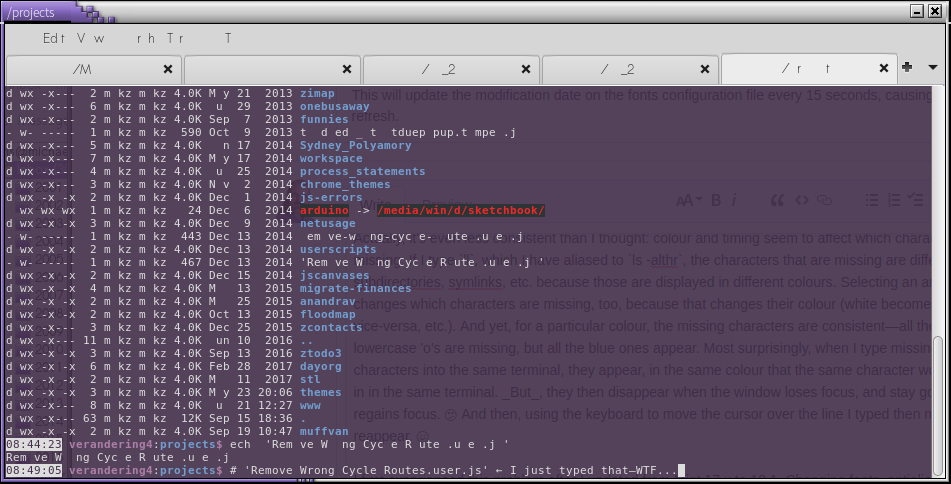
Also, I've never seen this issue on a web page, or in a PDF document. It seems that when the font is _part of the content_, there's no problem. I chose those words carefully: characters go missing in vim all the time, even though vim renders some text in italics or bold as part of syntax highlighting. The bold and italics aren't part of the content, though; vim makes its own decisions about what font or colour to use for different parts of the code. Characters most commonly go missing in the terminal, window title bars, menus, and dialogues. It often makes my system pretty impossible to use, unfortunately:
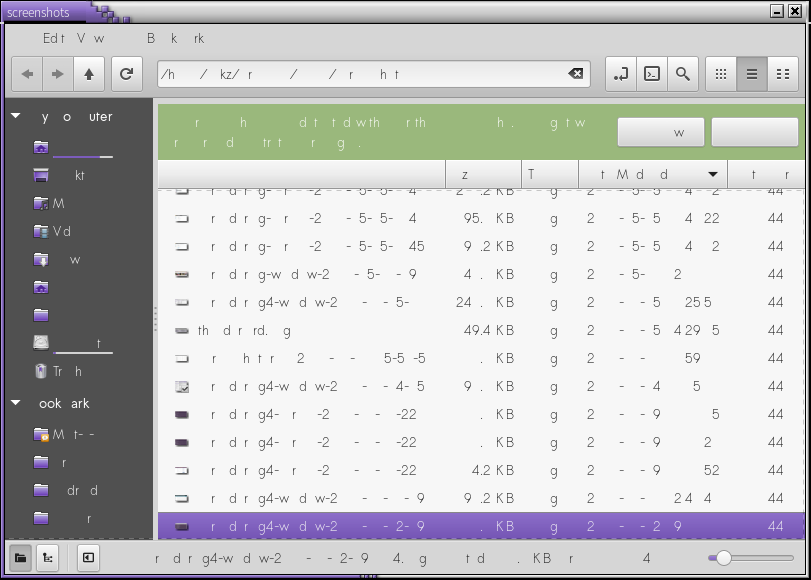
I should note that I demand a lot from my poor old laptop. I currently have 40 windows open over six workspaces, and probably over 100 tabs, and I'm pretty low on available memory. I'm also finicky about diacritics and use emoji as often as commas; I use the Compose key a lot, type emdashes nearly as often as commas, and am always the first to find i18n/Unicode bugs 😉. So it's very likely that my system renders more characters than a typical US hacker who uses all 7-bit ASCII and thinks semicolons are used exclusively in programming languages. So, if there's some limit to the number of characters that can be rendered at once, I'm more likely to hit it. It'd be interesting to know what the locale and typing habits for @raph82, @wrdls and @Falconus are. (I didn't mean system locale, but FWIW, I have mine set set to en_AU.UTF-8)
 mscheper
on 12 Oct 2017
mscheper
on 12 Oct 2017
As to the locale question in this post, I'm using a French keyboard and locale (fr_FR.UTF-8).
You have a glimpse to the missing characters and corruptions in the provided screen captures (compare the corrupted taskbar with the non-corrupted windows list). They don't seem to be exotic characters (pretty much ASCII rather).
To me this bug is related to an unidentified sleeping/resume bug. If I turn off my computer at night rather than putting it to sleep, I have much less characters corruptions occurrence.
raph82
on 16 Oct 2017
Related issues
 kram1t
·
42Comments
kram1t
·
42Comments
 mcarans
·
84Comments
mcarans
·
84Comments
 guzzard
·
40Comments
guzzard
·
40Comments
 ghost
·
53Comments
ghost
·
53Comments
 geckolinux
·
63Comments
geckolinux
·
63Comments
Most helpful comment
This is my desktop menu, how can i help you to find the bug ?
