Cht-core: Webapp does not supply XML forms (XForms) to Collect
When trying to _Get Blank Form_, medic-collect reports:
Error Getting Form List
Form listing failed. https://myhost/api/v1/forms responded with Internal Server Error (500)
The issue can be recreated using curl:
GET /api/v1/forms HTTP/1.1
X-OpenRosa-Version: 1.0
Date: Tue, 18 Apr 2017 08:22:40 GMT
Accept-Encoding: gzip
Host: myhost
Connection: close
->
HTTP/1.1 500 Internal Server Error
Server: nginx/1.9.11
Date: Tue, 18 Apr 2017 08:22:43 GMT
Content-Type: text/plain
Transfer-Encoding: chunked
Connection: close
X-Powered-By: Express

c
Server error
0
Server side error log example:
2017-04-18T08:21:12.322Z - error: Server error:
 Error: Form not found.
    at /srv/storage/gardener/data/working_dir/aHR0cDovL2xvY2FsaG9zdDo1OTg0L21lZGljL19kZXNpZ24vbWVkaWMvbWVkaWMtYXBp/node_modules/medic-api/controllers/forms.js:107:25
    at Request._callback (/srv/storage/gardener/data/working_dir/aHR0cDovL2xvY2FsaG9zdDo1OTg0L21lZGljL19kZXNpZ24vbWVkaWMvbWVkaWMtYXBp/node_modules/medic-api/node_modules/nano/lib/na
no.js:217:16)
    at Request.self.callback (/srv/storage/gardener/data/working_dir/aHR0cDovL2xvY2FsaG9zdDo1OTg0L21lZGljL19kZXNpZ24vbWVkaWMvbWVkaWMtYXBp/node_modules/medic-api/node_modules/request
/request.js:188:22)
    at emitTwo (events.js:106:13)
    at Request.emit (events.js:191:7)
    at Request.<anonymous> (/srv/storage/gardener/data/working_dir/aHR0cDovL2xvY2FsaG9zdDo1OTg0L21lZGljL19kZXNpZ24vbWVkaWMvbWVkaWMtYXBp/node_modules/medic-api/node_modules/request/r
equest.js:1171:10)
    at emitOne (events.js:96:13)
    at Request.emit (events.js:188:7)
    at IncomingMessage.<anonymous> (/srv/storage/gardener/data/working_dir/aHR0cDovL2xvY2FsaG9zdDo1OTg0L21lZGljL19kZXNpZ24vbWVkaWMvbWVkaWMtYXBp/node_modules/medic-api/node_modules/r
equest/request.js:1091:12)
    at IncomingMessage.g (events.js:291:16)
 alxndrsn
All 31 comments
@marc @ngamita @henokgetachew is this expected, or should fetching XML forms over HTTP from a medic instance work from Medic Collect?
alxndrsn
on 18 Apr 2017
This is currently expected as we don't host these forms anywhere on the instance currently but this would be a great improvement if we can have this possible to update collect forms over HTTP( from medic instance). It's currently so manual and we have to collect all phones back for partners to upload manually from a single computer.
 ngamita
on 18 Apr 2017
ngamita
on 18 Apr 2017
Good to know that the behaviour is expected!
Serving forms over HTTP would not be complicated technically. It would require some different behaviour by Collect users though:
- have working data connection on the phone
- regularly check for form updates
alxndrsn
on 18 Apr 2017
This is actually a bug as it worked with https://github.com/medic/medic-webapp/issues/886. The only part that was never working was serving media files, as per https://github.com/medic/medic-webapp/issues/979.
 abbyad
on 18 Apr 2017
abbyad
on 18 Apr 2017
@abbyad will this block some instances from upgrading?
alxndrsn
on 18 Apr 2017
It sounds as though it wasn't (unfortunately/fortunately) being used by tech leads... but we should confirm.
abbyad
on 18 Apr 2017
N.B. this may require a migration to move forms from old location to new (matching their internal ID, with form: prefixed)
alxndrsn
on 19 Apr 2017
@mandric please review: functional change at https://github.com/medic/medic-api/pull/147, related test at https://github.com/medic/medic-webapp/pull/3426
alxndrsn
on 27 Apr 2017
@mandric to write a test for this in medic-api, it would either have to be:
- a unit test, using sinon to mock the XML GET request issued by
openrosa-formlist(a third-party lib) - a unit test, mocking
openrosa-formlist, although I'm not sure if wholerequired libs can be mocked(?) - an e2e test, running an extra HTTP server to serve the form XML
I think the e2e test in webapp is enough to stop regressions. If you think any of the above approaches is worth the effort, we can investigate further.
alxndrsn
on 28 Apr 2017
I don't understand why you can't just unit test controllers/forms.js:listFormsXML since that is where the patch is? I praise your attempt at doing e2e testing but that also breaks or fails to contribute to the lib's coverage?
Also the third party lib is currently hosted by medic, we have our own fork so we can do whatever we think is right and try to push upstream again (or not). If it's a bug in openrosa-formlist then that's where the fix should go.
 mandric
on 28 Apr 2017
mandric
on 28 Apr 2017
I also think we're already hitting communication limits and confusion on GH, it might be less pain if we chat next time you have a chance or schedule a time to review this?
mandric
on 28 Apr 2017
Sure, let's talk next week.
alxndrsn
on 29 Apr 2017
@mandric @alxndrsn Any update on this?
 garethbowen
on 9 May 2017
garethbowen
on 9 May 2017
Seeing as this is in master already I'm going to close this and set it to acceptance testing.
garethbowen
on 22 May 2017
Tested using the Medic Collect demo and confirmed using the curl statement above as well. Working well, moving to Ready.
 sglangevin
on 20 Jun 2017
sglangevin
on 20 Jun 2017
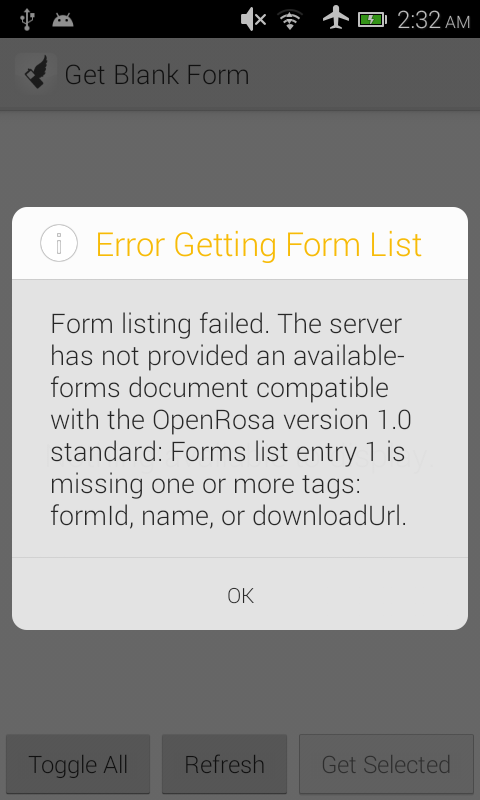
Moving back to AT as it turns out the demo or Collect I was using wasn't set to the right server URL. The curl statement works fine but I'm getting an error in Medic Collect.
sglangevin
on 20 Jun 2017
@garethbowen this one failed AT. It's the last thing left to complete before we release and would be very much appreciated by all of our projects that are upgrading from v0.4.
sglangevin
on 20 Jun 2017
@sglangevin That error looks like one of the forms on the server is invalid. Can you check the API logs to ensure there's no error on the server side? Also can you check the collect logs (if there are any) to see if there's more information available? Finally, can you check that your form is valid, and perhaps try a trivially simple one?
garethbowen
on 20 Jun 2017
@garethbowen: @abbyad and I looked into this a bit together. There is no API error and it's not a problem with the form. It seems to be an issue with the request coming to API from Collect. @abbyad is looking into this further - assigning over to him.
sglangevin
on 20 Jun 2017
The call from Collect seems to be alright, but the XML form list is missing the name field. The name field is required for Collect to process the forms list.
The "name" is stored in the form's doc as title, which is either a string or a localized object as shown below. We should return the localized version when the Accept-Language header is used.
[
   {
       "locale": "en",
       "content": "New Pregnancy"
   },
   {
       "locale": "hi",
       "content": "नई गर्भावस्था"
   }
]
@abbyad The form list XML is generated by our fork of a third party library and I don't like the idea of hacking the output just to add a custom name element. Alternative options:
1) ensure all forms have a title - this could be enforced at some validation stage when uploading forms or just managed manually.
2) modify medic-collect to default to the formId when no name is available.
Unfortunately neither of these options allow for translation of the title.
What do you think?
garethbowen
on 22 Jun 2017
NB: for anyone else trying to test this, this is the URL to curl:
curl -vvvv -H "x-openrosa-version: 1" http://user:pass@host:port/api/v1/forms
Thanks for looking into it. The name field is pulled from the title in the XForm, and although the project form we tested has the title field, we are actually stripping it automatically with the upload_xform script.
@alxndrsn is it safe to leave the title in the XML?
abbyad
on 22 Jun 2017
@abbyad I caught up with @alxndrsn just now. There are a range of ways to do this but the easiest and cleanest is to remove the title stripping code from the upload_xform script. This was introduced to fix #1433 which I think would be better fixed by hiding the title using CSS. Possibly we should only hide it for mobile where the title is shown in the header bar anyway.
Does this make sense?
garethbowen
on 22 Jun 2017
Yes, that makes sense, and seems like a much cleaner approach too.
abbyad
on 22 Jun 2017
It seems as though the XForm title cannot be localized, so perhaps better to either:
A) not show it, even in desktop view
B) bring in the localized title from the form's doc.title
Given that we haven't had a specific request to show the title in the desktop view and option B requires writing new code, I'd lean towards option A.
abbyad
on 22 Jun 2017
After some discussion we decided on option B because the code already exists so it was a simple change.
garethbowen
on 22 Jun 2017
Code review please @mandric
This needs to be backported to 2.12.x
garethbowen
on 22 Jun 2017
Merged in order to get the 2.12.0 release out.
garethbowen
on 22 Jun 2017
To test this you'll need to upload the forms again with the latest version of the upload_xform script.
garethbowen
on 23 Jun 2017
Tested on 2.12.0-beta.8 and it's working well. Hooray! Moving to Ready.
sglangevin
on 27 Jun 2017
Related issues
mandric
·
37Comments
 yembrick
·
46Comments
sglangevin
·
35Comments
yembrick
·
46Comments
sglangevin
·
35Comments
 n-orlowski
·
29Comments
n-orlowski
·
29Comments
 SCdF
·
38Comments
SCdF
·
38Comments