Chronograf: [WIP] Design for IFQL Builder
Foundational Stories
3 Facets
- IFQL Package
- Completion API
- [ ] get function names (https://github.com/influxdata/ifql/pull/269)
- [ ] get function params (https://github.com/influxdata/ifql/pull/269)
- 2.0 API Responses (Meta queries for populating lists)
- [ ] show tag keys
- [ ] show tag values
- [ ] show tables
- [ ] show measurements (does this still exist?)
- [ ] data query api
- Completion API
- Chronograf
- [ ] Add Routes for Completion API in chrono api
- [ ]
/api/v1/suggestions<- provides funcs - [ ]
/api/v1/suggestions/:func_name<- provides params for given func
- [ ]
- [ ] Components
- [ ] IFQL Text Editor
- [ ] Argument Types
- [ ] Invalid Kind = iota
- [ ] Nil
- [ ] String
- [ ] Int
- [ ] UInt
- [ ] Float
- [ ] Bool
- [ ] Time
- [ ] Duration
- [ ] Regexp
- [ ] Array
- [ ] Object
- [ ] Function
- [ ] From
- [ ] Filter
- [ ] Range
- [ ] Window
- [ ] Group
- [ ] Aggregate Functions
- [ ] mean
- [ ] max
- [ ] top
- [ ] bottom
- [ ] highestMax
- [ ] highestAverage
- [ ] highestCurrent
- [ ] lowestMin
- [ ] lowestAverage
- [ ] lowestCurrent
- [ ] stateCount
- [ ] stateDuration
- [ ] distinct
- [ ] percentile
- [ ] median
- [ ] forking
- [ ] join
- [ ] API team to figure out how they want to proxy requests
- [ ] Add Routes for Completion API in chrono api
Overview
IFQL is the upcoming new query language for use with InfluxDB. It is different enough from our current query language to require an interface re-design. This presents an opportunity to not only explore some entirely new ideas, but to solve some of the existing limitations in the same fell swoop. My goal is to deliver designs that can be easily translated into functional specs and broken into manageable phases.
Existing Limitations
- _Build a query string_ paradigm
- The current UI is centered around this action; we have made it transparent to the user what is happening underneath the hood
- If we present the query string being built users will want to manually edit the string which demands a builder/editor pattern
- Syncing the query string in the editor to the builder UI isn't always 1:1, which can feel like hitting a wall
- Not everything a user can do with the query language is represented in the UI
- Query strings read best when displayed horizontally which limits what we can do with the UI
- The builder was initially designed for data exploration but has been shoe-horned into a dashboarding role; it is not specialized for either context
New Opportunities Arise
- Erasing the editor/builder binary in favor of a 1:1 pattern
- The "Method Chaining" syntax naturally lends itself to a modular UI
- Will not be hard to represent most (if not all) functionality in the UI
- Switching between modes will no longer have limitations or translation issues
- IFQL uses a "Method Chaining" syntax similar to TICKscripts
- Could be a big UX win to use a similar UI for editing both
- Users will only have to learn a single "building" UI
Working Assumptions
- IFQL Proposal
- As methods are added to a chain they will automatically sort into the correct order
- Every chain will be defined as a variable under the hood
- This will make the cloning/preset actions more natural
- Every chain can have its own unique color
The Design
Chains, Methods, and Arguments represented in collapsible tree format
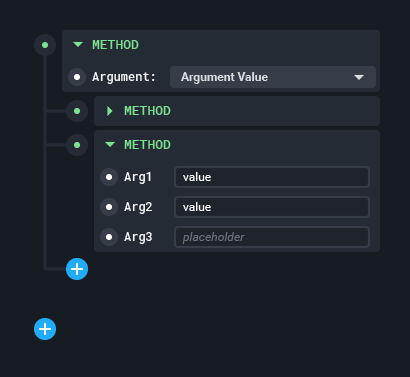
- The first method (usually
SELECT) receives no identation - All following methods are indented 1 level (as shown in example above)
- Each method is associated with a UI specification, so that Chronograf knows how to render an appropriate form for it; this is known as the Arguments Block
- Methods can be collapsed which hides their Arguments Block
"Smart" Plus Buttons

- Most (if not all) add actions can be performed with the
(+)button - The button is "smart" because it offers the user a differing options based on its context in the tree
- Each
(+)button appears inline with the tree, informing users of where in the tree the new method or argument will appear - Examples menu contents:
- Clicking
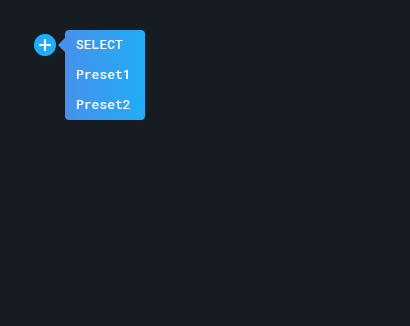
(+)from a blank builder and/or the "hanging plus": SELECT-- Creates a new blank chain. Always first in the listPresetA-- Creates a new chain from a saved preset. One menu item per saved preset. If no presets exist just displaySELECT- Clicking
(+)from within an existing chain: - List all available methods here
.where(),.range(),.clear(),.window(),.keys(),.values(),.cardinality(),.limit(),.timeShift(),.interpolate(), etc.
- Do not show
.join()and related operations in this menu - If a method has already been used in the chain, display it in the menu but leave it disabled
- User can "Fork" a chain at that node (see details below in Forking section)
- Clicking
(+)from within a method's argument block - Depends on the method
- Some common argument structures:
- Key/Value pairs with text fields
- Key/Value pairs with dropdowns
- Boolean operators
AND/OR - Boolean comparisons
[key][math operator][value]
- Clicking
Actions & Batch Actions
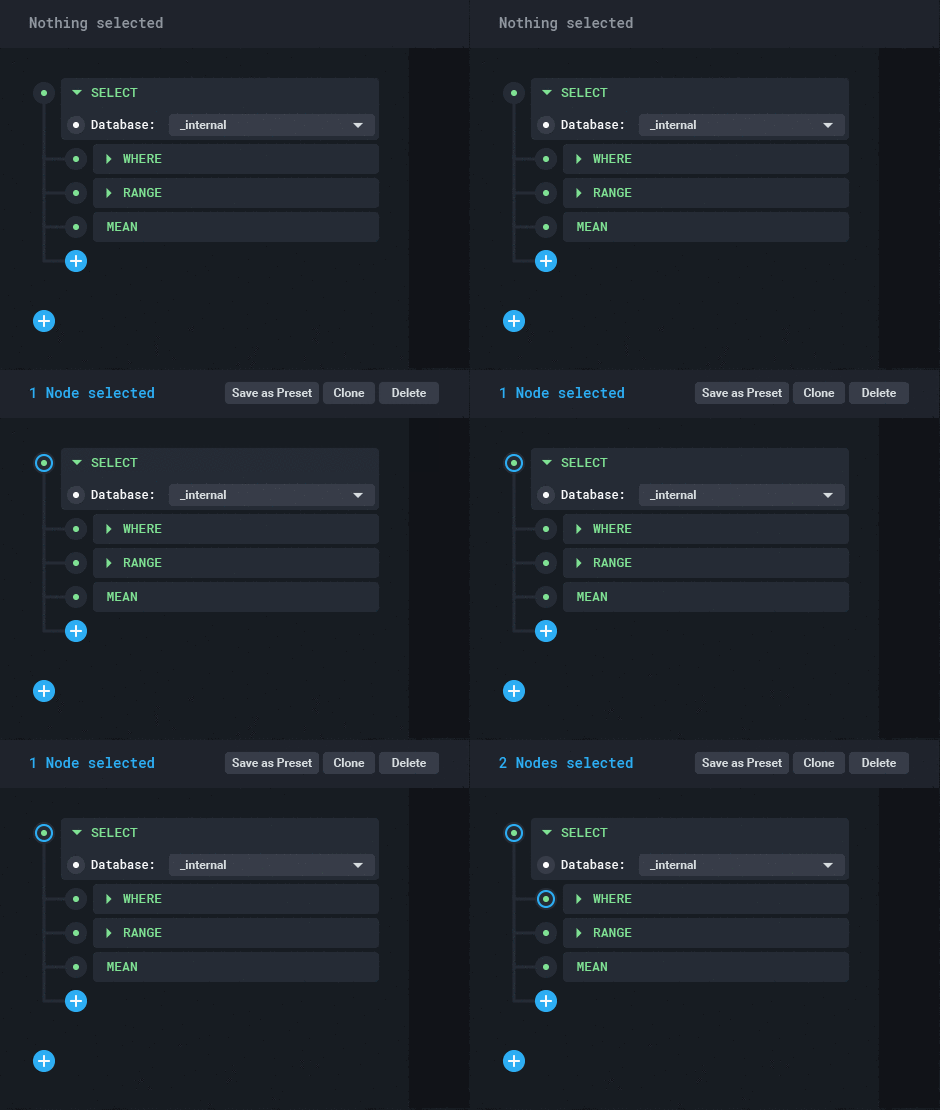
- User can select multiple methods and/or chains to perform batch actions
- Methods can be selected by clicking the circle graphic to the left
- After the user has selected a single method, the _Action Bar_ appears atop the builder
- Depending on the combination of selected methods different actions will be available in the Action Bar
- If a user selects any quantity of methods (even in multiple chains) they can batch
Delete - If a user selects two (or more?) chains, the Action Bar will display the
Joindropdown - If a user selects a single method they can
Copyit. If they have previously copied a method then they canPasteinto the selected chain - If a user selects the first method in a chain and any amount of methods in the same chain the user can
Save as Preset(See details below) - If a user selects a single method they can
Forkit (see details below)
- If a user selects any quantity of methods (even in multiple chains) they can batch
Query Presets
- Presets are designed to reduce repetitive tasks for users
- Essentially a means to save and recall queries in a "templated" format
- Can be useful when creating a dashboard
- To be saved as a Preset, the user must have selected at least the
Selectmethod and any number of methods afterwards in the same chain
- Presets store the entire selected query object complete with arguments for each method
- When the user clicks
(+)to create a new chain, they can recall a saved Preset
- User can then drill down to each method and argument to change the values that need changing
- UX benefits and potential:
- Saves the user time
- User can build up an arsenal of customized presets to speed up their workflow
- Chronograf empowers users
- Chronograf could ship with common presets, which could save the user more time and help introduce them to Query Presets
- Similar to the
Meta Queriesdropdown in the Data Explorer
Forking Queries
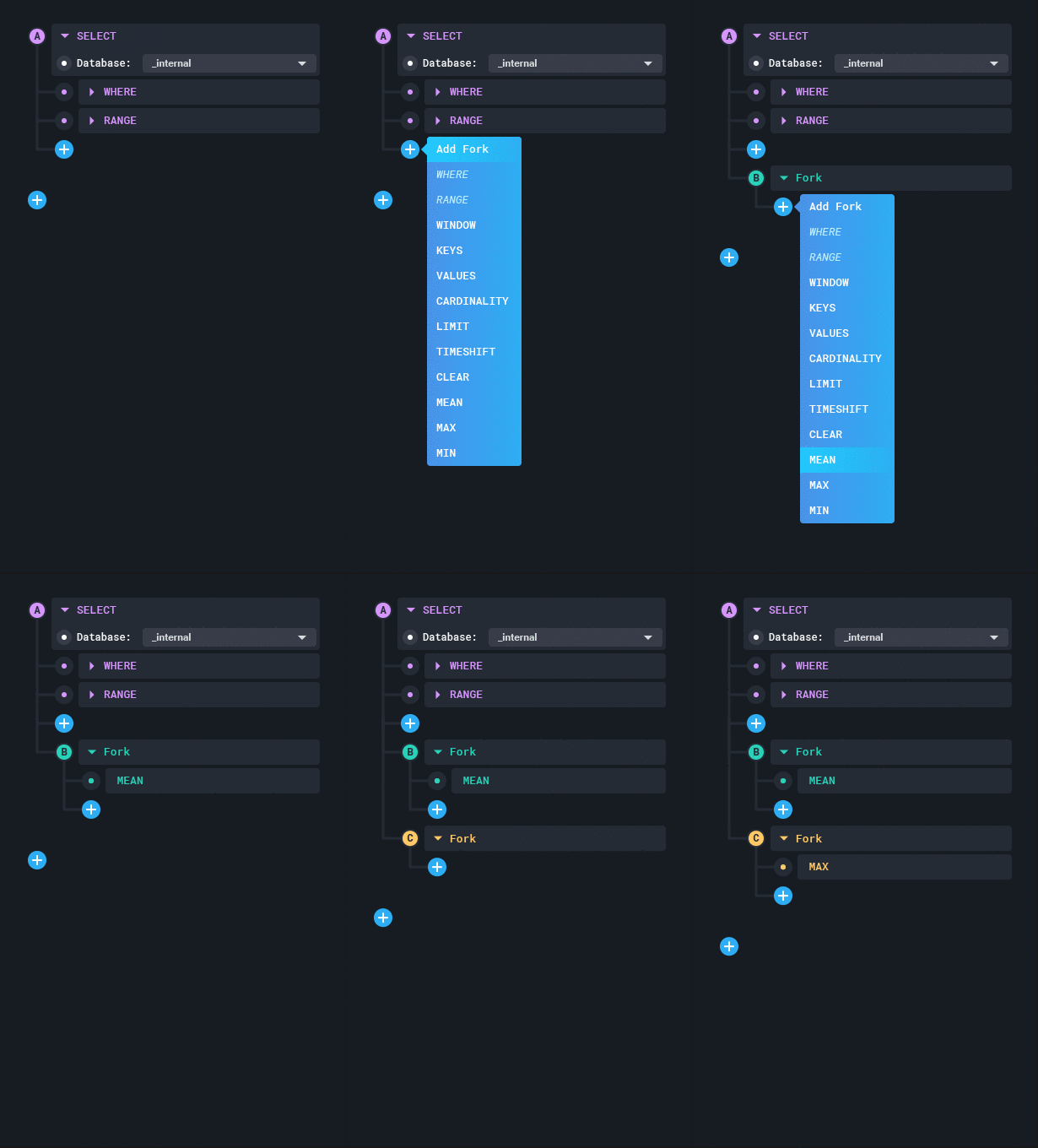
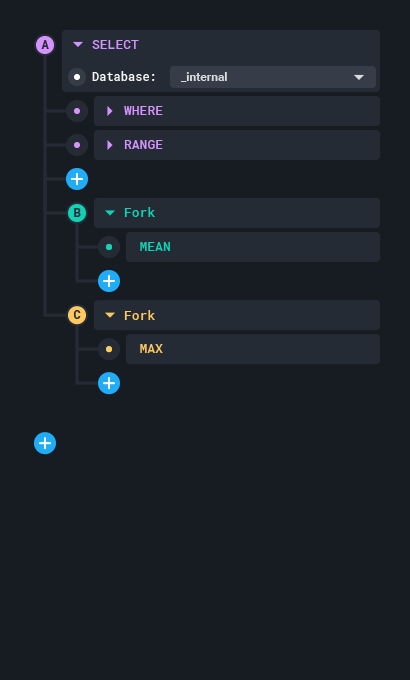
- There are cases in which a user may want to "fork" a query and perform slightly different methods on a common chain
- In IFQL the easy way to do this would be using variables
- ```
var a = select().where().range()
var b = a.mean()
var c = a.max()
- In this new design the same effect can be achieved using _Forking_
- User can select a single method in a chain and perform a "Fork"
- This adds a visual fork in the tree representing the relationship as it exists in IFQL
- Users can create multiple forks at the same location
- Users cannot add methods to a chain past a fork
- They must add methods to each chain or before the fork
- Users could theoretically fork a chain multiple times
- If a user saves a preset that includes a fork, that fork is preserved when the preset is recalled
Phases
- MVP
- Ability to construct a query using "Smart Plus Buttons"
- Ability to select and delete a single method
- Batch Actions
- Ability to select and delete many methods
- Ability to copy a single method and paste in the same or another query
- Presets
- Ability to select the beginning of a chain (Starting with
SELECT, any number of continuous methods after) and save as a preset - Ability to create a new chain from a preset using the
(+)button
- Ability to select the beginning of a chain (Starting with
- Forking
- Ability to fork a chain using the
(+)button - Ability to chain methods to a fork using the
(+)button - Ability to select a fork and delete it
- Ability to batch delete with mixed types (ex: 2 methods, 1 chain, and a fork)
- Ability to save presets containing forks
- Ability to fork a chain using the
UX Considerations
Since this is an entirely new feature, we can't expect users to magically know how to use it right away. For existing Chronograf and InfluxDB users the learning curve may be steeper as they have to unlearn the previous query language and associated interfaces. In my opinion IFQL is easier to learn due to its syntax, but regardless we may need some sort of tutorial or walkthrough for users.
Here are some thoughts and open questions:
- Are the circles next to each method obviously clickable?
- Can this be solved with a UI change alone?
- Do we need a tutorial?
- Is it worthwhile to build a conversion tool that can transition users existing queries into IFQL?
- Could also help them learn the new query language
- I feel strongly that the 1:1 mapping between the language and the builder is the essence of the experience
- Even though most users may never want to manually edit the IFQL it will always be a clunky experience for those who do if we don't adhere to 1:1 mapping
- 1:1 Mapping makes the builder more powerful; advanced users are less inclined to do things manually, regular users feel more advanced
- Also makes the sharing / importing of queries a much smoother experience
- Imagine being able to simply copy & paste a query to another user, and they can copy & paste to import it. No fancy UI needed
- What are some presets we could ship with that would save time for users?
- Taking into account the various different use cases of the software, could be grouped by use case
- eg: DevOps Monitoring could include presets that would be standard in a monitoring dashboard
 alexpaxton
All 6 comments
Thank you for building this great product.
Will it be possible for your team to have this IFQL package available as a separate platform independent Module/Library or package with UI/UX (if possible) for Javascript or Typescript, so that people can extend chronograf capabilities to custom, in-house Apps easily
 akansal1
on 6 Oct 2017
akansal1
on 6 Oct 2017
@akansal1 That's definitely the plan! We want to help application developers build apps quickly on top of our platform.
 pauldix
on 6 Oct 2017
pauldix
on 6 Oct 2017
@pauldix that will be great, is there any expected broad timeline ?
akansal1
on 9 Oct 2017
@akansal1 tough to say at this point. We have to release the MVP of the server stuff. Then our UX team can get to work on the front end bits. The work on IFQL is the first part of some broader work on new APIs, which are what we'll be building libraries for. Best guess is early next year. Can't happen fast enough for me :)
pauldix
on 14 Oct 2017
Foundational Stories
3 Facets
- IFQL Package
- Completion API
- [ ] get function names (https://github.com/influxdata/ifql/pull/269)
- [ ] get function params (https://github.com/influxdata/ifql/pull/269)
- 2.0 API Responses (Meta queries for populating lists)
- [ ] show tag keys
- [ ] show tag values
- [ ] show tables
- [ ] show measurements (does this still exist?)
- [ ] data query api
- Completion API
- Chronograf
- [ ] Add Routes for Completion API in chrono api
- [ ]
/api/v1/suggestions<- provides funcs - [ ]
/api/v1/suggestions/:func_name<- provides params for given func
- [ ]
- [ ] Components
- [ ] From
- [ ] Filter
- [ ] Range
- [ ] Window
- [ ] Group
- [ ] Aggregate Functions
- [ ] mean
- [ ] max
- [ ] top
- [ ] bottom
- [ ] highestMax
- [ ] highestAverage
- [ ] highestCurrent
- [ ] lowestMin
- [ ] lowestAverage
- [ ] lowestCurrent
- [ ] stateCount
- [ ] stateDuration
- [ ] distinct
- [ ] percentile
- [ ] median
- [ ] forking
- [ ] join
- [ ] API team to figure out how they want to proxy requests
- [ ] Add Routes for Completion API in chrono api
 russorat
on 21 Mar 2018
alexpaxton
on 29 Mar 2018
russorat
on 21 Mar 2018
alexpaxton
on 29 Mar 2018
Related issues
russorat
·
4Comments
 jaredscheib
·
3Comments
jaredscheib
·
3Comments
 jackzampolin
·
6Comments
jackzampolin
·
6Comments
 dhasenan
·
5Comments
dhasenan
·
5Comments
 mleonhard
·
3Comments
mleonhard
·
3Comments
Most helpful comment
@akansal1 tough to say at this point. We have to release the MVP of the server stuff. Then our UX team can get to work on the front end bits. The work on IFQL is the first part of some broader work on new APIs, which are what we'll be building libraries for. Best guess is early next year. Can't happen fast enough for me :)