Choices: How to change value of existing Choice?
I have the existing element select#selector
I can't change developer's src bundle.
I just need add my fuctionality.
I'd like to do
var selector = new Choices(document.getElementById('selector'));
selector.setValue('bla-bla');
but it doesn't work.
Can you help me?
 morphikus
All 15 comments
Hey! setValueByChoice is what you’re after! :)
 jshjohnson
on 17 Oct 2017
jshjohnson
on 17 Oct 2017
When I call setValueByChoice I see "Attempting to select choice that does not exist" in console log.
I don't need to create a Choice combobox =) I want use the existing Choice combobox.
morphikus
on 18 Oct 2017
What are you passing as the argument to setValueByChoice? You need to pass the value of the option you want to select.
jshjohnson
on 18 Oct 2017
For example:
select id="select"
option value="123"
One two three
option value="456"
Four Five Six
Somebody had done the Choice element from select#select earlier.
I'm trying to "connect" to his Choice element
var selector = new Choices(document.getElementById('select'));
selector.setValueByChoice('456');
but I see "Attempting to select choice that does not exist" in console log. =))
morphikus
on 18 Oct 2017
Could you do me a favour and send me the output of console.log(selector.presetChoices) please?
Thanks
jshjohnson
on 18 Oct 2017
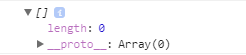
=(
morphikus
on 18 Oct 2017
Hmm something's not right with your setup. Could you send me your full choices config as well as the markup for the select please?
jshjohnson
on 18 Oct 2017
if (document.querySelector('.js-choice')) {
  Array.from(document.querySelectorAll('.js-choice')).forEach(
    element => new Choices(element, {
      search: false,
      itemSelectText: '',
      shouldSort: false
    }));
}
So every select at site will become Choice element. I can't change config. I need to work with the existing elements. =(
morphikus
on 18 Oct 2017
So are you trying to set the value on every single select box? I'm confused
jshjohnson
on 19 Oct 2017
I have a similar issue. I am making every select on the page into a Choices instance so I don't really have access to the specific one I want to set the value of (via a separate instance variable).
Choices in my case is inside a wrapper:
const Select = (selector = 'select:not(.js-manual-select)', settings = {}) => {
    if (!document.querySelector(selector)) {
        return console.warn('Select: no matching element');
    }

    return new Choices(selector, merge(defaultSettings, settings));
};
Since I have access to code, I excluded a certain class as seen above and created an instance separately.
This did give me an error in the console saying Incompatible input passed, which seemingly doesn't really affect anything, everything works. (Care to still comment this, though?)
Listening to select changes and setting the new value as the Choices instance value of the select would solve @morphikus and my issue I guess. A possibility to retrieve the instance via an HTML element etc would work as well.
 sergonius
on 12 Feb 2018
sergonius
on 12 Feb 2018
I have the same issue, I'm creating many instances of Choices on page init. I don't have access to each choices instance as a variable to update later so would like to target via the source DOM element e.g.
var elChoice = document.querySelector('.choices-instance');
var choicesInstance = Choices(elChoice);
choicesInstance.setValue(['Set value 1', 'Set value 2']);
 bennybee
on 16 Oct 2018
bennybee
on 16 Oct 2018
This is fixed in develop - soon to be released. Just writing some e2e tests...
jshjohnson
on 16 Oct 2018
@jshjohnson Any ETA? Having this issue with 4.1.0.
 binarious
on 23 Nov 2018
binarious
on 23 Nov 2018
@jshjohnson Having the same issue.
 carlwood
on 4 Feb 2019
carlwood
on 4 Feb 2019
<!-- Let's assume we have a select like this: -->
<select name="test" id="test">
<option value="1">One</option>
<option value="2">Two</option>
</select>
//convert all selects on the page in Choices
document.getElementsByTagName('select').forEach(function(current_node, index){
// create a new property on it, which will store Choices
current_node.choices = new Choices(node);
})
// Access it anytime using the property declared earlier
document.getElementById('test').choices.setValue([{value: 2, label: "Two"}])
 besciualex
on 28 Jan 2020
besciualex
on 28 Jan 2020
Related issues
 ckotzbauer
·
5Comments
ckotzbauer
·
5Comments
 CodeExplore
·
4Comments
CodeExplore
·
4Comments
 sebastien-roch
·
3Comments
sebastien-roch
·
3Comments
 rstacruz
·
4Comments
rstacruz
·
4Comments
 ggcaponetto
·
4Comments
ggcaponetto
·
4Comments
Most helpful comment
<!-- Let's assume we have a select like this: --><select name="test" id="test"><option value="1">One</option><option value="2">Two</option></select>//convert all selects on the page in Choicesdocument.getElementsByTagName('select').forEach(function(current_node, index){// create a new property on it, which will store Choicescurrent_node.choices = new Choices(node);})// Access it anytime using the property declared earlierdocument.getElementById('test').choices.setValue([{value: 2, label: "Two"}])