Chocolatey-coreteampackages: (1password) Installation failed due to change in installer
Expected Behavior
1password to be updated
Current Behavior
Failing with an error message
Installing 1PasswordSetup-7.3.657.exe...
error: Found argument '/VERYSILENT' which wasn't expected, or isn't valid in this context
USAGE:
    1PasswordSetup-7.3.657.exe [OPTIONS]
For more information try --help
ERROR:
Running ['C:\Users\[myusername]\AppData\Local\Temp\chocolatey\1password\7.3.657\1PasswordSetup-7.3.657.exe'  /VERYSILENT /NORESTART /SUPPRESSMSGBOXES /SP- /LOG="C:\Users\[myusername]\AppData\Local\Temp\chocolatey\1password.7.3.657.InnoInstall.log"] was not successful.
 Exit code was '1' See log for possible error messages..
The upgrade of 1password was NOT successful.
Error while running 'C:\ProgramData\chocolatey\lib\1password\tools\chocolateyInstall.ps1'.
 See log for details.
Possible Solution
Change silent installation parameters.
Steps to Reproduce (for bugs)
- Just install / update 1password
Context
Update of 1password is failing, resulting that one can't install the latest version of 1password
Your Environment
- Package Version used: 7.3.657
- Operating System and version: WS10
- Chocolatey version: 0.10.12-beta-3-gb65f586
- Install/uninstall gist: https://gist.github.com/mkevenaar/1cbe6e74e7995d1c685e87cc07a0e908
 mkevenaar
All 45 comments
I have tried to solve this, got updates working, but new installation fails with an permission error from installer.
mkevenaar
on 13 Jan 2019
same problem.
 ndroftheline
on 17 Jan 2019
ndroftheline
on 17 Jan 2019

So apparently the installer finishes correctly if I simply run it without any arguments, also there is no gui only output in powershell ...
 oechsler
on 21 Jan 2019
oechsler
on 21 Jan 2019
@mkevenaar are you able to verify that everything works as expected when not supplying arguments to the installer?
 AdmiringWorm
on 21 Jan 2019
AdmiringWorm
on 21 Jan 2019
@AdmiringWorm I managed to get updates working, but new install failed.
I have pushed my changes to https://github.com/mkevenaar/chocolatey-coreteampackages/tree/fix-1password.
mkevenaar
on 21 Jan 2019
@mkevenaar do you get an error during install?
If so, what kind (or does it hang).
Could be that we need to rely on autohotkey in the latter case.
AdmiringWorm
on 21 Jan 2019
@AdmiringWorm It was a week ago, but if I remember correctly I got an error code 5 (access denied error) I was unable to investigate at that point what was going on.
If you want I can create a PR for my changes so you can continue to work on it.
mkevenaar
on 21 Jan 2019
@mkevenaar sure, do that.
AdmiringWorm
on 21 Jan 2019
@AdmiringWorm done #1208
mkevenaar
on 21 Jan 2019
Any updates on this?
 aleksijohansson
on 9 Mar 2019
aleksijohansson
on 9 Mar 2019
@aleksijohansson unfortunately not, we have not been able to pinpoint the issue we have with the new installer.
AdmiringWorm
on 4 May 2019
@AdmiringWorm I was able to get this working with this change: https://github.com/chocolatey-community/chocolatey-coreteampackages/pull/1208#discussion_r268379749
I'm no longer on Windows though, it was a one-off task, so hard to confirm it still works.
 fsouza
on 4 May 2019
fsouza
on 4 May 2019
@mkevenaar are you able to verify that this works?
I'm unfortunately no longer in windows myself, and my vm went haywire when I tried to launch it earlier today (happens from time to time).
AdmiringWorm
on 4 May 2019
I hope I have some time soon to check this @AdmiringWorm
mkevenaar
on 4 May 2019
Should be fixed now, confirm.
 majkinetor
on 7 Jun 2019
majkinetor
on 7 Jun 2019
I can't work it out to force update on 1password for some reason... You will have to try it from the repo.
majkinetor
on 7 Jun 2019
maybe uppercase stream names isn't respected by AU? or it got problems with package names starting with a number.
I also noticed it is missing the [CmdletBinding()] declaration. Could this be the problem?
@majkinetor ^^
AdmiringWorm
on 7 Jun 2019
I tested this again and the same issue still persists.
aleksijohansson
on 11 Jun 2019
@aleksijohansson it isn't released on gallery, is that how you tested it ?
majkinetor
on 11 Jun 2019
@majkinetor Yes, I just normally tried to install 1password with chocolatey. I could test something else too, if you can provide instructions?
aleksijohansson
on 11 Jun 2019
Just download code cpack it and install it.
Or wait for new release. Or some admin can publish it.
/cc @gep13
majkinetor
on 11 Jun 2019
Ok, I’ll wait for the release
aleksijohansson
on 15 Jun 2019
New error for this:
Installing 1PasswordSetup-7.3.705.exe...
error: Found argument '--log_path' which wasn't expected, or isn't valid in this context
USAGE:
    1PasswordSetup-7.3.705.exe [FLAGS] [OPTIONS]
For more information try --help
ERROR:
Running ['C:\Users\Paul\AppData\Local\Temp\chocolatey\1password\7.3.705\1PasswordSetup-7.3.705.exe'  --log_path .] was not successful.
 Exit code was '1' See log for possible error messages..
The upgrade of 1password was NOT successful.
Error while running 'C:\ProgramData\chocolatey\lib\1password\tools\chocolateyInstall.ps1'.
 See log for details.
 pauby
on 7 Aug 2019
pauby
on 7 Aug 2019
Well, that worked when I changed the installer. Since I don't use 1password, perhaps you can give help output.
Anyway, I am leaving this for others to take; its proprietary tool with stupid installer which I don't use. I showed how it could be done previously, perhaps something trivial could be changed such as parameter name.
Proof that it worked, i.e. that parameter existed back in time:
https://github.com/chocolatey-community/chocolatey-coreteampackages/pull/1208#discussion_r268379749
majkinetor
on 7 Aug 2019
Running the installer with --help gives:
USAGE:
    1PasswordSetup-7.3.705.exe [FLAGS] [OPTIONS]

FLAGS:
        --silent     Silent install.
    -h, --help       Prints help information
    -V, --version    Prints version information

OPTIONS:
    -i, --install_location <INSTALL_LOCATION>    Optional: Custom install location
OK, so they removed the parameter now. Perhaps because they added --silent so it should be even easier now and my code can be totally removed.
majkinetor
on 7 Aug 2019
I'll try and pick this one up today or tomorrow.
pauby
on 8 Aug 2019
I'm working on the assumption that unfortunately 1Password have not yet found an installer they can use silently or haven't completed writing their own. Either that or it's been sent to test us.
The --silent switch sadly doesn't install silently. What it does do it pop up a box asking if you want to install it (note that the session running Chocolatey to install it has admin rights).
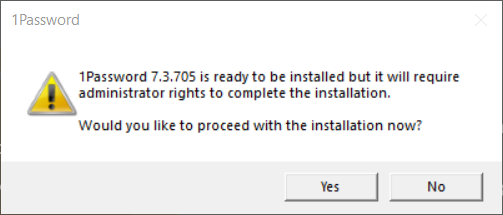
Easy enough to automate that via Autohotkey which I did. It then throws up a UAC box asking you to allow it to install. I'm assuming the installer spawns another install process that doesn't inherit the admin permissions from the parent. Not sure how I get around that. Suggestions?
Finally that code @majkinetor wrote around checking the log file to see what it finishes looks like it's still needed.
If we can't find a way around the installation process that 1Password is using, it should continue to be marked as an Upstream Issue until they fix it.
pauby
on 13 Aug 2019
Try to run installer via elevated scheduled task. If UAC doesnt happen then that could do.
On 13 Aug 2019, 12:03, at 12:03, Paul Broadwith notifications@github.com wrote:
I'm working on the assumption that unfortunately 1Password have not yet
found an installer they can use silently or haven't completed writing
their
own.
Either that or it's been sent to test us.The
--silentswitch sadly doesn't install silently. What it does do
it pop up a box asking if you want to install it (note that the session
running Chocolatey to install it has admin rights).
Easy enough to automate that via Autohotkey which I did. It then throws
up a UAC box asking you to allow it to install. I'm assuming the
installer spawns another install process that doesn't inherit the admin
permissions from the parent. Not sure how I get around that.
Suggestions?Finally that code @majkinetor wrote around checking the log file to see
what it finishes looks like it's still needed.--
You are receiving this because you were mentioned.
Reply to this email directly or view it on GitHub:
https://github.com/chocolatey-community/chocolatey-coreteampackages/issues/1186#issuecomment-520773013
majkinetor
on 13 Aug 2019
Any packages that do this already that I can borrow the code from?
pauby
on 13 Aug 2019
@pauby the Spotify package does this
mkevenaar
on 13 Aug 2019
@mkevenaar correct me if I'm wrong, but don't the spotify package run a schedule for installing spotify without admin privileges (due to requirements of the installer).
AdmiringWorm
on 13 Aug 2019
@AdmiringWorm it might be, I don’t know for sure
mkevenaar
on 13 Aug 2019
Not the installer per se but other stuff. Take a look at virtualbox helpers and modify accordingly.
Sent from BlueMail
On 13 Aug 2019, 15:29, at 15:29, Maurice Kevenaar notifications@github.com wrote:
@AdmiringWorm it might be, I don’t know for sure
--
You are receiving this because you were mentioned.
Reply to this email directly or view it on GitHub:
https://github.com/chocolatey-community/chocolatey-coreteampackages/issues/1186#issuecomment-520834759
majkinetor
on 13 Aug 2019
Is this still relevant? If so, what is blocking it? Is there anything you can do to help move it forward?
![stale[bot] picture](https://avatars.githubusercontent.com/in/1724?v=4&s=40) stale[bot]
on 12 Jan 2020
stale[bot]
on 12 Jan 2020
This remains an issue as of 1/13/2020, JFYI. Reading thru the GH issues it appears the problem is with 1password's installer, which attempts a second-order privilege elevation even when executed from an administrative prompt. I can confirm this happens on Win10-1909.
 tobyscales
on 13 Jan 2020
tobyscales
on 13 Jan 2020
I can confirm this issue. I was able to work around it by running :
choco install 1password -f -not-silent
 QNimbus
on 17 Jan 2020
QNimbus
on 17 Jan 2020
Is this still relevant? If so, what is blocking it? Is there anything you can do to help move it forward?
stale[bot]
on 17 Jun 2020
This issue still exists.
mkevenaar
on 11 Jul 2020
All issues still exists when bot announces closure. I am returning pending closure as it is obvious that nobody cares enough after more then year and a half.
majkinetor
on 11 Jul 2020
choco install 1password -f -not-silent
I too was able to install with this command but this package deserves an update as there is a newer version available than what gets installed via chocolatey
 virtualex-itv
on 13 Jul 2020
virtualex-itv
on 13 Jul 2020
This most definitely is still an issue. I use chocolatey to silently install packages (including 1Password) to my client workstations through a major name RMM. As most recent as yesterday, I was still getting the error message. If anybody wants me to test or review anything, I'm certainly happy to collaborate.
Download of 1PasswordSetup-7.3.705.exe (12.92 MB) completed.
Hashes match.
Installing 1password...
Microsoft.PowerShell.Commands.WriteErrorException
error: Found argument '--log_path' which wasn't expected, or isn't valid in this context
USAGE:
1PasswordSetup-7.3.705.exe [FLAGS] [OPTIONS]
Microsoft.PowerShell.Commands.WriteErrorException
For more information try --help
ERROR: Running ["C:\WINDOWSTEMP\chocolatey\1password\7.3.705\1PasswordSetup-7.3.705.exe" --log_path . ] was not successful. Exit code was '1'. See log for possible error messages.
The install of 1password was NOT successful.
Error while running 'C:\ProgramData\chocolatey\lib\1password\tools\chocolateyInstall.ps1'.
See log for details.
 ropearce
on 16 Jul 2020
ropearce
on 16 Jul 2020
I have a fix for the issue, but requires more testing. I'll have artifacts of the updated nupkg files on my appveyor soon for anyone that wants to test.
The installer they are using is still 'raw' and they are slowly working on only adding switches that are extremely necessary.
I'll update this post shortly with the links.
Edited 07/21/2020
This is the ongoing thread from the 1password forum
 RedBaron2
on 16 Jul 2020
RedBaron2
on 16 Jul 2020
@mkevenaar @ropearce
Thanks for the 👍
Here is the link to the zip file with my updates for the fix.
Please Test it !_! and let us know of any problems. Thanks
@majkinetor
FYI: If this works well for them. There is serious work that needs to be done to the functions that are normally called for Chocolatey Installations.
RedBaron2
on 22 Jul 2020
This issue have been fixed in the repository, thanks to @mkevenaar.
A new version is being queued to be pushed to chocolatey.org.
AdmiringWorm
on 4 Aug 2020
Related issues
 jacktose
·
5Comments
AdmiringWorm
·
5Comments
jacktose
·
5Comments
AdmiringWorm
·
5Comments
 kaffeekanne
·
4Comments
majkinetor
·
4Comments
kaffeekanne
·
4Comments
majkinetor
·
4Comments
 verglor
·
5Comments
verglor
·
5Comments
Most helpful comment
Any updates on this?