Chocolatey-coreteampackages: (visualstudiocode) upgrades 1.14.x to 1.15.x fail
Expected Behavior
cup all should upgrade visualstudiocode to the latest version
Current Behavior
cup all fails when attempting to upgrade 1.14.x to 1.15 series
Possible Solution
choco uninstall visualstudiocode
choco install visualstudiocode
Steps to Reproduce (for bugs)
- Have or install visualstudiocode from 1.14 release
- cup all
Context
Upgrading all installed chocolatey packages to their latest version
Your Environment
- Package Version used: visualstudiocode 1.14.1
- Operating System and version: Windows 7
- Chocolatey version: Chocolatey v0.10.7
- Install/uninstall gist: https://gist.github.com/basictheprogram/bdc2fbc0e5ddc08470865330ba231871
 basictheprogram
All 19 comments
Odd, I do not have 32-bit installed, in fact the package is not installed at all.
2017-08-18 15:21:55.045   Log opened. (Time zone: UTC-05:00)
2017-08-18 15:21:55.045   Setup version: Inno Setup version 5.5.6 (u)
2017-08-18 15:21:55.045   Original Setup EXE: C:\Users\Admin\AppData\Local\Temp\chocolatey\VisualStudioCode\1.15.1\VSCodeSetup-x64-1.15.1.exe
2017-08-18 15:21:55.045   Setup command line: /SL5="$B002E,41844951,144384,C:\Users\Admin\AppData\Local\Temp\chocolatey\VisualStudioCode\1.15.1\VSCodeSetup-x64-1.15.1.exe" /verysilent /suppressmsgboxes /mergetasks=!runCode,desktopicon,quicklaunchicon,addcontextmenufiles,addcontextmenufolders,addtopath /log="C:\Users\Admin\AppData\Local\Temp\chocolatey\vscode.log"
2017-08-18 15:21:55.045   Windows version: 6.1.7601 SP1  (NT platform: Yes)
2017-08-18 15:21:55.045   64-bit Windows: Yes
2017-08-18 15:21:55.045   Processor architecture: x64
2017-08-18 15:21:55.045   User privileges: Administrative
2017-08-18 15:21:55.076   64-bit install mode: Yes
2017-08-18 15:21:55.076   Created temporary directory: C:\Users\Admin\AppData\Local\Temp\chocolatey\is-A4384.tmp
2017-08-18 15:21:55.107   Message box (OK):
                          Please uninstall Code 32bits before installing this 64bits version.
Since 1.15 Visual Studio Code is available in a 64-bit version and the Chocolatey package will install the 64-bit version on a 64-bit system. This requires any 32-bit version to be manually uninstalled first.
It was decided that failing installation and having the user to manually uninstall Visual Studio Code first if he wants to switch to the 64-bit version. To stay on the 32-bit version install you can use the --x86 option. See #813
 pascalberger
on 18 Aug 2017
pascalberger
on 18 Aug 2017
Odd, I do not have 32-bit installed, in fact the package is not installed at all.
@basictheprogram Now I'm confused. The tilte of the issue is upgrades 1.14.x to 1.15.x fail which indicates that you have Visual Studio Code 1.14 installed
pascalberger
on 18 Aug 2017
Sorry, I can open another ticket.
Let me clarify. I thought the problem was 32 bit vs 64 bit so I uninstalled Visual Studio Code and tried to re-install it and it failed with "... Please uninstall Code 32bits before installing this 64bits version. ..."
Tried a reboot and install, still failed.
If this different issue I'll open another ticket, but for me
- Upgrading to 1.15 from 1.14.x fails
- Installation of 1.15.x fails (pristine Windows 7)
- installing --version 1.14.2 fails (pristine Windows 7)
Let me know about a new ticket or maybe a title check of this ticket?
basictheprogram
on 18 Aug 2017
Having to uninstall Visual Studio Code first if upgrading from 1.14 32-bit to 1.15 64-bit is expected as explained above.
The error message you mention here indicates that Visual Studio Code is still installed. If the Chocolatey package is not installed please check in control panel if you have an entry for Microsoft Visual Studio Code and uninstall it from there.
Let me know about a new ticket or maybe a title check of this ticket?
No need for this. So far everything is expected behavior. The message Please uninstall Code 32bits before installing this 64bits version.you receive is not from the Chocolatey package but from the Visual Studio Code installer. So most probably Visual Studio Code is still installed in some way, or otherwise this would be an issue in the Visual Studio Code installer and needs to be reported at https://github.com/Microsoft/vscode
pascalberger
on 19 Aug 2017
I do not see it when view via control panel.
basictheprogram
on 19 Aug 2017
I do not see it when view via control panel.
Can you please download the Visual Studio Code installer, start installation manually and check if the error also appears there.
If you think this is an error in the Visual Studio Code installer please open an issue at https://github.com/Microsoft/vscode, there's nothing we can do here, since the Chocolatey package is just a simple wrapper around the installer.
pascalberger
on 19 Aug 2017
Downloaded from https://github.com/Microsoft/vscode and manual installation worked.
via the below command line works as well
> .\VSCodeSetup-x64-1.15.1.exe /verysilent /suppressmsgboxes /mergetasks=!runCode,des
ktopicon,quicklaunchicon,addcontextmenufiles,addcontextmenufolders,addtopath
On the same machine with the same user?
Sorry, I'm out of ideas. I don't see any difference than in the call we do from the Chocolatey package in this case, and the error is thrown in the installer. I also never experienced a similar behavior.
pascalberger
on 19 Aug 2017
Same user, local Administrator, 13 different Windows7 machines.
basictheprogram
on 19 Aug 2017
13 different Windows7 machines.
Can we stick to one machine please, otherwise I don't have any chance to follow what you are doing.
So on the same machine the installer run manually worked but the Chocolatey package didn't?
Downloaded from https://github.com/Microsoft/vscode
What exactly did you download from there? The binaries aren't available from GitHub. Please download from https://code.visualstudio.com/
pascalberger
on 19 Aug 2017
Ok.
Using one machine, call it G1457, installation package downloaded form https://go.microsoft.com/fwlink/?Linkid=852157 installs with no problems.
https://go.microsoft.com/fwlink/?Linkid=852157 gave me the below file:
- MD5 (VSCodeSetup-x64-1.15.1.exe) = cc35b2a1a0f68fc0ef08b8807310f9f1
Installing via chocolatey fails
basictheprogram
on 19 Aug 2017
Can you please post the log of the failing output
pascalberger
on 19 Aug 2017
Showing Visual Studio Code is not installed via chocolatey.
PS C:\ProgramData\chocolatey\logs> choco list -lo
Chocolatey v0.10.7
ccleaner 5.33.6162
chocolatey 0.10.7
chocolatey-core.extension 1.3.1
DotNet4.5.2 4.5.2.20140902
git 2.14.1
git.install 2.14.1
GoogleChrome 60.0.3112.101
PowerShell 5.1.14409.20170510
8 packages installed.
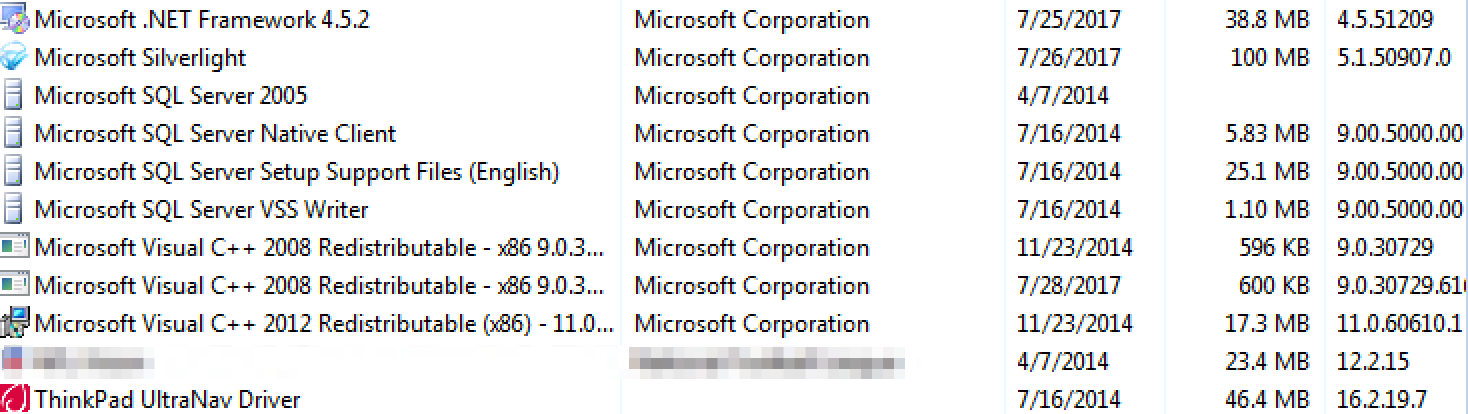
Visual Studio Code not listed in Control Panel
PS C:\ProgramData\chocolatey\logs> choco install visualstudiocode
Chocolatey v0.10.7
Installing the following packages:
visualstudiocode
By installing you accept licenses for the packages.
Progress: Downloading VisualStudioCode 1.15.1... 100%

VisualStudioCode v1.15.1 [Approved]
visualstudiocode package files install completed. Performing other installation steps.
Merge Tasks:
!runCode,desktopicon,quicklaunchicon,addcontextmenufiles,addcontextmenufolders,addtopath
File appears to be downloaded already. Verifying with package checksum to determine if it needs to be redownloaded.
Hashes match.
Hashes match.
Installing visualstudiocode...
This dialog is displayed.

I click Ok.
ERROR: Running ["C:\Users\Admin\AppData\Local\Temp\chocolatey\VisualStudioCode\1.15.1\VSCodeSetup-x64-1.15.1.exe
" /verysilent /suppressmsgboxes /mergetasks=!runCode,desktopicon,quicklaunchicon,addcontextmenufiles,addcontextmenufolde
rs,addtopath /log="C:\Users\Admin\AppData\Local\Temp\chocolatey\vscode.log" ] was not successful. Exit code was
'1'. See log for possible error messages.
The install of visualstudiocode was NOT successful.
Error while running 'C:\ProgramData\chocolatey\lib\VisualStudioCode\tools\ChocolateyInstall.ps1'.
 See log for details.

Chocolatey installed 0/1 packages. 1 packages failed.
 See the log for details (C:\ProgramData\chocolatey\logs\chocolatey.log).

Failures
 - visualstudiocode (exited 1) - Error while running 'C:\ProgramData\chocolatey\lib\VisualStudioCode\tools\ChocolateyIns
tall.ps1'.
 See log for details.
@ferventcoder Any idea what might be different between calling installer directly and from Chocolatey package which might cause the installer to behave differently?
pascalberger
on 19 Aug 2017
No.
Running the Microsoft download package by hand (like I stated above) with the chocolatey install options works fine.
That will be my Plan B (manual install).
Other then that I don't have clue.
I'm really a Unix guy and get Windows stuff dumped on me because DevOps platform is OS agnostic (so I'm told) :-(
basictheprogram
on 19 Aug 2017
How about this - just record the install with --no-script option, install manually and updates will work afterwards ?
 majkinetor
on 29 Aug 2017
majkinetor
on 29 Aug 2017
I did not know about the --no-script but I got a work around.
I got 2 new computers imaged with a new(er) version of things and the choco install works.
Sent 2 of the "broken" computer back for a re-image and choco install works.
The problem looks to be specific to something on my side and specific to the older OS images.
You can close this ticket.
Thanks.
basictheprogram
on 29 Aug 2017
@pascalberger 👍
 ferventcoder
on 30 Aug 2017
ferventcoder
on 30 Aug 2017
Related issues
 jbisson
·
6Comments
jbisson
·
6Comments
 Foadsf
·
4Comments
Foadsf
·
4Comments
 gep13
·
4Comments
gep13
·
4Comments
 pseigo
·
5Comments
pseigo
·
5Comments
 ericoporto
·
3Comments
ericoporto
·
3Comments
Most helpful comment
I did not know about the --no-script but I got a work around.
I got 2 new computers imaged with a new(er) version of things and the choco install works.
Sent 2 of the "broken" computer back for a re-image and choco install works.
The problem looks to be specific to something on my side and specific to the older OS images.
You can close this ticket.
Thanks.