Chocolatey-coreteampackages: (visualstudiocode) killswitch for visualstudiocode package
Hi guys. Can we add killswitch when installing/upgrading this package?
When machine has VSCode open, upgrade fails with MSI code '1'.
It can be a burden to do automated deploy.
Kill switch should be optional.
Expected Behavior
When upgrading package, with VSCode open by current user or any other user (RDP/Terminal) if killswitch is set to on, we can kill all instances of vscode.
Current Behavior
When upgrading package, with VSCode open by current user or any other user (RDP/Terminal) MSI exits with code '1'
Possible Solution
Steps to Reproduce (for bugs)
- choco install visualstudiocode (older version)
- open vsc
- add any file to it
- choco upgrade visualstudiocode
Context
Your Environment
- Package Version used:
- Operating System and version: W2k12, W2k6
- Chocolatey version: 0.10.7
- Install/uninstall gist:
 marcinbojko
All 8 comments
@pascalberger since visual studio code uses inno setup, maybe see if all we need is to add the following to the silent arguments /CLOSEAPPLICATIONS /RESTARTAPPLICATIONS?
 AdmiringWorm
on 17 Aug 2017
AdmiringWorm
on 17 Aug 2017
@AdmiringWorm Unfortunately doesn't work. Calling setup with /silent /forcecloseapplications leads to this:
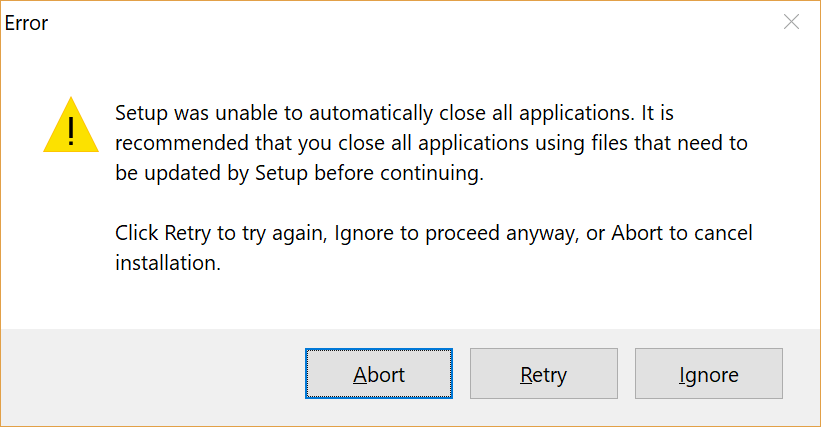
Together with the /suppressmsgboxes slot it will return with exit code 5.
 pascalberger
on 17 Aug 2017
pascalberger
on 17 Aug 2017
What about something brutal?
$killexec           = 1
$killexecprocess    = "doublecmd*"
# Should we kill some exec ?
if ($killexec) {
  Stop-Process -processname $killexecprocess -force
  }
  Start-Sleep -s 10
  Install-ChocolateyPackage @packageArgs

I used it in doublecmd package.
How about something non brutal: ps code | % { $_.CloseMainWindow() } ?
On my system it even saves automatically currently edited but not saved files (with "files.autoSave": "off",)
 majkinetor
on 30 Aug 2017
majkinetor
on 30 Aug 2017
ForEach-Object : Cannot bind parameter 'RemainingScripts'. Cannot convert the "?" value of type "System.String" to
type "System.Management.Automation.ScriptBlock".
At line:1 char:38
+ ps code | % { $_.CloseMainWindow() } ?
+                                      ~
    + CategoryInfo          : InvalidArgument: (:) [ForEach-Object], ParameterBindingException
    + FullyQualifiedErrorId : CannotConvertArgumentNoMessage,Microsoft.PowerShell.Commands.ForEachObjectComman
@marcinbojko remove the question mark (?) and try again.
AdmiringWorm
on 31 Aug 2017
Thanks. Works with saved and unsaved files in project.
marcinbojko
on 31 Aug 2017
Guys, tested with 16.x and 17.1 - this behaviour still stays.
ERROR: Running ["C:\Windows\TEMP\chocolatey\VisualStudioCode\1.17.2\VSCodeSetup-x64-1.17.2.exe" /verysilent /suppressmsgboxes /mergetasks="!runCode, desktopicon, quicklaunchicon, addcontextmenufiles, addcontextmenufolders, addtopath" /log="C:\Windows\TEMP\chocolatey\vscode.log" ] was not successful. Exit code was '5'. See log for possible error messages.
The upgrade of visualstudiocode was NOT successful.
Error while running 'C:\ProgramData\chocolatey\lib\VisualStudioCode\tools\ChocolateyInstall.ps1'.
See log for details.
Related issues
majkinetor
·
4Comments
 jacktose
·
5Comments
jacktose
·
5Comments
 kaffeekanne
·
4Comments
kaffeekanne
·
4Comments
 Korni22
·
3Comments
Korni22
·
3Comments
 verglor
·
5Comments
verglor
·
5Comments