Cherrytree: failed to launch on windows 10
Hi,
I just installed version 0.99.13 on Windows 10 (19041.508) and it does not work any more, nor Win install version nor portable version.
A mi alone with this pb ?
thanks
Gil
 gil390
All 29 comments
I installed 0.99.13 on Win10, and it worked just fine, the portable version is fine too. Maybe it's an antivirus that blocks the program?
@giuspen , a desktop shortcut created by the installer has a wrong path to the app, so it doesn't work.
 txe
on 28 Sep 2020
txe
on 28 Sep 2020
Hi! The same problem on Windows 10 (19041.508). App don't open GUI and close. tried to find some useful info with procmon, but failed.
 StrannikD
on 28 Sep 2020
StrannikD
on 28 Sep 2020
My antivirus is free Avast. It is up to date. I deactivated it and Win securities and cherrytree started after reboot.
I reactivated Avast and it warned me "IDP.Generic" on gdbus.exe
gdbus.exe seems free of virus for Virus Total
I reactivated all Win securities and gdbus.exe is in quarantaine. cherrytree app is working.
are all mingw apps necessary ?
thank a lot
Gil
gil390
on 28 Sep 2020
Correction:
cherrytree is working if i launch it from cmd.exe in "cherrytree_0.99.13.0_win64_portable\mingw64\bin" directory
chrrytree is not working if i double click on it from explorer. Application Event error: code exception 0x40000015
Access path of failed app: C:\Users\Gil\Downloads\cherrytree_0.99.13.0_win64_portable\mingw64\bin\cherrytree.exe
Access path of failed module : C:\Users\Gil\Downloads\cherrytree_0.99.13.0_win64_portable\mingw64\bin\libstdc++-6.dll
Strange ? It could be a path problem ?
thx
Gil
gil390
on 28 Sep 2020
Yes, it happens with non-portable version too. Antivirus disabled.
Faulting application name: cherrytree.exe, version: 0.99.13.0, time stamp: 0x00000000
Faulting module name: libstdc++-6.dll, version: 0.0.0.0, time stamp: 0x00000000
Exception code: 0x40000015
Fault offset: 0x000000000001ef2a
Faulting process id: 0x2b0c
Faulting application start time: 0x01d69579a7261566
Faulting application path: C:\Program Files\CherryTree\mingw64\bin\cherrytree.exe
Faulting module path: C:\Program Files\CherryTree\mingw64\bin\libstdc++-6.dll
Report Id: 9c9a7653-30aa-446a-93f9-fe71cebb5f84
Faulting package full name:
Faulting package-relative application ID:
StrannikD
on 28 Sep 2020
dbus is used in a few cases by Gtk, so to make these cases working, Gtk starts gdbus.exe. But I tried to remove dbus.exe and cherrytree still started without any issue. I cannot say anything about other mingw apps.
It a first time when I see such problem, probably avast removed other files as well or something else. If I were you, I'd just make avast ignore the cherrytree portable folder.
txe
on 28 Sep 2020
Adding that my experience is similar to what others are reporting. In particular I see what @txe is saying (desktop shortcut points to the wrong path)
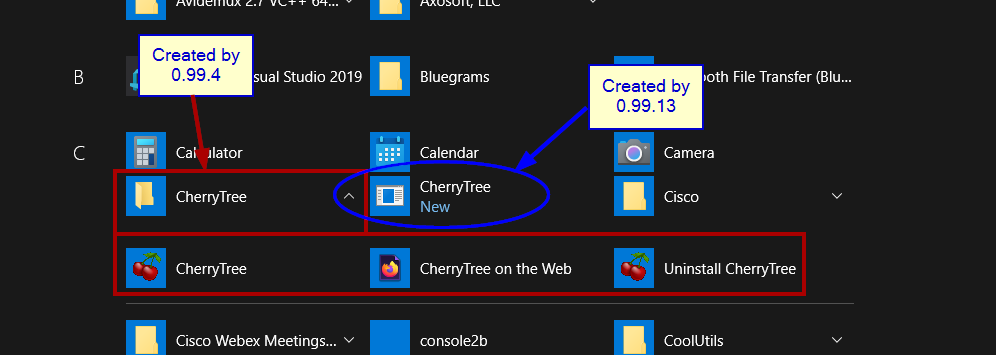
Actually, what I found is that the 99.13 installer creates an INVALID (correction: I previously reported it as valid) shortcut in Windows' Start Menu. However, the old 99.4 shortcut remains in place.
Furthermore, if a user had previously done a "pin to Start" and/or "pin to Taskbar" in 99.4, those pinned icons still point to 99.4.
... and, after installing 99.13, clicking on the old pinned icons attempts to launch 99.4 - which fails (despite the fact that 99.4 is still installed!)
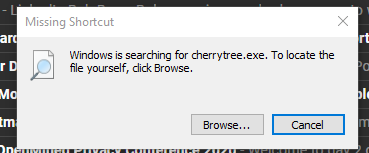
If the newly created (99.13) Start Menu icon is clicked, the user gets a "missing shortcut" error.
So, I see this as three separate issues:
The user's old 99.4 icons remain on the system and will attempt to launch 99.4
Once 99.13 is installed, the previously installed 99.4 is unable to launch (results in the blank window). Is this supported? If so, it is broken. If not, should the installer clean up the old icons?
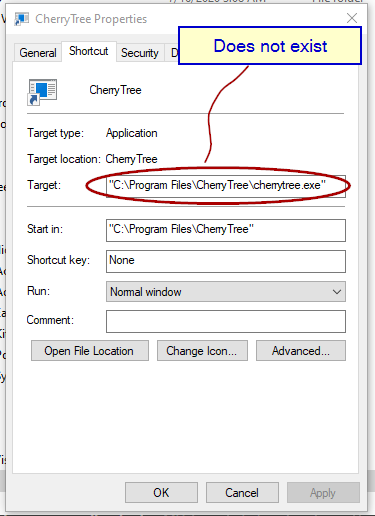
The new cherytree 0.99.13 start menu shortcut is invalid.
Some additional details...
0.99.13 installs in C:\Program Files\CherryTree\mingw64\bin\cherrytree.exe
00.99.13 creates a single desktop shortcut in Windows 10 Start Menu. But it points to "C:\Program Files\CherryTree\cherrytree.exe" which does not exist.
0.99.4 installed in C:\Program Files (x86)\CherryTree\bin\cherrytree.exe
0.99.4 installed an entire Cherry Tree folder in Windows 10 Start Menu
... these are illustrated in the following screenshots ...
Windows 10 > Start > All Apps ...
Popup after clicking on the new start menu shortcut (the one created by 0.99.13 installer) ...
Properties of the 0.99.13-created shortcut "C:\ProgramData\Microsoft\Windows\Start Menu\Programs\CherryTree.lnk" ...
 robertbyers1111
on 28 Sep 2020
robertbyers1111
on 28 Sep 2020
I dont't use installed version but portable one. Shortcut problem is another issue than mine.
gil390
on 28 Sep 2020
I also experience the same problem on Windows 10 with AVG antivirus. Even when I disabled the antivirus cherrytree.exe from neither the portable nor installed would run.
 elig0n
on 28 Sep 2020
elig0n
on 28 Sep 2020
I have the same problem. 0.99.13 doesn't launch.
I downloaded portable version from official site and extracted in new directory.
OS: Windows 10 Pro x64 1909 18363.959
Locale: Japanese
No antivirus software installed.
 piyo-gh
on 28 Sep 2020
piyo-gh
on 28 Sep 2020
Thanks I'm going to look at the wrong path issues
 giuspen
on 28 Sep 2020
giuspen
on 28 Sep 2020
I updated the installer please download it again https://www.giuspen.com/software/cherrytree_0.99.13.0_setup.exe now the desktop shortcut and double clicking from explorer should work
giuspen
on 28 Sep 2020
Note: dbus.exe is used only when you for example double click twice a document file from explorer. If you remove dbus.exe, you will end up with two independent cherrytree instances running two windows with the exact same document, otherwise the gtk3 application recognises that the same file is already opened and won't open it again but rather bring to the attention of the user the existing window
giuspen
on 28 Sep 2020
for who is failing to launch from windows portable and has the antivirus off, please try https://www.giuspen.com/software/cherrytree-0.99.13-test.exe.7z (extract and place cherrytree-0.99.13-test.exe in the portable folder beside cherrytree.exe) then run it from a console and report what you see printed
giuspen
on 29 Sep 2020
Results of running cherrytree-0.99.13-test.exe:
Microsoft Windows [Version 10.0.19041.508]
g:\SoftAG\Office\cherrytree_0.99.13.0_win64_portable\mingw64\bin>cherrytree-0.99.13-test.exe
terminate called after throwing an instance of 'std::runtime_error'
  what():  locale::facet::_S_create_c_locale name not valid
g:\SoftAG\Office\cherrytree_0.99.13.0_win64_portable\mingw64\bin>
Faulting application name: cherrytree-0.99.13-test.exe, version: 0.99.13.0, time stamp: 0x5f725635
Faulting module name: libstdc++-6.dll, version: 0.0.0.0, time stamp: 0x00000000
Exception code: 0x40000015
Fault offset: 0x000000000001ef2a
Faulting process id: 0x29d4
Faulting application start time: 0x01d696118e3f07fb
Faulting application path: g:\SoftAG\Office\cherrytree_0.99.13.0_win64_portable\mingw64\bin\cherrytree-0.99.13-test.exe
Faulting module path: g:\SoftAG\Office\cherrytree_0.99.13.0_win64_portable\mingw64\bin\libstdc++-6.dll
Hi,
Result is same as StrannikD.
C:\Users\Gil\Downloads\cherrytree_0.99.13.0_win64_portable\mingw64\bin>cherrytree-0.99.13-test.exe
terminate called after throwing an instance of 'std::runtime_error'
what(): locale::facet::_S_create_c_locale name not valid
Nom de l’application défaillante cherrytree-0.99.13-test.exe, version : 0.99.13.0, horodatage : 0x5f725635
Nom du module défaillant : libstdc++-6.dll, version : 0.0.0.0, horodatage : 0x00000000
Code d’exception : 0x40000015
Décalage d’erreur : 0x000000000001ef2a
ID du processus défaillant : 0x29d8
Heure de début de l’application défaillante : 0x01d6961f82e22d7b
Chemin d’accès de l’application défaillante : C:\Users\Gil\Downloads\cherrytree_0.99.13.0_win64_portable\mingw64\bin\cherrytree-0.99.13-test.exe
Chemin d’accès du module défaillant: C:\Users\Gil\Downloads\cherrytree_0.99.13.0_win64_portable\mingw64\bin\libstdc++-6.dll
ID de rapport : ffec96dd-2848-4f8d-9faf-d41882c6f083
Nom complet du package défaillant :
ID de l’application relative au package défaillant :
gil390
on 29 Sep 2020
I tried.
terminate called after throwing an instance of 'std::runtime_error'
what(): locale::facet::_S_create_c_locale name not valid
piyo-gh
on 29 Sep 2020
Thanks I'm going to produce a new exe for you to test later
giuspen
on 29 Sep 2020
for who is failing to launch from windows portable and has the antivirus off, please try https://www.giuspen.com/software/cherrytree-test2.7z (extract and place cherrytree-test2.exe in the portable folder beside cherrytree.exe) then run it from a console and report what you see printed
giuspen
on 29 Sep 2020
Thanks, cherrytree-test2 launched and can open cherrytree document.
First launch
** (process:9252): WARNING **: 09:09:04.554: locale::facet::_S_create_c_locale name not valid

[2020-09-30 09:09:04.824] [gtk] [critical] Class::register_derived_type(): base_query.type_name is NULL.
[2020-09-30 09:09:04.844] [   ] [error] !! file_dir error code 5
[2020-09-30 09:09:04.845] [   ] [error] !! doc_0 error code 5
[2020-09-30 09:09:04.846] [   ] [error] !! pick_dir_file error code 5
[2020-09-30 09:09:04.848] [   ] [debug] N:\app\cherrytree_win64_portable\config.cfg parsed

(cherrytree-test2.exe:9252): Pango-WARNING **: 09:09:06.586: couldn't load font "DejaVu Sans Bold Not-Rotated 175.08203125", falling back to "Sans Bold Not-Rotated 175.08203125", expect ugly output.

(cherrytree-test2.exe:9252): Pango-WARNING **: 09:09:06.643: couldn't load font "DejaVu Sans Bold Not-Rotated 294.345703125", falling back to "Sans Bold Not-Rotated 294.345703125", expect ugly output.

(cherrytree-test2.exe:9252): Pango-WARNING **: 09:09:06.664: couldn't load font "DejaVu Sans Bold Not-Rotated 243.080078125", falling back to "Sans Bold Not-Rotated 243.080078125", expect ugly output.
Second launch
** (process:3696): WARNING **: 09:11:37.289: locale::facet::_S_create_c_locale name not valid


(cherrytree-test2.exe:3696): Pango-WARNING **: 09:11:38.715: couldn't load font "DejaVu Sans Bold Not-Rotated 175.08203125", falling back to "Sans Bold Not-Rotated 175.08203125", expect ugly output.

(cherrytree-test2.exe:3696): Pango-WARNING **: 09:11:38.745: couldn't load font "DejaVu Sans Bold Not-Rotated 294.345703125", falling back to "Sans Bold Not-Rotated 294.345703125", expect ugly output.

(cherrytree-test2.exe:3696): Pango-WARNING **: 09:11:38.766: couldn't load font "DejaVu Sans Bold Not-Rotated 243.080078125", falling back to "Sans Bold Not-Rotated 243.080078125", expect ugly output.
Hi,
My result:
C:\Users\Gil\Downloads\cherrytree_0.99.13.0_win64_portable\mingw64\bin>cherrytree-test2.exe

** (process:3012): WARNING **: 07:17:46.346: locale::facet::_S_create_c_locale name not valid

[2020-09-30 07:17:46.646] [gtk] [critical] Class::register_derived_type(): base_query.type_name is NULL.
[2020-09-30 07:17:46.662] [   ] [debug] C:\Users\Gilles\AppData\Local\cherrytree\config.cfg parsed
[2020-09-30 07:17:48.167] [   ] [debug] Node name: 28 lun.
As piyo-gh, my app launched.
Thanks
Gil
gil390
on 30 Sep 2020
Does someone have a link to download previous version since the new one is still not working on my main computer?
Thanks in advance!
 savageloki666
on 30 Sep 2020
savageloki666
on 30 Sep 2020
https://www.giuspen.com/software/cherrytree_0.39.4_setup.exe and https://www.giuspen.com/software/cherrytree_0.39.4_win32_portable.7z - however I'm going to issue shortly a new version 0.99.14 please try it and report if you still have issues
giuspen
on 30 Sep 2020
Love Cherrytree and I use it daily.
However, the 0.39.4 edition is prompting to download the latest 0.99.13 and
I would prefer to wait until the 0.99.x series is more stable. Is it
possible to turn off the prompt without changing preferences for everyone?
Thanks!
-Jason
On Wed, Sep 30, 2020 at 2:45 PM Giuseppe Penone notifications@github.com
wrote:
https://www.giuspen.com/software/cherrytree_0.39.4_setup.exe and
https://www.giuspen.com/software/cherrytree_0.39.4_win32_portable.7z -
however I'm going to issue new version 0.99.14 please try and report if you
still have issues—
You are receiving this because you are subscribed to this thread.
Reply to this email directly, view it on GitHub
https://github.com/giuspen/cherrytree/issues/1184#issuecomment-701574443,
or unsubscribe
https://github.com/notifications/unsubscribe-auth/AGNOGPZ26QS7L4OOC5HJMYDSIN4FFANCNFSM4R4DKORA
.
 mofo1
on 30 Sep 2020
mofo1
on 30 Sep 2020
Thanks a lot and since I have the chance to chat with the owner, I'd like to thank you for this great piece of software too, keep the good work!
savageloki666
on 30 Sep 2020
@mofo1 it is configurable in the preferences dialog whether to check for newer version at startup
giuspen
on 30 Sep 2020
Just tried 0.99.14.0 both versions. Work excellently. Thanks a lot!
StrannikD
on 1 Oct 2020
Thanks @StrannikD I'm closing this for now
giuspen
on 1 Oct 2020
@giuspen Thank you for your responsiveness and your work.
gil390
on 2 Oct 2020
Related issues
 keesse
·
7Comments
keesse
·
7Comments
 bryn1u
·
5Comments
bryn1u
·
5Comments
 zauberparacelsus
·
7Comments
zauberparacelsus
·
7Comments
 codingo
·
7Comments
codingo
·
7Comments
 JC-paavo
·
3Comments
JC-paavo
·
3Comments
Most helpful comment
@giuspen Thank you for your responsiveness and your work.