Che: We need to define on a plugin deprecation policy
Is your task related to a problem? Please describe.
Plugins in the registry support a field
deprecate:
  automigrate: true/false
  migrateTo: <new plugin ID>
however, there is no defined policy on when this property should be used, and it's thus left up to whoever opens the PR to update a particular plugin. A consideration here is that there are two ways of specifying which plugin you want in your workspace:
- Use
latest(the default): you're only affected by deprecate when one plugin is deprecated in favor of another plugin; the use of deprecate is clear here. - You forego
latestand explicitly set a plugin version in yourmeta.yaml. Currently, there's not much reason to do this, but we offer it as an option, so we need to consider it.
Options
In increasing order of "how often deprecate is used":
1. Deprecate when a plugin explicitly should no longer be used
We deprecate plugins when we don't think users should use them, even if they chose that version specifically. Examples include
- Security vulnerability is found in an old plugin
- We want to remove the plugin from the registry since it's a year old or from a pre-release version
- We want to change the publisher or name of a plugin (e.g. moving from
camel-tooling/vscode-apache-cameltoredhat/vscode-apache-camel)
Pros:
Almost no chance of incompatability
Cons:
Highest requirement in terms of maintaining plugins (basically have to keep every plugin release, forever)
2. Deprecate old versions of plugins
We deprecate plugins when their version is outdated by some metric. For example we could deprecate plugins within major semver versions:
- If
1.2.0is released, deprecate all1.1.xreleases. - If
2.0.0is released, keep latest1.x.yversion.
Pros:
Provided semantic versioning is used as intended, this supports a common-sense use of the registry ("I want the latest release in major version 1.x")
Cons:
Some maintenance / manual work required when releasing a new version of a plugin.
3. Deprecate all older versions
When a new plugin is released, the previous version is deprecated.
Pros:
Simplest option, allows trimming number of supported plugin releases in registry (3mo after a plugin is deprecated, we could remove it)
Cons:
Makes the option of choosing any version other than
latestmeaningless.- A plugin removing a feature means users cannot choose the older version.
Historically, we've used option 1, and the registry supports creating a workspace with che-theia version 7.0.0-rc-4.0 (which IMO is an argument against it).
cc: @l0rd @slemeur @nickboldt
 amisevsk
All 8 comments
+1 for option 3
 l0rd
on 15 Jan 2020
l0rd
on 15 Jan 2020
cc @ericwill
l0rd
on 15 Jan 2020
I think option 2 is nice, but then we are at the mercy of relying on plugins to follow semantic versioning and that's not a guarantee. So +1 to option 3.
Are users in Che informed when a plugin they've selected for a workspace is deprecated? I.e. some sort of message like "Version x.x.x of this plugin is deprecated, please use the latest version"?
 ericwill
on 15 Jan 2020
ericwill
on 15 Jan 2020
@ericwill currently they are only informed if they go to the workspace details, AFAIK:
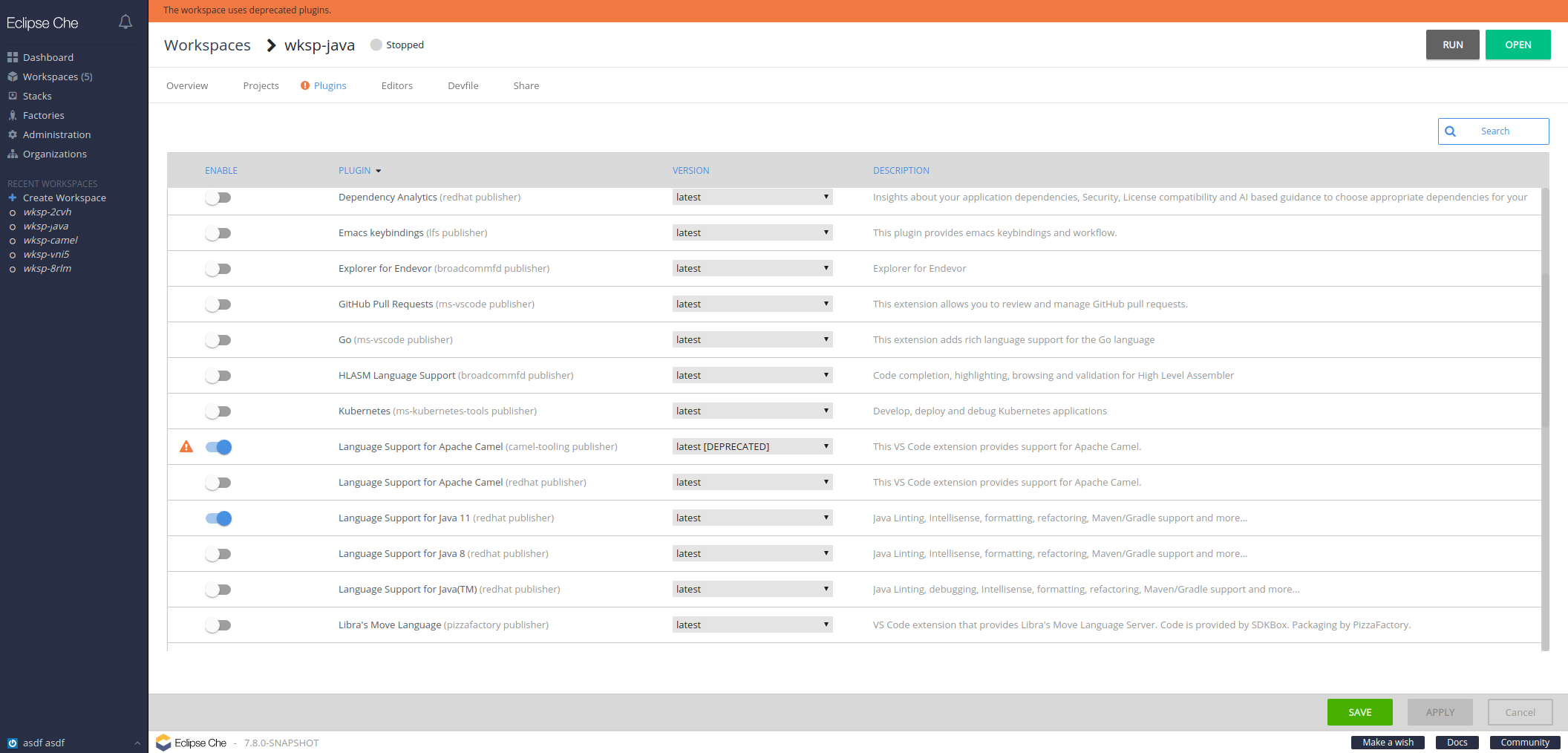
Also, autoMigrate does nothing at the moment: https://github.com/eclipse/che/issues/15461
@l0rd With option 3, would we also set autoMigrate for old versions?
amisevsk
on 15 Jan 2020
I am not sure I understand the autoMigrate use case.
My reasoning was based on the fact that the default version of a plugin is latest. Hence plugins gets "potentially" updated at every restart of a workspace. In other words deprecating and removing older versions of plugins has a minimal impact on users whereas maintaining multiple versions, migration mechanisms etc...is complicated and takes time to maintain.
I would not enable/implement the auto-migrate mechanism. I would rather:
- [ ] in the case of a deprecated plugin version: warn users when while a workspace including such a is starting
- [ ] in the case of a removed plugin version: provide a message explaining the problem and how to address it without even try to start the workspace
l0rd
on 18 Jan 2020
So to re-iterate for my understanding: plugins are deprecated when a new version of the plugin is added to the registry (and this version becomes the "latest).
When do we remove plugins? Is it based on time, how many more "newer" versions there are, or something else?
ericwill
on 20 Feb 2020
Issues go stale after 180 days of inactivity. lifecycle/stale issues rot after an additional 7 days of inactivity and eventually close.
Mark the issue as fresh with /remove-lifecycle stale in a new comment.
If this issue is safe to close now please do so.
Moderators: Add lifecycle/frozen label to avoid stale mode.
 che-bot
on 21 Aug 2020
che-bot
on 21 Aug 2020
To clarify, the policy I am following (which seems to be working) is:
- 3 versions of a plugin at any time
- Deprecation of the oldest plugin happens when a 4th plugin is added
- Deprecated plugins are removed after 3 sprints
ericwill
on 21 Aug 2020
Related issues
 skabashnyuk
·
3Comments
amisevsk
·
3Comments
skabashnyuk
·
3Comments
amisevsk
·
3Comments
 dmytro-ndp
·
3Comments
dmytro-ndp
·
3Comments
 Ohrimenko1988
·
3Comments
Ohrimenko1988
·
3Comments
 JamesDrummond
·
3Comments
JamesDrummond
·
3Comments