Che: Can't run Java Builder on latest release
Description
On a new installation Eclipse, I am experiencing issues building any projects, so I attempted to start a HelloWorld program from scratch. I'm unable to get beyond the "Problem Occurred" dialog stating "'Building workspace' has encountered a problem. Errors occurred during the build." Then the trace
Errors occurred during the build.
Errors running builder 'Java Builder' on project 'HelloWorld'.
java.lang.NullPointerException"
Eclipse IDE for Java Developers
Version: 2019-03 (4.11.0)
Build id: 20190314-1200
OS: Mac OS X, v.10.13.6, x86_64 / cocoa
Java version: 12
So far, this is not a unique issue, but none of the steps I tried from others has worked. What I have tried so far:
- https://stackoverflow.com/questions/19981634/errors-running-builder-java-builder
https://www.genuitec.com/forums/topic/troubleshoot-using-the-clean-command-line-argument/
https://blog.pdark.de/2011/09/02/restoring-a-corrupted-workspace-in-eclipse/ - Other bugs looks like they were resolved by using a different build of Eclipse. I just downloaded the latest stable.
Reproduction Steps
I just imported a working project or created a new project from scratch using the link above. Then, I get this
I validated this java is being used-
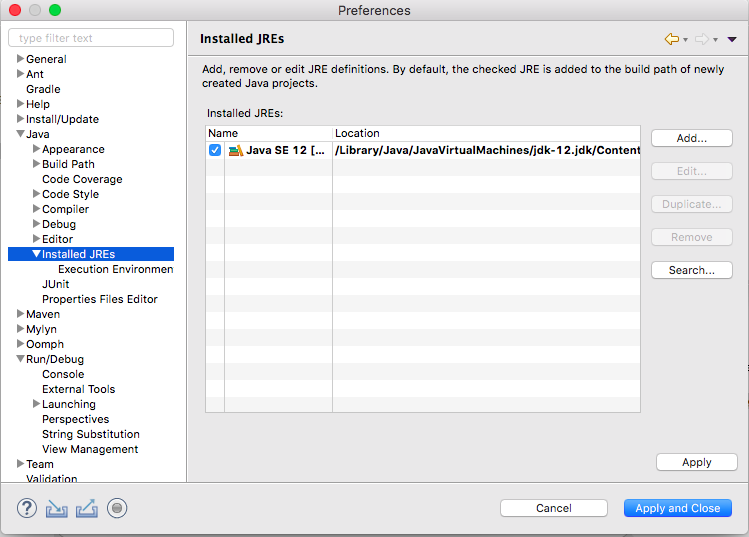
When I create a new run configuration for the program under Java Application, I get a different error:
Error occurred during initialization of boot layer
java.lang.module.FindException: Module moduleHelloWorld not found

I am a little bit lost because I would expect that I could at least get a HelloWorld running.
 jeffrechten
All 5 comments
@jeffrechten this is Eclipse Che repository, not related to desktop Eclipse. I suggest that you open a ticket here https://bugs.eclipse.org/bugs/
 ghost
on 20 Apr 2019
ghost
on 20 Apr 2019
Hi,I have got the same problem.
can you just help me out
 Gayathri145
on 29 May 2019
Gayathri145
on 29 May 2019
I am also facing the same problem. help us.
 dhairya1431
on 4 Jun 2019
dhairya1431
on 4 Jun 2019
same problem here buddy
 UtkarshBhardwaj007
on 4 Jun 2019
UtkarshBhardwaj007
on 4 Jun 2019
I got solution, everybody those are facing above problem try the Jdk version 8u instead of latest 12.0. .bcaz it's a most stable version of Jdk
dhairya1431
on 5 Jun 2019
Related issues
 sleshchenko
·
3Comments
sleshchenko
·
3Comments
 redeagle84
·
3Comments
redeagle84
·
3Comments
 johnmcollier
·
3Comments
johnmcollier
·
3Comments
 vanzhiganov
·
3Comments
vanzhiganov
·
3Comments
 Ohrimenko1988
·
3Comments
Ohrimenko1988
·
3Comments
Most helpful comment
same problem here buddy