Che: Unable to bring Workspace up on MultiUser Eclipse-che that is deployed on Openshift
Hi,
I have followed the below document for deploying MultiUser Eclipse-che onto Openshift..
https://www.eclipse.org/che/docs/setup/openshift/index.html
I was able to deploy it successfully on to Openshift 3.6.But when I try to create a workspace it is not able to create workspace ...
Here are the logs of Che container:
2018-01-03 12:39:30,871[aceSharedPool-3] [WARN ] [w.i.o.OpenShiftInternalRuntime 137] - Failed to start OpenShift runtime of workspace workspacesrs3lcqjvriuu1iw. Cause: error dialing backend: dial tcp: lookup openshift-stack-node1-oslci78t.project.matrix.com on 172.23.10.7:53: no such host
2018-01-03 12:40:06,406[aceSharedPool-3] [INFO ] [o.e.c.a.w.s.WorkspaceRuntimes 282] - Workspace 'matrix:wksp-z5mi' with id 'workspacesrs3lcqjvriuu1iw' start failed
2018-01-03 12:42:19,992[nio-8080-exec-2] [INFO ] [o.e.c.a.w.s.WorkspaceRuntimes 229] - Starting workspace 'matrix/wksp-z5mi' with id 'workspacesrs3lcqjvriuu1iw' by user 'matrix'
2018-01-03 12:52:44,196[aceSharedPool-4] [WARN ] [w.i.o.OpenShiftInternalRuntime 137] - Failed to start OpenShift runtime of workspace workspacesrs3lcqjvriuu1iw. Cause: Bootstrapping of machine dev-machine reached timeout
2018-01-03 12:53:16,223[aceSharedPool-4] [INFO ] [o.e.c.a.w.s.WorkspaceRuntimes 282] - Workspace 'matrix:wksp-z5mi' with id 'workspacesrs3lcqjvriuu1iw' start failed
It was throwing an Error saying that :
Could not start workspace wksp-0udi. Reason: Bootstrapping of machine dev-machine reached timeout
It seems to be a similar Issue as 7987...that was raised...
https://github.com/eclipse/che/issues/7987
I have tried removing the Eclipse-che namespace and the PVC's that are related to it ...and redeployed Eclipse-che again...But it still is the same..
How could I overcome this Issuee??
 LahariGuntha
All 79 comments
@LahariGuntha that's a different one. For some reason it does look like the bootstrapper binary URL is unavailable in a workspace pod.
What you can do is:
- Grab this URL from deployment config env
CHE_INFRA_OPENSHIFT_BOOTSTRAPPER_BINARY__URL - When a workspace pod gets created, open a terminal into it and run:
curl $CHE_INFRA_OPENSHIFT_BOOTSTRAPPER_BINARY__URL
 ghost
on 3 Jan 2018
ghost
on 3 Jan 2018
Also, can you check this if you have the following in your workspace pod when you get a shell into it:
user@workspaceg1bpibnvg2fqmkyl:/projects$ cd /tmp/bootstrapper/
user@workspaceg1bpibnvg2fqmkyl:/tmp/bootstrapper$ ls
bootstrapper  bootstrapper.log  config.json
user@workspaceg1bpibnvg2fqmkyl:/tmp/bootstrapper$ ls -la
total 8676
drwxr-xr-x. 2 user root      69 Jan  3 16:28 .
drwxrwxrwt. 5 root root      72 Jan  3 16:30 ..
-rwxr-xr-x. 1 user root 8854120 Jan  3 16:28 bootstrapper
-rw-r--r--. 1 user root    1497 Jan  3 16:28 bootstrapper.log
-rw-r--r--. 1 user root   24084 Jan  3 16:28 config.json
Hi,
I am trying to create a workspace.
But where can I see the workspace container in Openshift??I am not able to see the container under "Pods" section of Openshift.Whendoes the workspace pod gets created??
In our case it is trying to create workspace...but cannot see workspace pod...
LahariGuntha
on 4 Jan 2018
Now the Error Message changed to :
Could not start workspace wksp-izfr. Reason: Waiting for pod 'workspacejynt9l55vch4l03c.dockerimage' reached timeout
LahariGuntha
on 4 Jan 2018
@LahariGuntha it is created in a separate namespace/project
ghost
on 4 Jan 2018
Moreover while creating workspace...it is not downloading anything...I just tried to connect to the terminal...
Connection failed with terminal..some Error happened with web-socket conection....Is it something related to networking??
LahariGuntha
on 4 Jan 2018
@LahariGuntha please read my previous comments and things I asked for.
ghost
on 4 Jan 2018
yeah...It was creating workspace in another project..
LahariGuntha
on 4 Jan 2018
Hi,
I tried to execute the below command:
curl $CHE_INFRA_OPENSHIFT_BOOTSTRAPPER_BINARY__URL
It was trying to download the file to some extent...and gets struct after some point of time...and remains l;ke that even for five minutes....and then the container is getting deleted...by throwing Error message
Could not start workspace workspace1. Reason: Bootstrapping of machine dev-machine reached timeout
So I tried to download the bootstrap file on to my host and then copied the bootstrap file from my host to running container...But the workspace is not getting started even now...It is throwing the same above Error..
LahariGuntha
on 5 Jan 2018
Please, share output from curl -v $CHE_INFRA_OPENSHIFT_BOOTSTRAPPER_BINARY__URL
ghost
on 5 Jan 2018
Hi,
My CHE_INFRA_OPENSHIFT_BOOTSTRAPPER_BINARY__URL is https://che-eclipse-che./agent-binaries/linux_amd64/bootstrapper/bootstrapper...
I am doing curl request as follows:
curl http://
It is trying to download thinfs and it is getting idle at some point of time..
ools/org.jenkinsci.plugins.golang.GolangInstallation/go1.6.3/src/math/log_amd64.s/home/codenvy/tools/org.jenkinsci.plugins.golang.GolangInstallatio /home/codenvy/tools/org.jenkinsci.plugins.golang.GolangInstallation/go1.6.3/src/crypto/rsa/pkcs1v15.go/home/codenvy/tools/org.jenkinsci.plugins.go The above mentioned was the last-part of the o/p for the given curl comand...It is getting stopped there for more then 5 minutes...and the container is getting deleted with Error message "Could not start workspace workspace1. Reason: Bootstrapping of machine dev-machine reached timeout"
n/go1.6.3/src/unicode/utf8/utf8.go/home/codenvy/tools/org.jenkinsci.plugins.golang.GolangInstallation/go1.6.3/src/reflect/deepequal.go/home/codenvy
/tools/org.jenkinsci.plugins.golang.GolangInstallation/go1.6.3/src/reflect/makefunc.go/home/codenvy/tools/org.jenkinsci.plugins.golang.GolangInstal
lation/go1.6.3/src/reflect/type.go/home/codenvy/tools/org.jenkinsci.plugins.golang.GolangInstallation/go1.6.3/src/reflect/value.go
ome/codenvy/tools/org.jenkinsci.plugins.golang.GolangInstallation/go1.6.3/src/reflect/asm_amd64.s/home/codenvy/tools/org.jenkinsci.plugins.golang.G
olangInstallation/go1.6.3/src/sort/search.go/home/codenvy/tools/org.jenkinsci.plugins.golang.GolangInstallation/go1.6.3/src/sort/sort.go
g.GolangInstallation/go1.6.3/src/math/rand/normal.go/home/codenvy/tools/org.jenkinsci.plugins.golang.GolangInstallation/go1.6.3/src/math/rand/rand.
go/home/codenvy/tools/org.jenkinsci.plugins.golang.GolangInstallation/go1.6.3/src/math/rand/rng.go/home/codenvy/tools/org.jenkinsci.plugins.golang.
GolangInstallation/go1.6.3/src/math/rand/zipf.go/home/codenvy/tools/org.jenkinsci.plugins.golang.GolangInstallation/go1.6.3/src/internal/singleflig
ht/singleflight.go/home/codenvy/tools/org.jenkinsci.plugins.golang.GolangInstallation/go1.6.3/src/unicode/digit.go/home/codenvy/tools/org.jenkinsci
.plugins.golang.GolangInstallation/go1.6.3/src/unicode/graphic.go/home/codenvy/tools/org.jenkinsci.plugins.golang.GolangInstallation/go1.6.3/src/un
icode/letter.go/home/codenvy/tools/org.jenkinsci.plugins.golang.GolangInstallation/go1.6.3/src/unicode/tables.go/home/codenvy/tools/org.jenkinsci.p
lugins.golang.GolangInstallation/go1.6.3/src/encoding/base64/base64.go
ation/go1.6.3/src/path/filepath/path.go/home/codenvy/tools/org.jenkinsci.plugins.golang.GolangInstallation/go1.6.3/src/path/filepath/path_unix.go/h
ome/codenvy/tools/org.jenkinsci.plugins.golang.GolangInstallation/go1.6.3/src/path/filepath/symlink_unix.go/home/codenvy/tools/org.jenkinsci.plugin
s.golang.GolangInstallation/go1.6.3/src/path/filepath/match.go/home/codenvy/tools/org.jenkinsci.plugins.golang.GolangInstallation/go1.6.3/src/crypt
o/tls/alert.go/home/codenvy/tools/org.jenkinsci.plugins.golang.GolangInstallation/go1.6.3/src/crypto/tls/cipher_suites.go/home/codenvy/tools/org.je
nkinsci.plugins.golang.GolangInstallation/go1.6.3/src/crypto/tls/common.go/home/codenvy/tools/org.jenkinsci.plugins.golang.GolangInstallation/go1.6
.3/src/crypto/tls/conn.go/home/codenvy/tools/org.jenkinsci.plugins.golang.GolangInstallation/go1.6.3/src/crypto/tls/handshake_client.go/home/codenv
y/tools/org.jenkinsci.plugins.golang.GolangInstallation/go1.6.3/src/crypto/tls/handshake_messages.go/home/codenvy/tools/org.jenkinsci.plugins.golan
g.GolangInstallation/go1.6.3/src/crypto/tls/handshake_server.go/home/codenvy/tools/org.jenkinsci.plugins.golang.GolangInstallation/go1.6.3/src/cryp
to/tls/key_agreement.go/home/codenvy/tools/org.jenkinsci.plugins.golang.GolangInstallation/go1.6.3/src/crypto/tls/prf.go/home/codenvy/tools/org.jen
kinsci.plugins.golang.GolangInstallation/go1.6.3/src/crypto/tls/ticket.go/home/codenvy/tools/org.jenkinsci.plugins.golang.GolangInstallation/go1.6.
3/src/crypto/tls/tls.go
/home/codenvy/tools/org.jenkinsci.plugins.golang.GolangInstallation/go1.6.3/src/mime/grammar.go/home/codenvy/tools/org.jenkinsci.plugins.golang.Gol
angInstallation/go1.6.3/src/mime/mediatype.go/home/codenvy/tools/org.jenkinsci.plugins.golang.GolangInstallation/go1.6.3/src/mime/type.go/home/code
nvy/tools/org.jenkinsci.plugins.golang.GolangInstallation/go1.6.3/src/mime/type_unix.go/home/codenvy/tools/org.jenkinsci.plugins.golang.GolangInsta
llation/go1.6.3/src/mime/encodedword.go/home/codenvy/tools/org.jenkinsci.plugins.golang.GolangInstallation/go1.6.3/src/mime/multipart/formdata.go/h
ome/codenvy/tools/org.jenkinsci.plugins.golang.GolangInstallation/go1.6.3/src/mime/multipart/multipart.go/home/codenvy/tools/org.jenkinsci.plugins.
golang.GolangInstallation/go1.6.3/src/mime/multipart/writer.go
1.6.3/src/net/textproto/header.go/home/codenvy/tools/org.jenkinsci.plugins.golang.GolangInstallation/go1.6.3/src/net/textproto/reader.go/home/coden
vy/tools/org.jenkinsci.plugins.golang.GolangInstallation/go1.6.3/src/net/textproto/textproto.go/home/codenvy/tools/org.jenkinsci.plugins.golang.Gol
angInstallation/go1.6.3/src/net/textproto/writer.go
ath/path.go/home/codenvy/tools/org.jenkinsci.plugins.golang.GolangInstallation/go1.6.3/src/path/match.go/home/codenvy/tools/org.jenkinsci.plugins.g
olang.GolangInstallation/go1.6.3/src/compress/gzip/gunzip.go/home/codenvy/tools/org.jenkinsci.plugins.golang.GolangInstallation/go1.6.3/src/compres
s/gzip/gzip.go/home/codenvy/tools/org.jenkinsci.plugins.golang.GolangInstallation/go1.6.3/src/encoding/binary/varint.go/home/codenvy/tools/org.jenk
insci.plugins.golang.GolangInstallation/go1.6.3/src/internal/golang.org/x/net/http2/hpack/encode.go/home/codenvy/tools/org.jenkinsci.plugins.golang
.GolangInstallation/go1.6.3/src/internal/golang.org/x/net/http2/hpack/hpack.go/home/codenvy/tools/org.jenkinsci.plugins.golang.GolangInstallation/g
o1.6.3/src/internal/golang.org/x/net/http2/hpack/huffman.go/home/codenvy/tools/org.jenkinsci.plugins.golang.GolangInstallation/go1.6.3/src/internal
/golang.org/x/net/http2/hpack/tables.go
rnal/chunked.go/home/codenvy/tools/org.jenkinsci.plugins.golang.GolangInstallation/go1.6.3/src/net/http/internal/testcert.go
denvy/tools/org.jenkinsci.plugins.golang.GolangInstallation/go1.6.3/src/crypto/rand/eagain.go/home/codenvy/tools/org.jenkinsci.plugins.golang.Golan
gInstallation/go1.6.3/src/crypto/rand/rand_linux.go/home/codenvy/tools/org.jenkinsci.plugins.golang.GolangInstallation/go1.6.3/src/crypto/rand/rand
_unix.go/home/codenvy/tools/org.jenkinsci.plugins.golang.GolangInstallation/go1.6.3/src/crypto/rand/util.go
enkinsci.plugins.golang.GolangInstallation/go1.6.3/src/crypto/sha1/sha1.go/home/codenvy/tools/org.jenkinsci.plugins.golang.GolangInstallation/go1.6
.3/src/crypto/sha1/sha1block_decl.go/home/codenvy/tools/org.jenkinsci.plugins.golang.GolangInstallation/go1.6.3/src/crypto/sha1/sha1block_amd64.s/h
ome/codenvy/tools/org.jenkinsci.plugins.golang.GolangInstallation/go1.6.3/src/crypto/aes/aes_gcm.go/home/codenvy/tools/org.jenkinsci.plugins.golang
.GolangInstallation/go1.6.3/src/crypto/aes/block.go/home/codenvy/tools/org.jenkinsci.plugins.golang.GolangInstallation/go1.6.3/src/crypto/aes/ciphe
r.go/home/codenvy/tools/org.jenkinsci.plugins.golang.GolangInstallation/go1.6.3/src/crypto/aes/cipher_asm.go/home/codenvy/tools/org.jenkinsci.plugi
ns.golang.GolangInstallation/go1.6.3/src/crypto/aes/const.go
6.3/src/crypto/aes/asm_amd64.s/home/codenvy/tools/org.jenkinsci.plugins.golang.GolangInstallation/go1.6.3/src/crypto/aes/gcm_amd64.s/home/codenvy/t
ools/org.jenkinsci.plugins.golang.GolangInstallation/go1.6.3/src/crypto/cipher/cbc.go/home/codenvy/tools/org.jenkinsci.plugins.golang.GolangInstall
ation/go1.6.3/src/crypto/cipher/ctr.go/home/codenvy/tools/org.jenkinsci.plugins.golang.GolangInstallation/go1.6.3/src/crypto/cipher/gcm.go/home/cod
envy/tools/org.jenkinsci.plugins.golang.GolangInstallation/go1.6.3/src/crypto/cipher/io.go/home/codenvy/tools/org.jenkinsci.plugins.golang.GolangIn
stallation/go1.6.3/src/crypto/cipher/xor.go
s/block.go/home/codenvy/tools/org.jenkinsci.plugins.golang.GolangInstallation/go1.6.3/src/crypto/des/cipher.go/home/codenvy/tools/org.jenkinsci.plu
gins.golang.GolangInstallation/go1.6.3/src/crypto/des/const.go
1.6.3/src/crypto/hmac/hmac.go/home/codenvy/tools/org.jenkinsci.plugins.golang.GolangInstallation/go1.6.3/src/crypto/rc4/rc4.go/home/codenvy/tools/o
rg.jenkinsci.plugins.golang.GolangInstallation/go1.6.3/src/crypto/rc4/rc4_asm.go
angInstallation/go1.6.3/src/crypto/rc4/rc4_amd64.s/home/codenvy/tools/org.jenkinsci.plugins.golang.GolangInstallation/go1.6.3/src/crypto/x509/cert_
pool.go/home/codenvy/tools/org.jenkinsci.plugins.golang.GolangInstallation/go1.6.3/src/crypto/x509/pkcs1.go/home/codenvy/tools/org.jenkinsci.plugin
s.golang.GolangInstallation/go1.6.3/src/crypto/x509/pkcs8.go/home/codenvy/tools/org.jenkinsci.plugins.golang.GolangInstallation/go1.6.3/src/crypto/
x509/root.go/home/codenvy/tools/org.jenkinsci.plugins.golang.GolangInstallation/go1.6.3/src/crypto/x509/root_unix.go/home/codenvy/tools/org.jenkins
ci.plugins.golang.GolangInstallation/go1.6.3/src/crypto/x509/sec1.go/home/codenvy/tools/org.jenkinsci.plugins.golang.GolangInstallation/go1.6.3/src
/crypto/x509/verify.go/home/codenvy/tools/org.jenkinsci.plugins.golang.GolangInstallation/go1.6.3/src/crypto/x509/x509.go/home/codenvy/tools/org.je
nkinsci.plugins.golang.GolangInstallation/go1.6.3/src/crypto/x509/pem_decrypt.go
angInstallation/go1.6.3/src/hash/hash.go/home/codenvy/tools/org.jenkinsci.plugins.golang.GolangInstallation/go1.6.3/src/crypto/crypto.go
s.golang.GolangInstallation/go1.6.3/src/crypto/sha512/sha512block_decl.go/home/codenvy/tools/org.jenkinsci.plugins.golang.GolangInstallation/go1.6.
3/src/crypto/sha512/sha512block_amd64.s/home/codenvy/tools/org.jenkinsci.plugins.golang.GolangInstallation/go1.6.3/src/math/big/arith.go/home/coden
vy/tools/org.jenkinsci.plugins.golang.GolangInstallation/go1.6.3/src/math/big/int.go/home/codenvy/tools/org.jenkinsci.plugins.golang.GolangInstalla
tion/go1.6.3/src/math/big/ratconv.go/home/codenvy/tools/org.jenkinsci.plugins.golang.GolangInstallation/go1.6.3/src/math/big/intconv.go/home/codenv
y/tools/org.jenkinsci.plugins.golang.GolangInstallation/go1.6.3/src/math/big/intmarsh.go/home/codenvy/tools/org.jenkinsci.plugins.golang.GolangInst
allation/go1.6.3/src/math/big/nat.go/home/codenvy/tools/org.jenkinsci.plugins.golang.GolangInstallation/go1.6.3/src/math/big/natconv.go/home/codenv
y/tools/org.jenkinsci.plugins.golang.GolangInstallation/go1.6.3/src/math/big/roundingmode_string.go
.plugins.golang.GolangInstallation/go1.6.3/src/math/big/arith_amd64.s/home/codenvy/tools/org.jenkinsci.plugins.golang.GolangInstallation/go1.6.3/sr
c/crypto/subtle/constant_time.go/home/codenvy/tools/org.jenkinsci.plugins.golang.GolangInstallation/go1.6.3/src/crypto/ecdsa/ecdsa.go
lang.GolangInstallation/go1.6.3/src/crypto/rsa/pss.go/home/codenvy/tools/org.jenkinsci.plugins.golang.GolangInstallation/go1.6.3/src/crypto/rsa/rsa
.go/home/codenvy/tools/org.jenkinsci.plugins.golang.GolangInstallation/go1.6.3/src/enc
LahariGuntha
on 5 Jan 2018
My curl request was
curl http://
LahariGuntha
on 5 Jan 2018
@LahariGuntha ok, so everything's ok with the url.
Can you run in a workspace pod:
cd /tmp/bootstrapper
ls -la
ps ax
Hi,
Here is the output of the commands given:
$ cd /tmp/bootstrapper
$ ls -al
total 28
drwxr-xr-x. 2 user root 49 Jan 5 08:54 .
drwxrwxrwt. 4 root root 49 Jan 5 08:54 ..
-rw-r--r--. 1 user root 49 Jan 5 08:54 bootstrapper.log
-rw-r--r--. 1 user root 24405 Jan 5 08:54 config.json
$ ps ax
PID TTY STAT TIME COMMAND
1 ? Ss 0:00 /bin/sh -c tail -f /dev/null
19 ? S 0:00 tail -f /dev/null
33 ? Ss 0:00 /bin/sh -i -c TERM=xterm /bin/sh
39 ? S 0:00 /bin/sh
62 ? R+ 0:00 ps ax
bootstrap file is not getting downloaded...
LahariGuntha
on 5 Jan 2018
@LahariGuntha i don't understand how you managed to download it from within a workspace.
Can you confirm you can do this in a workspace pod?
cd /tmp/bootstrapper
wget $binary_url
ls -la
Please share output.
Also, what is your OS? Can you give it a try with firewalld off? Restart docker and OCP then.
ghost
on 5 Jan 2018
Hi....
Since I am using Openshift...When I create workspace in Eclipse-che....a workspace pod is getting created in some other workspace.I am going to the terminal of pod and then executed the below comamnds:
Here is the output...
$ cd /tmp/bootstrapper
$
$
$ wget http://172.30.212.5:8080/agent-binaries/linux_amd64/bootstrapper/bootstrapper
--2018-01-05 10:57:27-- http://172.30.212.5:8080/agent-binaries/linux_amd64/bootstrapper/bootstrapper
Connecting to 172.30.212.5:8080... connected.
HTTP request sent, awaiting response... 200
Length: 8854120 (8.4M)
Saving to: ‘bootstrapper’
bootstrapper 100%[=====================================================================>] 8.44M --.-KB/s in 0.06s
2018-01-05 10:57:28 (153 MB/s) - ‘bootstrapper’ saved [8854120/8854120]
$ ls
bootstrapper bootstrapper.log config.json
$ la -la
/bin/sh: 10: la: not found
$ ls -la
total 8676
drwxr-xr-x. 2 user root 69 Jan 5 10:57 .
drwxrwxrwt. 4 root root 49 Jan 5 10:56 ..
-rw-r--r--. 1 user root 8854120 Dec 29 20:01 bootstrapper
-rw-r--r--. 1 user root 49 Jan 5 10:56 bootstrapper.log
-rw-r--r--. 1 user root 24405 Jan 5 10:56 config.json
In Eclipse-Che while creating workspace It is not downloading anything....and I am not able to evn "Connect to the Terminal".......so I went to the workspace pod and executed the comamds..
There is no output in the "dev-machine" tab...Nothing is shown there...It remains the same throught the creation of workspace..
LahariGuntha
on 5 Jan 2018

LahariGuntha
on 5 Jan 2018
When I try to connect to the terminal...It is throwing the below Error
"Connection failed with terminal..some Error happened with web-socket conection"...
LahariGuntha
on 5 Jan 2018
http://172.30.212.5:8080/agent-binaries/linux_amd64/bootstrapper/bootstrapper this cannot be your url. It must be an OpenShift route.
Share your Che DeploymentConfig (actions - edit yaml)
ghost
on 5 Jan 2018
It is the service Ip...I think we can you it...I was not able to download it from Openshift route...Because the conatienr is not able to Identify the route..Since Eclipse-che and workspace both are containers in Openshift...I think we can use the Service Ip...
LahariGuntha
on 5 Jan 2018
If I want to use Openshift Route I have to update my hosts file ...with the route and the IP for my container to recognize the Route...which I cannot do...I cannot Update a file in the container..
LahariGuntha
on 5 Jan 2018
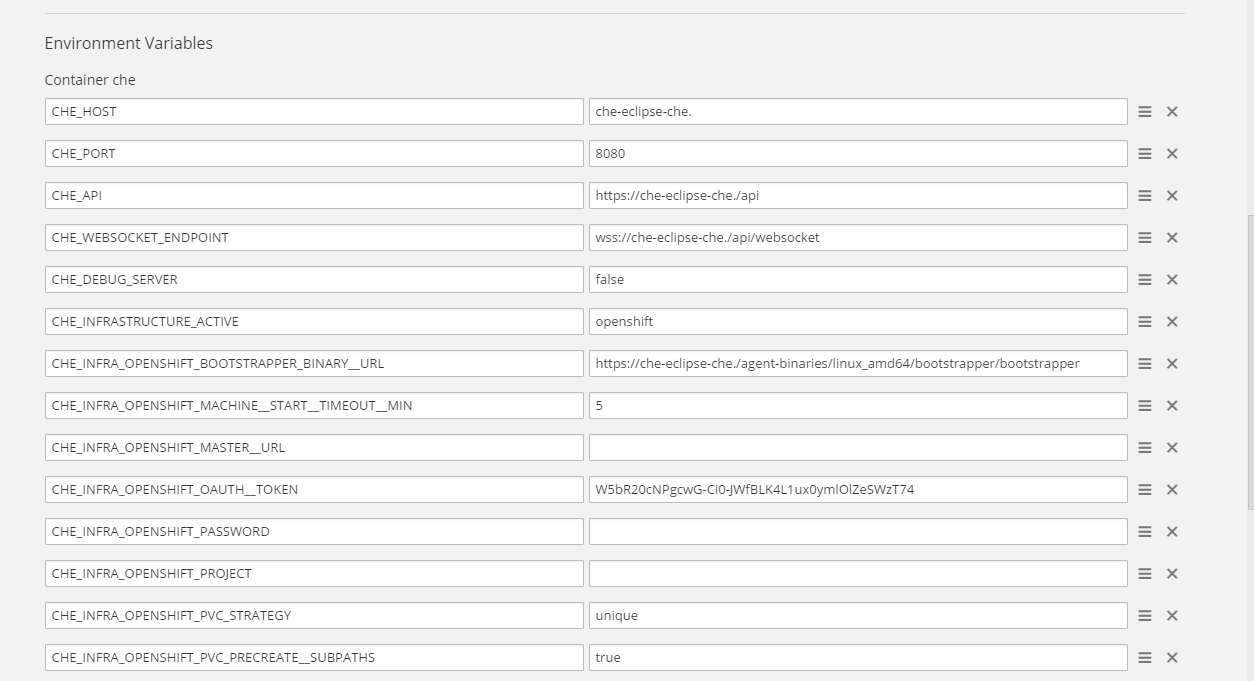
@LahariGuntha please answer my questions. I need to know what URL Che server uses.
ghost
on 5 Jan 2018
LahariGuntha
on 5 Jan 2018
@LahariGuntha why is your host che-eclipse-che.
How did you deploy Che? Step by step with all exported variables
ghost
on 5 Jan 2018
Hi,
I have followed the below Document:
https://www.eclipse.org/che/docs/setup/openshift/index.html
Cloned the repo..
git clone https://github.com/eclipse/che
cd che/dockerfiles/init/modules/openshift/files/scripts
Set the following ENV:
export CHE_KEYCLOAK_AUTH__SERVER__URL=http://
export CHE_KEYCLOAK_REALM=
export CHE_KEYCLOAK_CLIENT__ID=
export OPENSHIFT_ENDPOINT=
export OPENSHIFT_FLAVOR=ocp
export OPENSHIFT_NAMESPACE_URL=
export CHE_MULTIUSER=true
export CHE_DEDICATED_KEYCLOAK=false
export CHE_MULTIUSER=true
export OPENSHIFT_TOKEN=
./deploy_che.sh && ./wait_until_che_is_available.sh && ./replace_stacks.sh
and Nothing Else..The host name was given by default...I have not set any particular ENV for that
LahariGuntha
on 5 Jan 2018
So, what is your OPENSHIFT_ENDPOINT?
ghost
on 5 Jan 2018
URL of my Openshift...
Something similar to this...Not this..
https://opnshmdnsy3t7twsh.centralus.cloudapp.azure.com:8443
LahariGuntha
on 5 Jan 2018
Well, it wasn't picked up. I'd suggest you remove the namespace, export envs once again and make sure that you have got proper urls in deployment config.
https://www.eclipse.org/che/docs/6/che/docs/multi-user-openshift.html#openshift-container-platform
ghost
on 5 Jan 2018
Yeah...I will try that...what will be the value of ENV "CHE_HOST" if it is properly configured???
LahariGuntha
on 5 Jan 2018
It should definitely contain your OpenShift hostname.
ghost
on 5 Jan 2018
okay...will try that and Update...
LahariGuntha
on 5 Jan 2018
Hi,
Tried doing so as mentioned in the docs:
https://www.eclipse.org/che/docs/6/che/docs/multi-user-openshift.html
git clone https://github.com/eclipse/che
cd che/dockerfiles/init/modules/openshift/files/scripts
export CHE_MULTIUSER=true
export OPENSHIFT_ENDPOINT=
export OPENSHIFT_TOKEN=
export OPENSHIFT_ROUTING_SUFFIX=
export OPENSHIFT_FLAVOR=ocp
export CHE_KEYCLOAK_AUTH__SERVER__URL=http://:/auth
export CHE_KEYCLOAK_REALM=
export CHE_KEYCLOAK_CLIENT__ID=
export CHE_DEDICATED_KEYCLOAK=false
Now I get my ENV CHE_HOST:che-eclipse-che.
LahariGuntha
on 5 Jan 2018
Please share values - you may change them a bit, but I cannot help otherwise
ghost
on 5 Jan 2018
Beacause of some security reasons I cannot provide them....
LahariGuntha
on 5 Jan 2018
I have a change in my ENV CHE_HOST variable..this time I got it as che-eclipse-che.(routing suffix)
i.e if I have routing suffix as project.com...I have my ENV as che-eclipse-che.project.com
LahariGuntha
on 5 Jan 2018
project.com is your routing suffix? This how route urls end when you do other deployments?
ghost
on 5 Jan 2018
It is similar to project.com
All the route url's end up with this routing suffix...when I do other deployments
LahariGuntha
on 5 Jan 2018
When I deployed Eclipse-che with the above steps...I autoamtically get a https route...While accessing that https route...I am unable to even create a workspace...The Eclipe-che Icon is just blinking...blinking...and it remains in that state...
I saw a similar Issue at : https://github.com/eclipse/che/issues/7284
So I created a http route manually...and when I can access that route I was able to atleast have an option of creating workspace...Does it cause any Issue with the Manual creation of http route???
LahariGuntha
on 5 Jan 2018
https://www.eclipse.org/che/docs/6/che/docs/openshift-config.html#https-mode you may disable https. Set it to false.
As to routing suffix, i think you misunderstand what it is. Of course, unless your OpenShift node is deployed on project.com domain and you own it.
ghost
on 5 Jan 2018
When I do oc get nodes....
all my nodes end with some routing suffix....I have provided the same routing suffix ....for the ENV OPENSHIFT_ROUTING_SUFFIX
LahariGuntha
on 5 Jan 2018
@LahariGuntha I can't help much and can't guess too. In your first deployment you never set your OpenShift master URL. Now, you set your suffix as project.com, which means, all your routes look like route-name.project-name.project.com. Is that true?
ghost
on 5 Jan 2018
Hi,
After giving the domain suffix...now I am able to bring up my workspace...Now It shows
"Your workspace is ready to use" status.....
But when i try to Import project...It shows..
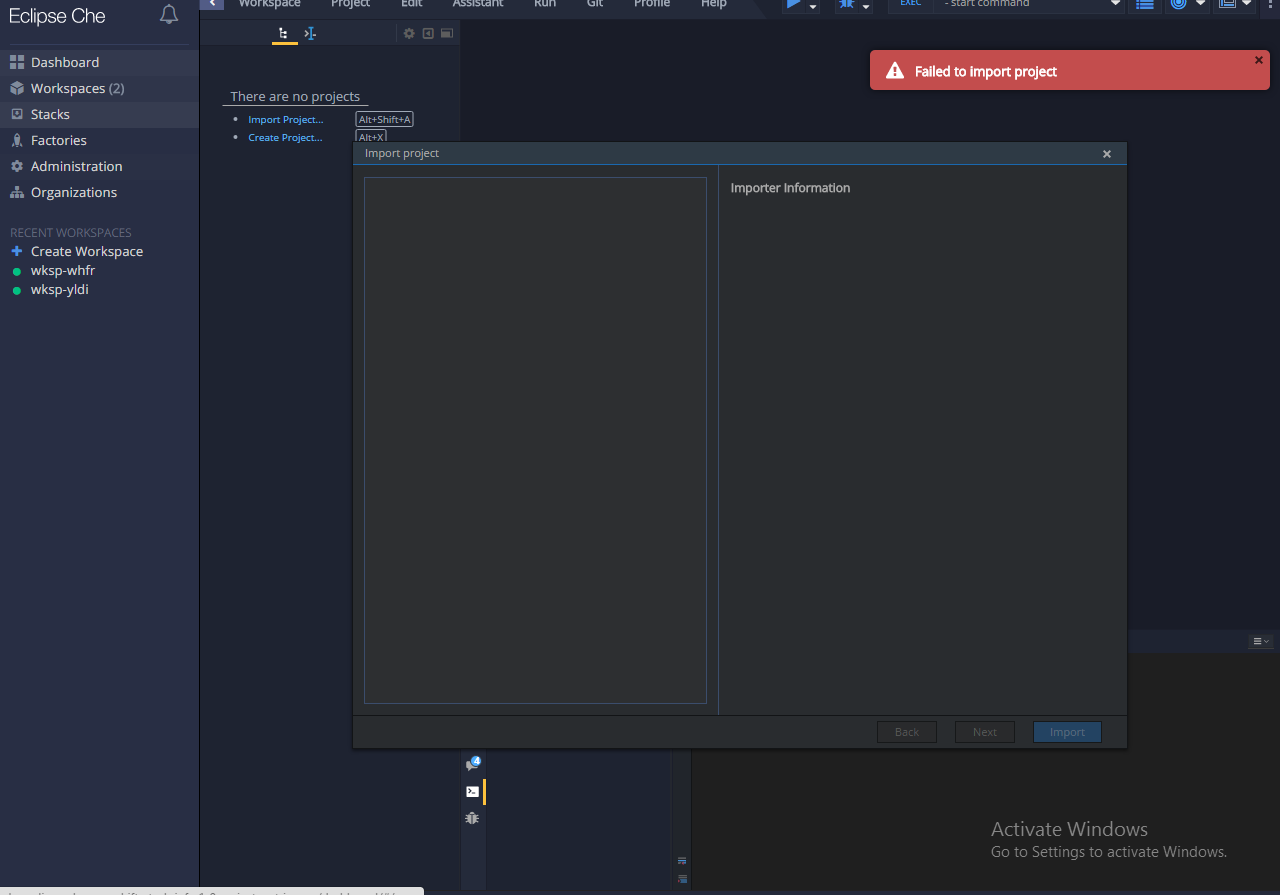
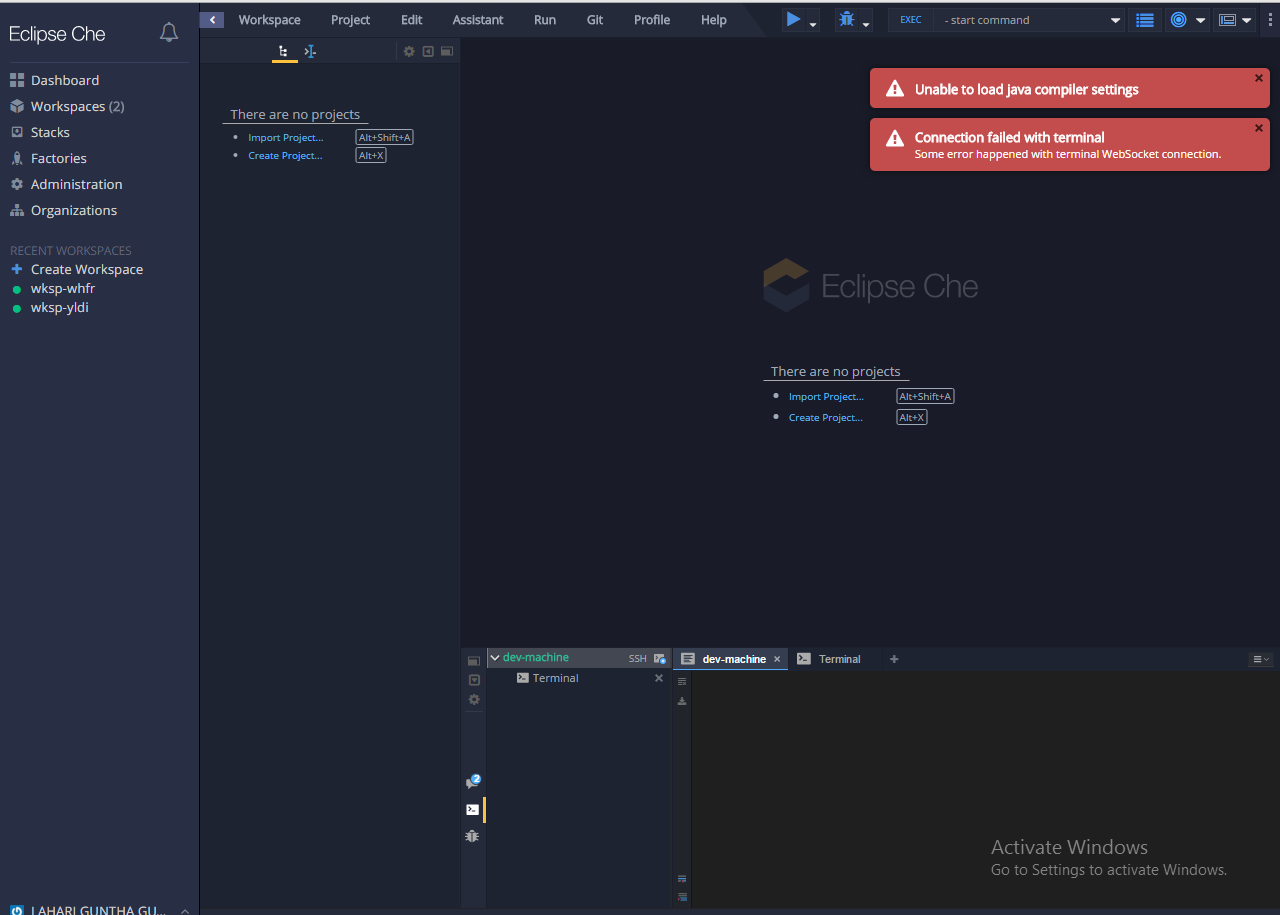
"Unable to load java compiler settings"
LahariGuntha
on 8 Jan 2018
LahariGuntha
on 8 Jan 2018
Hi,
Should we add Github Identity Broker in Keycloak??
LahariGuntha
on 8 Jan 2018
@LahariGuntha yes, if you need GitHub oAuth and be able to use automatically upload SSH keys to GitHub.
As to the error you show, it looks like a networking issue - browser cannot connect to some of the agents running in a workspace. However, the server has been able to verify that the workspace is up and running.
ghost
on 8 Jan 2018
Hi,
I was not able to "Import Project" into my workspace...It is throwing Error like:
"Failed to import Project" as shown in above Image..
LahariGuntha
on 8 Jan 2018
Is your Che route publicly available? You may send it to me privately using email in my profile.
ghost
on 8 Jan 2018
Hi,
Sorry but the Route is not publicly available..
LahariGuntha
on 8 Jan 2018
Should I follow
https://www.eclipse.org/che/docs/ide/git-svn/index.html ???
for eg:
CHE_OAUTH_GITHUB_CLIENTID=yourClientID
CHE_OAUTH_GITHUB_CLIENTSECRET=yourClientSecret
CHE_OAUTH_GITHUB_AUTHURI= https://github.com/login/oauth/authorize
CHE_OAUTH_GITHUB_TOKENURI= https://github.com/login/oauth/access_token
CHE_OAUTH_GITHUB_REDIRECTURIS=http://${CHE_HOST_IP}:${SERVER_PORT}/wsmaster/api/oauth/callback
or should I create Github Identitty broker in keycloak??Inorder to Import Github project to Eclipse-che??
LahariGuntha
on 8 Jan 2018
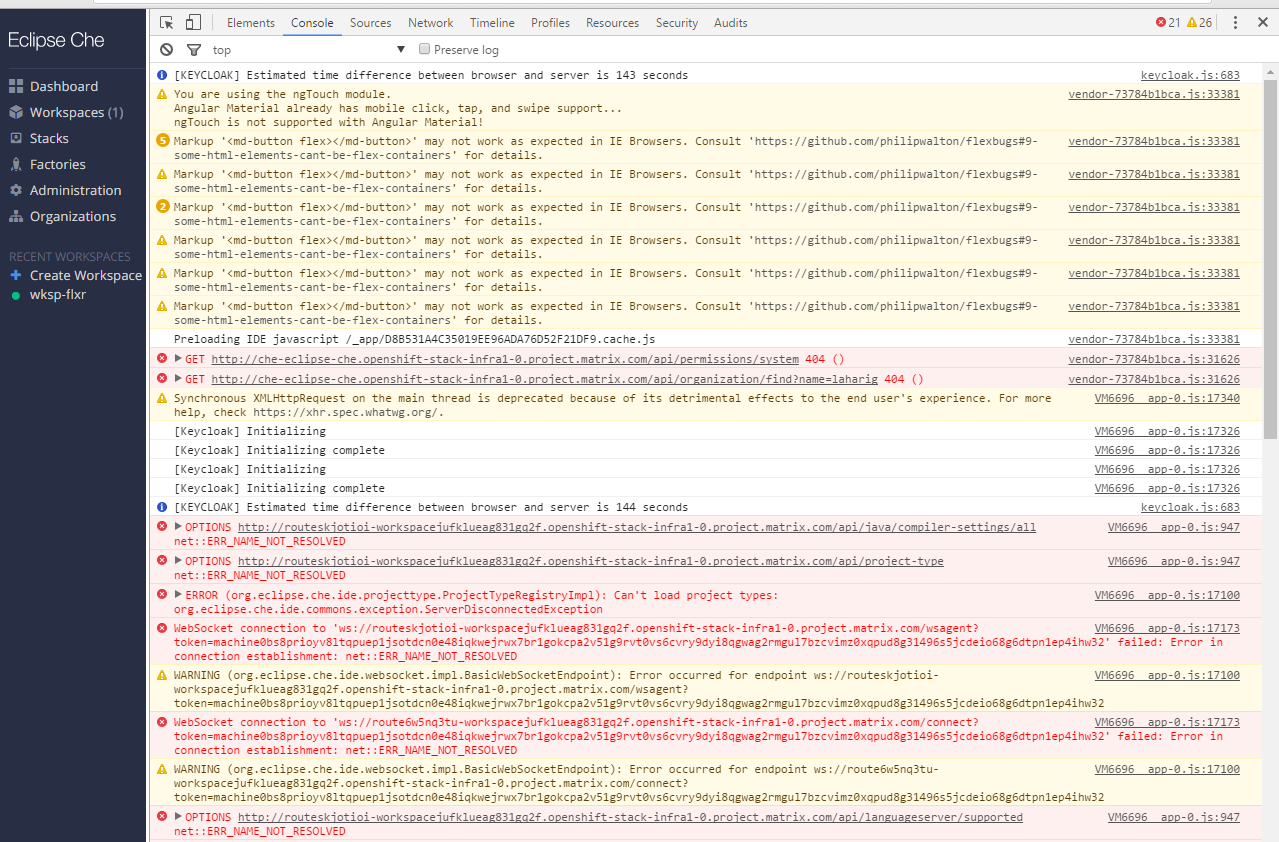
Can you open browser dev console, network tab, and refresh the page when in a workspace? Same for console tab
ghost
on 8 Jan 2018
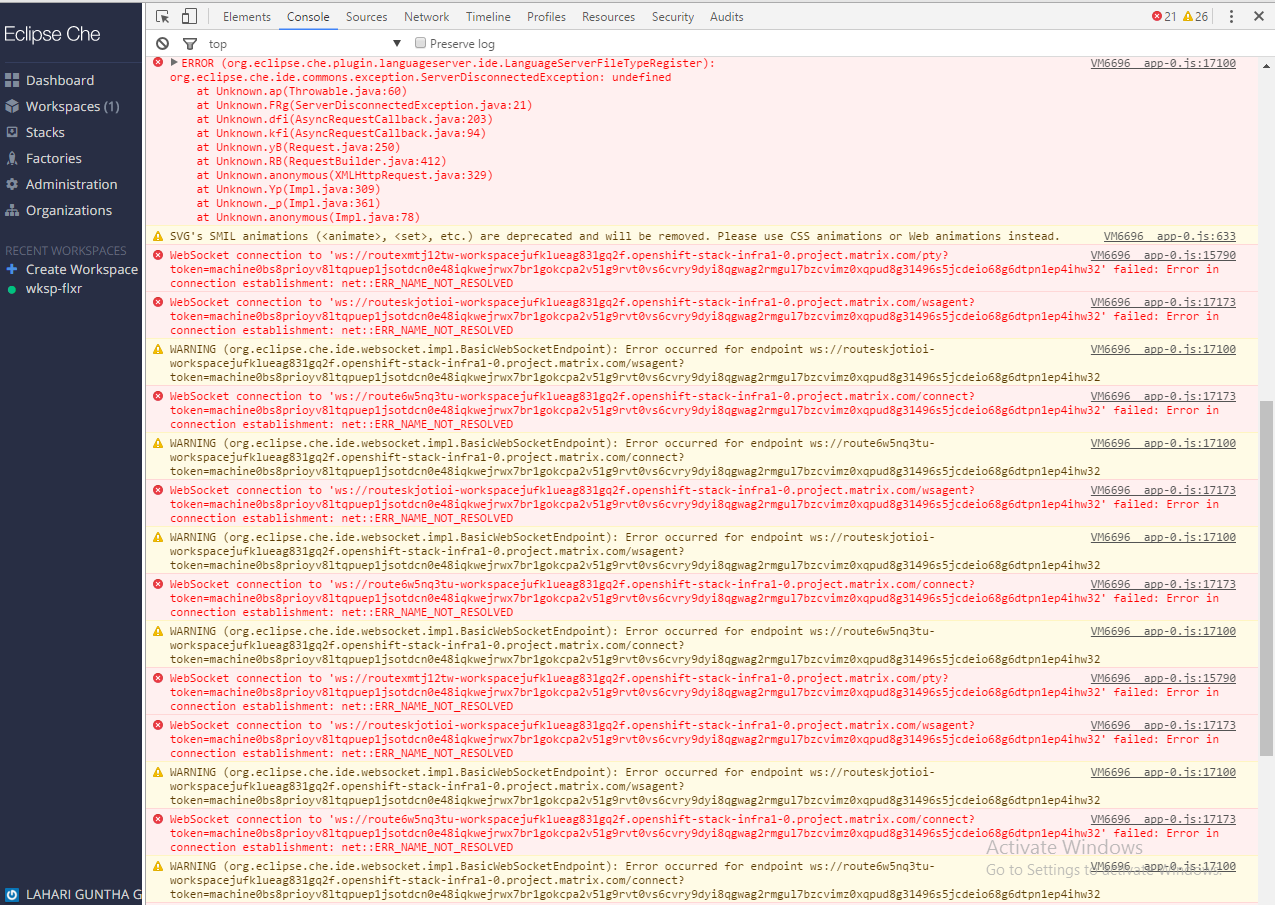
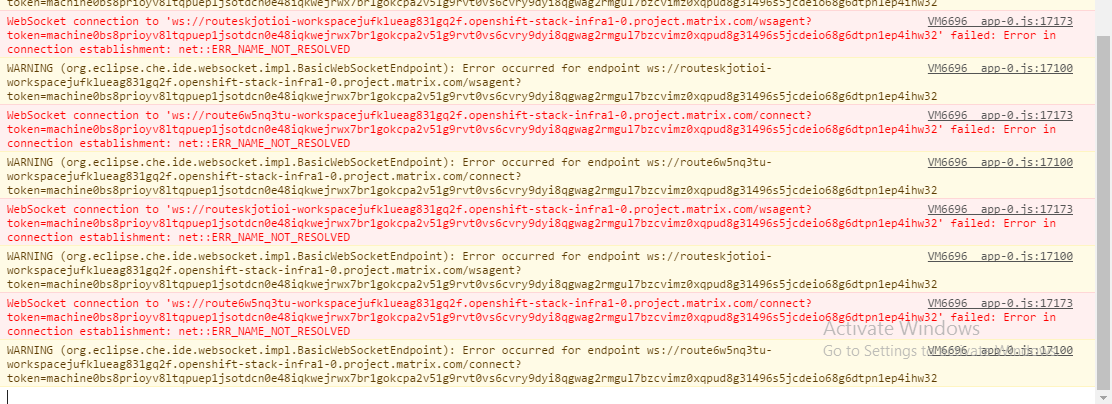
LahariGuntha
on 8 Jan 2018
@LahariGuntha routes cannot be resolved in your network. A workspace has started and Che server was able to reach it using the same route. However, when your browser connects some endpoints, it's not connection timed out or smth like that.. it's name cannot be resolved. It's smth that I get when trying to connect to your Che server, probably because it's behind a vpn?
ghost
on 8 Jan 2018
Thanks for the reply...My host was not able to resolve the route...So i had to add a entry in my "hosts" file...So that I could get the "Terminal" connected...I could proceed further..
LahariGuntha
on 9 Jan 2018
Hi,
I was able to Import project into my workspace...and was able to push back to Github...by adding SSH keys....But I am facing Issue while using "Java Mysql " stack for creating workspace...It is throwindg Error saying "Failed Infrastructure not found for type: compose"
What might be the reason for this Issue??
LahariGuntha
on 9 Jan 2018
@LahariGuntha this recipe type isn't supported for OpenShift. There's a different stack - scroll down a bit, you will see OpenShift multi pod stack
ghost
on 9 Jan 2018
Hi,
I was able to properly bring my workspaces up and running for some amount of time...But suddenly I was facing the below Issue while trying to strat the workspace that is stopped earlier:
Failure executing: GET at: https://kubernetes.default.svc/apis/project.openshift.io/v1/projects/workspacexv8yy719f92zzyiv. Message: Unauthorized! Configured service account doesn't have access. Service account may have been revoked. Unauthorized .
Now I am unable to atleast create a new-workspace...When i try to create workspace now...the workspace is getting created and remains in the stopped state and when i try to start it..it is throwing the above error..
LahariGuntha
on 9 Jan 2018
Do you have token or credentials in Che deployment config env?
ghost
on 9 Jan 2018
Hi,
I have a token in my Che deployment config...
I have this variable set:
CHE_INFRA_OPENSHIFT_OAUTH__TOKEN=bFyBNcwOSl3VkWP9dgWjkzilLbtDmAVJKRKwWM7v4HI
LahariGuntha
on 9 Jan 2018
Can you create and start new workspaces? Or does it happen to a single workspace
ghost
on 9 Jan 2018
For now...Even if I create workspace...it is not getting started...It is just showing the name of the workspace that is created under the workspaces tab..In the "Stop" state...and if I try to start the workspace it is throwing Error as above..
Failure executing: GET at: https://kubernetes.default.svc/apis/project.openshift.io/v1/projects/workspacexv8yy719f92zzyiv. Message: Unauthorized! Configured service account doesn't have access. Service account may have been revoked. Unauthorized .
Earlier everything used to work fine...but after some time it strted throwing the above error...
LahariGuntha
on 9 Jan 2018
@LahariGuntha looks like your token is invalidated. Can you obtain a new token and redeploy?
ghost
on 9 Jan 2018
Hi,
Can we use User name , password Instead???as mentioned in the document..
https://www.eclipse.org/che/docs/6/che/docs/multi-user-openshift.html#openshift-container-platform
Because changing of token is not that good..Because it needs to be changed and redeployed everytime..when token gets expired..
LahariGuntha
on 9 Jan 2018
Yes, you can give username and password
ghost
on 9 Jan 2018
Okay will try that...
LahariGuntha
on 9 Jan 2018
Hi Eivantsov,
i have Used user name and password...As far as I have used I did not face the "Failure executing: GET at: https://kubernetes.default.svc/apis/project.openshift.io/v1/projects/workspacexv8yy719f92zzyiv. Message: Unauthorized! Configured service account doesn't have access. Service account may have been revoked. Unauthorized ." Issue again...
Thankyoy for your support....Thanks a lot....
LahariGuntha
on 10 Jan 2018
@LahariGuntha we will be working on https://github.com/eclipse/che/issues/8178 and I have also created https://github.com/eclipse/che/issues/8223
ghost
on 10 Jan 2018
@eivantsov I had a similar issue but I set CHE_INFRA_OPENSHIFT_MASTER__URL=https://(mysite):8443/ and the GET post is directed incorrectly to "https://(mysite):8443/apis/project.openshift.io/v1/projectrequests".
The CHE_INFRA_OPENSHIFT_MASTER__URL=https://(mysite):8443/ I fixed in a PR I closed at https://github.com/eclipse/che/pull/7893/files#diff-5f9fa634fc7f3eaedb44305cf291506bR60 but never created another PR to include it as I didn't remember why I did this. Created new PR to fix it https://github.com/eclipse/che/pull/8236.
Everything works for me.
 JamesDrummond
on 10 Jan 2018
JamesDrummond
on 10 Jan 2018
Hi ,
I am again running into below Isuue while trying to bring up my workspace....
Could not start workspace Test. Reason: Bootstrapping of machine dev-machine reached timeout
I checked in the /tmp/bootstrapper folder...I already have my bootstrapper file..
When I try to create a workspace..First it is trying to create and configure workspace..
But it is talking a more than 5 minutes...and then workspace is getting stopped..and is throwing the below Error:
"Could not start workspace Test. Reason: Bootstrapping of machine dev-machine reached timeout"
Why am I facing this Issue again??
I have not changed any configuration anywhere..
What might be the reason for this behaviour???
This is the log that I see in the dev-console:
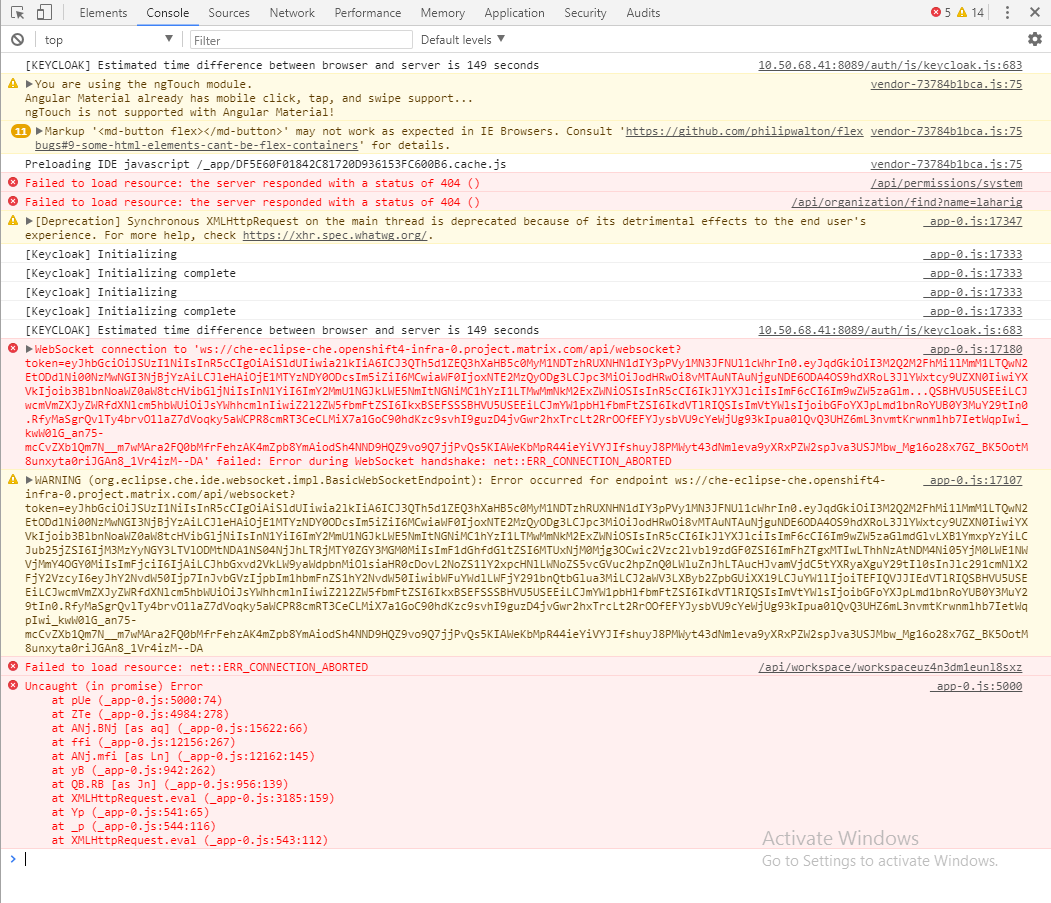
LahariGuntha
on 19 Jan 2018
Can you run ps ax in a workspace pod?
ghost
on 19 Jan 2018
Hi,
O/p of the following command:
ps ax
PID TTY STAT TIME COMMAND
1 ? Ss 0:00 /bin/sh -c tail -f /dev/null
12 ? S 0:00 sudo /usr/sbin/sshd -D
13 ? S 0:00 tail -f /dev/null
14 ? S 0:00 /usr/sbin/sshd -D
55 ? Ss 0:00 /bin/bash
71 ? R+ 0:00 ps ax
LahariGuntha
on 19 Jan 2018
And there's no bootstrapper binary in /tmp/bootstrapper? Try to curl it manually using url from Che deployment environment
ghost
on 19 Jan 2018
user@workspaceuz4n3dm1eunl8sxz:/tmp/bootstrapper$ ps ax
PID TTY STAT TIME COMMAND
1 ? Ss 0:00 /bin/sh -c tail -f /dev/null
12 ? S 0:00 sudo /usr/sbin/sshd -D
13 ? S 0:00 tail -f /dev/null
14 ? S 0:00 /usr/sbin/sshd -D
53 ? Ss 0:00 /bin/bash
71 ? R+ 0:00 ps ax
user@workspaceuz4n3dm1eunl8sxz:/tmp/bootstrapper$ ls
bootstrapper bootstrapper.log config.json
When I do ls it is showing the bootstrapper file....
LahariGuntha
on 19 Jan 2018
You may want to check log file for clues
ghost
on 19 Jan 2018
Hi,
I cannot see any logs in the pod...and I cannot see any output in the terminal...like downloading something..Under the dev-machine tab...
What I could see is the only thing in the dev-console...the snapshot that I have posted earlier...
Can I see the logs somewhere else??
LahariGuntha
on 19 Jan 2018
bootstrapper.log
ghost
on 19 Jan 2018
Here is my bootstrapper.log:
2018/01/19 13:44:24 Bootstrapper configuration
2018/01/19 13:44:24 Push endpoint: ws://che-eclipse-che.openshift-stack-infra1-0.project.matrix.com/api/websocket
2018/01/19 13:44:24 Push logs endpoint: ws://che-eclipse-che.openshift-stack-infra1-0.project.matrix.com/api/websocket
2018/01/19 13:44:24 Auth enabled: true
2018/01/19 13:44:24 Runtime ID:
2018/01/19 13:44:24 Workspace: workspaceuz4n3dm1eunl8sxz
2018/01/19 13:44:24 Environment: default
2018/01/19 13:44:24 Owner: laharig
2018/01/19 13:44:24 Machine name: dev-machine
2018/01/19 13:44:24 Installer timeout: 180seconds
2018/01/19 13:44:24 Check servers period: 3seconds
2018/01/19 13:44:24 Push logs endpoint reconnect period: 10seconds
2018/01/19 13:44:24 Couldn't connect to endpoint 'ws://che-eclipse-che.openshift-stack-infra1-0.project.matrix.com/api/websocket', due to error 'websocket: bad handshake'
LahariGuntha
on 19 Jan 2018
I have an issue with start workspace in single-user with eclipse che in openshift platform origin 3.9. Te issue seems appear on webconection socket.
2018-06-07 10:12:41,815[aceSharedPool-3] [INFO ] [o.e.c.a.w.s.WorkspaceRuntimes 390] - Workspace 'che:wksp-3owh' with id 'workspace20gbat6mem0360jt' start failed
2018-06-07 10:12:44,098[ ConnectionPool] [WARN ] [okhttp3.OkHttpClient 130] - A connection to https://che-astro.pic.es:8443/ was leaked. Did you forget to close a response body? To see where this was allocated, set the OkHttpClient logger level to FINE: Logger.getLogger(OkHttpClient.class.getName()).setLevel(Level.FINE);
2018-06-07 10:12:44,191[ ConnectionPool] [WARN ] [okhttp3.OkHttpClient 130] - A connection to https://che-astro.pic.es:8443/ was leaked. Did you forget to close a response body? To see where this was allocated, set the OkHttpClient logger level to FINE: Logger.getLogger(OkHttpClient.class.getName()).setLevel(Level.FINE);
2018-06-07 10:13:49,787[ ConnectionPool] [WARN ] [okhttp3.OkHttpClient 130] - A connection to https://che-astro.pic.es:8443/ was leaked. Did you forget to close a response body? To see where this was allocated, set the OkHttpClient logger level to FINE: Logger.getLogger(OkHttpClient.class.getName()).setLevel(Level.FINE);
2018-06-07 10:13:49,882[ ConnectionPool] [WARN ] [okhttp3.OkHttpClient 130] - A connection to https://che-astro.pic.es:8443/ was leaked. Did you forget to close a response body? To see where this was allocated, set the OkHttpClient logger level to FINE: Logger.getLogger(OkHttpClient.class.getName()).setLevel(Level.FINE);
2018-06-07 10:13:50,790[ ConnectionPool] [WARN ] [okhttp3.OkHttpClient 130] - A connection to https://che-astro.pic.es:8443/ was leaked. Did you forget to close a response body? To see where this was allocated, set the OkHttpClient logger level to FINE: Logger.getLogger(OkHttpClient.class.getName()).setLevel(Level.FINE);
2018-06-07 10:13:51,115[ ConnectionPool] [WARN ] [okhttp3.OkHttpClient 130] - A connection to https://che-astro.pic.es:8443/ was leaked. Did you forget to close a response body? To see where this was allocated, set the OkHttpClient logger level to FINE: Logger.getLogger(OkHttpClient.class.getName()).setLevel(Level.FINE);
Anyone can help me??
thanks regards.
 mrmStack
on 7 Jun 2018
mrmStack
on 7 Jun 2018
@mrmStack can you open a new issue with details of your problem and some screenshots of what you see in the IDE when a workspace fails to start?
ghost
on 7 Jun 2018
OK!!
mrmStack
on 7 Jun 2018
Related issues
 InterestedInTechAndCake
·
3Comments
InterestedInTechAndCake
·
3Comments
 luckymore0520
·
3Comments
luckymore0520
·
3Comments
 vanzhiganov
·
3Comments
vanzhiganov
·
3Comments
 skabashnyuk
·
3Comments
skabashnyuk
·
3Comments
 redeagle84
·
3Comments
redeagle84
·
3Comments